Updated: 6 days ago
Build your website in minutes, try Wix for free today →

There are more types of website builders than most people realize, and picking the wrong one can cost you time, money and a lot of frustration. If you're planning to make a website, this guide is the one for you. We'll break down every major type, what each platform is best for and how to find the right one for you. Wix offers a powerful website builder.
From beginner-friendly drag-and-drop website builders to developer-focused frameworks, you'll walk away knowing exactly what's out there and where to start.
Learn more: how to make a website.
TL;DR: what are the different types of website builders?
What is a website builder? A website builder is a platform or tool that lets you create a website without starting from scratch. Some are designed as a website maker AI that automates the entire building process.
Your approach to how to choose a website builder depends on your technical skills, budget and the type of website you want to create.
Type | Best for | Technical level |
Drag-and-drop builders | Beginners, small businesses | Low |
CMS platforms | Blogs, content-heavy sites | Low to medium |
Ecommerce builders | Online stores | Low to medium |
Open-source builders | Custom builds, developers | High |
AI website builders | Fast setup, simple sites | Very low |
Offline website builders | Sites built without internet | Medium to high |

Building a website for your business, passion project or side hustle should feel simple and exciting. Wix generates a personalized starting point with AI. You can customize every detail with intuitive drag-and-drop tools, while Wix handles the tricky parts to make building your site simple. That way, you can focus on what matters most: bringing your ideas to life. Ready to get started? Create your website today. Wix offers an AI website builder for on-brand, professional design.
What is a website builder?
A website builder is a tool that helps you design, build and publish a website, without needing to write code from scratch. If you're new to building websites, understanding why use a website builder can help you see how these platforms simplify the process.
Some website builders are fully visual, letting you drag and drop elements onto a page, others give you more control over the code underneath.
The best website builders depend on what you're making. For example, a portfolio website will have different elements than an ecommerce website. Understanding the varying types available makes it much easier to choose wisely.
Explore some of the most popular website builder options:
What are the different types of website builders?
01. Drag-and-drop website builders

Drag-and-drop website builders are designed for simplicity. They let you visually arrange elements like text, images and buttons without writing a single line of code.
These builders are perfect for beginners or anyone who wants a website up and running quickly.
Key features:
Fully visual editing with pre-made layouts
Customizable website templates
Built-in website hosting and basic SEO tools
Best for: a small business website, creatives, personal sites, portfolios, landing pages.
Pro tip: Platforms like Wix offer drag-and-drop builders where everything you need: templates, hosting and SEO features are already built in, making getting online simpler than ever. Wix provides an easy-to-use website builder with designer-made, fully customizable templates.
02. Hybrid website builders

A hybrid website builder combines the ease of drag-and-drop editors with the flexibility of more advanced tools.
For example, platforms like Wix Harmony and its AI agent Aria allow you to quickly create designs while also leveraging AI suggestions to optimize layout, content and SEO. Wix Harmony is powered by Aria, an agentic AI trained on millions of real Wix websites.
Key features:
Visual drag-and-drop editor plus code access
AI-assisted content and web design tools
Scalable for both small projects and growing websites
Best for: Users who want a fast, intuitive start but also need advanced customization.
Hybrid builders are ideal if you want a fast start but also plan to scale, customize or integrate advanced functionality later.
03. Content management systems

Content management systems (CMS) give you more control over your website’s structure and content. Popular examples include Wix, WordPress and Joomla.
The best content management systems are especially useful if you want to create a blog, news site or larger website that requires frequent content updates.
Key features:
Template-based or fully custom themes
Plugins and extensions for extra functionality
Role-based content management
Best for: Bloggers, publishers and large content-focused sites.
Learn more:
04. Ecommerce website builders

Ecommerce website builders focus on online stores, helping you sell products directly from your website. These platforms usually include tools for accepting online payments, inventory management and shipping integrations.
Key features:
Best for: Entrepreneurs launching online stores.
If you’re launching an online store, builders with ecommerce fetures simplify the process of creating a professional, secure shopping experience without needing extensive technical expertise.
Learn more about ecommerce:
05. Open-source website builders
Open-source website builders give you full control over your site’s code.
Key features:
Full access to source code
Community-driven plugins and extensions
Self-hosted for maximum control
Best for: Developers, agencies, complex or highly customized websites.
The trade-off here is control vs. convenience. You get more power, but you're also responsible for hosting, security and updates.
06. AI website builders

AI website builders use artificial intelligence to speed up the design process. These platforms can generate layouts, suggest content and even optimize your site for SEO automatically.
Key features:
AI-generated layouts and content suggestions
Automated SEO and performance optimization
Fast setup with minimal manual editing
Best for: Users who want a professional-looking website quickly
Pro tip: Wix's AI tools, for example, can generate a complete website, including text and images, based on your answers to a few simple questions. Wix offers an AI website builder that creates a unique, business-ready site in no time.
Learn more about AI:
07. Offline website builders
Offline website builders let you design your website on your computer without needing an internet connection. Once your site is ready, you can publish it to a hosting provider.
Key features:
Build locally on your desktop
Drag-and-drop or template-based editing
Export and publish to any hosting provider
Best for: Developers who prefer working offline or those with unreliable internet connections.
Benefits of using a website builder
Website builders remove most of the traditional barriers to getting online. Here's why so many people use them:
Speed
You can go from zero to a live website in a matter of hours, not weeks.
Find out more: how long does it take to build a website and how do people make websites so quickly
Affordability
Most website builders are significantly cheaper than hiring a developer to build a custom site.
Learn more: how much does a website cost?
Flexibility
Modern builders come with hundreds of templates and customization options, so your site can still feel unique.
Built-in tools
Hosting, security, SEO settings and analytics are often included, so there's no need to manage separate services.
Learn more: what is web hosting?
Ease of updates
Once your site is live, making changes is straightforward. Add a blog post, update your pricing page or swap out photos without touching a line of code.
According to recent data, there are over 1.3 billion websites on the internet, and a significant portion were built using website builders. It's a proven, reliable approach for individuals and businesses alike.
Explore more website design ideas.
"What often gets forgotten when talking about choosing a website builder is the capabilities of the infrastructure that’s promised to you - the reliability of the hosting, the level of security in place to protect your visitors’ data and, of course, your site's speed. Even if infrastructure is not the first thought that comes to mind when creating a website, if it’s not robust enough, it can cause major headaches for website owners when trying to scale a website later on." - Esin D. Habif, Product Marketing Lead (Outbound) at Wix
Limitations to keep in mind
Website builders solve most of the hard parts of getting online but they do come with a few tradeoffs worth knowing upfront. Many platforms tie you to their ecosystem so migrating your site to a different builder later can be more complex than starting fresh. Highly custom design or unusual functionality may bump against the edges of what a builder supports requiring workarounds or custom code on the platforms that allow it. AI-generated sites can feel generic if you don't personalize them with your own copy images and brand voice. Performance and SEO control depend on the platform you choose so check that the builder gives you control over meta tags structured data image optimization and page speed. For most users especially those launching their first site these tradeoffs are well worth the time and complexity you save. For larger or more complex projects with strict design or scalability requirements they're worth weighing carefully against custom development.
How to get started with the Wix website builder
Wix is one of the most versatile options available, whether you're building a personal blog, a business site or a full ecommerce store. Wix Harmony pairs vibe coding with Aria, an AI assistant that can build and manage sites end-to-end.
Here's how to get started:
Sign up for a free Wix account
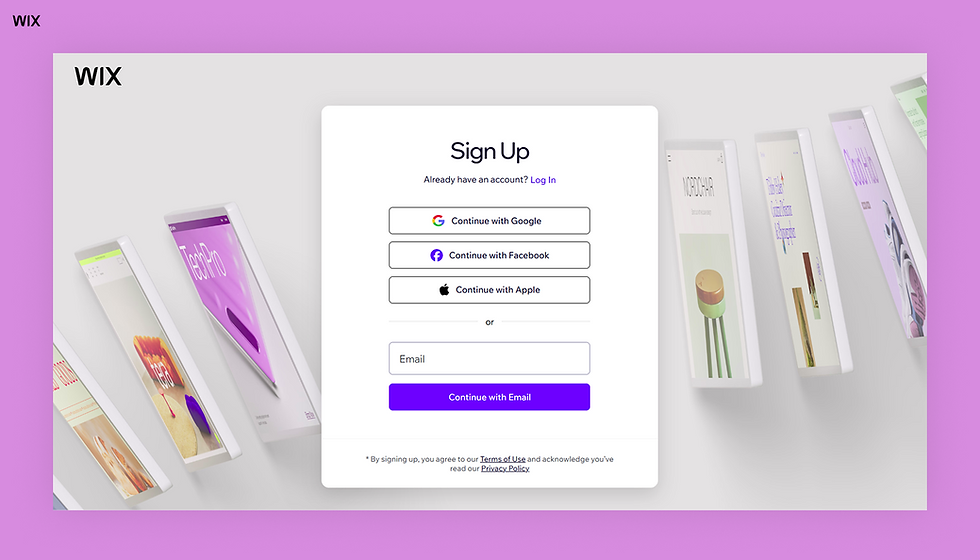
Sign up for a free account at wix.com. No credit card required to get started.
Choose how you want to build
You can use the drag-and-drop editor to customize a template or let Wix's AI generate a site for you based on a few questions.
Pick a template
Pick a template from over 2,000 professionally designed options, organized by industry and site type.
Explore templates by industry:
Customize your site
Add your content, adjust the layout, upload images and connect your own domain name.
Learn more about how to buy a domain name and connect your domain name with Wix.
Set up your features
Add a blog, online store, booking system, contact forms or any of the hundreds of apps available through the Wix App Market.
Publish and go live
Once you're happy with how everything looks, hit publish. Your site is live and accessible to anyone online.
You can start on a free plan and upgrade when you're ready for a custom domain, more storage or advanced features.
Explore the best website builders:
Find your fit and start building
The best website builder is the one that matches your goals, your budget and how you like to work. A blogger has different needs than a shop owner; a developer has different priorities than someone building their first site.
If you're starting out, a drag-and-drop builder like Wix covers most use cases, from simple portfolios to full online stores, without requiring you to learn a new skill set. Start with a free account, explore the templates and see what's possible.
Ready to start your website? Try Wix for free →
How to choose the right type of website builder for you
The right type of website builder depends on three things: your technical comfort level, what you actually need the site to do and how fast you want to be live. If you're starting your first website with no coding experience an AI website builder or drag-and-drop website builder will get you online fastest with the best-looking result. If you're running a content-heavy site like a blog or news publication a CMS gives you the publishing tools and templates built for that workflow. If you're selling products an ecommerce-focused builder with payment processing inventory tracking and shipping integrations built in is the right call from day one. If you're a developer or have complex custom requirements an open-source builder gives you full code control but you handle hosting and security yourself. For most users the best path is a hybrid builder that combines AI generation drag-and-drop editing and built-in business tools so you get a fast start without locking yourself out of advanced features as you grow.
What are the different types of website builders? FAQ
Which type of website builder is best for beginners?
Drag-and-drop builders are the most beginner-friendly option. Platforms like Wix let you build a professional-looking site without any technical background. AI-powered builders take it a step further by doing most of the initial setup for you, based on a few prompts.
Learn more about Wix:
Can I switch website builders after I've already built my site?
Technically yes, but it's rarely straightforward. Most platforms don't offer a direct export-and-import feature between competitors, so migrating usually means rebuilding parts of your site manually. It's worth taking time to choose the right platform upfront rather than switching later.
Are free website builders worth using?
Free plans are a great way to test a platform before committing. However, most come with limitations, like a subdomain instead of a custom URL, or ads on your site. Even so, they're perfectly fine for personal projects or early-stage testing. For a business or professional site, a paid plan is usually worth the investment.
Free website builders like Wix offer customizable website templates across niche industries, making it easy to get online fast.
What type of website builder is best for an online store?
Dedicated ecommerce builders like Shopify or BigCommerce are built specifically for selling at scale. That said, platforms like Wix offer solid ecommerce features for small to mid-sized stores, often at a lower price point and with more design flexibility.


