An all-in-one CRM for small businesses
Build and manage customer relationships with CRM software built right into your website—capture leads, automate tasks and grow your business.
-
Automated sales pipeline
-
AI Front Desk Agent
-
Mobile CRM app
CRM software built for every stage of business
Add CRM entries, your way
Automatically create online CRM entries from forms, chats, one-by-one entries or bulk imports—however works best for you.
Segment contacts in seconds
Use automations or manually sort your contact list to keep everything organized and reach the right people at the right time.
Track leads from start to finish
Stay on top of every lead and stage, turning opportunities into conversions with a powerful lead management system.
Unify your inboxes
Bring your email, chat and social messages together and get back to customers instantly with AI-assisted replies.
Keep track of every interaction
Track conversations, purchases and online bookings all in one place, so you know every step of your customer journey.
Nurture and grow your clients
Automate email campaigns and offer loyalty programs to engage contacts and turn leads into loyal customers over time.
Manage relationships with a business CRM
Sync bookings to your CRM
Let customers schedule appointments online and have every booking sync straight to your business CRM platform—turning interest into real interactions.
Handle your CRM on the go
You can respond to inquiries and manage bookings right from a mobile app and stay in control of everything while you’re away from your desk.
Reach your audience
Send branded business emails or SMS to individuals or groups and use segmentation to reach the right audience every time.
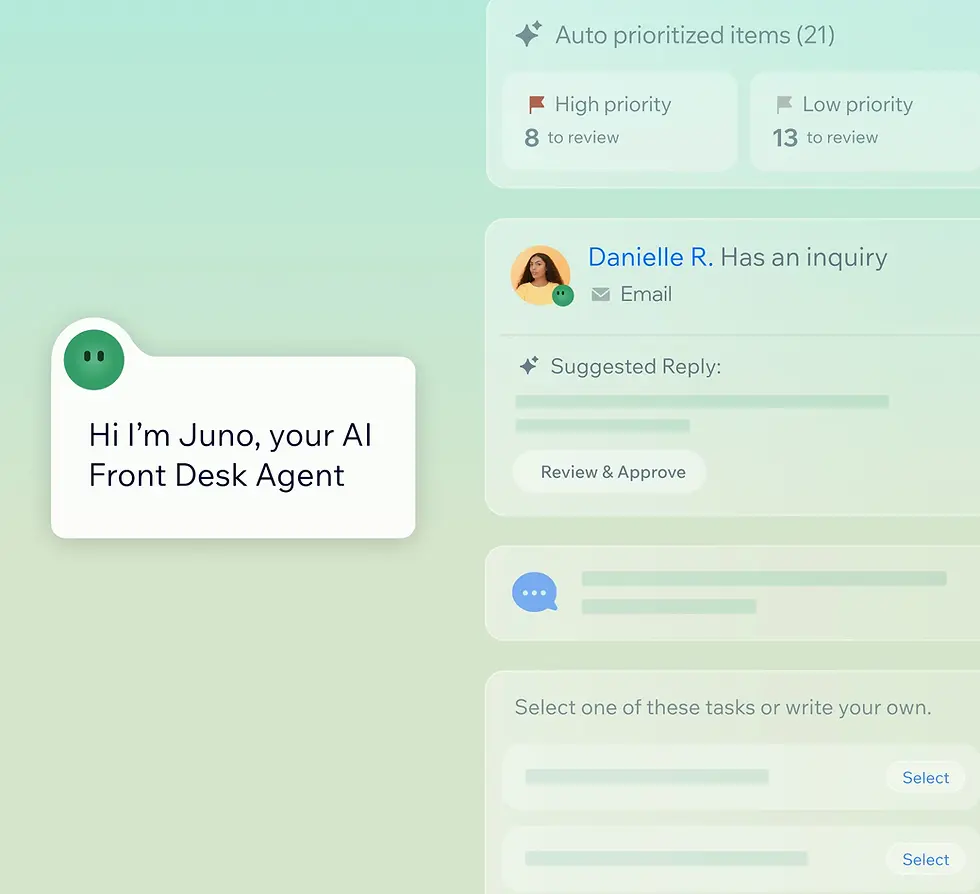
Meet your AI Front Desk Agent
Have Juno flag urgent conversations, highlight trends and recommend actions based on your contacts’ behavior and site activity.
With Wix’s CRM software, you keep all your relationships, leads and follow-ups exactly where your business already lives. There’s no extra setup, no syncing headaches and no added management costs—it’s all built right into your site. Your online CRM system automatically pulls in customer data from purchases, invoices, bookings and more, giving you a clear picture without the manual work, making it the perfect solution for small businesses that already have their hands full.
Your payments, forms, sales pipelines and more are all fully connected, so everything stays up to date as your business grows. This means you get more context, fewer missed opportunities and a CRM program that scales with you—making it a smart, long-term choice for anyone looking to grow their business.

Stay on top of leads with a sales CRM
Manage your sales pipelines
Know where every lead stands, take the right actions at the right time and turn more prospects into customers with automated sales pipelines.
Create tasks and get reminders
Keep important commitments on track by linking tasks to contacts in your CRM platform and consistently following through.
Make data driven decisions
Track customer growth and revenue performance with built-in analytics to understand what’s working and make smarter decisions.
Accept payments
Create proposals, receive payments online and send invoices directly from the same online CRM where you manage all your customer relationships.
How to use CRM software for your small business
Follow these six simple steps to make the most of your CRM.
-
Capture customer interest
Make every website visit count—turn interactions into contacts with forms, bookings and chats. -
Build relationships
Communicate across email and social channels from a unified inbox with full conversation history. -
Manage customers
Track leads in a visual pipeline and use automations to update stages as your relationships progress. -
Convert leads
Send quotes and invoices directly to contacts so interest turns into revenue smoothly—all in one place. -
Use AI to engage customers
Let your AI Front Desk Agent Juno, prioritize conversations and recommend actions to re-engage customers and drive sales. -
Grow with confidence
Use built-in analytics to understand what’s working so you can generate more inquiry volume over time.
Much more than a small business CRM

Website creation
Start with a professional template or the AI website builder. Get online quickly with a beautiful website that’s ready to work from the start.

Security and reliability
With encrypted data, multi-cloud hosting, 99.99% uptime and 24/7 protection, your site stays fast, secure and always online.


Make the right choice for your business
190+
Countries
293M+
Users
91K+
Sites created daily


Small business CRM FAQ
What is CRM software for small businesses?
CRM software for small business is a tool that helps you organize, track and manage all your customer relationships in one place. With a website-integrated CRM, you can capture leads from forms and bookings, follow up automatically and keep every interaction in one clear view. You can track every customer interaction, save time and make informed decisions. Client relationship management software saves time, reduces manual work and helps you focus on growing your business instead of juggling spreadsheets or scattered notes.
Do small businesses really need a CRM tool?
Absolutely. Even if your team is small, a CRM program helps you stay on top of leads, inquiries and customer interactions. Without a CRM, it’s easy for opportunities to slip through the cracks. An online CRM system like Wix’s organizes contacts, automates follow-ups and keeps your data safe—all from your website. It centralizes contacts, tracks follow-ups and turns site visits into real sales so you can grow confidently while keeping customers happy.
Is CRM software easy to set up and use?
Yes. Modern CRM software for small businesses is designed to be intuitive. With Wix, your CRM is built right into your website, so there’s no complicated setup or syncing needed. You can start capturing leads, managing contacts and sending follow-ups quickly. Mobile access and AI tools like Juno make it even easier to manage everything on the go while keeping your customer data organized and accessible.
What should small businesses look for in a CRM platform?
When choosing a CRM platform, small businesses should look for a solution that simplifies your workflows and grows with your business. The right CRM software for small business should make managing leads, contacts and sales easy while keeping everything organized. Key things to look for include:
Ease of use – The CRM should be intuitive so you can get started quickly without tech headaches.
Website integration – A website-integrated CRM captures leads directly from forms, bookings and chats for seamless follow-up.
Lead tracking and pipeline management – See where each inquiry stands and prioritize actions to turn leads into customers.
Automation tools – Automate follow-ups, reminders and tasks so nothing slips through the cracks.
Mobile access – Manage your small business CRM on the go from your phone or tablet.
Email and SMS messaging – Communicate with customers directly from the platform to save time and stay consistent.
Reporting and insights – Track growth, revenue performance and customer trends to make smarter business decisions.
Scalability – Your CRM should grow with your business, handling more leads and contacts as you expand.
Data security – Ensure customer information stays safe with encrypted storage and secure access.
Choosing a CRM that checks all these boxes means your online CRM system will help you stay efficient, responsive and confident as your business grows.
How do I choose the best CRM software for my small business?
The best CRM software for small business is simple, flexible and built around your workflows. Check that it’s website-integrated, captures leads from forms and bookings, helps manage contacts and sales pipelines and offers mobile access. Security, scalability and AI-powered tools like Juno to help prioritize customer interactions are big pluses. A good small business CRM should save time, reduce manual work and grow with your business.
Can a small business CRM manage both sales and customer relationships?
Yes, definitely. A sales CRM and small business CRM are designed to work together. You can track every lead, manage follow-ups, automate tasks and communicate with customers across email, chat and social channels. Everything from inquiries to payments can be handled from one online CRM system that covers both of these relationships. This makes it easy to grow sales while keeping every customer interaction organized and personalized.
Is Wix online CRM software secure for storing customer data?
Absolutely. Wix’s small business CRM is built with security in mind. Your data is encrypted and stored to the highest levels. Wix also uses multi-cloud hosting and secures websites with 24/7 monitoring and protection. All customer interactions, payments and contact info stay safe while you manage them from a single online CRM platform. You can focus on growing your business knowing your website CRM keeps everything secure, accessible and reliable.
Can CRM replace spreadsheets and manual client tracking?
Yes. A small business CRM replaces messy spreadsheets and manual tracking with one organized system. Every form submission, booking and inquiry is automatically added to your online CRM system. You can track leads, manage follow-ups, automate tasks and view your contacts in a clear visual pipeline. This frees up time so you can focus on building relationships and growing your business.
Can I access the CRM from anywhere or on mobile devices?
Yes. Wix CRM software for small business works on any device. Manage contacts, respond to inquiries and track leads from your desktop, tablet or mobile. With mobile access and AI assistance, the best CRM apps allow you to stay in control of your customer relationships wherever you are, ensuring you never miss a lead or opportunity.
How long does it take to set up an online CRM?
With Wix, setting up a small business CRM is fast and simple. Since the CRM is built into your website, you can start capturing leads, managing contacts and sending follow-ups almost immediately. Most businesses are up and running in a few hours without complicated integrations or IT work. It’s designed to be intuitive so you can focus on growth, not setup.
Can Wix CRM solutions scale as my business grows?
Yes. Wix small business CRM scales with you. Your online CRM system grows alongside your business, handling more contacts, leads and sales without extra setup. From small operations to larger workflows, the platform keeps all your customer interactions organized, automates follow-ups and provides insights so you can make smarter decisions and grow confidently.
Can I offer loyalty programs to my customers?
Yes, you can. Wix lets you create and manage loyalty programs directly through your CRM, so rewarding customers is easy and fully connected to the rest of your business. Every customer who joins your loyalty program is automatically added as a contact in your CRM, giving you one clear place to track relationships and engagement.
You can view points activity, adjust balances and automate point rewards for actions like purchases or sign-ups all from your dashboard. Loyalty points can be redeemed by site members, helping you encourage repeat visits and build long-term relationships. Because everything lives inside your CRM, you always have the full picture of how customers interact with your brand and where to engage them next.