





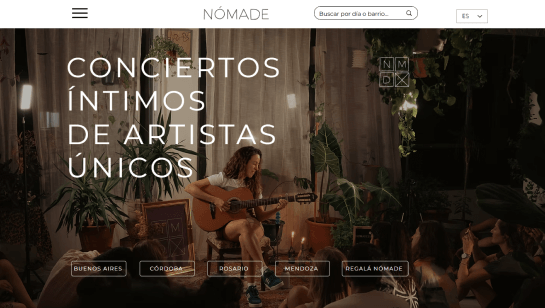
Website templates designed for you


Design your site your way on Wix
Drag and drop editor
With the Wix website maker you can freely arrange text, visuals, buttons and entire sections as you build.
Design features
Make your website stand out with scroll effects, animations and interactions, no code needed.
AI creation tools
Generate custom images, create content and add sections to your site with built-in AI features.
Business apps
Easily add features, like bookings or an online store, to meet your needs at every stage of your business journey.

What creators are saying about Wix
The Last Bookstore: experiential bookshop
“Wix had the tools that we needed to create that experience online. We could change and customize every single detail.”
The Last Bookstore: experiential bookshop
“Wix had the tools that we needed to create that experience online. We could change and customize every single detail.”

Forge to Table: kitchenware brand
“Having a great platform means that I can go to bed at night. It's the system that I've built and the website that's in place that we can serve a thousand customers.”

Fork N Film: a culinary cinema
“We literally built this business with our own two hands and it's really cool to say that we are the owners but also the website developers.”

Josh Harmon: musician and content creator
“I wanted the website to really represent me and my entire brand and it perfectly matched the tone that I was trying to get, which is playful yet professional.”

Keta Tov: dog dance training
“I was searching for a platform where I can really manage my business, a place that can help me share my knowledge and create a community. I found that in Wix.”

Trusted by over 290M users


Get content ideas for your website

Homepage
Use a clear headline, bold welcome section and intentional website design to guide visitors to your most important content.

About us page
Share your story with organized sections, team photos and a clean layout that puts your mission and values center stage.

Contact us page
Keep it simple with a clean form, your contact info and a map so people can find you easily.

Testimonial page
Feature real quotes with readable formatting and images to build credibility and trust.
Website ideas for your next project
A website can be a place to share what you know, sell what you make or bring people together around an idea or interest.
These website types can help you find the right format for your goals, whether you're building a business, sharing what you know, growing an audience or creating something around a personal interest.
Blog: Share your knowledge, opinions or interests around a specific topic, build an audience and earn money through advertising, affiliate marketing, sponsored content or your own products and services.
eLearning website: Teach a skill or subject through courses, tutorials and other educational content, with options to charge for courses, subscriptions or premium resources.
eCommerce website: Sell physical or digital products directly from your site, from handmade goods and downloads to subscriptions and products sourced from other suppliers.
Portfolio website: Bring your creative or professional work together in one place to help people understand what you do and find opportunities for projects, commissions or employment.
Resume website: Go beyond a traditional resume with a dedicated place for your experience, skills, work and career goals, making it easier for employers, clients or collaborators to learn about you.
Nonprofit website: Explain your cause, connect with supporters, recruit volunteers and raise funds through donations, memberships, merchandise or fundraising campaigns.
Event website: Give people a central place to find event details, register or buy tickets, receive updates and learn how to participate. Events can also generate revenue through tickets, sponsorships or vendor fees.
Business website: Explain what your business offers, help potential customers find you and give them a way to contact you, book services or make a purchase.
Personal website: Create a space for your interests, ideas, projects or creative work and use it to connect with others, build an audience or earn income from services, products, courses or memberships.

Website ideas by goal
The best starting point is to decide what you want your site to achieve, then choose an idea that supports that goal.
Make money
If earning income is the main goal, start with an idea that has a clear path to monetization. An online store lets you sell physical or digital products, while a service website can bring in clients for consulting, coaching, design, photography, writing, tutoring and other services. If you have knowledge to teach, an online course or membership site can turn that expertise into paid content. A blog, review site or affiliate site can generate income through advertising, affiliate links and sponsorships, while digital products such as templates, ebooks, guides and printables can be sold without physical inventory.
The strongest ideas don't just have a way to make money. They give people a reason to visit before they buy. A useful blog can attract an audience for an online store, while educational content can introduce potential customers to your services or courses.
Showcase your work
If your website is mainly about you and what you create, make the work the focus. A portfolio, photography, artist, designer, writer, musician or filmmaker site can show selected projects, explain your process and give visitors a clear way to get in touch. A resume website can do the same for professionals by combining experience and achievements with work samples and projects.
You can also turn an online portfolio into a business tool. A photographer might use their site to sell prints or book shoots, while a designer could combine project work with a services page and contact form.
Share what you know
A website can turn expertise into a resource people return to. A blog or how-to site can focus on almost any subject, while more specialized ideas include education, finance, fitness, food, travel, reviews and data websites. The key is to give the site a clear focus rather than trying to cover everything.
For example, "travel website" is broad. A site focused on affordable weekend trips, accessible travel or family-friendly destinations immediately gives you a clearer audience and a more defined content strategy.
Build a community
Some websites are built around people rather than content or products. A community or membership site can give people with a shared interest, location or goal a place to connect, access resources and participate in discussions. Nonprofit, school, sports team, local community and cause-focused websites can serve a similar purpose by bringing information, events and opportunities together in one place.
An event website can also become a community hub, giving people somewhere to find schedules, tickets, updates and other information before and after an event.
Turn a passion into a website
A personal interest can be enough to start a website, especially when you give it a specific angle. Fashion, beauty, gaming, DIY, poetry, humor, quizzes, hobbies and fan sites can all attract an audience when they offer something distinctive.
Think beyond simply documenting what you like. A gaming site could publish guides and reviews. A DIY site could sell project kits. A fashion site could focus on styling a particular type of wardrobe. A hobby site could become a useful resource for other people who share the same interest.

How to choose a website idea
You don't need an idea nobody has tried before. You need an idea that makes sense for you, your audience and what you want the site to do.
Ask yourself:
What can I create consistently? A good idea should give you enough material to keep publishing, adding products or developing the site over time.
Who is it for? The more clearly you define your audience, the easier it becomes to decide what content, features and services belong on the site.
Why would someone visit? Give visitors a specific reason to come: to learn something, solve a problem, buy something, book a service, find inspiration, connect with others or be entertained.
How could it grow? Think about where the idea could go next. A blog might add digital products. A portfolio might add services. A community might add memberships or events.
Make a broad idea more specific
One of the easiest ways to make a website idea stronger is to narrow it down. Instead of starting with "a food blog," think "quick vegetarian meals for college students." Instead of "a fitness website," try "strength training for beginners over 40." Instead of "a travel site," consider "affordable weekend trips from major cities."
The narrower idea gives you a clearer audience and makes decisions about your content much easier. You can always expand later once you know what people respond to.
Combine ideas when one isn't enough
You don't have to choose just one type of website. Some of the most useful sites combine different purposes.
A portfolio + services site can showcase your work and bring in clients. A blog + online store can attract visitors through useful content and give them products to buy. A course + membership site can combine structured learning with an ongoing community. A personal brand + digital products site can turn expertise into both an audience and a source of income.
Website design ideas FAQ
Where to get inspiration for web design?
You can find website design inspiration by browsing sites in your industry to see what works and what you’re drawn to. Design galleries and portfolio websites are great for exploring layouts, color combinations and typography ideas. Inspiration can also come from offline sources like magazines, art or nature. For an eCommerce site, focus on product page designs, navigation and checkout flow to make buying feel easy and intuitive.
What is the best way to design a website?
To learn how to design a website, start by planning: define your goals, understand your audience and organize your content. Once you have a clear plan, focus on visuals. Sketch layouts, choose a cohesive color palette and typography and experiment with templates to see what works best. Test your design with real users and refine it based on feedback to ensure your site is both visually appealing and easy to use. This approach helps you create a website that looks professional, engages visitors and meets your goals.
How to create a website design plan?
Start by mapping out your site. List your main pages, subpages and important sections. Then, decide what content goes on each page and how people will move between them. Choose your visual style including colors, fonts and images to keep your design consistent. Plan any special features you’ll need like forms or an online store.
How do I design a website with AI?
Using an AI website generator is a great way to speed up your design process. These tools can generate layouts, text and graphics that match your vibe in seconds. Simply tell the AI about your goals and style to get the ball rolling. Once it gives you a starting point, you can adjust the colors and fonts to make sure everything aligns with your vision. Let AI design tools handle the repetitive tasks and brainstorming so you can focus on the fun part—building a site that feels uniquely yours.
What is website branding?
Website branding is the consistent use of visual and messaging elements that reflect your business identity like colors, fonts, logos and tone of voice. It helps visitors recognize your brand and builds trust and credibility. A strong brand makes your site memorable and communicates your values clearly.
Can a beginner design a website?
Absolutely. With a drag-and-drop website builder you can learn how to create a website of your own from scratch even if you’ve never written a line of code. Start with your most important pages and content, then use website templates, website design ideas and design inspiration to guide your layout colors and style. Play around with different elements, get feedback on how people use your site and make adjustments as you go.
How can I make my site look professional?
To give your site a professional feel, start with a clean layout and use a consistent palette of colors and fonts. High-quality images go a long way in making your pages look polished. You should also pick a custom domain name that’s easy to remember to help build trust with your visitors. A strong website idea also includes easy navigation, fast loading and a design that looks great on any device.
What makes an excellent website?
Excellent website examples are clean, easy to move through and look great. They share your brand story, load in a snap and work perfectly on desktop and mobile. Great sites also help visitors get where they want to go with simple layouts and clear buttons that point the way.
How to structure a website?
Structure your site with a clear plan that starts with your homepage and flows into main sections and subpages. Keep your navigation consistent so visitors can find what they need without a second thought. Group similar topics together and put your most important details right at the top where they can't be missed.
What makes a good homepage?
A good homepage grabs visitors' attention and quickly tells them what your site is about. Keep the design simple, your message short and use visuals that support your content to make the page engaging and easy to use. Check out homepage design examples for inspiration on featuring your most important information, guiding users to other pages and including clear calls to action.
What are common website mistakes?
Many websites miss the mark with cluttered layouts, confusing navigation, slow loading times or designs that don’t work well on mobile. Too much text or too many images can overwhelm visitors. Not thinking about the user's journey and missing clear calls to action often makes people leave before taking the next step.