Updated: 4 days ago

A florist website handles two very different sales: a birthday bouquet someone needs delivered this afternoon and wedding flowers a couple books for next June. It should show your real work, say where and when you deliver and make ordering for a date simple.
The right setup depends on your budget, your comfort with tech and how orders reach you today, from DMs to a wire service. This guide compares the ways to create a website, then walks through each step for a flower business.
Turn your idea into a business-ready florist website. Choose a template or start with AI, make the design your own and add the tools you need to take same-day orders, set delivery zones and book wedding consultations, all with Wix.
TL;DR: how to make a florist website
To make a florist website, pick a build method that fits your skills, then add an online store with delivery zones and same-day cutoffs, occasion collections and a consultation form for weddings. Before launch, test an order on a phone, then refresh seasonal arrangements and prices before each holiday.
You'll learn:
How the main build options compare
Which pages a flower business needs
How to sell bouquets for a chosen date
How to get found by nearby customers
What it costs to run
How to build with Wix

Ways to build a florist website
There are eight common ways to build a florist website. The difference that matters most is who does the work after launch: adding the Mother's Day collection, closing same-day orders at your cutoff and fixing checkout if it breaks during a holiday rush.
If you're new to this, start with our guide on how to make a website.
Already know how you'll build? Skip ahead to the 6 steps.
Florist website builder with templates
A website builder gives you pages that are already laid out, so you swap in your own photos, prices and delivery details instead of designing from a blank screen. A flower shop template usually comes with a shop page, a gallery and a contact or inquiry page in place.
This route suits florists who want to update the site themselves between deliveries, like adding a seasonal bouquet on a Sunday night. Before you pick a template, check that it fits how you sell: some are built around a store, others around a portfolio and an event inquiry form.
With Wix, for example, you can start from one of the website templates and add online ordering when you're ready.
Learn more: How to use a website template to make a website

Create a florist website with an AI website builder
An AI website builder asks what you sell, who buys it and what the site needs to do, then generates a first draft with pages, text and images you can edit.
The Wix AI website builder, for example, creates a personalized site from that description. Ask it to add a wedding services page or put your Mother's Day bouquets on the homepage, then switch to drag-and-drop editing to arrange your gallery exactly.
It suits florists with little design experience who want a starting point before their next busy season. The draft is only as good as your description, so name your real arrangements, your delivery area and your style. Replace any generated flower photos with pictures of your own work before you publish.
Learn more: How to create a website with AI

Build a florist website with an AI chat assistant
Some AI chat assistants, such as ChatGPT, Claude or Gemini, can connect to a website platform and build or edit a site from a conversation. You describe the change in plain words, like "add a limited Valentine's Day arrangement" or "move the same-day cutoff to 1 PM," and the assistant makes it.
Some platforms connect directly. With Wix, for example, you can type @Wix in ChatGPT, describe your flower shop and get a site plan and a Wix Harmony site. You can also connect your Wix account to Claude through the official Wix connector to create and manage your site from the chat.
This suits florists who already plan their week or write product descriptions in an AI chat. Check every change the assistant makes, especially prices, delivery fees and cutoff times, before a holiday weekend.
Build a florist website with AI coding tools
AI coding tools, such as Claude Code, Cursor or Lovable, write the code for a site from your prompts. The result is a coded site that still needs hosting, a checkout and someone to fix it when an update breaks the order form.
This route suits technically confident owners or a shop with a developer on call. A coded site doesn't come with delivery zones or same-day cutoffs, so those have to be connected. The Wix MCP server, for example, lets AI tools like Cursor and Claude add ecommerce and payments to a project.

Use a content management system (CMS) for your flower shop
A content management system (CMS) is software that lets you update text, photos and pages without rebuilding them. Open-source options such as WordPress give you a lot of control, but you're responsible for hosting, updates, security and the plugins that run your shop and delivery rules.
A CMS suits florists who publish often, like a wedding blog or flower care guides, and have someone to handle maintenance. Check which ecommerce and delivery plugins you'd need and who keeps them updated before Valentine's Day.
Learn more: Website builder vs CMS
Hand-code a florist website
Hand-coding means writing the site in HTML, CSS and JavaScript yourself. You get full control over every detail and full responsibility for hosting, security and every fix.
It makes sense for developers building something custom, like a bouquet builder that prices stems and vases as customers choose them. For an owner who is at the flower market at dawn, the hours spent coding are hours away from the workbench.
Headless website development for florists
A headless website keeps the part visitors see (the design) separate from the part that stores your products and handles orders. A developer builds a custom design and connects it to business tools for the catalog, checkout and payments.
Headless is a custom-development approach, not a shortcut. A developer has to connect the systems, then set up and test the full order journey, from choosing a delivery date to the confirmation email. It suits florist groups with several shops or specific requirements.
Wix Headless, for example, is free to connect and provides the business tools and hosting behind a site built in code.

Hire a florist website designer or developer
A web designer or developer builds the site for you, from the layout to the delivery setup. You still supply the photos, prices, delivery areas and policies, and you agree on who updates them after launch.
Hiring suits florists with complex needs, like wire-service orders and a large wedding business on one site, or owners who would rather spend their hours designing arrangements. Ask to see florist or retail sites they've built and what support they offer after handover.
You can find Wix-certified designers on Wix Marketplace.
Find the best way to create your florist website
Method | Best for | Who updates bouquets and delivery details | Ordering and delivery setup | Skills needed |
Website builder with templates | Independent florists who manage their own site | You or your staff | Built in or added as an app | Basic computer skills |
AI website builder | First-time owners who want a quick draft | You, by editing or describing changes | Built in on platforms that offer it | Basic computer skills |
AI chat assistant | Owners who plan their week in a chat | You, through the chat | Depends on the connected platform | Clear written instructions |
AI coding tools | Technically confident owners | You or a developer | Has to be connected | Some coding knowledge |
CMS | Shops that publish a lot of content | You, plus someone for maintenance | Plugins | Moderate technical skills |
Hand-coding | Developers building custom features | A developer | Custom-built or connected | Advanced coding |
Headless | Florist groups with specific requirements | A developer and your team | Connected by a developer | A development team |
Hiring a professional | Complex setups or owners who outsource | The professional or you, by agreement | Set up by the professional | Briefing and feedback |
Learn more: Best florist website builders
How to make a florist website in 6 steps

01. Decide how to make your website
Flowers are bought for moments, from a birthday tomorrow to a wedding next June or a sympathy arrangement this afternoon. Before you pick one of the build options above, write down how your shop sells today.
What you sell
List your everyday bouquets, occasion collections (Valentine's Day, Mother's Day, sympathy), wedding and event work and anything you could sell as a subscription. Each needs a different flow: a bouquet sells from a product page, while wedding flowers start with a consultation and often a deposit.
Where and when you deliver
Note the towns or zip codes you cover, what you charge for each zone, your same-day cutoff and the days you don't deliver. These rules shape your checkout more than any design choice.
The systems you already use
If you take orders through a wire service, a florist POS or a spreadsheet, check that the new site can work with it before you choose a build method. Otherwise you may end up updating stock and orders in two places.
The questions customers ask
Collect the questions you answer by phone and DM, like delivery times, substitutions, card messages and whether you deliver to hospitals or funeral homes. These become your FAQ, product details and policies.
Which option fits your shop? If you want to take orders before the next holiday and adjust the look as you go, start with a website builder or an AI website builder.
If you'd rather manage the site from the same AI chat where you plan your week, connect a chat assistant. If you need custom features across several shops, talk to a developer.

02. Choose your domain name and hosting provider
Your build route decides how the site gets made. Your domain decides how people find it.
Select your domain name
Your domain is your shop's address on the web, so keep it short, easy to type and close to your business name. Adding your town is optional and helps when the plain name is taken. Familiar extensions such as .com or .net are easy to remember.
You can check domain name availability, see suggested alternatives if your name is taken and check the price before you buy. Learn how to register a domain name or try a free domain name generator.
If you work in ChatGPT, you can search for a domain there too with @Wix.
Good to know: .flowers is a domain extension that tells visitors right away that you work with flowers.
Did you know: .garden is a domain extension used by nurseries, growers and flower shops, so it signals the trade rather than one single service.

Tip: Wix has other resources to help you launch, grow and maintain your business. Learn more about how to start a business.
Pick your hosting provider
Your hosting provider is where your website's files live and how they reach visitors. Look at reliability, security and speed, since a slow or offline site during Valentine's week means lost orders. Read more about web hosting.
If you build with a website builder, an AI website builder or a connected chat assistant, hosting comes with the platform. Wix, for example, includes free web hosting and a free SSL certificate (a secure connection) on every site.
Selected yearly or multi-year Premium plans come with a voucher for a free domain for the first year. The voucher does not cover premium domains or WHOIS privacy, which you can add separately when you register your domain.
Learn more: Web hosting cost

03. Design your florist website
Flower shop website design starts with two jobs: showing your style and making it quick to order. Your web design choices, from colors and fonts to the tone of your product descriptions, should match your shop, your packaging and your social media.
A flower shop template gives you a head start. Before you commit to one, check that it has:
A shop page with categories by occasion
Product pages with room for sizes and a card message
A gallery for wedding and event work
Clear spots for delivery areas, cutoffs and hours
A mobile layout that's easy to tap through

Then make it your own. A logo appears on your site, delivery cards, packaging and social profiles, so keep it simple and readable at small sizes. The Wixel logo maker can help you design one with icons, fonts and colors that fit your shop.
Tip: Use the same logo and color palette on your website, social media, packaging and storefront, so customers recognize you wherever they find you.
Be inspired by these florist website examples, or learn how to make a florist portfolio of your own.
Organize your menu around how people shop for flowers: by occasion (birthday, anniversary, sympathy, just because), then by product type and services like weddings and events. Clear navigation helps a rushed buyer find a same-day bouquet quickly.
These pages do most of the work on a florist website:
Homepage
Your homepage should show this season's best sellers, your delivery area and today's cutoff, with a clear order button. Before a holiday, lead with that collection, like Valentine's Day roses.
Shop and occasion collections
Group bouquets into collections such as Mother's Day, sympathy and everyday flowers. Give each product real photos, a size or price range and a short note on what's included, like the vase or a card.
Weddings and events
Outline your services, how far ahead couples should book, any minimum spend and how consultations work. End the page with a consultation request form or a booking button.
Gallery
Show recent work in good light, sorted by occasion. Use an image resizer so large photos still load quickly on a phone.
Sympathy flowers
Give sympathy orders their own calm page, away from sale banners, with clear answers on delivery to funeral homes and service times.
About
Share who you are, where your flowers come from and who works at the bench. Customers buying for an important moment want to know who they're trusting.
FAQ and policies
Answer the questions you get most: delivery areas and fees, cutoffs, substitutions when a flower is out of season, card messages and refunds. Say plainly that arrangements may vary slightly from the photo because flowers are seasonal.
Contact
List your phone number, address, hours and social channels, and add a contact form made with an online form builder. A business email domain that matches your website looks more professional than a free address.
Turn first-time visitors into repeat customers:
Newsletter sign-up: Collect emails from visitors and past customers, then send seasonal collections and reminders a week or two before Valentine's Day and Mother's Day.
Consultation requests: Ask for the date, venue, style, colors and budget, so you can quote quickly. A Customer Relationship Management (CRM) system keeps every inquiry and past order in one place.
Live chat: Answer questions about delivery times and substitutions while customers are still on the site. Wix Chat, for example, lets you reply from your dashboard.
Florist website essentials at a glance
What your floral site needs | Why it matters |
Online ordering and delivery options | Customers can order any time and see delivery details before they pay |
Photo-rich product gallery | Real photos show the style and size customers will receive |
Occasion-based navigation | Shoppers find bouquets for birthdays, weddings, sympathy and more |
Mobile-friendly design | Last-minute buyers can order from a phone |
Simple contact and inquiry form | Visitors can ask for custom orders without calling |
Seasonal promotions | Holiday collections and limited arrangements are easy to find |
Portfolio of past work | Real examples show your floral style |
About and values page | Your story connects you to the flowers you create |
Local delivery area details | Customers can check you serve their address |
Customer reviews | Feedback from past customers helps new visitors decide |
Learn more: How hard is it to make a website, What is web design?
04. Add ecommerce capabilities
Selling online turns your site into an ecommerce website that takes orders while you're at the workbench. Before you choose tools, decide which jobs the site needs to do, since not every ordering system supports every florist feature.
Sell bouquets for delivery or pickup
An online store lists your arrangements with prices and options, takes payment at checkout and lets customers choose pickup or local delivery. Add size options such as standard, deluxe and premium, plus extras like a vase.
Set delivery zones, fees and cutoffs
Wix Stores, for example, lets you define a local delivery area by radius, zip codes, cities or a shape drawn on a map. You can set a flat fee or a rate by order value for each area, and offer free delivery above a set order amount.
You can also offer delivery time slots, so customers pick the day and time, with a cutoff for same-day or next-day orders (for example, order by 1 PM for delivery today). Add store pickup for customers who would rather collect.
Add card messages and delivery notes
Add a text box to each bouquet for the card message, with a character limit that fits your cards. A custom checkout field can collect delivery notes, like a side entrance or a hospital room number.
Plan occasion collections
Build your Valentine's Day, Mother's Day and sympathy collections ahead of time and feature them on the homepage a few weeks before each date. Track stock on limited arrangements so they show as sold out once they're gone, and set cutoffs your team and drivers can meet.
Offer flower subscriptions
Wix Ecommerce lets merchants sell physical products as subscriptions with configurable order frequency, duration and discounts. For a florist, that could be a weekly bouquet for an office or a monthly delivery sent as a gift, which gives you steadier orders to plan stock around.
To sell subscriptions, you need a payment method that supports recurring payments.
Sell gift cards
When a customer can't choose a bouquet, or their date is already full, a gift card still makes the sale. Wix Ecommerce lets merchants sell digital gift cards with custom or preset amounts, scheduled email delivery and online redemption.
Book wedding and event consultations
Wedding and event work rarely fits a standard checkout. A common setup is a consultation booked through appointment scheduling, followed by a quote and an invoice for the deposit. With Wix Bookings, a consultation can be free or paid.
Get paid securely
Choose a reputable payment provider that accepts cards and digital wallets and meets PCI DSS, the card industry's security standard. Wix Payments, for example, accepts major cards and methods such as Apple Pay and Google Pay, depending on your location.
Worth knowing: Wire services and florist POS systems often run their own order flows. If many of your orders come through one, ask whether it connects to your website platform before you move your shop online, or decide how you'll handle both.
Questions to ask before you choose an ordering setup:
Can customers pick a delivery date and time slot?
Can you set delivery areas with different fees?
Can you set a same-day cutoff?
Is there a field for the card message?
Can you sell subscriptions and gift cards?
Does it work with your POS or wire service?
Who on your team gets the new order alert?
Learn more: How to sell online, What is website infrastructure?

05. Promote your florist website
Once your site is live, start with the customers you can deliver to, then reach further with content, social media and email.
Local SEO
Start with local search, in this order:
Claim your Google Business Profile: Keep your hours, address, photos and website link accurate on your Google Business Profile, so nearby customers find you on Google Maps.
Use local keywords: Pair what you sell with where you deliver (see below).
Give each delivery area a mention: List the towns, hospitals and funeral homes you deliver to on your delivery page.
Ask for reviews: Ask happy customers to leave a review after a delivery or a wedding.
Which keywords should a florist website use? Customers search for what they need plus where, so pair your services with your area: "florist in [city]," "flower delivery [city]," "same-day flowers [neighborhood]," "wedding florist [city]" and "sympathy flowers [city]."
Put each phrase on the page that answers it, in the page title, heading, product descriptions and image alt text: delivery terms on your delivery page, wedding terms on your weddings page. Walden Floral Design, for example, lists every town it delivers to.
Wix SEO tools let you edit the title, description and alt text for each page. Rankings still depend on your competition and your content, so treat keywords as a way to describe your shop clearly, not a guarantee.
Content marketing
A blog with flower care guides, seasonal picks or wedding trends gives customers a reason to come back and gives search engines more pages to show. Start a blog and publish before each season, like a Mother's Day gift guide in April.
Social media
Post photos of finished arrangements and link each post to its product page. Behind-the-scenes clips from the workbench or a wedding setup suit Instagram and TikTok. Ask happy customers to tag you when their flowers arrive, which gives you real photos to share.
Email marketing
Send a reminder a week or two before Valentine's Day and Mother's Day with the collection and your order cutoff. Email marketing campaigns can go to past customers and newsletter subscribers from one list.
Online ads
Paid search and social ads can reach people near your shop who are searching for florists or flower delivery. Start with your busiest dates, set a budget and send each ad to the matching collection page rather than the homepage.
06. Manage and update content
A florist site changes with the calendar. Use a simple website management routine to review these items on a schedule, and decide who owns each one:
Collections and prices: before each holiday, by the owner
Delivery areas, fees and cutoffs: each season
Product photos: whenever an arrangement changes
Policies and substitutions: when seasons or suppliers change
Checkout and forms: a monthly test order
Test before you launch and before each holiday
Place a same-day order before and after your cutoff
Check the fee for an address in each delivery area
Add a card message and find it on the order
Book a test consultation, then cancel it
Pay on a phone with a card and a digital wallet
Confirm the customer and staff emails arrive
Refund a test order
Keep your portfolio and blog fresh
Swap in recent work every season and post the arrangements you're proudest of. Use free photo editors online to fix light and color, but keep photos true to what customers receive.
One honest note: AI-generated or heavily edited flower photos can set expectations your arrangements won't match. Use real photos of your own work, so customers get what they saw on the site.
Hand off the busy-season admin. Wedding inquiries rarely arrive one at a time, and they tend to land just as Valentine's orders peak. Symphony by Wix is an AI agent platform built for independent business owners and small businesses, from a florist working solo to a small team.
It gives you agents for areas like marketing, client communications, scheduling, finance and operations, all directed through one conversation. That could mean promoting your Mother's Day collection, replying to wedding inquiries or booking consultations into your calendar.
Symphony gets to know your shop, suggests the next move and asks for your approval before its agents act. It works whether or not your website is built on Wix, so it fits whichever route you picked in step 01.
6 florist and flower shop website examples
We've gathered florist websites that are all built on Wix. For more ideas, browse these floral portfolio websites.
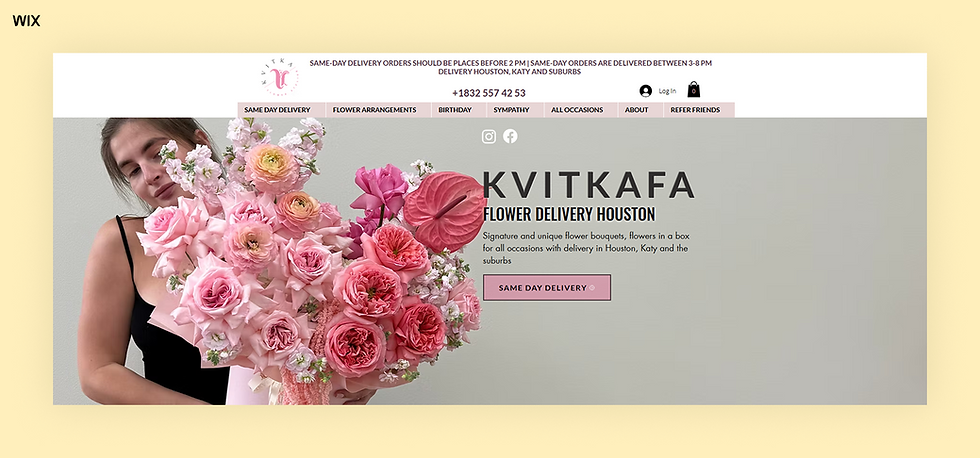
Kvitkafa flower delivery
Kvitkafa is a boutique flower delivery service in Houston known for its artistic, European-style arrangements. The site nails the mix of elegance and ease, opening with lush, full-width shots of their flower boxes and bouquets.
Navigation is simple, with quick access to "Same Day Delivery" and "Long Lasting Flowers," and a banner at the top of every page shows the same-day cutoff. The product pages feel curated, not cluttered, and soft colors and delicate fonts make it feel premium without trying too hard.
There's a European vibe throughout, and the Quick View feature keeps the buying flow smooth. It's clean, romantic and built for people who want flowers (and answers) fast.
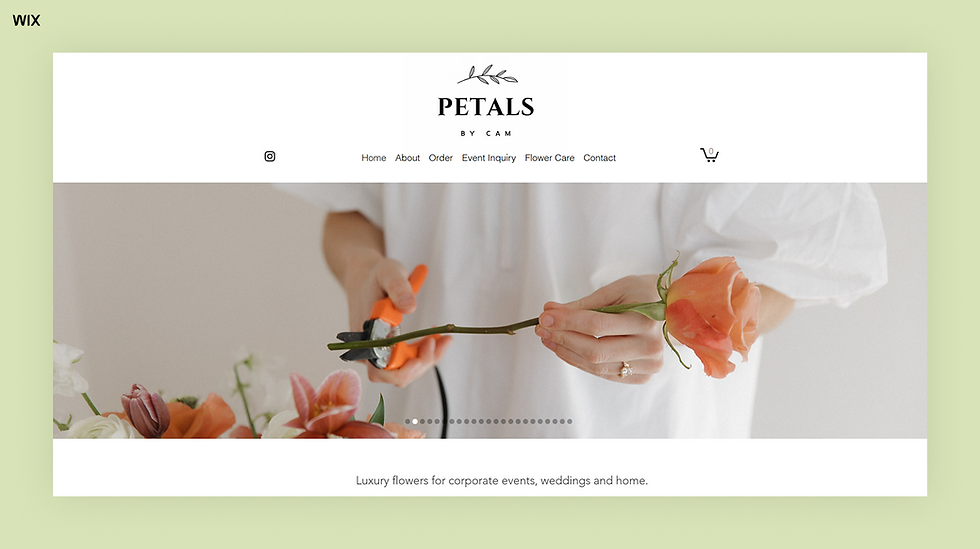
Petals by Cam floral design
Utah florist Petals by Cam has a website that mirrors the artistry of its floral work. The clean layout and elegant visuals draw visitors in, and separate Order and Event Inquiry pages split everyday orders from wedding and corporate work.
Further down the homepage, testimonials from corporate and wedding clients add a personal touch. These reviews highlight the florist's skill, reliability and care, helping build trust with new customers.
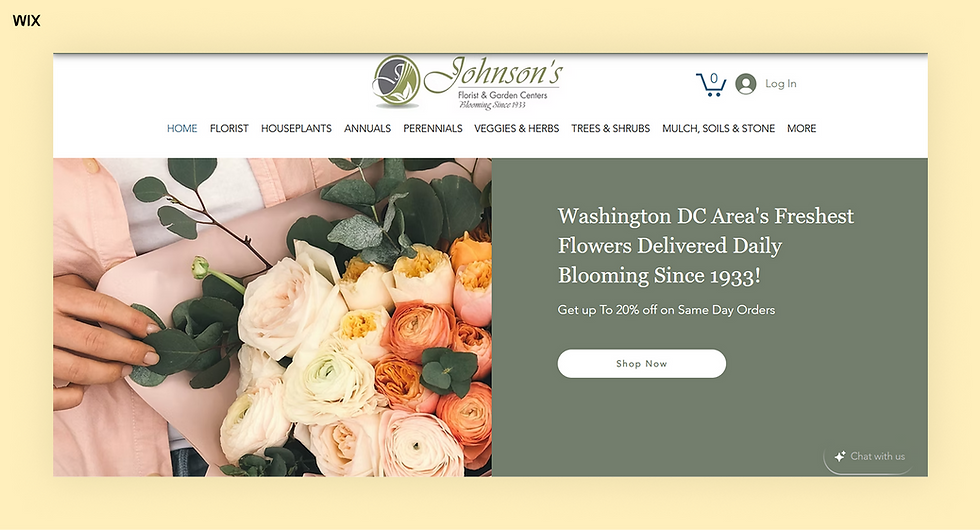
Johnson's Florist & Garden Center
Johnson's Florists has been blooming in the Washington, D.C. area since 1933, and its website captures that legacy with warmth and color. From classic roses to seasonal bouquets, its most-loved arrangements offer something for every occasion.
Flowers are just the beginning: gardeners will find plants, tools and supplies, from perennials and shrubs to mulch, pottery and herbs. The menu also gives flower subscriptions, delivery areas, funeral flowers and wedding services their own pages.
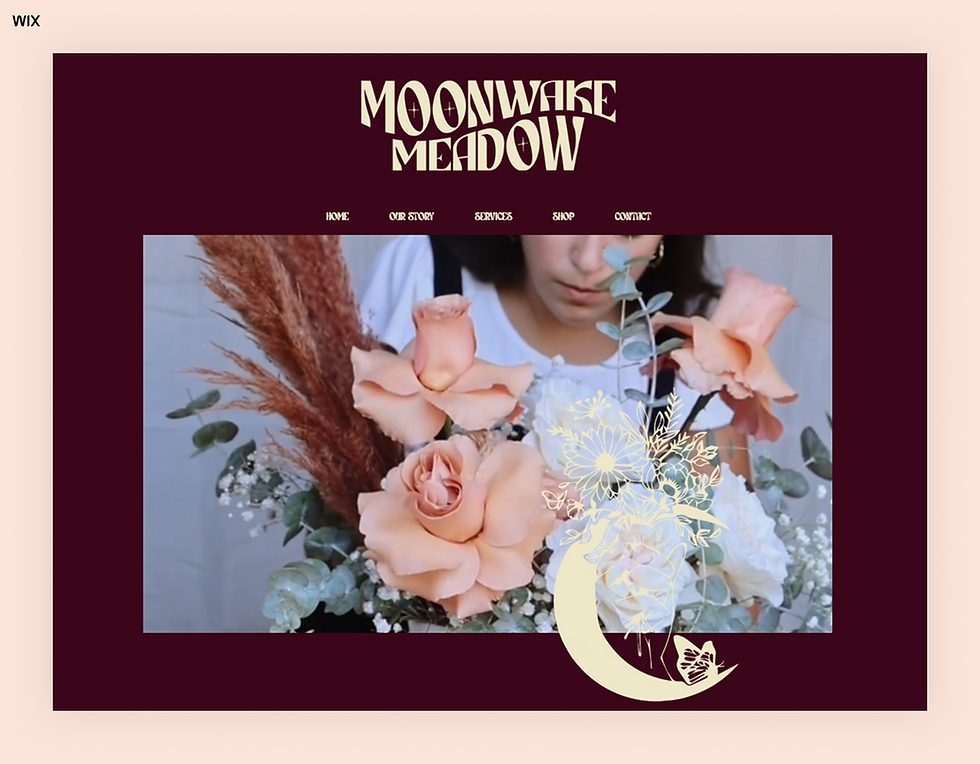
Moonwake Meadow
Long Island, NY-based floral design company Moonwake Meadow has a website that catches the eye with its distinct logo, color palette and font choices. Stylized videos and curated galleries show this floral designer's authentic brand.
Founder Nicole Oliveira pushes the aesthetic boundaries of a florist website:
Nicole Oliveira, founder of Moonwake Meadow
"People love to go onto a website and see a really clean canvas with a neutral background and very beautiful photos. But I love color and patterns, so I brought that in."
TFG Florist
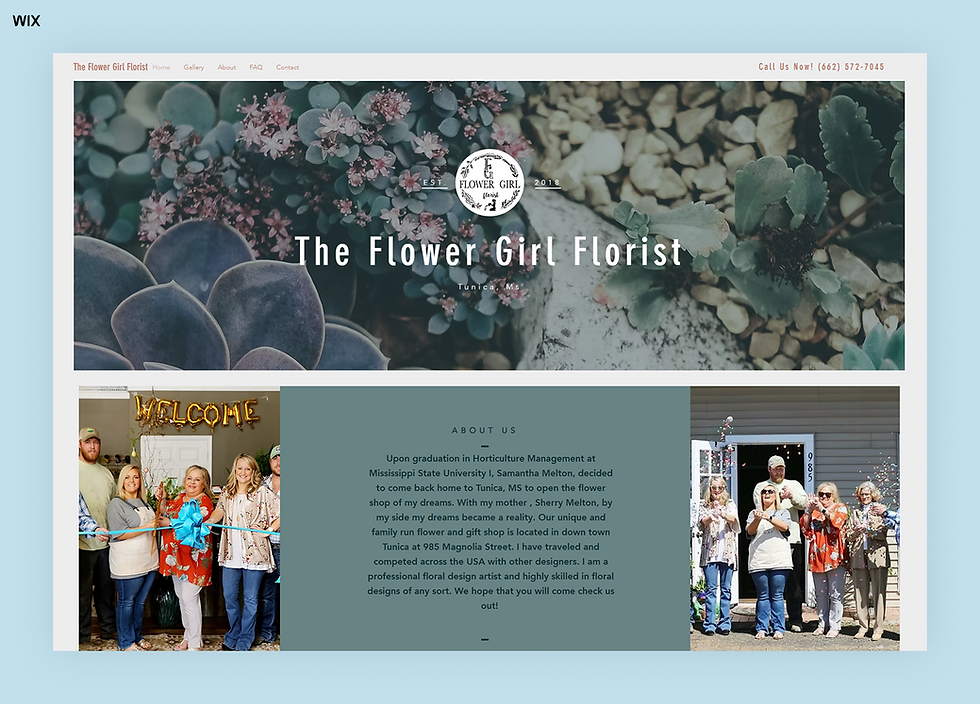
The Flower Girl Florist in Tunica, Mississippi markets to local customers by putting its town and store details up front. The site also has an FAQ page that answers common questions and smooths the path to purchase.
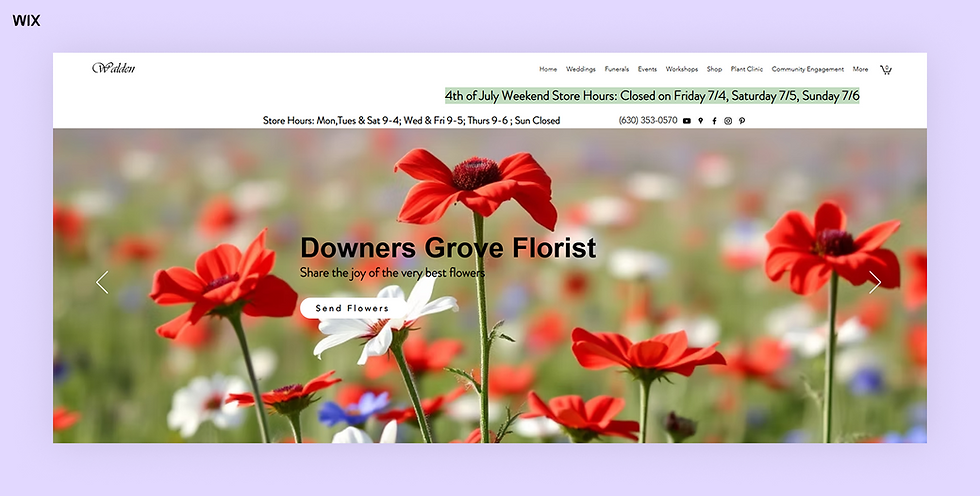
Walden Floral Design Co
Walden Floral's website creates a soft, immersive experience from the moment you land. A full-width hero image sets the tone, leading into a product grid with a broad selection of arrangements. The tagline, "Share the joy of the very best flowers," is warm and welcoming.
Functional touches like "Quick View" make browsing smooth. A local delivery section lists the towns, hospitals and funeral homes it serves, with separate same-day and next-day delivery pages, so customers know their flowers will arrive on time.
Floral design portfolio secrets
Your floral design portfolio answers the silent questions customers have: Can I trust this florist? Do they get my style? Will the flowers actually look like this?
If your portfolio isn't helping you book more orders or inquiries, it might be time for a rethink. From outdated images to confusing layouts, small mistakes can cost you leads. Here's how to turn your portfolio into a tool that reflects your style, builds trust and helps visitors take action.
Lead with your strongest designs
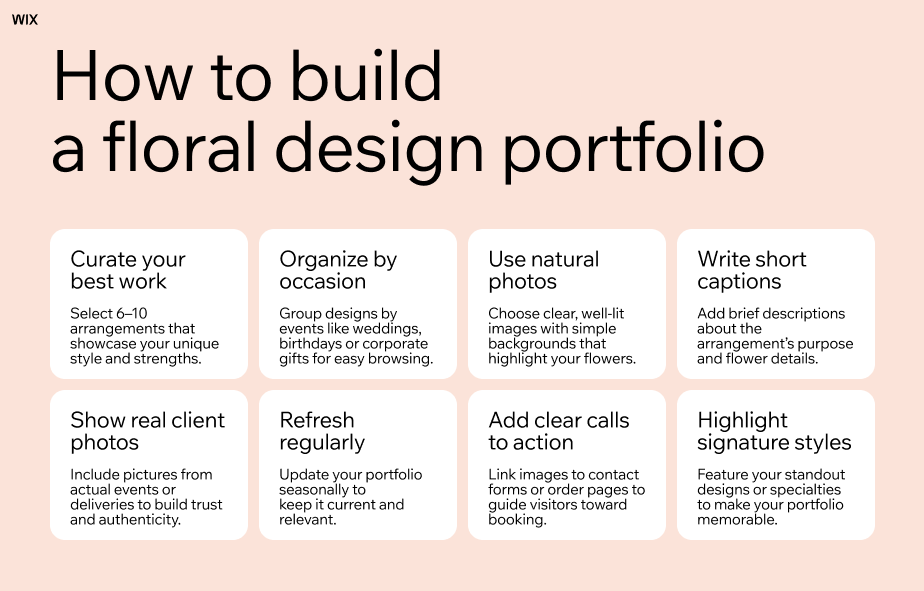
Your floral design portfolio should feel like a highlight reel, not a long scroll of everything you've ever made. Start with a curated selection of 6 to 10 designs that best reflect your current style, skill and offerings.
These might include your most-requested bouquets, seasonal favorites or standout arrangements for weddings, events and premium deliveries. If you have a signature aesthetic, like minimalist color palettes or lush, garden-style blooms, make sure it stands out.
Organize by what customers are looking for
Shoppers often start with the occasion, not the flower: birthdays, weddings, sympathy arrangements or just because. Structure your portfolio around real needs.
Instead of sorting by color or flower type, group arrangements by use: everyday bouquets, wedding designs, preserved florals or special occasion gifts.
Use photos that feel real, but polished
You don't need a professional studio to create great portfolio photos. Natural light, clean backgrounds and sharp images can go a long way. Avoid clutter, filters or anything that distracts from the flowers themselves.
Try to include a mix of styled shots and real-life photos, like arrangements in client homes or on event tables. People want to see what your flowers actually look like when delivered, not just how they're styled for the web.
Write short, helpful captions
Even a simple caption can do a lot of work. Descriptions like "spring bouquet with pastel ranunculus, delivered in Houston" or "elegant preserved roses for a luxury birthday gift" add helpful context.
These details help customers imagine what the arrangement is for and what kind of occasion it suits. You don't need flowery language, just something clear and specific enough to guide the decision.
Keep it updated and seasonal
A stale portfolio can make your entire business look inactive. Refresh your portfolio every season: remove older styles that no longer reflect your work, update colors to match the time of year and feature recent arrangements you're proud of.
If you've worked events or styled florals for a brand, highlight those moments.
Make it easy to act
If someone falls in love with an arrangement, make it easy for them to take the next step. Each item in your portfolio can link to a product page, a contact form or a way to request a custom version.
Even if you don't sell directly on your site, add a clear call to action near your portfolio, like "Want something similar? Reach out and we'll create it for you." Every photo is a chance to move someone from browsing to booking.
Learn more about how to make a florist website and run your business:
Why a florist website matters
A florist website works when your shop is closed. Customers can browse arrangements, check that you deliver to them and order for a date without calling.
Get found locally: Show up when nearby customers search for a florist or flower delivery.
Take orders around the clock: Late-night shoppers can order for tomorrow.
Show your style: A portfolio website gives couples and event planners a reason to book a consultation.
Keep the customer relationship: Orders placed on your own site come to you directly, so you can follow up before the next holiday.
Matt Matergia, who leads global B2B partnerships at Wix, puts the ownership point simply:
Matt Matergia, VP of Global B2B Partnerships (SaaS) at Wix
"Compared to social media, a website is the one place within the online ecosystem that you have full ownership and control to express yourself and communicate directly with customers. Simply put, a website is a business's online real estate."
A website won't replace word of mouth, wire-service orders or walk-in customers. It works best as the place those customers go to check your delivery area, see this week's flowers and place an order.
How much does a florist website cost?
The full cost of a florist website is more than the plan price. Budget for a domain, a website plan that supports online payments, payment processing fees on each order and any delivery or POS apps.
Add wire-service fees if you use one, product photography and the hours you or a helper spend updating collections before each holiday.
Some platforms bundle hosting, a secure connection and ecommerce tools into one plan, while others charge for each piece separately. With a builder you manage yourself, the main costs are the plan and your time. A custom-coded or headless site adds developer time for every change.
With Wix, you can build a website for free or choose a paid plan with the business features you need. For a full breakdown, see how much a website costs.
How to build a florist website with Wix
Wix gives a florist one place to build the site, take orders and run the shop. Here's how its tools match what flower shop owners need.
Build and update your site
Start from a flower shop template, generate a first draft with the AI website builder or build with Wix Harmony, which combines prompts with drag-and-drop editing. Aria, the AI agent in Harmony, can build pages and rewrite copy as you go.
You can also start in ChatGPT with @Wix or manage your site from Claude with the Wix connector. In the editor, Wix AI features help with text, images and layout.
Sell and deliver
Wix Stores covers the florist checkout: local delivery areas by zip code, radius or city, delivery time slots with same-day and next-day cutoffs, card message fields, subscriptions and gift cards, as set up in step 04.
Book consultations
Wix Bookings lets couples and event planners book a wedding or event consultation from your calendar, as a free or paid appointment.
Sell at the counter
Wix POS keeps in-person sales and online store inventory synchronized, so a bouquet sold in the shop also comes off the website.
Market and run the business
Send holiday reminders with Wix email marketing and hand off admin like inquiry replies to Symphony by Wix, both covered in steps 05 and 06.
Build for clients or in code
If you build florist sites for clients, Wix Studio adds advanced design tools and lets you manage projects, team and clients in one place. If a developer builds your site in code, Wix Headless provides the store, payments and hosting behind it, while the developer sets up and tests the delivery and checkout flow.
Other types of websites to create
How to make a florist or flower shop website FAQ
How can I sell my flowers online?
Build a website with an online store and product pages that show real photos and prices. Then set up local delivery, pickup and secure payments. Organize bouquets by occasion, then promote the site through local search, social media and email.
How can I manage same-day delivery online?
Set a same-day cutoff time, define the zip codes or towns you deliver to and let customers choose a delivery date and time slot at checkout. Show the cutoff on your homepage and product pages so customers see it before they order.
Do I need a portfolio if I'm not a wedding florist?
Yes. A floral portfolio helps every customer see the style and quality of your work. Include everyday arrangements, seasonal specials and custom orders.
How can I make ordering flowers online simple?
Organize your shop by occasion, show prices and sizes clearly and keep checkout short. Ask only for what you need: delivery date, address, card message and payment.
How do I write content for my florist website?
Write as if you're talking to a customer: clear, friendly and specific. Say what makes your flowers different, how ordering and delivery work and what's included with each arrangement.
What is the best website builder for a florist?
Look for a builder with florist templates, an online store with local delivery and same-day cutoffs, card message fields and secure payments. Wix offers all of these, and you can start from a template, with the AI website builder or from a chat in ChatGPT or Claude.
Can I charge different delivery fees by area?
Yes, if your ecommerce tool supports delivery zones. With Wix Stores, for example, you can create several local delivery areas by zip code, radius or city and set a different rate for each.
Can I sell flower subscriptions on my website?
Yes. Set up a bouquet as a subscription product with a delivery frequency, such as weekly or monthly, and an optional discount. You'll need a payment method that supports recurring payments.
Will my website work with a wire service or florist POS?
It depends on the systems involved. Ask your wire service or POS provider whether it connects to your website platform, and test how orders from each channel reach your team before a holiday.
How much does a florist website cost?
Costs depend on the platform, the plan and the extras you add, such as delivery apps, payment processing fees and photography. With Wix, you can build a website for free or choose a paid plan when you're ready to sell online.


