Updated: 6 days ago

To make a toy website, pick a platform, secure a domain and hosting, build pages around clear toy categories, load your catalog with photos and age details, then switch on payments and shipping. Wix offers a powerful website builder that allows you to build a great toy website, fast. You'll learn how to make a toy website step by step, whether you're starting a business or selling from a passion for toys.
Building a website for your business, passion project or side hustle should feel simple and exciting. Wix generates a personalized starting point with AI. You can customize every detail with intuitive drag-and-drop tools, while Wix handles the tricky parts to make building your site simple. That way, you can focus on what matters most: bringing your ideas to life. Ready to get started? Create your website today.
TL;DR: how to make a toy website
This guide will walk you through the key steps necessary to establish a professional and engaging online presence for your toy business. From deciding how to build your site to marketing it once it's live, you'll find all the essential information needed to attract and engage your target audience.
Top features of a toy website
Feature | Why it matters |
Clear product categories | Makes it easy for shoppers to find the toys they want, creating a smooth and enjoyable browsing experience. |
High-quality photos and videos | Shows the look and play of each toy so parents and gift-givers can feel confident in their purchase. |
Age and safety details | Shares age recommendations and safety information clearly, helping customers make informed choices. |
Customer reviews | Highlights feedback from other buyers, building trust and encouraging more purchases. |
Mobile-friendly design | Ensures your site works beautifully on any device so shoppers can explore and buy toys wherever they are. |
What is a toy website?
A toy website is an online platform that showcases and sells toys to potential customers. It can be used by toy businesses or individuals passionate about toys to promote their products, connect with customers and build a community around their brand. These types of websites typically include features such as product listings, shopping cart functionality, customer reviews and engaging content like blog posts or videos.
Learn more: How to sell toys online

How to make a toy website in 9 steps
Before you dive into the technical setup, get clear on your niche. Are you focused on educational toys, nostalgic collectibles, STEM kits or handmade wooden toys? Narrowing your focus helps you tailor your product selection, design and marketing to a specific audience instead of trying to appeal to everyone.

01. Decide how to make your website
Parents, grandparents and collectors all shop for toys differently, and your site needs to work for each of them, especially in the weeks before the holidays. Before you pick a name or a color scheme, settle how the site gets built. You have two options.
Wix AI website builder: Describe your toy shop, whether it sells wooden toys, STEM kits or vintage collectibles, along with your goals, the look you want and the features you need. The AI website builder generates a personalized site with pages, text, images and layouts built around your range. Ask it to add an age-group category or brighten the homepage for the holidays, and it refines the site from your description. When you want to place every product tile just so, switch to drag and drop editing. It connects to Wix Ecommerce for your catalog, bookings for in-store workshops, a blog for gift guides and contact forms for party or wholesale inquiries.
Wix MCP and the Wix Claude connector: Toy sellers who already brainstorm gift lists and product blurbs with an AI assistant can build the shop right there. The Wix MCP server works with any MCP-compatible AI client, and the Wix Claude connector puts Wix natively inside Claude, with no browser extension or separate setup. Create your pages, then manage products, workshop bookings and content in the same conversation. In ChatGPT, typing @Wix generates and publishes a site from the chat. It earns its keep after launch, when a bestseller sells out in December and you want to update the listing or add a new demo date in one message.
Opening your first online toy shop? The AI website builder gets you to a working store fastest. Pick the Claude connector if you want to run the shop by conversation.
Learn more: How to build an ecommerce site
02. Select a domain and website host
Once you know how your shop will be built, it needs a name customers can find and a place to live online. When designing a toy website, a well-chosen domain name, thoughtful site architecture and dependable hosting are crucial components. These elements impact your site's success by affecting user experience and search engine visibility. For selling toys online, there are key steps to follow. If this is your first site of any kind, our guide on how to build a website from scratch covers the same groundwork in more detail.
Your domain name is like the sign outside a physical toy store. It's the digital address your customers should easily find. Choose a domain name that reflects your toy brand and is easy to remember. Try to avoid hyphens and numbers and keep it short. A domain name generator can help you find an available and suitable name, and domain name search checks availability across more than 400 extensions, suggests alternatives if your first choice is taken and shows pricing before you buy. You can also search for a domain from inside ChatGPT with @Wix. Wix simplifies domain registration for your business, and every Wix domain includes a free SSL certificate.

New to the world of domains? Learn more about what is a domain name and how it can enhance your toy website.
Web hosting stores your toy website files and makes them accessible to customers. Consider the pricing, speed, site reliability and customer support of different hosting websites. Since toy lovers can shop anytime from anywhere, your site must be always available, with issues resolved quickly. Website security is vital to protect sensitive information and build trust with your customers. Wix’s free web hosting lets you scale your hosting as your toy business grows. Wix offers secure, scalable web hosting built in when you create your website.

03. Design your toy website and pages
Align your toy website with your brand to create a memorable online presence. Choose a website color scheme that reflects your brand's personality, whether vibrant or soothing, to engage your audience. Display your logo prominently to boost brand recognition, ensuring it fits the overall website design. Select typography that conveys your brand's tone and is easy to read on all devices. This approach strengthens your identity and connects with your audience effectively.
Want the shelves already built? A website template is a pre-designed website layout that sets the overall look and feel of your site, including fonts, colors, images and web page layouts. This ready-made toy store website template is designed for toy shops, so you can drop in your own catalog and brand colors, or browse other website templates for a different style.

Keep your site navigation simple and intuitive. Regardless of the variety of toys or categories you offer, make sure your customers can easily find the toys they want. Organize your categories, use clear labels and include a search bar to help visitors find what they're looking for. Add breadcrumbs so users always know their location and can easily navigate back.
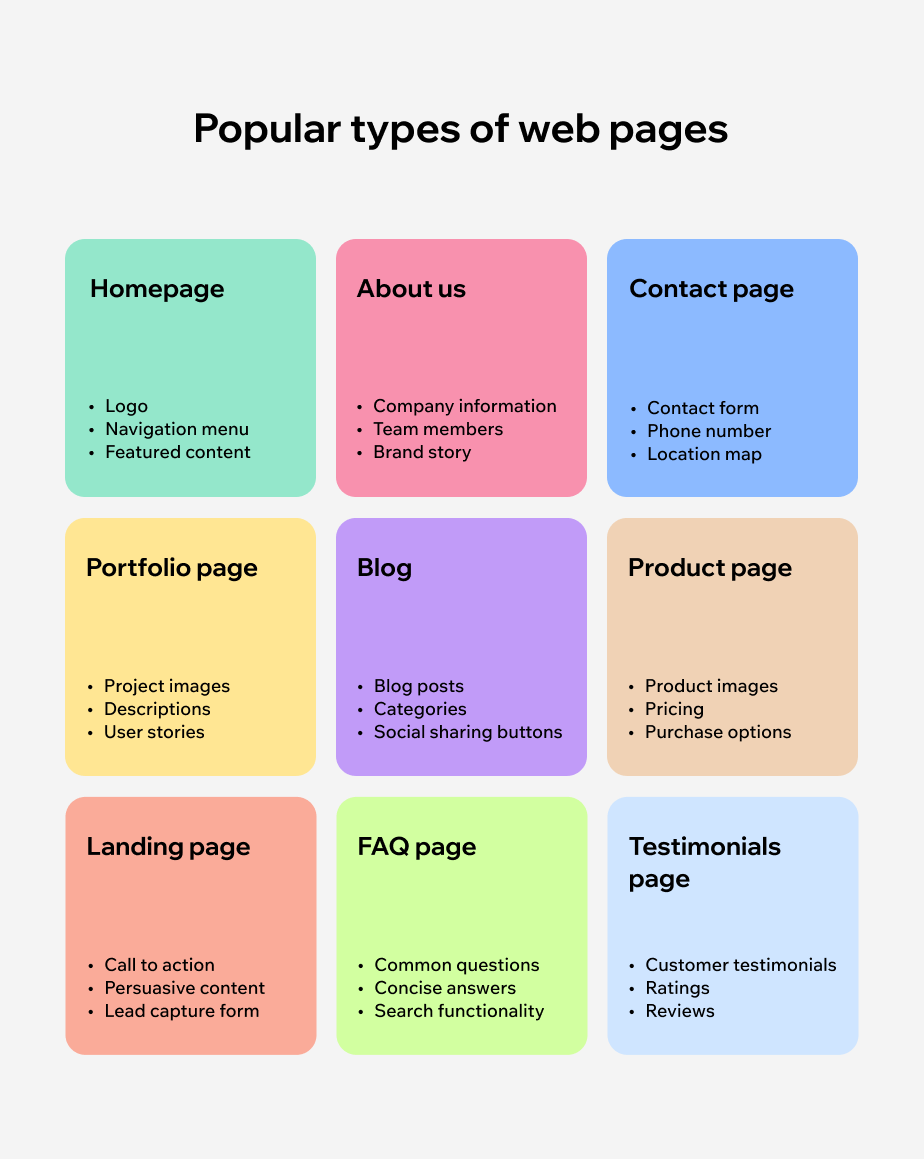
Consider these key pages to include on your toy website:
Homepage: The first page visitors see when they land on your website. Make it eye-catching and informative, with clear calls to action.
Product pages: Include high-quality images, detailed descriptions, pricing and a call to action button.
About Us: Share the story of your toy business or passion for toys. This helps build trust and gives customers a personal connection to your brand.
Contact Us: Provide multiple ways for customers to reach you, through an email address on your custom email domain, business phone number, online forms or social media links.
FAQs: Anticipate and answer frequently asked questions to save customers time and create a better shopping experience.
Learn more: What is web design?
04. Add your toy product catalog
Showcase your toys effectively on product pages to capture customer interest. Use high-quality images from various angles, provide detailed descriptions, list pricing and include customer reviews if available. Create descriptive titles and integrate keywords for better search visibility. Use a video maker to add videos or interactive demos to let visitors see the toys in action, helping them understand their appeal and motivating purchases.
Make it easy for customers to navigate through your products by organizing them into categories and subcategories. Consider categories like "Educational Toys," "Outdoor Play," "Puzzles" and "Board Games," with subcategories for "STEM Learning," "Toddler Toys" or "Family Games." You can also use filters such as price range or age group to help customers find specific toys quickly. Make sure to include a call to action button, such as "Add to Cart" or "Buy Now," on each product page.

05. Create a compelling homepage
Your homepage is often the first impression customers have of your toy store. It should be visually appealing and provide essential information about your brand, products and unique selling points. Use captivating images or videos to highlight bestsellers or new arrivals. Include a brief description of your brand and what sets you apart from other toy stores. Use clear calls to action, such as "Shop Now" or "Learn More," to guide visitors to explore further.
Consider adding interactive elements like quizzes or polls related to the toys you offer to engage visitors and create a more personalized experience. Update your homepage with seasonal themes and decorations, especially around holidays and special occasions. This keeps your toy website fresh and engaging, encouraging repeat visits and capitalizing on seasonal shopping trends. You can also include customer testimonials or reviews on your homepage to build trust with potential customers.
06. Set up events
Toy stores can offer more than just toys. These stores can host engaging events, toy demonstrations and creative workshops, making them ideal for family outings. Through event listings with online scheduling, customers can easily see what's happening and sign up to participate. Use event registration forms to collect customer information and send reminders or updates leading up to the event.
Consider offering special discounts or promotions for attendees, providing an incentive for customers to attend your events. You can also use events as an opportunity to showcase new toys or collaborations with other businesses, enhancing your toy store's overall appeal.

07. Integrate ecommerce features
To successfully sell toys online, your toy website should include ecommerce features to ensure a seamless and secure buying experience for customers. Consider adding these key features to your site:
"We are constantly enhancing our ecommerce experience for our subscribers and their shoppers. We know that for small businesses both ecommerce and mobile functionality are crucial... Growth of our ecommerce and transaction-enabled subscriptions continues to exceed our overall subscriptions growth, highlighting our broad reach with small businesses."
— David Schwartz, VP of Product at Wix
Shopping cart: A shopping cart allows customers to add multiple items before proceeding to the checkout page. This page has options of adding and removing the items, so that users can modify the order while placing it. The checkout process should be user-friendly, with clear steps and instructions for customers to follow.
Payment processor: Choose a secure payment processor that integrates with your ecommerce platform to accept payments. Ensure it accepts multiple payment methods, including credit cards, PayPal and other popular options. Digital wallets and other alternatives, such as Apple Pay and BNPL, are becoming increasingly popular, so it makes sense to offer them too.
Shipping integration: Offer various shipping options and integrate with a reliable shipping service provider to ensure timely delivery of orders. Consider offering free shipping for orders above a certain amount to incentivize customers to purchase more.
Inventory management: Keep track of your inventory levels in real-time to avoid overselling or stock shortages. This feature is especially crucial during peak seasons or when promoting new products.
Wish list and save for later: Some customers may not be ready to make a purchase immediately, so having the option to save items for later or add them to a wish list can encourage them to return and complete their purchase.
Order tracking: Provide customers with an order tracking feature that allows them to monitor the status of their purchases. This can help build trust and confidence in your brand by keeping customers informed and updated on their orders.
Third party integrations: Explore the Wix App Market for tools like a cart countdown timer that creates urgency to boost sales or loyalty club apps to expand your sales and customer base. The cost of these features can vary depending on the provider and what type of tools you use.

08. Start a blog (optional)
If you have the resources and expertise, starting a blog can be an excellent way to drive traffic to your toy website and establish yourself as a go-to source for toy-related information. Use the online blog to share product reviews, gift guides or tips on how to play with specific toys. You could also collaborate with popular parenting or lifestyle bloggers for sponsored content or guest posts to reach a wider audience.
Creating engaging and informative content can help attract potential customers who are interested in your niche. It also gives them a reason to keep coming back to your site for valuable information, ultimately leading to more sales opportunities.

09. Market your toy website
Once your business website is up and running, it's time to spread the word and attract potential customers. Try these marketing strategies:
Social media: Use social media platforms like Instagram, Facebook and Pinterest to showcase your products, interact with customers and run targeted ads. Use an image resizer to display photos of your toys in action or behind-the-scenes content to engage your audience.
Email marketing campaigns: Collect customer email addresses through newsletter sign-ups or event registrations. Send out regular newsletters that include updates on new products, promotions, events or valuable information related to toys.
Collaborations: Partner with other businesses or influencers in the toy industry for cross-promotion opportunities. This can help expand your reach and introduce your brand to a new audience.
Google Business Profile: Create a Google Business Profile for your toy store. This will ensure that your store appears in local search results and Google Maps, providing essential information such as your address, hours of operation and contact details. Encourage satisfied customers to leave positive reviews on your profile to boost your online reputation and attract more foot traffic through local searches.
SEO optimization: Optimize your toy website for search engines by using relevant keywords, meta descriptions and alt tags on images. This can improve your website's ranking on search engine results pages and make it easier for potential customers to find you.
Tip: Your Wix site comes with built-in advanced SEO features including an SEO setup checklist.

Make the holiday rush easier with a team of AI agents. Picture the first Saturday in December. Workshop seats are filling, gift-guide emails need to go out and the register hasn't stopped. Symphony by Wix is an AI agent platform for independent business owners and small businesses, sized for a toy shop run by one person or a team of up to 10. It brings together agents for marketing, client communications, scheduling, finance and operations, all coordinated through one conversation. For a toy store, that could mean drafting your holiday gift-guide emails, reminding families about the demo or workshop they signed up for and tracking sales and expenses through the gifting season. Symphony gets to know your shop, suggests the next move and checks with you before any agent acts. It works whether your site is built on Wix or not, so it fits either route you picked in step 1.
Excited to launch your toy website? Get started with the Wix AI website generator.
Example toy websites
These inspiring examples of toy website ideas can guide your own website development, and all of them were created using Wix.
Room To Grow Toys
Room To Grow is a delightful online toy store that captivates visitors with its engaging and user-friendly homepage. The website features a wide selection of toys catering to all ages, making it a haven for parents and children alike seeking quality playtime options. Navigation is a breeze with intuitive call-to-action buttons encouraging visitors to explore and shop their curated collection. The homepage is further enhanced by glowing client testimonials. This welcoming atmosphere, combined with an extensive array of toys, positions Room To Grow as a premier destination for finding the perfect toy.

JC's Toy Box
JC's Toy Box specializes in a wide array of nostalgic toys from the '80s, including beloved brands like G.I. Joe, Lego and Star Wars. What sets JC's Toy Box website apart is its comprehensive catalog, equipped with an impressive array of filters that enable customers to search by category, price, color and even specific features like cut types and sign types. This curated selection and user-friendly navigation make JC's Toy Box website a go-to destination for discovering both cherished classics and unique finds.

Why you need a toy website for your business
Having a dedicated toy website for your business offers numerous benefits and can greatly contribute to the success of your venture. Consider these reasons to invest in a toy website:
Accessibility and convenience: A website allows customers to view and purchase your products from anywhere at any time, making it easier for them to shop.
Increased visibility: Having a website makes it easier for potential customers to find you through search engines or social media. This can lead to more foot traffic in your physical store as well.
Enhanced customer experience: An online store allows customers to browse and compare products without feeling pressured by sales staff. It also offers features like wish lists, order tracking and customer reviews, enhancing the overall shopping experience.
Targeted marketing: With a website, you can reach a wider audience through targeted ads on social media or search engines. This allows you to focus your marketing efforts on potential customers who are interested in your products, increasing the chances of conversion.
Insights and analytics: A website provides valuable insights into customer behavior, popular products and sales trends. This information can help you make data-driven decisions to improve your business's performance and profitability.
How to make a toy website FAQ
Do I need any technical skills to create a toy website?
No, you do not need advanced technical skills to create a toy website. There are no code website builders, like Wix, that offer user-friendly interfaces and customizable templates, and the Wix AI website builder can generate your first version from a description of your shop. If you prefer working in an AI assistant, the Wix MCP server and Claude connector let you build and manage your site from Claude, or you can type @Wix in ChatGPT. Alternatively, you can hire a web developer to design and build your site for you.
How much does it cost to create a toy website?
The cost to build a website can vary depending on factors such as the platform used, website features and hiring professionals for services like web design or content creation. Using a DIY website builder like Wix can start at $17 a month, while hiring a professional can range from a few hundred to a few thousand dollars.
Can I sell products directly from my toy website?
Yes, you can create an online store on your toy website to sell products directly to customers. Most website builders offer built-in ecommerce capabilities or integration with popular payment processors like PayPal or Stripe. However, keep in mind that there may be additional fees associated with using these features.


