Ready to showcase your best work? Start building your portfolio →

You make a teaching portfolio by choosing a format, curating your strongest lesson plans, student work and credentials, then publishing them where a hiring committee can browse everything in minutes. Today that rarely means a three-ring binder. Most educators build online with a portfolio builder or an AI website builder, creating a teaching portfolio that grows with them. Wix makes it easy to create a teaching portfolio website.
Whether you’re applying for a teaching job, showcasing your skills to peers or simply building your professional confidence, an organized portfolio makes a powerful impression and tells your story as an educator. In this guide, you’ll learn how to make a teaching portfolio step by step, see the best teacher website examples and get free templates and tips for your own.
With Wix’s portfolio builder, you can create a professional, eye-catching portfolio in just a few clicks. Customizable templates and intuitive tools make it easy to showcase your work with confidence, leaving a lasting impression on every visitor.
TL;DR: How to make a teaching portfolio
A teaching portfolio collects your teaching philosophy, lesson plans, assessments, student work and credentials in one place, so schools can see how you teach and not just where you have taught. You can build one as a printed binder, a shareable PDF or a website, and the website version is the one you can update, link to in an application and keep open to hiring committees around the clock. The same process works in any field, so the wider guide to how to make a portfolio is a useful companion read.

For help choosing the right platform, check out the best website builders for portfolios plus examples of the best portfolio websites to spark ideas.
How to make a teaching portfolio in 7 steps
Whether you're wondering how to make a teaching portfolio for high school interviews or you're applying for a new district, these steps can help you build one that reflects your unique style.
01. Define your teaching goals
Start by identifying what you want your teaching portfolio to achieve. Are you preparing for interviews? Applying for a specific position? Seeking promotion? Your goals will shape the structure, tone and web content of your portfolio.
Be honest about your strengths and the unique value you bring to the classroom. Your goals might include emphasizing your classroom management approach, showcasing student work or aligning with a school’s educational philosophy. Clarity here will guide every decision you make.
02. Choose a portfolio builder

To create a professional online teaching portfolio, start by selecting a portfolio website maker that fits your needs. Ideally, the portfolio builder you choose should let you register a domain, provide free website hosting and offer tools like a domain name generator and domain name search to help you find the perfect web address.
A strong website builder gives you a strong website infrastructure including flexibility, scalability, website security and ease of use. Whether you prefer to use drag-and-drop tools or let an AI assistant guide the process, look for a platform that helps you launch quickly while still offering robust customization.
Wix Harmony pioneers a hybrid creation experience that blends vibe coding with full manual control. Describe your vision in a single prompt and Wix Harmony builds a complete, business-ready site around it, with pages, business tools and a responsive layout wired in from the start. Aria, Wix Harmony's built-in AI agent, stays beside you throughout, contextually aware of what you are building and ready to generate sections, refine copy and offer web design and business strategy expertise on demand.
When you want hands-on precision, radical customization tools are ready: pixel-level drag-and-drop editing, custom component generation and a brand kit for global site styles. You are never locked into one mode, because AI and manual control coexist in the same interface, backed by Wix's enterprise-grade infrastructure.
Think about long-term features too, such as blog functionality, contact forms and the ability to update your site as your teaching career evolves.
"An outstanding portfolio is all about storytelling. It’s not just a showcase of work but a narrative that weaves together a professional’s skills, creativity and personality. Features like dynamic presets, AI setup and beautiful templates let creators bring their stories to life, ensuring that every portfolio not only stands out for its aesthetic appeal but also tells a compelling story about the creator behind it." - Hani Safe, product lead at Wix
Explore the best website builders for teachers to get started on your portfolio.
03. Find a portfolio template that suits your style

Your teaching portfolio should reflect your personality, professionalism and teaching approach. Choosing the right website templates, especially portfolio templates, is crucial. Look for clean, modern website designs with intuitive website navigation so that hiring committees can easily explore your work.
Strong web design balances style and substance. Don’t overwhelm visitors with too many colors or complicated layouts. Instead, choose a website layout that puts your teaching philosophy and work samples front and center. Prioritize templates with organized sections, accessible menus and responsive design so your site looks great on any device.
04. Select and present your best teaching work
Once you’ve chosen a format and template, it’s time to fill your teaching portfolio with meaningful content. Start by curating your strongest lesson plans, student work samples, classroom management strategies and any relevant certifications. Quality over quantity is key, and each piece should tell a story about your effectiveness as an educator.
Give context for each sample you include. For example, instead of simply uploading a worksheet, explain what learning objectives it addressed, how students responded and any measurable outcomes. This narrative approach helps hiring managers see your teaching in action and understand the impact you’ve made in the classroom.
05. Optimize for mobile and SEO

Most Many people will review your portfolio on a phone or tablet, so it’s critical to build a site that functions smoothly on smaller screens. Ask yourself: what is a mobile website? It’s a version of your site tailored for smartphones, easy to navigate, fast to load and touch-friendly. Use one of the best mobile website builders to ensure your site works seamlessly across all devices.
Equally important is search engine visibility. Choose one of the best website builders for SEO and take advantage of built-in seo features to help your portfolio rank higher in search results.
Want to boost visibility even more? Use a blog maker and explore how to start a blog, which is a great way to enhance your blog SEO and showcase thought leadership through your portfolio. Together, these steps create a strong foundation for SEO website design.
Learn how to start a teaching blog in just a few easy steps.
06. Add a clear call to action
Your teaching portfolio isn’t just a presentation, it’s a communication tool. So what’s the next step for your visitor? This is where a call to action comes in. Strong CTAs help guide your audience, whether you want them to download your resume, contact you for an interview or request a full portfolio via email. Check out call to action examples or browse a guide on call to actions to craft one that fits your tone.
Effective CTAs are clear, visible and actionable. Use bold buttons that say things like “Get in Touch,” “Schedule a Call” or “Download My Portfolio.” Position them in key places: the homepage, end of each section and your site footer. A compelling call to action helps turn a great first impression into a real opportunity.
07. Review and refine your teaching portfolio
A teaching portfolio should evolve as you grow. After launching your site or preparing your print version, take time to review everything. Ask trusted colleagues to proofread and offer feedback. Make sure your links work, your content is error-free and your site functions properly on desktop and mobile devices.
Set a schedule to revisit your portfolio every few months, especially before job applications. Update older materials with new examples, revise your teaching philosophy to reflect your latest thinking and replace generic content with more personalized, targeted work. A regularly refreshed portfolio shows initiative and ongoing professional development.
What is a teaching portfolio?
A teaching portfolio is a curated collection of documents, lesson plans, reflections and evidence of teaching effectiveness. It’s used to showcase your skills, philosophy and growth as an educator.
Key purposes:
Highlight your teaching philosophy
Present lesson plans, assessments and student work
Reflect on your growth and development
Provide evidence of student learning
Demonstrate qualifications to potential employers
Pro tip: An online portfolio is easy to share in an application and easy to keep current. An online teaching portfolio can show tech-savviness, organization and initiative, all things school administrators value.
Common teacher portfolio formats
Format of a teaching portfolio | Description | Best for |
Print portfolio | Physical binder with tabs and printed documents. | In-person interviews. |
Digital PDF | Shareable, downloadable file. | Email applications. |
Website portfolio | Online version hosted via website builder. | Showcasing work 24/7; interactive experience. |
Why create a teaching portfolio?

Even if it's not required, having a professional portfolio shows initiative, professionalism and a genuine passion for teaching.
Benefits:
Helps you prepare for interviews by organizing your talking points.
Showcases your unique teaching style and strengths.
Builds credibility and confidence in your abilities.
Makes you memorable to hiring committees.
"In an interview setting, your teaching portfolio does more than back you up—it speaks for you. A clean, organized portfolio shows you think like an educator and a professional." - Sharon Hafuta, managing blog editor at Wix
What to include in a teaching portfolio
This is one of the top questions educators ask, and for good reason. There’s no universal format, which can be both freeing and overwhelming.
Here’s a breakdown of what to put in your teaching portfolio, with a template you can follow:
Section of your teaching portfolio | Purpose | Tips |
Cover page | Introduce your portfolio. | Include your name, title, photo and contact info. |
Table of contents | Navigation aid. | Hyperlink sections for digital formats. |
Teaching philosophy | Share your beliefs and goals. | Keep it personal yet professional. |
Resume/CV | Outline your qualifications. | Tailor it to education roles. |
Lesson plans | Show teaching skills in action. | Add student outcomes or reflections. |
Assessments | Demonstrate evaluation strategies. | Include examples of feedback. |
Student work samples | Showcases results. | Include a range of learning levels. |
Letters of recommendation | External validation. | Choose diverse voices. |
Certifications & awards | Proof of credentials. | Include relevant dates. |
Professional development | Commitment to growth. | List conferences, courses, webinars. |
Optional additions:
Classroom management plan
Syllabi or course outlines
Technology integration samples
DEI-focused practices

Teaching portfolio examples
Looking through real-life teaching and personal portfolios can spark ideas for your own. Below, we’ve handpicked a few standout examples, each showcasing a unique strength, from design to content structure to accessibility. Whether you're building your site from scratch or using templates, these examples highlight what’s possible when you bring personality and professionalism together.
01. Art Smart with Mrs. J
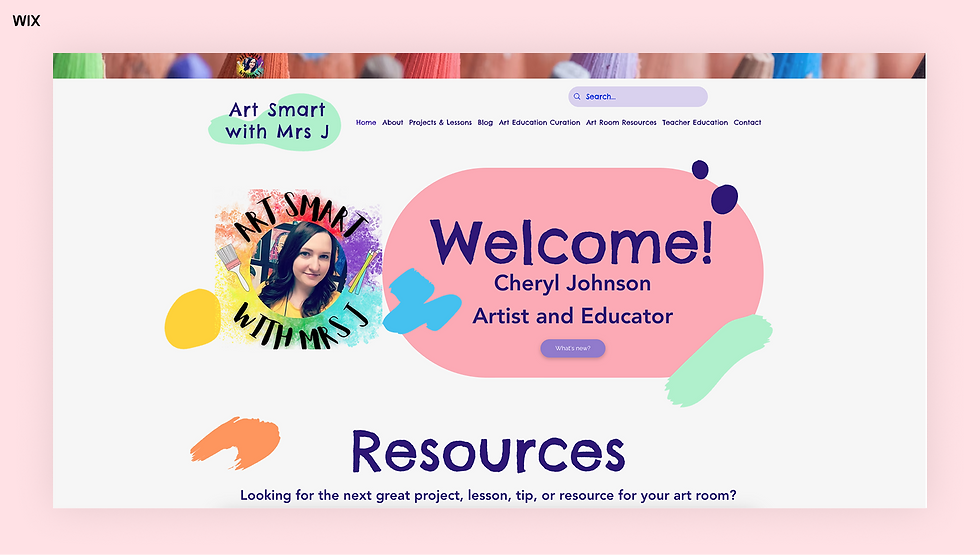
Art Smart with Mrs. J’s art teacher portfolio feels like an extension of the classroom itself. The use of playful fonts, student artwork and thematic sections turns the site into an immersive teaching experience. From lesson plans to videos, every element reinforces Mrs. J’s identity as a passionate and creative educator.
It’s a reminder that your site should feel like you. Don't be afraid to incorporate your subject matter into the design, especially if you're teaching art, music or drama. A themed portfolio is not only fun to explore but also tells a story about how you engage with students.
02. Sunflower Scaffolds

Sunflower Scaffolds’ teaching portfolio embraces a bold, expressive color scheme, using warm hues and soft web gradients that reflect the nurturing energy of early childhood education. The gentle transitions between rainbow colors give the site a vibrant yet soothing feel, perfectly in tune with its audience of educators and young learners.
This site reminds us that a portfolio doesn’t need to be neutral to be professional. Color can be used intentionally to evoke emotion and reinforce your teaching values. Thoughtful use of web gradients and palettes creates a warm, welcoming digital space that’s both on-brand and inviting.
03. Teaching Allison

Teacher Allison’s portfolio is a great example of an authentic and approachable teaching website. It showcases her educational background, teaching philosophy and even personal touches like favorite quotes. While the layout is simple, the content feels genuine and relatable, ideal for educators who want their site to reflect their personality, not just their credentials.
This site is a good reminder: your teaching portfolio doesn’t need to be complex to be compelling. If you’re just starting out, focus on telling your story honestly and updating as you grow.
04. Mrs. Kinder's Korner

Mrs. Kinder’s Korner combines bright design with best practices in website accessibility. From readable font sizes to high-contrast text and keyboard-friendly navigation, it’s clear the creator understands web accessibility and how it impacts the user experience. This site is a great case study in how to make a website accessible without compromising on personality.
If you're building your portfolio on Wix, take note: Wix offers built-in tools and guidelines for accessibility. Familiarize yourself with website accessibility best practices and learn how to make a Wix website accessible to ensure your teaching portfolio is welcoming to all visitors, including those with disabilities.
05. Isabel Forward

Isabel Forward’s teaching website doubles as a portfolio and digital resume, making it a great example for job-seeking educators. The homepage features a polished headshot, concise website bio and easy-to-navigate sections for resume highlights, projects and classroom work. If you're wondering how to make a professional resume website, this is a strong blueprint.
Wix is one of the best resume website builders, offering stunning resume website templates and tools to help you stand out. Use this site as inspiration for website layout, tone and structure if you're searching for resume website examples that balance visuals and content effectively.
06. Cheryl Cofer

Cheryl Cofer’s teaching portfolio makes a lasting first impression with its crisp layout, intuitive website navigation and modern website design. The standout feature? A subtle Apple-style logo that lends a sleek, tech-forward tone to the homepage. This logo isn't just decorative, it’s a reflection of Cheryl’s professional identity. If you're inspired by this, consider using a logo maker to create your own mark or explore guides on how to design a logo that matches your teaching philosophy.
The minimalist design, white space, limited color palette and a clean font mirror the style of high-end brand websites, which lets her content shine without distraction. It’s proof that simplicity, when done right, can feel powerful and memorable.
Check out these niche industry portfolios:
Teaching portfolio templates
Want a head start? Explore these free teaching portfolio template to get started:
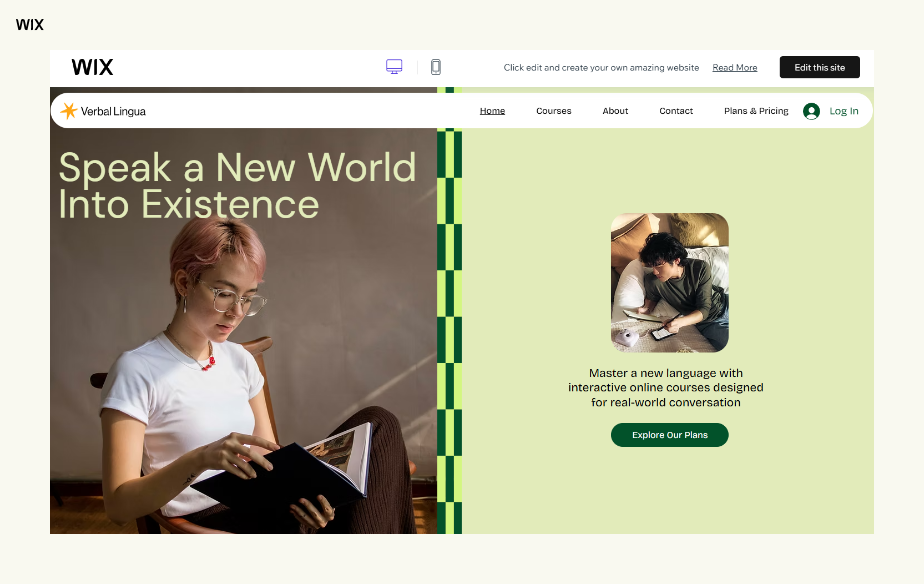
Template name: Online language school website template

Template name: Classroom website template
Template includes:
Editable cover page
Table of contents with hyperlinks
Teaching philosophy page
Lesson plan and assessment templates
Student work sample layout
Free portfolio templates on Wix
Teaching portfolio cover page tips & examples
First impressions matter. A strong cover page should be:
Visually clean and easy to read
Aligned with your teaching style
Personalized with your name and photo
Sample cover page layout
Element | Example |
Full name | John Smith |
Title | Middle School Science Teacher |
Photo | Professional headshot |
Contact | Phone number, email address and LinkedIn |
Design | Soft colors, clear typefaces, school themed icons |
Online vs. print: which teaching portfolio format is best?
Feature | Online portfolio | Print portfolio |
Accessibility | 24/7 access | Requires physical delivery |
Visual impact | Interactive design options | Tangible, tactile presence |
Updates | Easy to revise | Requires reprinting |
Best for | Remote applications, networking | In-person interviews |
Pro tip: You can always create both. Use a website as your primary portfolio and a printed version for interviews.
How to make a teaching portfolio FAQ
What is a teaching portfolio?
A teaching portfolio is a curated collection of teaching documents that shows your educational philosophy, classroom experience and impact on student learning. It usually holds a philosophy statement, resume, lesson plans, assessments, student work samples and evidence of professional development, and it can live as a printed binder, a PDF or a website.
What should I include in a teaching portfolio?
A teaching portfolio should include your teaching philosophy, resume, lesson plans, assessments, student work samples, letters of recommendation and certifications. Add context to each item, such as the learning objective it addressed and how students responded, so a hiring committee can see the thinking behind the work.
How do I make a teaching portfolio from scratch?
You make a teaching portfolio from scratch by defining your goal, choosing a format, gathering your strongest teaching materials and publishing them in a structure someone can navigate quickly. Building it as a website keeps it easy to update and easy to share as a single link in an application.
Are digital teaching portfolios accepted?
Yes, online teaching portfolios are increasingly expected, especially for all types of teaching positions.


