- Mar 11
- 7 min read
Updated: May 6

Learning how to make a hair salon website helps you attract more local clients and manage appointments effortlessly. The first step involves finding a reliable website builder that gives you the right tools to grow your brand.
Figuring out how to go about making a website might seem like a big task at first glance. Once you break the process down into actionable steps, you will quickly have a beautiful space to share your portfolio and services. In this guide, you’ll learn how to make a hair salon website step by step so you can showcase your services and start accepting bookings online.
Create your site with a salon website builder and start taking bookings online.
TL;DR: how to make a hair salon website
Creating a hair salon website is straightforward when you choose the right platform and follow a clear process. Start by selecting a website builder, choosing a domain name and picking a salon template that fits your brand. Then add essential pages, customize your design, set up online booking and publish your site to start attracting new clients.
To meet your business goals, your site should include high-quality photos of your work, clear pricing and an easy way for people to book an appointment.
Feature | Why it matters |
Online booking | Lets clients schedule visits at any time |
Service menu | Sets clear expectations for treatments |
Photo gallery | Displays your styling skills accurately |
Contact info | Helps people find your physical location |
Learn more about how to make a beauty website.
How to make a hair salon website in 7 steps

Building a beautiful site for your styling business is completely doable. Follow these simple steps to get your brand set up and ready to accept new clients.
01. Choose a professional website builder
Picking the right platform is the most vital decision for your business. You want a tool that handles the technical heavy lifting while giving you creative freedom. It needs to offer specific features built for service-based businesses like yours. You can then focus entirely on growing your client base instead of worrying about updates.
A good platform also scales with your business over time. As your team grows or your services expand, your site should easily accommodate those changes. Look for the best salon website builders that provide reliable customer support and built-in marketing tools. Taking the time to select the right foundation makes everything else much easier down the road. You will save hours of frustration by making a smart choice early on.
Expert tip from Marine Levy Belder, product marketing manager at Wix
"When it comes to website building, one of the biggest challenges for business owners is the amount of time needed to create one. With AI, everything is much faster and easier. Business owners can now build their own websites, update their content and create or enhance images with minimal effort. AI is revolutionizing the world and technology is expanding into everything we do."
Start building your salon website with Wix's AI website builder.
02. Pick a domain name for your salon
Your domain name is your website’s address on the internet, so it should be easy for clients to remember and type. Ideally, choose a name that includes your hair salon’s brand name and possibly your city or neighborhood. This helps local clients find you more easily when searching online.
Keep your domain short, simple and professional. Avoid complicated spellings, extra numbers or unnecessary symbols that might confuse potential clients. Many website builders allow you to purchase and connect a domain directly while creating your site, which makes the setup process much easier. Securing a clear and memorable domain gives your business a professional online identity from day one.
Pro tip: To choose a domain name, try out a hair business name generator or domain name search for inspiration.

Learn more about beauty business names and hair salon business plan.
03. Choose a salon website template

Starting with professionally designed website templates makes building your site much faster and easier. Wix lets you launch fast with easy-to-use designer-made website templates. Hair salon website templates provide a ready-made layout with sections already designed for service businesses. This means you can focus on adding your own content instead of designing everything from scratch.
Look for templates specifically built for beauty or hair salons. These often include sections for service menus, booking buttons, photo galleries and client testimonials. A good template also ensures your website looks great on both desktop and mobile devices. Once you select the template that fits your brand, you can easily customize colors, images and text to match your salon’s style.
Find inspiration in simple websites that get straight to the point.
Explore designer-made website templates:
04. Add essential pages to your website
Every hair salon website should include a few key pages that help visitors understand your business quickly. Start with a homepage that introduces your salon and highlights your main services. Then create a services page where clients can browse your full menu and pricing details.
You should also add an About us page that shares your story, experience and the inspiration behind your salon. A gallery page is another important addition because it showcases your best hairstyles and color work. Finally include a contact page with your phone number, address, opening hours and booking links. These essential pages give visitors all the information they need to trust your salon and schedule their appointment.
05. Customize your design and branding
Your website should reflect the exact vibe of your physical location. When a client visits your page, they should instantly feel your unique brand personality. Pick colors and fonts that match your physical space and beauty logo. Use high-quality images of your actual work rather than generic stock photos. Genuine photos build trust and give potential clients a real look at your styling talent.
Keep your website layout clean and easy to navigate. Visitors should find exactly what they want within a few clicks. Make sure your business name and logo sit clearly at the top of every page. A cluttered layout often drives potential customers away before they even view your services. Simple design choices lead to a much better experience for everyone visiting your site.
Learn more about how to make a beauty logo.
06. Set up your booking system
Allowing clients to schedule their own appointments changes the way you run your business. You no longer have to stop cutting hair to answer the phone. A great scheduling tool syncs directly with your personal calendar to prevent double bookings. Wix helps you to accept online bookings anytime. This convenience keeps your chair full and your clients happy.
Automated reminders drastically reduce the number of people who forget their appointments. Wix enables online services on your website with automated scheduling, confirmations and client management. You can even require a deposit for larger color services to protect your valuable time. Giving your clients the power to manage their own visits makes your life significantly easier. You can finally focus on doing great hair instead of playing receptionist.
Book more clients faster with easy-to-use scheduling software.
07. Publish and promote your site
Hitting the publish button is an exciting moment for any business owner. Before you share your new site with the world, double-check all your links and text. Ask a friend to review the pages on both a computer and a mobile phone. Mobile optimization is crucial since most people will look you up on their phones. Once everything looks perfect, it is time to share your creation.
Start by adding your new web address to your social media profiles. Put the link in your Instagram bio and share it in your stories. Mention your new booking process to clients while they are in your chair. Print your web address on your physical business cards and promotional materials. Consistent promotion ensures your local community knows exactly where to find you.
Learn more:
Hair salon website templates
Hair salon website templates make it easy to launch a professional site without starting from scratch. These templates are designed specifically for beauty businesses and often include sections for service menus, booking buttons, photo galleries and client testimonials. By starting with a salon-focused template, you can quickly customize the design to match your brand and create a polished website that attracts new clients.

Template name: Hair extensions manufacturer (elegant) website template

Template name: Hair extensions manufacturer (modern) website template
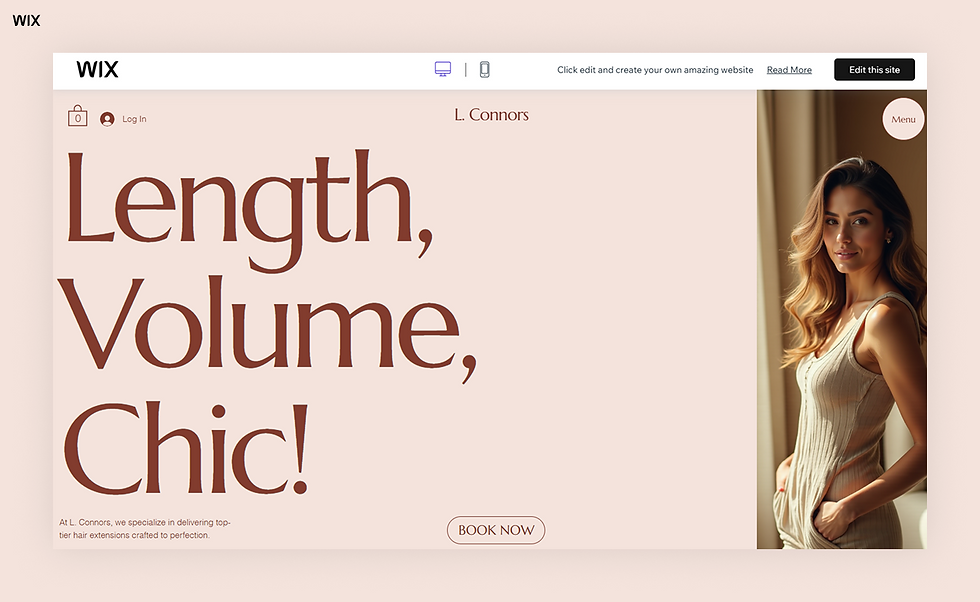
Template name: Hair extensions salon (Chic) website template
How to make a hair salon website FAQ
How much does a salon website cost?
Building a site can cost anywhere from a few dollars a month to several thousand dollars. Using a website builder keeps costs low while providing professional results. Hiring a custom designer will naturally increase your initial investment significantly.
Learn more:
What makes a good salon website?
A successful site is visually appealing and easy for visitors to navigate. It must clearly list your services, prices and physical location. Most importantly, it should offer a simple way for people to book an appointment with you.
Check out some popular website templates to get started quickly:
Can I build a salon website myself?
You absolutely can build a beautiful site all on your own. Modern tools are designed specifically for people without any coding background. You just need a few hours and some great photos of your work to get started.
Learn more about how to make a Wix website.


