Updated: 3 days ago
The perfect domain is just a click away: register your domain→

Choosing where to register your domain name can make a big difference in how your site runs, how secure it is and what it costs over time. Pick the wrong place and simple things like updating settings, moving your domain or fixing technical hiccups can turn into a headache.
A good domain registrar makes managing it simple. With clear controls, built-in privacy options and support you can actually rely on, you can spend your energy building your website instead of fighting fires behind the scenes.
Secure your perfect domain in just a few clicks with Wix. Get everything you need in one place: business email, reliable hosting, SSL protection and full privacy. With 24/7 support and no hidden fees, getting your site live is simple and worry-free.
TL;DR: where to register a domain
Almost any accredited domain registrar can hold the name for you, so judge them on what happens after checkout: whether the renewal figure is shown up front or buried, whether WHOIS masking and transfer locks are bundled or billed as extras, whether you can edit DNS entries yourself without raising a ticket, and whether auto-renew is enabled by default so nothing lapses unnoticed.
You’ll learn:
How domain registration works and the types of domains available
Important features to look for in a registrar and dashboard
Tips for pricing, domain privacy, security and support
Steps to register a domain and connect it to your website
Common mistakes to avoid when managing your domain

Understanding domain registration
You don't own your domain forever; you lease it for a set period. It's usually for one year, but you can register for multiple years at once.
When you register a domain, the registrar records your ownership and connects the domain to your site through DNS settings. This tells the internet where to find your website, email and other services.
Learn more:
Found the perfect name for your business? Lock in your domain before someone else does.
Choosing the right registrar
Picking the right registrar can save you a lot of headaches later. Start by thinking about how easy it is to use. A clean, simple dashboard makes managing your domain faster, especially if you plan to have more than one.
You want to be able to change settings, update DNS records or enable privacy protection without digging through confusing menus. Here’s what to look for:
Easy-to-use domain dashboard
You’ll be spending a lot of time in your registrar's dashboard so it’s good to pick one you like. Look for a clean and intuitive interface with clearly labeled sections for DNS settings renewals and privacy options. If you plan to manage multiple domains, check for features like bulk edits or a clear overview of all your domains.
Practical tip: Check for a demo walkthrough or tutorial to see how simple it is to make basic changes like connecting your domain to a website. If it feels confusing at first, managing your domain will only get harder as your site grows.
When you upgrade to a premium plan, you’ll even get a voucher for a free domain name for your first year.
Transparent domain pricing and renewal costs
The first-year offer isn't the only price tag. Renewals and extra features can add up, so get clear on the full picture. Here's what to look for:
Renewal fees and how often they go up
Costs for privacy protection or email forwarding
Any transfer fees if you decide to move your domain later
A good rule of thumb is to calculate the total cost for at least three years. This way you'll avoid surprises and can compare registrars fairly.
Discover more:

Essential domain security features
Domain security should be top of mind when you choose a domain registrar. Look for domain locking, which stops anyone from transferring your domain without your permission. This feature adds an extra layer of protection against unauthorized changes or hijacking.
Two-factor authentication is a great safeguard. Even if you have a strong password, adding a second verification step helps keep your account secure from hackers. It’s a simple move that makes it much harder for someone to get into your account.
Privacy protection is another feature you’ll want to enable. If you don’t your personal info can be listed publicly in WHOIS databases. That means you could get spam unwanted calls or other kinds of attention you didn’t ask for.
Find out more:

Reliable registrar support and help
Good support can make or break your experience. DNS errors email issues or domain transfers can be tricky to figure out on your own. You'll want to pick a registrar that has:
Multiple support channels (chat email phone)
Quick response times
Clear and actionable instructions
Domain registration options to consider
Some registrars have features that make running and managing your website easier. Picking the right one can save you time and help you skip extra services later.
Email setup and email forwarding
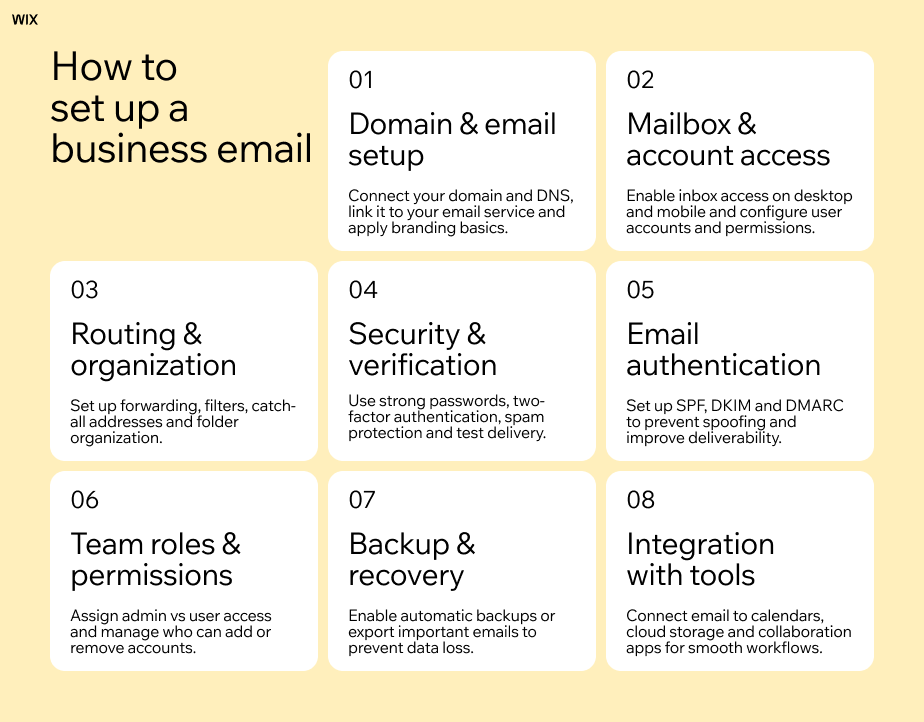
Many registrars offer email features connected to your domain. This lets you use it as a business email domain, with custom addresses like info@yourdomain.com or hello@yourdomain.com, making your communication look more professional.
Some providers also offer email forwarding which sends messages from your domain email to another inbox. For example, emails sent to contact@yourdomain.com could automatically land in your Gmail or Outlook. This gives you a branded email address without having to manage a separate email service.
Domain forwarding and redirects
Domain forwarding lets you redirect one domain to another. This is useful if you own multiple versions of your domain name or common misspellings. For example you might forward yourbrand.net or yourbrand.co to your main website so visitors always end up in the right place.
Forwarding can also help during a rebrand. If you change your business name and register a new domain you can redirect the old domain to the new one so existing visitors and customers still find your website.
DNS management
DNS management controls how your domain connects to services like your website email platforms or third-party tools. A good registrar should make it easy to update DNS records like A records CNAME records and MX records without complicated steps.
Clear DNS controls are especially helpful if you plan to connect your domain to a website builder set up email or integrate tools like analytics or marketing platforms. Even if you don’t need advanced settings right away having simple DNS management makes future changes much easier.
Tools for managing multiple domains
If you’re thinking about growing your website or running multiple projects managing several domains can get complicated fast. Some registrars offer bulk management tools that let you update settings renew domains or enable security features across multiple domains at once.
Easy domain transfers are also something to think about. As your needs change you might move your domain to another platform or service. Domain registrars that support simple transfers with clear instructions will make this process a lot smoother for you.
Learn more:

Tips for selecting a domain registrar
Check their reputation: Read user reviews and feedback to gauge how reliable a registrar is. Look for comments about billing transparency, domain renewals and support quality. Frequent complaints about transfers, hidden fees or slow support can be a red flag.
Compare included features: Some registrars include DNS management, email forwarding or subdomains at no extra cost. Others charge for each feature separately. See what’s included so you understand the real value of the service.
Review renewal pricing: A low first-year price can be misleading. Renewal fees are often higher and apply every year you keep the domain. Check the standard renewal cost so you know what you’ll actually pay long term.
Check transfer policies: You might want to move your domain later. Look for registrars that allow straightforward transfers and provide clear instructions. Complicated transfer rules or extra fees can make switching services frustrating.
Look for strong security options: Features like domain locking, two-factor authentication and privacy protection help protect your domain from unauthorized access or transfers. A registrar should make these settings easy to enable.
Check DNS management tools: Good DNS controls make it easier to connect your domain to websites, email services and other tools. Look for simple editing, clear record types and quick updates.
Think about your domain management needs: If you plan on having multiple domains, tools like bulk editing, domain grouping and simple renewals can save you time. These features help keep everything organized in one place.
See what support they offer: When you’re dealing with DNS issues or domain transfers you might need some help. A registrar with quick support via chat, email or phone can get you back on track in no time.
Try out the dashboard: The registrar's dashboard is your command center for all your domain settings. Find a layout that makes it easy to do things like update DNS, turn on privacy protection or renew domains.
Look for automation tools: Features like automatic renewals, renewal reminders and security alerts can help you avoid common issues like expired domains or unwanted changes. These handy tools can save you from accidentally losing your domain.
Find out more:

Steps to register your domain with Wix
Use a domain name generator to come up with some creative ideas or find other options if your first choice is already taken. Follow these simple steps to register your domain:
Search for your domain: Use a domain search to see what’s available.
Compare your options: Check out domain pricing renewal fees and included perks like privacy before you decide.
Register your domain: Fill in your contact info, pick a registration period, choose your privacy settings and finish your purchase.
Turn on privacy and security: This keeps your personal info safe and stops any sneaky transfers.
Set up your DNS: Point your domain to your website, email or other services and then do a quick test to make sure it's all working.
Claim a premium domain to boost your brand authority and make marketing easier from day one.

Learn more:
Choosing the right domain type
There are several types of domains to consider, and each serves a different purpose:
Standard domains (.com, .net or .org) – These are the most widely recognized and trusted domain extensions by users worldwide. A .com is often best for businesses, personal sites or blogs that want global appeal. .org is traditionally used for nonprofits or communities while .net is sometimes chosen by tech or service companies.
Country-specific domains (ccTLDs, like .co.uk, .ca and .de) – These domains are tied to a specific country, letting search engines and visitors know your site is geared toward a local audience. They’re a great choice if your business targets customers in a certain country or if you want to rank higher in local search results. Keep in mind some ccTLDs have special rules, like needing a local address, so check the requirements before you commit.
Specialty or niche domains (.shop .blog .design etc.) – These domains tell everyone what you do right from the start. For example, a .design domain is perfect for a designer’s portfolio website and a .shop domain is a great fit for a small online store. These domains are super creative and memorable but they might be less familiar to some people.
Learn more: What is TLD?
Common domain registration mistakes to avoid
Registering a domain is simple but a few common mistakes can create problems later on. For example:
Losing your domain to an accidental expiration
Domains are registered for a set period usually a year. If you forget to renew, your domain could expire and become available for anyone to register. You might be able to get it back but the process can be pricey or even impossible if someone else snags it first.
To avoid a domain disaster turn on automatic renewal and make sure your payment details are up to date. It’s also a good idea to set a calendar reminder a few weeks before the renewal date. This gives you plenty of time to update your billing info or decide if you want to keep the domain.
Forgetting to protect your privacy
When you register a domain your contact information is usually added to the public WHOIS database. Without privacy protection this can include your name email address and phone number. Spammers and marketers often scan these databases which can lead to unwanted emails and calls.
Privacy protection replaces your personal details with proxy information. This simple setting helps reduce spam and keeps your contact info private.
Tip: In order to run a WHOIS search, simply use Wix's free WHOIS lookup tool.

Choosing domain names that are too clever
Domains with hyphens, numbers or complicated spellings are harder for people to remember and type. If your visitors mistype the address or forget it entirely, you could lose out on traffic.
Simple and clear names work best. Short domains that are easy to say and spell make it easier for people to come back to your site or recommend it to others.
Ignoring security features
It’s easy to skip over security settings when you’re registering a domain but they play a big part in protecting it. Without them someone could get into your account or try to transfer your domain without your permission.
You can enable two-factor authentication so your account requires an extra verification step at login. Domain locking is another great tool. It stops unauthorized transfers by requiring you to unlock the domain before it can be moved. These settings only take a few minutes to set up and add a strong layer of protection.
Learn more:

Editor’s note: prices are current as of August 25, 2026 and are subject to change at any time.
Where to register a domain FAQ
What should I look for in a registrar dashboard?
Look for a dashboard that’s intuitive and easy to navigate with clearly labeled sections for DNS settings, renewals and privacy options. If you plan to manage multiple domains, bulk management tools are a huge time saver. Quick access to support and clear status indicators for each domain are also very helpful.
What’s the difference between a domain registrar and a web host?
Think of a domain registrar as the place where you buy and manage your website's address. A web host on the other hand is where you store your website files to make your site live. You can use the same company for both services, but knowing the difference will help you set up your site without any confusion.
Free website builders like Wix offer customizable website templates across niche industries, making it easy to get online fast.
Check out some popular website templates to get started quickly:
How much does a domain cost?
A standard domain costs a modest annual fee, and the renewal rate is commonly higher than the first-year price. It varies by extension and registrar, so check what the renewal will be rather than only the headline rate. Extra features like privacy protection email or DNS management might cost more. Be sure to check renewal fees since they can sometimes be higher than the initial price.
Can I transfer my domain later if I change my mind?
Yes you can. Most registrars let you transfer your domain but there are a few rules to follow. For example you might have to wait 60 days after registering your domain before you can move it. Some registrars also charge a transfer fee so make sure to read their instructions carefully to avoid any downtime for your website. Planning ahead will help you make a smooth move if you decide to switch providers.
How long can I register a domain for?
You can usually register a domain for one year at a time but many registrars let you sign up for multiple years up to 10. Going for a longer registration means you don't risk accidentally losing your domain and can sometimes get you a better price.
What if my dream domain name is taken?
If your first choice isn’t available consider alternative spellings, hyphens or different extensions. You can also use a domain name generator to find creative options. Some registrars offer backordering which lets you claim a domain if it becomes available in the future.
Can I register a domain without a website?
Yes, you can register a domain name now and build your website later. Think of it like reserving your business name. Your domain will be yours as long as you renew it on time. This is a great move if you're still planning your site or want to lock down a brand name before someone else does.
When you're ready to build your site, Wix makes it easier than ever to get online with free website templates.
Explore designer-made website templates:


