Updated: Oct 26

Wix provides a business email account through Google Workspace. You can get a custom address like name@yourdomain.com straight from your Wix account as long as you have a connected domain name.
The email comes with spam and phishing protection, collaboration tools like Calendar and Drive plus the ability to create additional addresses for your team and set up routing rules.
Get your business email up and running fast. Wix provides built-in security, plenty of storage and real-time tools to help you stay on top of your work. Everything’s backed by 24/7 support so you can focus on growing your business.
Already have a business email?
You can head over to the Business Email page in your Wix account to see what you’ve got. Bought your email elsewhere? You can still connect it to your Wix site in just a few steps.
Why an email with Wix is worth it
A business email isn’t just a nice-to-have, it adds serious credibility to your brand. Plus, if you’re using Wix’s built-in marketing tools, your custom email keeps everything consistent and productive.
Learn more: How much does a business email cost
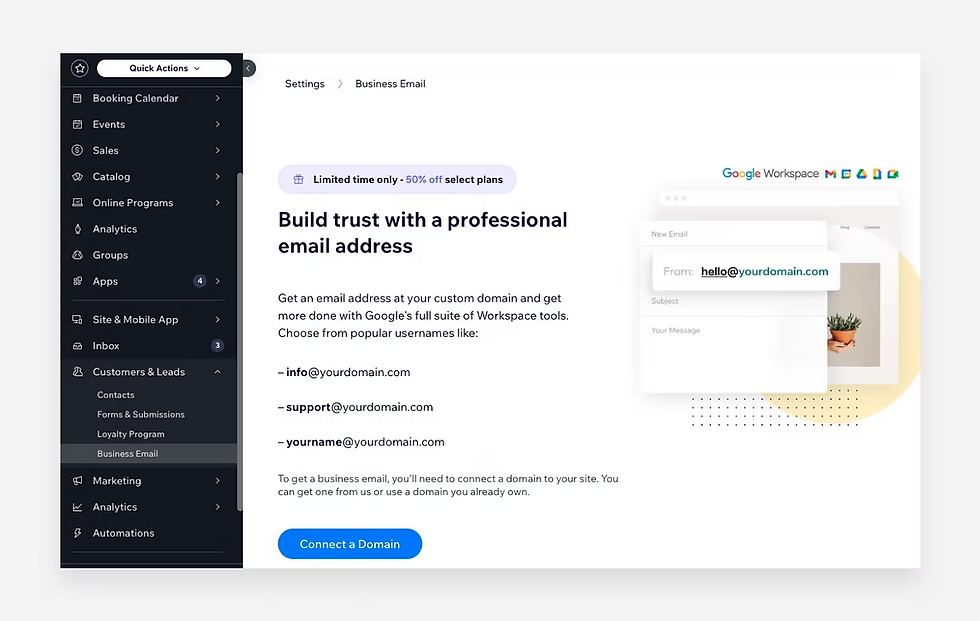
With Wix you can learn how to create business email addresses for every team member. That means:
hello@mywebsite.com for customer service
sales@mywebsite.com for inquiries
name@mywebsite.com for individual team members
It’s a great way to keep things organized and help your customers reach the right people without unnecessary back-and-forth.
Google Workspace also comes with a range of useful productivity features such as:
Smart compose
Email scheduling
Real-time collaboration on docs, slides and sheets
Built-in chat to ping your team when needed
Wix and Google Workspace doesn’t just help your business look good, it also comes with phishing protection, spam filters and 24/7 customer support (chat, email or phone).
There are also advanced delivery options to route emails, set rules for unknown senders, or catch-all addresses if you like to keep tabs on everything.
As noted by Meghan Kennedy, founder of lucid ladybug (sustainable styling and coordinating services), who attended a recent Wix x Google workshop:
"As a sustainable stylist, I work to individualize and customize every client experience and event. I trust Google Workspace to help streamline all communication and utilize email, Google Sheets, Google Docs—and now, Google Gemini and NotebookLM. Having a shared workspace allows me to run notes between clients, eliminating excess back-and-forth and relieving my bandwidth as a solopreneur."
Wix makes things simple by offering Google Workspace plans directly within your Wix account.
You get:
Access to Google Calendar
30GB (or more) of inbox + Drive storage
File sharing and collaboration tools
Access to the Google Gemini AI assistant and NotebookLM
Everything you need to run your business from one place.
Pro tip: If you're serious about your business, having a custom email is one of the easiest upgrades you can make. And with Wix, it takes just a few clicks to set it up.
Learn more:
How much does email with Wix cost?
The cost of a business email depends on the Google Workspace plan you choose. You don't need a paid Wix plan to buy a business email. But you must own a Wix domain.
*Some Workspace business email plans are not yet available in all regions.
Each plan offers different services and has different amounts of cloud storage per user. Plans can be upgraded at any point.

Business Starter
Business email
Gemini AI for Gmail
Phishing and spam protection
Ad-free email experience
2-step verification
Enforced ssl connections
Alert Center: notifications of potential security issues
Basic endpoint management ( secure connection on different devices)
30 gb cloud storage per user
Up to 100 participants in Chat and Google Meet video calls
Business Standard
All the features of Business Starter with the following extras:
Gemini AI for Gmail, Docs, Meet and more
2 TB cloud storage per user
Up to 150 participants in Chat and Google Meet video calls
Record Google Meet meetings
Shared Drives for teams
Learn more: How to start a business

Business Plus
All the features of Business Starter with the following included:
Gemini AI for Gmail, Docs, Meet and more
5 TB cloud storage per user
Up to 250 participants in Chat and Google Meet video calls
Advanced endpoint management (ensuring secure connection on different devices)
Google Vault for eDiscovery and information governance
You can also learn more information on plans from Google.
Learn more about how to use Wix as a website builder and to manage your business.
Wix business email FAQ
Do I need to buy a domain before I can set up a business email with Wix?
Yes, a business email uses your own domain, such as you@yourcompany.com, so you'll need a registered domain first. If you already have one you can connect it, and if not, Wix can register it for you, with a free domain included for the first year on eligible annual plans. Once the domain is in place, creating mailboxes on it takes just a few steps.
Can I access my Wix business email through Gmail or Outlook?
Yes, Wix business email is powered by Google Workspace, so you can use the familiar Gmail web interface and the Gmail mobile app. You can also connect it to Outlook or other mail clients using standard IMAP settings. Your team gets to work in tools they already know while sending from your branded address.
How many mailboxes can I create for my business?
You can create a separate mailbox for each team member or role, such as sales@ or support@, and add more as your business grows. Each mailbox is billed individually, so you only pay for the accounts you actually need. This makes it easy to start small and scale up over time.
Is there a free business email option with Wix?
Wix business email is a paid service, so there isn't a permanently free plan, but the cost per mailbox is modest and billed monthly or yearly. Eligible annual Premium plans do include a free domain for the first year, which lowers your overall setup cost. A branded inbox is a small investment that adds real credibility with customers.
What happens to my business email if I cancel my Wix plan?
Your mailbox sits on its own email subscription, so it can stay active even if you change your site plan, as long as that email subscription remains paid. If you let it lapse, you risk losing access to your messages, so export or migrate your data first. Keeping your domain registered also ensures you can move the email to another provider if needed.


