Updated: 2 days ago
Build your website, your way with Wix Harmony →

Making a website in GPT is easier than most people realize and the fastest way to do it doesn't require any technical setup at all.
You open ChatGPT, write a prompt describing the site you want, tag @Wix and a complete Wix Harmony site is generated in your account. That's the whole process. No integrations to configure, no code to write, no separate platform to open.
The Wix plugin for ChatGPT connects directly to your account. It works with any AI website builder conversation: you describe your idea, refine it through chat and when you're ready, tag @Wix to trigger the build.
The result is a full Wix Harmony site, with free website hosting, mobile-optimized, SEO-ready and open in the editor with Aria standing by to keep refining. Whether you already know exactly what you want or you're still figuring it out, this guide covers how to make a website in GPT from first prompt to live site.
This guide covers both paths: the @Wix tag method for instant site creation inside ChatGPT, and the deeper MCP integration for users who want to manage their site on an ongoing basis through AI.
It also covers how to write prompts that produce results worth keeping, what happens in the Wix Harmony Editor after the site is generated and how to get the most out of Aria once you're inside.
With Wix, ChatGPT becomes more than a content generator, it becomes a full website builder you can operate entirely through conversation.
TL;DR: how to make a website in GPT
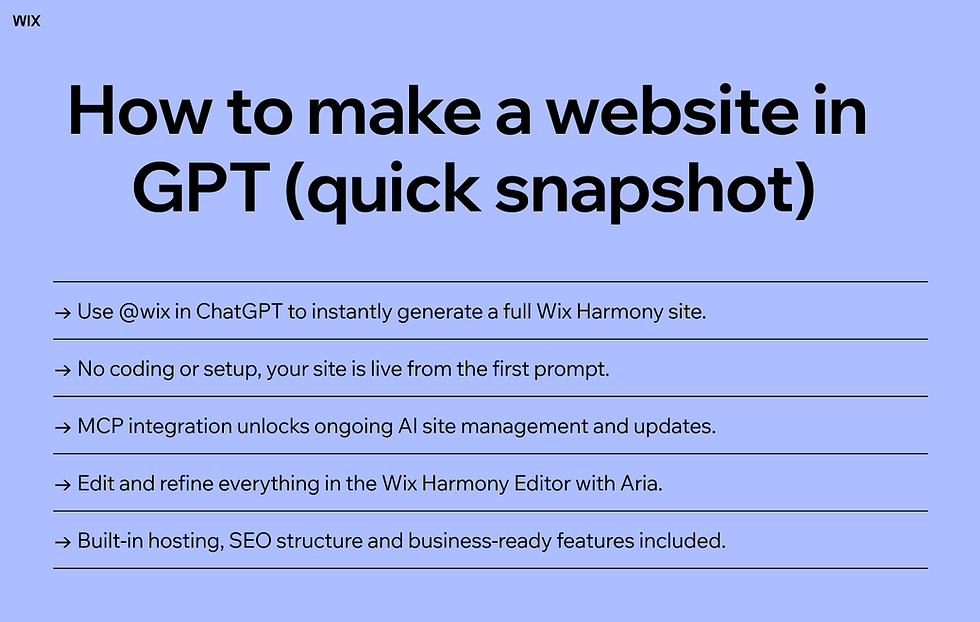
Wix has a native plugin inside ChatGPT. You connect it once, then tag @Wix in any prompt to generate a complete Wix Harmony site from your description. The site appears in your Wix account, ready to edit in the Wix Harmony Editor with Aria.
For users who want to go further, the Wix MCP integration gives ChatGPT ongoing, live access to manage and update any Wix site through conversation. This is especially useful if you're exploring how to make a website with a custom GPT, where the AI can continuously refine and operate your site beyond the initial build. Here’s the short version:
Here's the short version:
The @Wix tag method: connect the Wix plugin for ChatGPT once, then tag @Wix in any prompt to generate a full site, no MCP setup needed.
The MCP method: a deeper integration that gives ChatGPT live, ongoing access to build and manage your Wix site through conversation.
Both methods produce a real Wix Harmony site: hosted, SEO-structured and editable in the Harmony Editor.
Wix's AI agent Aria continues the refinement process inside the editor after ChatGPT creates the site.
No coding, no separate build step, no hosting configuration, the site is live and in your account from the first prompt.
Method | Best for | Setup required | What you get |
@Wix tag in ChatGPT | Fast site creation from a conversation | Connect the Wix plugin once | Full Wix Harmony site in your account |
Wix MCP integration | Ongoings site management thorough AI | One-time MCP connection | Live, real-time site access from ChatGPT |
Aria in the Wix Harmony Editor | Refining and managing after creation | None: included with ever Wix site | Full AI editing, updates and business management |

Wix Harmony brings AI and manual creation together in a single, smart platform. You can generate full pages, layouts and content with natural language, then fine-tune every detail with precise drag-and-drop control. It’s faster, more flexible website creation, without sacrificing quality or creative freedom.
How to make a website in GPT: step-by-step
There are two distinct ways to make a website in ChatGPT, and they serve different purposes. The @Wix tag method is built for site creation, it's the fastest path from idea to a live Wix Harmony site and it requires no technical knowledge beyond knowing how to type a prompt.
If you're specifically looking for Wix Harmony creating a site from ChatGPT, this method is exactly where to start, taking you from a simple prompt to a fully generated site you can immediately edit.
The MCP integration is built for ongoing management, it gives ChatGPT direct, live access to your site so you can update, expand and operate it through conversation over time.
Most people will start with the @Wix method and add the MCP integration later when they want deeper control. Both are covered here in full. Jump to the section that matches where you are:
01. Connect the Wix plugin for ChatGPT

The Wix plugin for ChatGPT connects to ChatGPT through a one-time setup. Once connected, it stays connected, you never have to do this step again. The connection lets ChatGPT access your Wix account safely and generate sites on your behalf directly from a conversation.
Here's how to connect it:
Go to ChatGPT and log in to your account
Click Plugins on the left sidebar
Search for Wix plugin and click "Install plugin"
That's the complete setup. The Wix plugin is now connected to your ChatGPT account, and @Wix is active in any conversation. The permissions you grant let ChatGPT create sites in your Wix account, nothing else. You can review and revoke access at any time through your Wix account settings.
One important note: make sure you're logged into your Wix account before starting a site-creation conversation. ChatGPT needs that active session to place the generated site in your account. If you're not logged in, the site generation step will prompt you to do so before proceeding.
02. Describe your site and tag @Wix

Once the Wix plugin for ChatGPT is connected, making a website in ChatGPT is a single prompt. You describe the site you want, include @Wix in the message, and the AI generates a complete Wix site based on your description. The @Wix tag is what activates the plugin, without it, ChatGPT will respond conversationally but won't trigger the site build.
A prompt like "@Wix create a modern portfolio site with a home page, projects gallery and contact page" gives the AI clear direction and enough structure to produce a useful starting point.
You can be as detailed or as loose as you want, the AI interprets intent, not just instructions. "@Wix build a warm, minimal site for a small bakery in Portland that does custom cakes and catering" is just as valid a prompt as a highly structured brief.
What you don't have to do is figure it all out before you tag @Wix. ChatGPT is a conversation. You can brainstorm your idea first: talk through what the site needs, what the business does, who it's for, what tone you want then tag @Wix only when you feel ready.
The conversation history becomes context for the build. That means the AI that generates the site already understands everything you've discussed, not just the final prompt.
@Wix must appear in the prompt to activate the Wix plugin and trigger site generation.
Describe your business type, site purpose, key pages and desired tone for best results.
Brainstorm freely first: tag @Wix only when you're ready to build.
The full conversation is context for the build, not just the final prompt.
Expert tip: Not sure what to include in your prompt? Our guide on AI prompts for website building covers the prompt structures that consistently produce more specific, on-brand results.
03. Review, refine and create

After you tag @Wix, ChatGPT responds with a summary of the planned site, including what pages it will include, how they'll be structured and what content it intends to generate.
This is a checkpoint, not an automatic build. You have two options: click Create Site to proceed or write another message to adjust the plan before anything is built.
The review step is worth taking seriously. It costs nothing to refine the description at this stage, and it's significantly faster than editing a built site that went in a wrong direction.
If the planned structure doesn't match your mental model, too many pages, missing a key section, wrong tone, adjust it here. Add a message like "make it more minimal, no blog section, and add a testimonials section to the home page" and the AI updates the plan before creating.
Once you click Create Site, the build happens. When it's complete, the chat shows a preview of the site, you can scroll through it directly in the conversation window or click the fullscreen icon to see a full-page version. From there, three options appear: Edit Site (opens the Wix Harmony Editor), Open in New Tab (shows your live site in the browser) or continue refining in the chat. The site is already live in your Wix account, it appears in your sites dashboard the same way any other Wix site would.
ChatGPT presents a site plan after @Wix is tagged: review it before clicking Create Site.
Refine the plan through additional chat messages before building, it's faster than fixing a built site.
After creation, preview the site in the chat, open it fullscreen or go directly to the Harmony Editor.
The generated site is live in your Wix account immediately, no separate publishing step.
04. Open in the Wix Harmony Editor and continue with Aria
The Wix Harmony Editor is where the site goes from AI-generated draft to finished, personalized website. It gives you the freedom to choose how you work: edit manually using drag-and-drop website creation, continue through AI conversation with Aria or combine both. Most people use Aria for the bigger changes and manual editing for precise adjustments, the two modes complement each other naturally.
Aria is Wix's AI agent inside the Harmony Editor. She is trained on millions of real Wix websites and business configurations. She can generate new sections, rewrite copy in your brand voice, adjust layout, configure business tools and answer questions about your site, all through conversation.
The experience of working with Aria in the editor is a direct continuation of the ChatGPT workflow: you describe what you want, and it happens. Understanding how to vibe code a website helps here, Aria in the Harmony Editor is vibe coding in its most refined form, trained specifically on Wix's platform rather than on general web patterns.
You can also access any site ChatGPT created from your Wix account's sites dashboard. Go to manage.wix.com, find the site and open it from there. This is useful if you close the ChatGPT tab before clicking Edit Site, the site doesn't disappear with the conversation. It's in your account permanently, like any other site you've created in Wix.
Aria in Wix Harmony continues the AI workflow started in ChatGPT: same conversational model, deeper site access.
Use Aria for structural and content changes, manual editing for precise element control.
ChatGPT-created sites appear in your Wix account dashboard and can be accessed anytime.
The Wix Harmony Editor is a full drag-and-drop editor, no AI required if you prefer manual control.
Learn more about Wix Harmony:
05. Go deeper with the Wix MCP integration
The @Wix tag method is built for site creation. The Wix MCP integration is built for everything after. The Model Context Protocol server gives ChatGPT live, ongoing access to your Wix site, it can read your current site structure, make real-time changes to content and settings, configure business tools, manage your store and bookings and update SEO metadata, all through natural language in a ChatGPT session.
The difference between the two methods matters. The @Wix tag generates a site and places it in your account, ChatGPT's involvement ends when you click Edit Site. The MCP integration keeps ChatGPT connected to your live site, so every conversation is a direct operation on the actual site. This is the deeper sense of what a ChatGPT website builder can mean: not just a tool that generates a starting point, but a persistent interface for building and running your entire web presence through AI conversation.
The MCP integration also enables workflows that go well beyond what the @Wix method supports. Understanding how to make a website with a custom GPT, or with a custom MCP-connected workflow, is relevant for developers and power users who want to build tailored AI experiences on top of Wix's platform: custom agents with specific instructions, integrated pipelines that combine Wix with other tools or automated workflows triggered by Wix events through n8n.
The MCP is the infrastructure layer that makes all of this possible.
@Wix creates, MCP manages. Use both together for the complete workflow.
The MCP gives ChatGPT live access to your site for real-time changes and business operations.
MCP supports: content updates, website management, SEO, online scheduling, CRM and developer workflows.
Compatible with any MCP client: Claude, Cursor and ChatGPT all connect to the same Wix infrastructure.
Expert tip: For a broader look at how AI website builders work at the platform level: what separates an agent-native builder from one that's bolted on AI features. Our guide on how an AI website builder works gives useful context before you decide how much of your workflow to run through ChatGPT versus the Wix Harmony Editor.
Explore the best custom GPTs.
06. Write prompts that get results worth keeping
The quality of the site ChatGPT generates is directly shaped by the quality of the prompt.
A detailed, specific prompt produces a site that needs minimal editing. A vague prompt produces a generic starting point that requires significant work. The gap between the two is usually one paragraph of additional context, worth writing before you tag @Wix.
Knowing which prompts to use with an AI website builder gives you a repeatable framework for getting useful outputs from the first generation rather than having to rebuild from a generic draft.
A strong site-creation prompt includes five things: what the business does (specific, not generic), who it serves (describe the customer, not just the industry), the primary action the site needs to drive (book, buy, contact, read), the tone and aesthetic (three adjectives works well) and any must-have pages or sections. That's it. You don't need to specify fonts, layout structures or technical configurations, those are Wix's domain. Your job is to give the AI enough business context to make good decisions.
For ongoing management through the MCP, the same principle applies at the prompt level: be specific about what to change, where and why. "Update the homepage" is ambiguous. "Rewrite the hero headline on the homepage to emphasize our 24-hour turnaround, keeping the tone conversational" is actionable. The more precisely you frame the instruction, the more accurately ChatGPT executes it, and in a live site context, precision matters because the change happens immediately.
Include: business description, target customer, primary CTA, tone (3 adjectives), must-have pages.
Don't specify design details, give business context and let Wix handle the design decisions.
For MCP updates: Action + Target + Context + Constraint = accurate, immediate execution.
Refine the plan in chat before clicking Create Site, it's faster than editing a built page.
Learn more: How to create a website with an LLM
Why the ChatGPT + Wix workflow is vibe coding in practice
The @Wix method is vibe coding in its most accessible form. Vibe coding is the practice of creating and editing digital products through natural language prompts. The output is a finished artifact, not a draft, not a wireframe, not a code file. The prompt and the product are connected in one continuous workflow.
Understanding what vibe coding is explains why the ChatGPT + Wix experience feels so different from previous web-building approaches. You're not specifying technical instructions. You're communicating intent, tone and goals, and the AI translates that into a real, functional website.
When you tell ChatGPT "@Wix build a calm, editorial site for a meditation teacher who works with corporate clients," you're vibe coding. You're describing a feeling and a purpose, and the platform has enough intelligence to turn that into a site worth launching.
Using a vibe coding website builder through ChatGPT means the way you build and the way you manage are consistent. You tag @Wix in ChatGPT to create. You talk to Aria in the Harmony Editor to refine. You use the MCP to manage over time. All three interfaces share the same model: describe what you want and it happens. There is no mode-switching between creation and editing, no context-switching between tools, no separate publishing step. The site is always current, always live and always one conversation away from the next change.
This is also why vibe coding a website has become the natural default for non-developers who want a professional result fast. The traditional model required a designer, a developer, a CMS, hosting and weeks of back-and-forth. The vibe coding model requires a prompt, an account and a few minutes. The result is the same category of output, a real, hosted, professionally structured website at a fraction of the time and cost.
The same model now extends beyond websites, too. With Base44, Wix’s vibe coding platform for apps, you can build an app with AI from a single prompt, backend and database included.
Built a site in GPT and want it hosted? Learn more
Wix Harmony, Aria and the platform behind every ChatGPT site
When you tag @Wix and a site appears in your account, the technology doing the actual work is Wix Harmony, Wix's AI-native creation and management platform.
Wix Harmony is not a template library with AI copy. It is a platform built from the ground up for prompt-driven creation and operation. The site ChatGPT generates through @Wix is a Wix Harmony site, which means it's built on enterprise-grade site infrastructure, optimized for mobile and SEO from the first render and connected to Wix's full suite of business solutions.
At the center of Wix Harmony is Aria. Aria is the AI layer that interprets your prompts, whether they come through ChatGPT or directly in the Wix Harmony Editor, and translates them into real site changes.
Aria is not a general-purpose language model. She is a purpose-built agent with specialized knowledge of web design, conversion optimization, SEO structure and Wix's business tools. When you tag @Wix, Aria is what generates the site. When you open the Harmony Editor, Aria is available to continue from where ChatGPT left off.
What you can do with Aria after ChatGPT builds the site
Knowing how to make a website with an AI agent doesn't end at generation. Aria in the Harmony Editor gives you a full AI design and management partner who works on your specific site, with full context of what's already there. She can restructure a page, generate a new section from a description, rewrite copy in your tone, adjust typography and spacing, configure your booking calendar, set up a product catalog and answer questions about any element on the site. Every capability of the Wix platform is accessible through Aria's conversational interface.
The Wix Harmony Editor also gives you full manual control at any point. You are never locked into the AI workflow. If you want to drag an element, resize an image, change a color or edit a line of text directly, you do that. Aria is available when you want her and invisible when you don't. The site is yours to work on however you prefer, and the AI is there to accelerate the parts that would otherwise slow you down.
For business owners, Aria extends to operations, not just design. She manages your Wix Inbox, helps configure your booking availability, updates product descriptions, drafts marketing content and surfaces site performance data all through conversation in the Business Manager. The site ChatGPT creates in thirty seconds becomes the foundation for a full AI-managed business presence, with Aria handling the operational layer.
Aria works on your specific site with full context, not a generic AI without site knowledge.
Every Wix platform capability is accessible through Aria's conversational interface.
Manual editing is always available, AI assistance and drag-and-drop work side by side.
Aria extends to business operations: inbox, bookings, products, marketing strategies and website analytics.
Beyond the website: running your business through AI
The ChatGPT + Wix workflow isn't limited to building a site. The first step is learning what is an AI agent? Managing your online business with an AI agent means the same tools that generated your site can run your store, manage your bookings, respond to customers and keep your content current, all through the same conversational model.
This is what sets Wix apart from platforms that offer AI for initial creation and then hand everything back to a manual dashboard.
For businesses that sell products, Wix functions as a fully capable AI eCommerce builder, not just a store you set up once, but an agentic commerce infrastructure that can be managed, updated and optimized through AI conversation.
Product pages, inventory, pricing, collections and post-purchase flows are all accessible through Aria and the Wix MCP. And every Wix store has a built-in Site MCP endpoint, meaning your store is automatically accessible to AI agents acting on behalf of your customers, browsing, comparing and completing purchases through conversation rather than manual navigation.
This is the broader shift the ChatGPT + Wix integration represents. It's not a website creation tool. It's the entry point to an AI-operated business platform, one where the line between building, managing, and running a business online is a single conversational interface.
The conversation still waits for you to start it. Symphony by Wix is always running in the background so your business keeps moving even when you're not actively managing it, which is what separates a platform you operate from one that operates.
Learn more about running your business through AI:
How the ChatGPT + Wix combination compares to other AI builders
The ChatGPT + Wix workflow is one approach to AI-powered site creation, and it's worth understanding what it does differently from the alternatives.
Even the best AI website builders exist on one end of a spectrum: tools that generate content for you to implement manually on one side and tools that automate the full creation and deployment workflow on the other. The @Wix method sits firmly at the latter end, with the MCP integration extending even further into ongoing management.
What distinguishes the ChatGPT + Wix approach is the combination of three things that most alternatives can't offer together: a live ChatGPT integration that works without technical setup, a purpose-built AI agent (Aria) that continues the workflow inside the editor and enterprise-grade hosting and business infrastructure that's included from the first prompt. You're not generating a draft in ChatGPT and then building separately, the ChatGPT conversation and the live Wix site are the same continuous workflow.
The MCP layer adds a dimension that very few platforms have matched. The Wix MCP is designed for any MCP-compatible client, which means developers and power users can connect Wix to Claude, Cursor or custom AI workflows using the same infrastructure that powers the ChatGPT integration. The same business tools, the same site management capabilities and the same agent access are available regardless of which AI tool you're working in.
Your website is one @Wix prompt away
Making a website in ChatGPT is now as simple as describing what you want and tagging @Wix.
The Wix plugin for ChatGPT connects to your account in minutes, the build happens in the conversation and the result is a complete Wix Harmony site: live, hosted and open in the editor with Aria ready to keep refining. No technical knowledge required. No separate platform to open. No steps between the prompt and the published site.
Whether you're starting from scratch, rebuilding something outdated or looking for a faster way to manage a site you already have, the ChatGPT + Wix workflow is the most direct path from idea to live web presence available right now. And once the site is live, Aria and the Wix MCP mean the work of running it can be just as conversational as the work of building it.
When developers need more than the @Wix flow
The @Wix integration generates a complete, Wix-hosted site through Wix Harmony. For development teams that need full frontend control, building on React, Next.js or a custom stack, Wix Headless is the headless solution that exposes the same backend powering every Wix Harmony site: CMS, APIs, eCommerce, bookings and business tools, all callable from any frontend you build.
The connection to the Wix MCP matters here too. A developer can use the MCP to manage content and operations programmatically, while the presentation layer is entirely their own. Same enterprise-grade infrastructure as the @Wix ChatGPT flow, with no frontend constraints.
Learn more:
Open ChatGPT, connect the Wix plugin and type your first @Wix prompt. Get started with Wix Harmony today.
How to make a website in GPT FAQ
How do I make a website in ChatGPT using Wix?
Connect ChatGPT's Wix plugin through the plugin section on the left sidebar, this is a one-time setup that takes about five minutes. Once connected, write a prompt describing the site you want and ChatGPT will generate a complete Wix Harmony site in your account. You can review the plan before the build, preview the result in the chat and then open it directly in the Wix Harmony Editor to continue refining with Aria.
What is the @Wix tag and how does it work?
The @Wix tag activates the Wix website builder inside a ChatGPT conversation. When you include @Wix in a prompt, ChatGPT connects to your Wix account and uses your description to generate a complete Wix Harmony site. Without the tag, ChatGPT will respond conversationally but won't trigger the site build. You only need to include it once in the prompt where you're ready to create, you can brainstorm and refine your idea through conversation first, then tag @Wix when you're ready for the build.
Where does my Wix site go after ChatGPT creates it?
After ChatGPT generates your site through @Wix, it appears in your Wix account exactly like any other site you've created. You can access it from manage.wix.com under Sites, open the Wix Harmony Editor from there or click Edit Site directly in the ChatGPT conversation. The site is live in your account permanently, it doesn't disappear when you close the chat. From the Wix Harmony Editor, Aria is available to continue making changes and you can also edit manually using drag-and-drop at any point.


