Updated: 2 days ago
Turn your ideas into a live website in minutes with Wix’s AI Website Builder →

Learning how to create a website with an LLM means describing the site you want in plain language and letting a large language model turn that description into a real, working site. There are two main ways to do it. You can prompt a general-purpose LLM like ChatGPT or you can use an AI website builder that runs on an LLM and adds design, hosting and editing on top. Either way, you start with words instead of code.
The appeal is that you skip the code, the designer and the weeks of setup and still get a site that's fully yours. Wix offers an AI website builder that generates beautiful, fully customizable sites. From there, knowing how to design a website with AI is what turns a generic draft into something that looks like you. In this guide, you'll learn how to plan your site, choose the right tool, write a strong prompt and publish a finished site.
TL;DR: how to create a website with an LLM
Creating a website with an LLM comes down to a simple loop. You describe what you want, the model generates a draft and you refine it until it feels like yours. That describing step can happen inside a chat tool like ChatGPT or inside an AI website builder such as Wix Harmony. You can even build straight from ChatGPT itself, which connects to Wix to generate a full site. Wix Harmony takes you from a single prompt to a business-ready site for any industry or creative vision.
The six steps below take you from a blank prompt to a published site with no design experience or coding required. Read more about how AI is changing website creation and why websites are still relevant.
Step | What to do |
1. Plan | Decide your site's purpose, audience and key pages before you prompt. |
2. Choose a tool | Pick an LLM chat or an AI website builder you can edit freely afterward. |
3. Write a prompt | Describe your business, style and pages in specific detail. |
4. Generate | Let the LLM produce a first draft, then review it against your goal. |
5. Customize | Refine the design, swap images and rewrite copy in your own voice. |
6. Publish | Connect a domain, check mobile and turn on SEO before you go live. |
Learn more: How to make a website with Wix in ChatGPT

With Wix's AI website builder, you can generate a complete website with an AI agent, design direction and professional copy, then customize every detail to make it your own. Go from idea to a polished, business-ready website in minutes.
How to create a website with an LLM in 6 steps
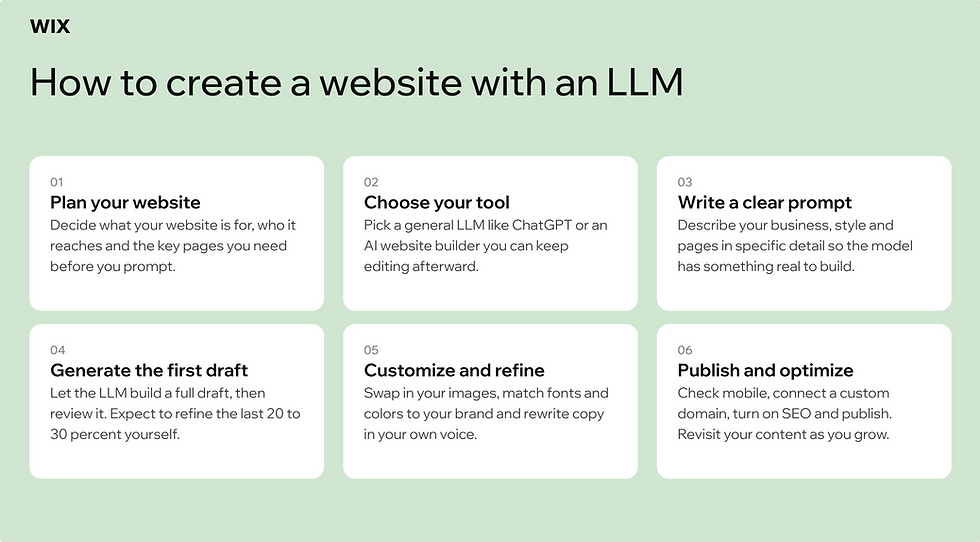
Building with an LLM is now a mainstream way to get online, not an experiment. The AI website builder market is on track to grow more than sixfold over the coming decade, according to Custom Market Insights, a sign of how fast this approach is becoming the default. The workflow below works whether you prompt a general LLM directly or use an AI website builder and it breaks down into six clear steps.
01. Plan your site and define the goal
An LLM is only as good as the instructions you give it, so start before you open any tool. Write down what the site is for, who it's meant to reach and the handful of pages you actually need, such as a home page, an about page and a contact or booking page. A clear brief is the single biggest factor in how usable your first draft turns out to be and it's a big part of the answer to how people make websites so quickly.
Learn more about how to make your own website from scratch.
02. Choose your LLM or AI website builder
You have two broad options. A general-purpose LLM like ChatGPT can draft copy, suggest structure and even write code, but you then have to assemble and host the result yourself. An AI website builder uses an LLM to generate a complete site, with hosting and built-in SEO, then lets you edit visually afterward. Many builders also pair the model with an AI agent that works alongside you, so it helps to get familiar with what is an ai agent before you choose.
For most people the builder route is faster and less technical, especially if you want a site you can keep editing without touching code. Wix is one option worth weighing here, and our guide on is wix good for website building lays out the case. With Wix Harmony, for example, you prompt for a full site and then refine it by hand.
One more distinction is worth making. If your project is closer to an app than a website, say a dashboard, portal or tool with logins and a database, an AI-powered web app builder like Base44 is purpose-built for that, generating the full app from the same kind of plain-language prompt.
"We faced the challenge of showcasing our passion for creativity while managing ticket sales and advertising for our events. Then we discovered the AI website builder from Wix, which made the entry process incredibly easy for us. After the basic structure of our website was set up, we established ticket sales and email marketing." - Charlotte & Clara Jeroma, Founders of Calla Concept and Wix users
Learn more: How to make a website in GPT
03. Write a strong prompt describing your site
Your prompt is the brief you hand the model. Include your business type, your audience, the style or mood you want, the pages you need and any specific features like a booking form or product gallery. A vague prompt like "make me a website" gives you a generic result. A specific prompt like "a warm, minimal site for a freelance wedding photographer in Austin, with a portfolio, an about page and an inquiry form" gives the LLM something real to work with.
If you want a head start, our roundup of AI prompts for website building has examples you can adapt and we go deeper into the format in prompts to use with AI website builder.
04. Generate and review the first draft
Now let the LLM build. In a few moments you'll get a full layout with sample copy and images already in place. Treat this as a first draft, not a finished product. Most AI-generated sites land somewhere around 70 to 80 percent of the way there, which means the structure is set and your job is to refine the rest. Before you start editing, look at a few sites in your industry you'd be happy to match, so you have a clear benchmark for your own.
05. Customize and refine the design, copy and brand
This is where the site goes from generic to yours. Swap in your own images, adjust colors and fonts to match your brand and rewrite any placeholder copy so it sounds like you rather than a template. You can keep working through prompts or take over by hand whenever you want precise control. Learning how to vibe code a website is what makes that hands-on side click.
Worth knowing: an AI-generated site is a starting point rather than a finished design. People who spend time customizing fonts, colors and section layouts to match their brand consistently end up with better-performing sites than those who go live with minimal changes.
Wix's AI agent Aria is a genuine shift in how websites get made. She makes it possible to go from idea to live site faster than ever before, without sacrificing quality or control. The point is that you stay the decision-maker, so the AI handles speed while you bring the judgment.
Learn more about how to make a website with an ai agent.
06. Publish, connect a domain and optimize
Before you go live, run a quick pre-launch check. View every page on your phone, test each link and make sure nothing looks cramped or broken on smaller screens. Then connect a custom domain, turn on your SEO and marketing settings and publish. AI makes this stage quick, which is part of how people learn how to make a website fast. Launching isn't the finish line either, so plan to revisit your content as your site grows.
Learn more about how to build a website in a day.

Is Wix good for building a website with an LLM?
Wix is a strong fit because the LLM and the editing tools live in the same place. You describe what you want, get a complete draft and then refine it by chatting with AI or editing by hand.
Wix Harmony is Wix's AI website builder that lets you go from a single prompt to a fully designed, business-ready website. At the center of the experience is Aria, Wix Harmony's built-in AI agent, who is contextually aware of your canvas and can generate pages, refine copy and offer expert web design and business strategy guidance throughout the build.
From there, full drag-and-drop control lets you shape every detail by hand: pixel-level customization, custom component generation and a brand kit for global site styles give you radical creative control on top of AI generation. Move fluidly between chatting with Aria and editing manually whenever you want. Every site is backed by Wix's enterprise-grade infrastructure, so reliability, security and performance are built in from the start.
Wix frames the platform around durability, not just speed.
"Unlike many AI-first tools built for quick demos, Wix Harmony is designed for real businesses. AI is native to the platform, not layered on top, so changes are applied consistently across the site. Users can move fluidly between prompting and hands-on design, confident they are building something stable, scalable and ready to grow." - Nir Zohar, President of Wix
You're also not limited to building inside Wix itself, which is the part that fits the LLM question most directly. The Wix plugin for ChatGPT allows you to type "@Wix" in a conversation to invoke its Wix Harmony vibe code website builder and generate a full, live Wix website including booking systems and menus. You can create a working site straight from an LLM chat you're already using, as we walk through on how to make a website through a GPT chat.

It's worth being precise about what each tool does. ChatGPT can generate a full Wix site through that integration. Claude connects to Wix too, but its role is narrower, since it handles automated business logic and can generate landing pages rather than building a complete site from one prompt. Knowing the difference helps you pick the right tool for the job.
Describing what you want in plain language isn't limited to the build. Symphony by Wix is an AI agent platform that gives each business owner a team of AI agents built around their goals and business needs, so the conversational pattern you used to generate the site applies to the work of running it.
Explore more:
Common mistakes to avoid when building with AI
An LLM gets you moving quickly, but a few habits separate a site that looks AI-generated from one that looks like yours. Our roundup of mistakes to avoid when using an AI website builder covers the big ones.
Treating the first draft as final: The generated site is a starting point, not the destination. Plan to refine it.
Leaving placeholder copy in place: Generic text reads as generic. Rewrite it in your own voice and details.
Skipping brand customization: If you don't adjust colors, fonts and images, your site can look like anyone's.
Ignoring mobile: Layouts that work on desktop often need tweaks on phones, where most visitors land.
Forgetting SEO basics: Set page titles, descriptions and clean URLs so people can actually find the site.
Writing vague prompts: The less specific your prompt, the more generic the output. Detail pays off.
How to create a website with an LLM FAQ
Can an LLM build a complete website?
Yes, for most standard sites. With an AI website builder or through an integration like ChatGPT's connection to Wix, an LLM can generate a full, live site with pages and built-in features. You still review and refine it, since brand voice and accuracy need a human eye.
Do you need coding skills to create a website with an LLM?
No. AI website builders are designed for non-technical users and handle the code for you. If you use a general-purpose LLM to generate raw code, some technical comfort helps, but it isn't required for a standard site.
Is it free to create a website with AI?
You can usually start for free and explore the builder without paying. Publishing your site and connecting a custom domain typically need a paid plan, though prices vary by platform and features.
How long does it take to build a website with an LLM?
Generating a first draft takes minutes. The time-consuming part is refining the copy, swapping in your own images and getting the design right, which can take anywhere from an afternoon to a few days depending on how polished you want it.
Will an AI-built website rank on Google and in AI search?
It can, as long as the content is clear, useful and well structured. Search engines and AI tools care about the quality and organization of your content, not whether AI helped build the site. Set solid titles, descriptions and headings, then write genuinely helpful pages.


