Updated: Jul 23

Learning how to make a pharmacy website helps you connect with patients and grow your business. You can use a website generator to get started quickly, saving time and allowing you to focus on providing excellent patient care.
In this guide, you'll learn how to make your own website for your pharmacy. This gives you full control over your brand. Patients can easily find your hours and contact information in one place, helping you build trust and making it easier for patients to get the care they need.
Start building with Wix's AI website builder.
TL;DR: how to make a pharmacy website
Pharmacy professionals need a website to connect with patients and provide essential information. The online pharmacy market is projected to reach USD 472.09 billion by 2032, growing at a CAGR of 17.35%. A well-designed pharmacy website builds trust and makes it easier for patients to refill prescriptions, book appointments and explore your services. You can create one by choosing a suitable platform and template.
To create an effective pharmacy website, include your location, opening hours and the services you offer. Adding patient resources and an about page helps establish credibility. Here are the key features that make a pharmacy website successful.
Feature | Why it matters |
Location & hours | Shows your address, opening hours and contact info so patients can easily find you and plan visits |
Online prescription refill | Lets patients refill prescriptions online, saving time and improving convenience |
Appointment booking | Enables scheduling of consultations or vaccinations, making timely care easier |
About page | Shares pharmacy history, team and mission to build trust and credibility |
Patient resources | Provides guides, FAQs and health tips to educate and support patients |
Services offered | Lists all pharmacy services (vaccinations, consultations, delivery, etc.) so patients know what you provide |
Contact form / chat | Offers a quick way to ask questions or request info, enhancing communication and support |
Mobile-friendly design | Ensures the site works well on phones and tablets for accessibility anywhere |
HIPAA compliance | Keeps patient information secure by following HIPAA privacy standards, building trust |
Building a website for your business, passion project or side hustle should feel simple and exciting. Wix generates a personalized starting point with AI. You can customize every detail with intuitive drag-and-drop tools, while Wix handles the tricky parts to make building your site simple. That way, you can focus on what matters most: bringing your ideas to life. Ready to get started? Create your website today.
How to make a pharmacy website in 7 steps
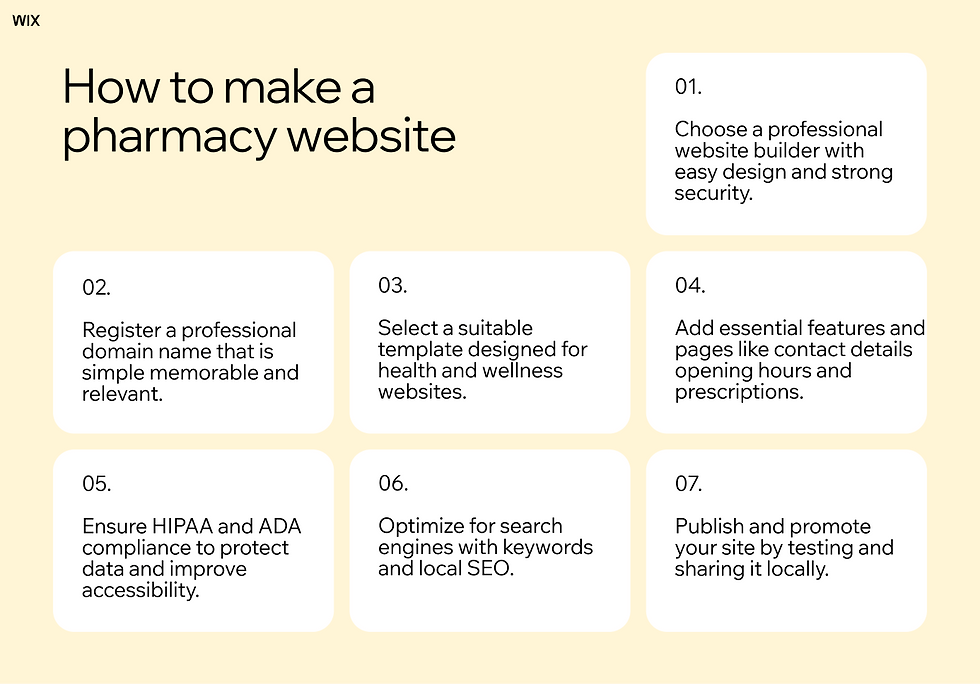
Building your pharmacy website is easier than you might think. Follow these simple steps to get your pharmacy online.
01. Choose a professional website builder
Finding the right website builder is the first step in this process. You want a tool that is easy to use and offers reliable website security. Wix simplifies website creation with designer-made templates and powerful AI, allowing you to focus on your business instead of worrying about design.
Once your platform is set up, you can quickly create and customize your pages to fit your brand. Your patients will appreciate the clean, professional look of your site, making it easier for them to find information and trust your pharmacy.
Expert tip from Nitzan Eiges, tech SEO team lead at Wix:
"When it comes to making a website, it's worth considering building a plan for all your website pages from the start of the process. This means creating a clear website plan that includes your planned and potential future pages. This allows you to build a URL structure for your site that is clean and consistent. In turn, this can also help you avoid making fixes to your URL structure later, such as adding redirects and manually updating or changing your internal linking."
Learn more:
02. Register a professional domain name
Securing a custom domain name gives your pharmacy website credibility and makes it simple for patients to find you online. A professional web address not only builds trust but also helps people remember where to find your services.
Try to choose a name that’s easy to spell and reflects your business, so patients know they’re in the right place from the very first click.
Pro tip: To choose a domain name, try out a domain name generator or domain name search for inspiration.

Learn more:
03. Select a suitable template

Your design sets the tone for your entire business. Wix supports your vision with website templates tailored to your niche. You can find layouts specifically created for health and wellness providers.
A good medical website template makes it easy to organize your information logically. Patients can navigate your pages to find what they need without frustration. Simply update the colors and fonts to match your pharmacy branding.
Explore pharmacy website templates:
04. Add essential features and pages
Patients visit your site looking for specific details. Make sure to include your opening hours and location and contact information. Wix empowers you to build a professional business website for any industry, including pharmacies, so you can focus on serving your patients.
You should also add pages for prescription refills and health services. Clear website menus help visitors move through the site easily. A well-organized website structure keeps patients returning to your site.
Get inspired: Dental website design examples
05. Ensure HIPAA and ADA Compliance
Trust is essential for any healthcare website. Make sure your pharmacy site keeps patient information private by following HIPAA guidelines. This means protecting sensitive data with secure forms and encrypted connections. It’s not just about legal requirements; it also shows your patients that you put their privacy first.
Part of meeting HIPAA standards is ensuring you have HIPAA compliant web hosting. Patient data must be stored on servers that meet HIPAA technical safeguard requirements, not just protected at the form level.
Don’t forget accessibility either. Following ADA compliance helps everyone use your site, including patients with disabilities. Use readable fonts, high-contrast colors and provide alt text for images. Simple changes like these make your site easier to navigate and more welcoming for all visitors.
Did you know? Wix is HIPAA compliant. This makes Wix a secure and reliable option for healthcare professionals who handle patient data, so you can create your site with confidence and maintain high privacy standards.
Learn more about how to make a website HIPAA compliant.
06. Optimize for search engines
Patients need to find your site when searching for local pharmacies. Using the right words on your website and applying basic SEO helps search engines understand what you offer. Wix boosts your online presence with a business website builder designed for visibility, making it easier for patients to discover your pharmacy.
Include location-based terms so local patients can find you quickly. Write clear descriptions of your services and add helpful health resources. You can also learn how to start a health blog to share useful health tips, attract more visitors and strengthen your pharmacy website. A well-optimized site drives more traffic and helps grow your patient base.

07. Publish and promote your site
Review all your pages to ensure the information is correct. Test the buttons and forms to make sure they work properly. Once everything looks good, you are ready to hit publish.
Share your new site with your current patients and the local community. Consider updating your business card design to include your web address and add it to receipts to encourage people to visit your site and use your online services.
Learn more:
Essential features and pages to include
When building your pharmacy website, make sure it has the key pages and website features that patients expect. These help visitors find information quickly and trust your services.
Homepage: Show your branding clearly, display your location and hours and make website navigation simple so patients can access the information they need.
Prescription services: Provide a secure portal for prescription refills and transfers to make managing medications easy for patients.
Product catalog: Include eCommerce website functionality to showcase over-the-counter health products and wellness items.
About us & contact: Introduce your team with photos, provide a phone number and embed an interactive map for easy directions.
Prescription upload: Enable a secure system where patients can upload prescription images or files for verification and home delivery.
Secure payment gateway: Use encrypted systems to handle financial transactions and sensitive healthcare data safely.
Medicine catalog: Offer a searchable database with filters for health conditions and detailed dosage instructions to help patients find what they need.
Security compliance: Make sure your website follows HIPAA standards to protect patient health information.
Local SEO optimization: Keep your name, address and phone number consistent across the site and include a Google Map to help local patients find your pharmacy.
How to make a pharmacy website FAQ
How can I make a pharmacy website for free?
You can create a pharmacy website for free using Wix. Start with a template and add your service information, product catalog and contact details. Even free plans let you set up basic SEO and a mobile-friendly design, so local patients can easily find your pharmacy online.
How can I make a pharmacy website with AI?
AI website builders can help you create a pharmacy website quickly and easily. They can suggest layouts, generate content ideas and optimize your site for search engines, making it simple to build a professional, patient-friendly website without any coding skills.
Discover more about AI website builders:
Is it hard to build a pharmacy website?
It is very easy when you use the right platform. Modern tools guide you through the process step by step. You do not need any special background to create a professional site.
How much does a pharmacy website cost?
The cost depends on the tools and features you choose. Basic plans are very affordable for small businesses. You can always upgrade later as your pharmacy grows and needs more features.
Do pharmacy websites need HIPAA compliance?
Yes. Any US-based pharmacy website that collects, stores or processes patient health information must follow HIPAA guidelines. This ensures patient data is secure and your pharmacy complies with federal law.


