
How to make a website HIPAA compliant starts with securing any patient data your site collects or processes. If your website uses intake forms, appointment scheduling or patient portals, you must protect that information with encryption, access controls and a signed Business Associate Agreement (BAA) with your website provider.
For healthcare professionals, HIPAA compliance isn’t optional. It’s how you protect patient privacy and maintain trust. Whether you’re a therapist, a dentist or run a wellness clinic, this guide shows you how to how to start a website that keeps patient data secure, so you can focus on caring for people.
Get started with Wix's AI website builder.

Building a website for your business, passion project or side hustle should be easy and exciting. With Wix, you can design, customize and launch a professional website in minutes. Everything about Wix is built to simplify the process so you can focus on what really matters: bringing your ideas to life. Ready to make it happen? Start creating the website you’ve always envisioned today.
TL;DR: how to make a website HIPAA compliant
If you’re short on time, here's the gist. HIPAA (Health Insurance Portability and Accountability Act) is a U.S. law designed to protect sensitive patient health information (PHI).
If your website collects, stores or transmits this data (think intake forms, appointment scheduling or patient portals) it needs to meet strict security standards. This proves to your clients that you take their privacy seriously.
To get there, you need HIPAA compliant hosting, encrypted forms and a signed Business Associate Agreement (BAA) with your website provider. It sounds technical, but platforms like Wix have launched native solutions to handle the heavy lifting for you.
Top 5 features of a HIPAA compliant website
Feature | Why you need it |
Data encryption | Scrambles data so it’s unreadable to hackers during transmission and storage. |
Access controls | Ensures only authorized personnel can log in and view sensitive patient information. |
Business Associate Agreement (BAA) | A legal contract where your tech vendors agree to protect PHI. |
Audit trails | Keeps a record of who accessed what data and when, which is crucial for compliance checks. |
Secure backups | Ensures patient data isn't lost during a system crash or cyber incident. |
Learn more:
How to make a website HIPAA compliant in 9 steps
Ready to secure your site? We’ve broken the process down into manageable chunks. You don't need to be a cybersecurity expert to get this right. You just need to follow the right roadmap.
01. Plan your website with security in mind
Before you start building, it's a good idea to map out your website features and structure, keeping HIPAA compliance at the forefront of your decisions. A solid plan will act as your blueprint, making sure that every part of your website is secure from the get-go.
Here's what you should think about when it comes to how to plan a website:
What kind of website do you need? Think about all the different web pages and features you want. Will your site be purely informational or will you need more complex functions like a patient portal, an appointment scheduling system or online intake forms? Each of these will handle different types of data and have its own security needs.
Where will Protected Health Information (PHI) be collected? Pinpoint every place on your site where patients might enter personal information. This could be a contact form, a registration page or a billing section. Identifying these areas early helps you figure out which features need strong encryption and extra security measures.
Create a website launch checklist. Your list should include all the essential security steps you'll take before going live. This includes implementing security measures like learning how to get an SSL certificate, signing a Business Associate Agreement (BAA) with your web host and any third-party service providers, setting up access controls for your team and establishing a regular backup schedule.
02. Choose a HIPAA-compliant website builder
Not all website builders are created equal when it comes to security. You need a provider that understands the healthcare industry's unique needs and offers native compliance features. This saves you from having to patch together third-party plugins which can often be the weak link in your security chain.
Wix offers native HIPAA compliance features directly within the platform. This means you can manage patient data and build client trust without needing complex workarounds. By building on existing security frameworks like SOC 2 and ISO27799, Wix simplifies the technical side of compliance so you can focus on your practice.
Choosing the right platform during website development is especially important in healthcare, since HIPAA compliance depends on secure website infrastructure, not just how your site looks.

03. Select a domain name and web host
A domain name is your site's web address, like www.yourpracticename.com. Having a professional domain name builds credibility and makes it easier for patients to find you. Most website builders including Wix include a custom domain for free with their premium plans.
When choosing a domain name, it's a good idea to:
Use your practice's name. This builds brand recognition.
Keep it short. A shorter name is easier for patients to remember and type.
Pick a relevant extension (TLD). While .com is always a solid choice, you can also consider industry-specific options like .fit, .center or .life. Wix offers quick domain registration.
Pro tip: To choose a domain name, try out a domain name generator or domain name search for inspiration.
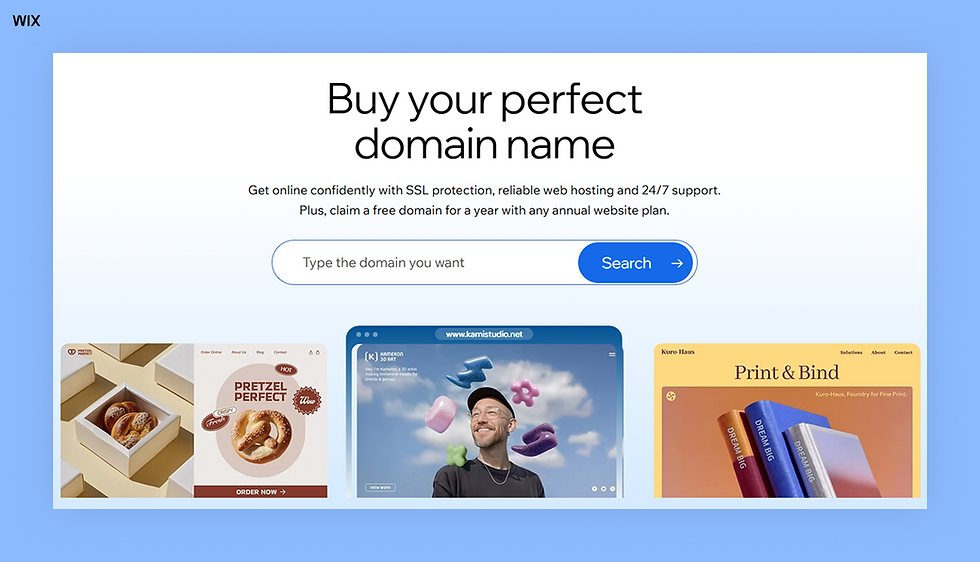
If you've already chosen a HIPAA-compliant website builder like Wix, your web hosting is included. This means you don't need to find a separate hosting provider and all your site's data is managed securely in one place. Wix offers secure, scalable web hosting built in when you create your website.
04. Sign a Business Associate Agreement (BAA)
This is the step many business owners overlook. A BAA is a legal contract between you (the covered entity) and your tech provider (the business associate). It legally binds your provider to the same HIPAA security standards that you follow.
Without a signed BAA you're not HIPAA compliant, no matter how secure your technology is. Wix makes this easy by allowing users to sign a BAA directly through the dashboard. This document clarifies roles and responsibilities, detailing how Wix protects your data and what happens in the unlikely event of a security breach.
05. Design your website
Now that you’ve got a website builder and a plan, it's time to plan your website design. Since no two medical practices are the same, start by picking a professional medical template that you like. Then, you can customize it to match your practice's identity and patient needs.
Wix offers 2000+ website templates with great layouts and built-in tools. You can make it your own by personalizing the colors, fonts and images to create a professional and trustworthy feel. You'll also want to add any certifications, credentials and affiliations to build trust with visitors looking for reliable health information.
Check out Wix's health and wellness website templates.
Expert quote from Yarin Singolda, PMM at Wix:
“Wix makes it easy to design with both style and usability in mind. Every element is designed to help your visitors move through your site smoothly and enjoy the experience.”
Learn more: What is web design?
06. Secure your forms and data collection
The most common way websites interact with PHI is through forms, such as contact pages, new patient intakes or insurance verification. Standard web forms often send data via unencrypted email, which is a major compliance risk.
Any web content that includes forms, scheduling tools or patient portals must be secured. Every piece of data entered into your site should be encrypted from the moment a patient submits it until it reaches a secure database.
Look for a solution that offers end-to-end encryption. If you’re using Wix, its native solution supports secure data handling, ensuring sensitive information never sits exposed in a standard email inbox.
Different types of websites handle patient data in different ways. A simple informational site may not process PHI at all, while appointment booking, intake forms and patient portals require much stricter security controls.
07. Implement secure backups
Data loss isn't just a headache when it comes to patient records, it’s a compliance risk. Even with strong encryption and access controls, patient data can still be lost due to system crashes, cyberattacks or accidental deletions.
Make it a habit to regularly back up your encrypted patient data. This ensures your PHI is safe and recoverable if something goes wrong.
Test your backups periodically to confirm that data can be restored quickly and securely.
Automating this process through your website builder or hosting platform reduces risk and helps maintain HIPAA compliance without adding extra work to your routine.
By doing this, you’ll have peace of mind knowing that if something goes wrong, you can get your business back up and running without missing a beat.
08. Set up strict access controls
Just because your website is secure doesn't mean everyone on your team should have the keys to the castle. HIPAA requires you to limit access to PHI to only those who strictly need it to do their jobs.
Implement unique login credentials for every staff member and never share passwords. Use multi-factor authentication (MFA) wherever possible. On your website backend, assign roles with the lowest level of access necessary. For example, your marketing freelancer needs to update blog posts but they definitely shouldn't have access to patient booking records.
09. Maintain compliance with audits
Ongoing HIPAA compliance is part of responsible website management. Regularly reviewing access logs, apps and data handling settings helps ensure your site stays compliant as your practice grows. Monitor who is accessing patient data and keep logs of that activity.
Wix’s new tools flag non-compliant apps and communication channels at the site level. This creates a helpful safety net, ensuring you're aware of any potential risks on your site. By regularly reviewing your site's "Compliance and Privacy" settings, you can stay ahead of potential issues before they become violations. Don't overlook your analytics setup - IP addresses and other visitor data captured by tracking tools can count as protected health information if they can be linked to someone seeking care. Review what your analytics tools collect and adjust settings accordingly.
How to make a HIPAA-compliant website on Wix

Before you begin: Wix sites built on the Wix Editor or Wix Studio Editor can be HIPAA compliant, but you can't just flip a switch on any plan. You must have a supported Premium or Studio site plan specifically Business, Plus, Elite, Business Elite or Enterprise plans.
While Wix gives you the secure environment and tools, remember that you're responsible for how you configure your site. Some apps or features might not be compatible with HIPAA standards.
01. Activate PHI protection
The Compliance, Privacy & Cookies page page in your dashboard is your command center. This is where you manage privacy tools and data requests.
To activate PHI protection:
Log in to your Wix account on a desktop.
Go to HIPAA Compliance in the Compliance, Privacy & Cookies page of your site's dashboard.
Review the list of HIPAA-compliant apps provided by Wix.
Click Activate PHI Protection.
Note: If you don't have the right site plan, you'll be prompted to upgrade before you can proceed.
02. Sign a Business Associate Agreement
Once you’ve activated PHI protection, you aren't done yet. You need to sign the BAA. This contract sets the conditions for how Wix handles your clients' PHI.
The BAA covers details like:
What information is protected.
The security measures Wix takes to safeguard data.
Rules on how Wix uses or shares information.
Your responsibilities (like not adding health data to non-HIPAA services).
Protocols for security incidents.
We recommend that you don't collect or store any PHI on your site until this is signed. If you processed health data before this step, be aware that it may not have been handled to HIPAA standards.
To sign a BAA:
Log in to your Wix account on desktop.
Navigate to HIPAA Compliance in the Compliance, Privacy & Cookies page.
Click Sign Now next to Business Associate Agreement (BAA).
Review the agreement carefully.
Check the box confirming you're authorized to sign.
Enter your name, date and signature, then click Submit.
You can view your signed BAA anytime in the HIPAA compliance tab if you need to refer back to it.
03. Complete data requests
Under HIPAA, patients have rights regarding their data. They may ask for a copy of their PHI or request that you delete it. Wix makes handling these requests straightforward.
To complete a data request:
Log in to your Wix account on desktop.
Go to Compliance, Privacy & Cookies in the dashboard.
Click the Visitor data tab.
Select Data request.
Click + New Request and choose either Export data or Delete data depending on what your client needs.
Medical and health website examples built on Wix
The easiest way to get inspiration for your medical website is to explore some of the best healthcare sites built on Wix. Here are a few excellent examples to check out, learn from and use as a guide:
01. The Doctors Who Care

The Doctors Who Care website offers a concierge, membership-based healthcare service with direct access to top physicians. Their website immediately conveys premium, modern care with a sleek, professional design. High-quality images and a clean layout build trust, while the site clearly explains membership benefits and showcases distinguished physicians with individual profiles. This approach positions the service as exclusive and helps potential patients feel confident in their choice.
Like what you see? Build your own health and wellness website using this same template.

Template name: Medical clinic website template
02. Cognitive connections

Cognitive Connections specializes in executive-function therapy and coaching for educators, students and professionals. Their website shows how a health and wellness site can target a professional audience. Integrated scheduling software makes it easy for busy professionals to book sessions and events.
Like what you see? Build your own health and wellness website using this same template.

Template name: Business consulting company website template
03. Practice Shraddha

Practice Shraddha is an online yoga and wellness community offering classes, meditations and workshops. The site feels calm and inviting, using soft gradients and wavy graphics to put visitors at ease. It organizes a variety of offerings, from yoga and meditation to creative workshops, without feeling cluttered.
Like what you see? Build your own health and wellness website using this same template.

Template name: Yoga instructor website template
04. Pransky and Associates

Pransky and Associates provides mental health and wellness coaching with a website that feels professional and welcoming. A calm color palette and warm imagery put visitors at ease, while self-paced products, live programs and coaching options are clearly outlined. Their blog makes complex topics easy to understand, and the organized layout helps visitors quickly find the resources they need.
Like what you see? Build your own health and wellness website using this same template.

Template name: Plant store website template
05. Bro Counsel

Bro Counsel offers faith-aligned mental health counseling and life coaching for individuals, couples and families. Their website connects with a specific niche through a clean, modern design and clear, direct messaging. It highlights available services and a simple process to get started, creating a welcoming atmosphere and helping visitors feel confident in taking the next step.
Like what you see? Build your own health and wellness website using this same template.

Template name: Coaching professional website template
Get inspired: Dental website design examples
How to make a website HIPAA compliant FAQ
Does a website need to be HIPAA compliant?
If your website collects, stores or transmits protected health information (PHI), then yes, it must be compliant. This includes features like patient portals, online scheduling, intake forms or live chats where medical advice is discussed. If your site is purely informational (like a brochure) and collects no data, you might not strictly need it, but it's still best practice for security.
How much does it cost to get HIPAA compliant?
The cost varies wildly depending on your route. Hiring a custom developer to build a secure infrastructure can cost thousands upfront and hundreds in monthly maintenance. However, using a website builder like Wix with native compliance puts the cost within reach for small businesses. You typically need a business-tier plan (like Business or Elite), which bundles security costs into your monthly subscription.
What is the best HIPAA compliant website builder?
The best builder is one that offers "native" compliance, meaning security is built into the platform's core rather than requiring third-party plugins. Wix is a top choice because it allows users to sign a BAA directly, offers one-click PHI activation and flags non-compliant apps automatically. It combines ease of use with enterprise-grade security standards like SOC 2 and ISO27799.
How to know if a website is HIPAA compliant?
You can't tell just by looking at the homepage. However, there are signs. A compliant site will always have an SSL certificate (the padlock icon in the URL bar), secure forms that don't email raw data and a privacy policy stating how data is handled. Internally, the business must have a signed BAA with their host. If you're unsure about your own site, use the compliance checklist in your Wix dashboard to verify your status.
What else is involved in getting HIPAA compliant?
Ensure you train your staff in the rules and requirements of HIPAA with a reputable HIPAA training vendor like TeachMeHIPAA, and that you conduct an annual risk assessment. Learn more here.


