Updated: Aug 2
Ready to showcase your best work? Start building your portfolio →

Building a standout UX portfolio comes down to a few strong case studies, a clear narrative around your work and a site that makes it easy to explore. A strong UX portfolio isn't just a list of projects, it's the story of your process, your thinking and the impact you create. Get it wrong and hiring managers might never see your full potential, even if your work is amazing.
You don't need weeks to get there. A free website builder gives you drag-and-drop editing to get your work online fast. Wix offers portfolio website templates built for case studies, so you can walk recruiters through your UX process, your decisions and your results. For ideas, browse some of the best portfolio websites before you start.
Check out Wix reviews to see how designers and UX professionals are using Wix to create professional portfolios.

With Wix’s AI portfolio builder, you can create a professional, eye-catching portfolio in just a few clicks. Customizable templates and intuitive tools make it easy to showcase your work with confidence, leaving a lasting impression on every visitor.
TL;DR: how to build a UX portfolio
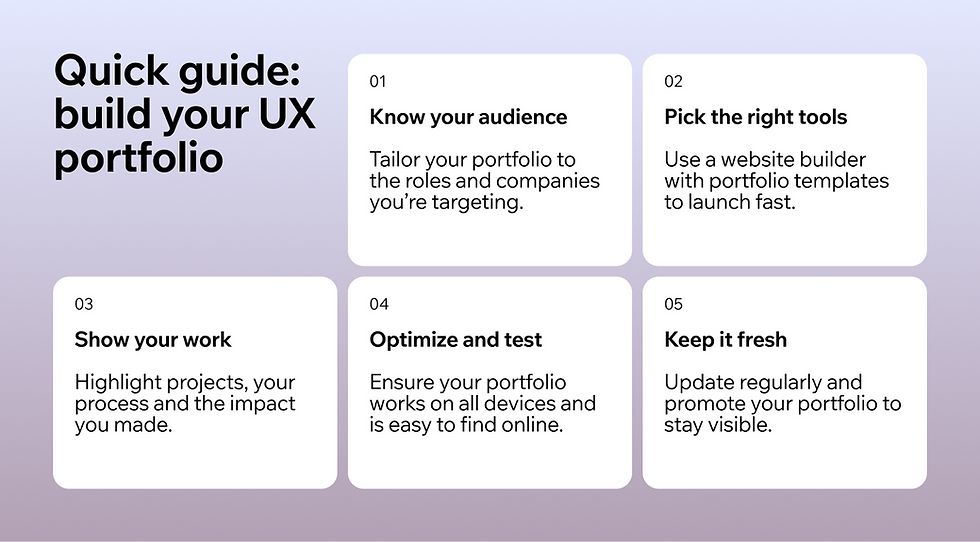
If you’re wondering what is a portfolio, it’s essentially a curated collection of your work that demonstrates your abilities, process and design thinking. For a UX portfolio, this means showing not just finished designs, but the web design process behind them, research, wireframes, prototypes and testing outcomes.
Whether you’re learning how to make a portfolio or exploring portfolio layouts, Wix gives you the tools to launch fast with the best website builder for portfolios.
Here’s everything you need to know to create a professional portfolio that impresses hiring managers and showcases your UX skills.
Summary of keep steps:
Define your target audience to tailor your portfolio
Choose a website builder that’s easy to use
Pick a domain name that’s professional and memorable
Select web hosting and a template suited for portfolios
Customize your website with your branding and UX work
Include essential pages like About, Contact and Projects
Create engaging content that shows your process, not just the final product
Optimize for SEO to get your portfolio discovered online
Test your portfolio on multiple devices before publishing
Step | Key action | UX portfolio tip |
Define audience | Identify who will view your portfolio | Hiring managers, UX leads, recruiters |
Choose builder | Select a platform like Wix | Use drag-and-drop editing and AI tools |
Domain name | Pick something professional | Keep it short and easy to remember |
Web hosting | Secure hosting for your site | Ensure reliability and speed |
Template | Choose a UX-friendly template | Focus on clean, intuitive design |
Customize | Add branding & style | Reflect your personality and design approach |
Pages | Include About, Contact, Projects | Highlight UX process and outcomes |
Content | Showcase projects with context | Include wireframes, prototypes and results |
SEO | Optimize your site for search | Use relevant keywords like “UX portfolio” |
Test & publish | Preview across devices | Check navigation, readability and speed |
Maintain & promote | Keep portfolio current | Share updates on LinkedIn, portfolios and networks |
“A portfolio isn’t just a collection of work, it’s a story about how you think and create. It gives people a reason to trust your skills and see your potential. That’s why curating it thoughtfully makes such a difference.” - Chava Katz, PMM @ Wix Pages at Wix
Explore portfolio website templates on Wix and start building your site with a no-code website builder, just drag, drop and showcase your best work.
How to build a UX portfolio in 10 steps

01. Define your target audience
“Your portfolio is your chance to direct the narrative. Decide what story you want to tell and build everything else around that.” - Doreen Weissfelner, head of Wix analytics and home
Before designing your UX portfolio, take a moment to think about who will be viewing it. Are you targeting hiring managers, UX recruiters or potential clients? Understanding your audience is crucial because it guides what projects and skills you highlight.
Knowing your audience also helps answer the question why do I need a portfolio. A portfolio isn’t just a gallery of screenshots; it’s your chance to tell a story about your work, show problem-solving skills and prove your value to potential employers or clients.
For instance, if you’re applying for a UX designer role at a tech startup, you’ll want to highlight projects that showcase product design, prototyping and user research, all tailored to what your audience cares about.
Explore more:
02. Choose a website builder
Choosing the right website builder is key to creating a polished UX portfolio quickly. Platforms like Wix offer drag-and-drop builders, AI design tools and professionally designed portfolio templates that make building your site simple. Wix offers a free AI website builder that turns a short description of your work into a designed UX portfolio, so you can start building in minutes.
When choosing a platform, it helps to compare the best website builders and best AI website builders to see which one fits your workflow. Look for features like customizable templates, easy media embedding and options to display case studies effectively. A good builder lets you focus on content and storytelling rather than technical setup, which is especially important for UX portfolios where clarity and usability matter.
You might also be wondering, does a portfolio have to be a website? While physical portfolios or PDFs can work in certain cases, a web-based portfolio is usually the most effective way to show interactive work, live prototypes and detailed design processes.
Even if you start with a simple site, a digital portfolio ensures your projects are easily accessible to recruiters and clients worldwide.
Expert tip: prioritize mobile-friendliness and fast load times, these small UX touches make a big impression and demonstrate your design skills in action.
“Your website builder sets the stage for everything, from how your site looks to how easily you can update it. The right one gives you design freedom and tools that actually save time. It’s worth choosing one that grows with your goals.” - Chava Katz, PMM @ Wix Pages at Wix
03. Pick a domain name

A clean, professional domain name makes your UX portfolio easy to find, share and remember. Your domain is essentially your online address, so it’s important to choose one that reflects your personal brand and looks professional.
When brainstorming a domain, consider using your full name or a combination with “UX” (e.g., jane-doe-ux.com). Short, simple and memorable domains convey professionalism and make it easier for recruiters and clients to find you.
If your preferred domain is taken, tools like a domain name generator can help spark creative alternatives or a domain name search can check availability across multiple extensions.
Once you’ve settled on a domain, learn how to register a domain with your website builder or a registrar. Most builders, like Wix, include domain registration in their plans, making the process seamless and avoiding the need for separate hosting accounts.
Remember, your domain sets the stage for your portfolio, so it should be easy to type, easy to recall and aligned with your personal brand to make the best first impression.
Note: If you’re still wondering what is a domain, think of it as the URL people type to access your portfolio, it’s the first impression of your work before anyone even clicks through.
Learn more:
04. Choose web hosting
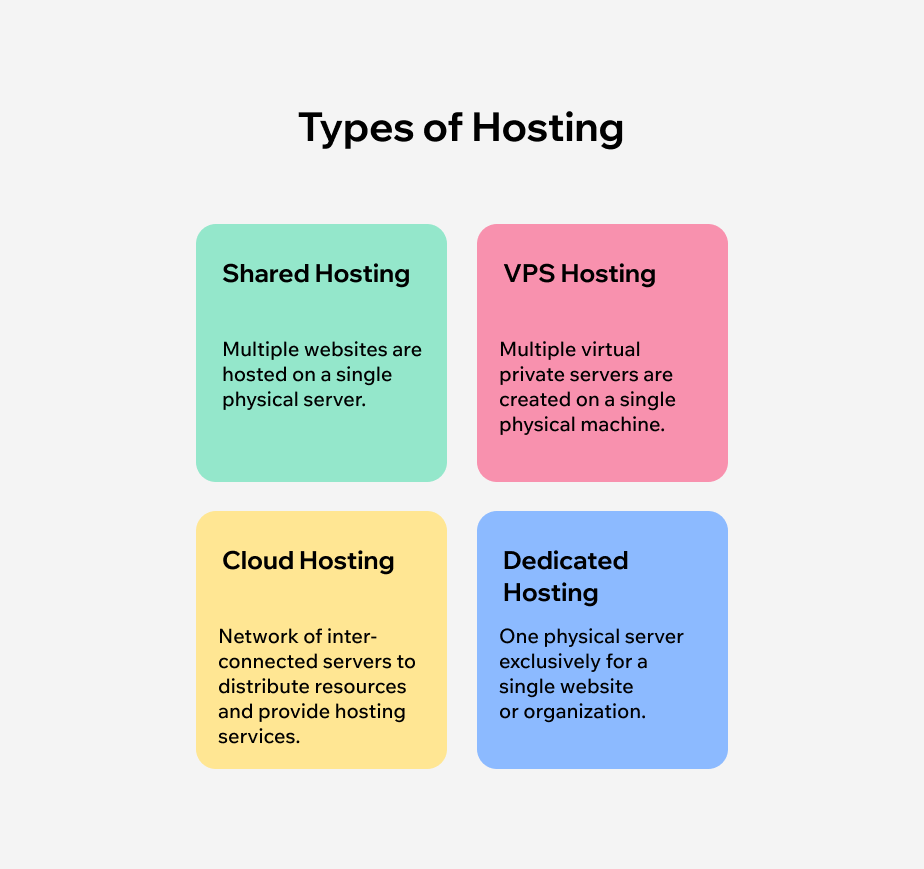
Reliable web hosting makes sure your UX portfolio loads quickly, stays accessible and provides a smooth experience for visitors.
If you’re wondering what is web hosting, it’s the service that stores your website’s files and makes them available online. Fast loading times, minimal downtime and reliable servers are crucial, especially for recruiters and hiring managers who might be browsing multiple portfolios in a short time.
Many website builders, like Wix, include free website hosting with their plans, so you don’t have to worry about separate servers or technical setup.
This makes it easy to focus on designing and showcasing your projects rather than managing backend infrastructure. Even if you start with a free hosting plan, you’ll get professional reliability and speed, which reflects well on your attention to detail as a UX designer.
05. Pick your website template

Your template sets the foundation for your UX portfolio and can make a big difference in how your work is perceived. Choose one with a clean, modern layout that emphasizes visual hierarchy, clear website navigation and an intuitive structure. Look for portfolio-specific templates that highlight projects with sections for process, deliverables and outcomes.
This approach works well whether you’re exploring digital portfolio examples or searching for web developer portfolio examples for inspiration.
When selecting a template, think about what to include in a portfolio. Make sure it allows space for detailed project case studies, wireframes, prototypes and final designs. Including these elements helps viewers understand your design thinking and problem-solving skills. Wix offers customizable portfolio templates you can adapt to your work, so your layout highlights your projects instead of forcing them into a fixed structure.
Templates can also guide you if you’re unsure how to make a portfolio for a job. A well-structured template provides a ready-made layout for showcasing your projects, About page, Contact us page and other essential sections, so you can focus on the content and storytelling rather than building everything from scratch.
Pro tip: This approach works well whether you’re exploring digital portfolio examples or searching for web developer portfolio examples for inspiration.
06. Customize your UX portfolio
“Keep your portfolio simple and intentional. Show only your best work and give each piece context so people understand your process. A curated portfolio always feels more confident than a crowded one.” - Chava Katz, PMM @ Wix Pages at Wix
Now comes the fun part, making your UX portfolio truly yours. Start by thinking about website branding: choose a cohesive color palette, typography and overall design style that reflects your personality and your approach to UX.
Your portfolio should feel polished, but it also needs to feel like you. This is your chance to show off not just your work, but your taste and attention to detail.
Next, add interactive website elements where possible. Think clickable prototypes, hover effects, before-and-after visuals or embedded design files. These features help visitors understand your design thinking and process, not just the final product.
Remember to keep it balanced. You want your site to be visually engaging and show off your creativity, but don’t let design choices overshadow your projects. Clear navigation, readable text and thoughtful spacing make your portfolio easy to explore. After all, the goal is to make it effortless for hiring managers or clients to see why you’re a UX designer they want to work with.
07. Add useful pages

Once you’ve got the overall structure of your UX portfolio, it’s time to think about the pages that will make your site easy to navigate and compelling to explore. Start with a strong homepage, this is the first thing people see, so make it clear, welcoming and reflective of your personal brand. A homepage should immediately show who you are, what you do and why your work matters, without overwhelming visitors with too much information.
Next, make sure to include an About page where you share your story, skills and design philosophy and a Contact page that makes it effortless for recruiters or clients to get in touch. For your projects, a web page dedicated to your portfolio or case studies is essential. Here, you can highlight your process, results and the impact of your work—think wireframes, prototypes and before-and-after visuals.
If you want to go the extra mile, consider adding a blog. Using a blog maker makes it easy to integrate on your website and lets you share UX insights, case studies or lessons learned from your projects.
Pro tip: Not only does adding a blog add depth to your portfolio, it also shows you’re engaged in the field and continuously learning. And if you’re aiming for a sleek, concise experience, look into the best one page website builders—these allow you to showcase your work, story and contact info all on a single scrollable page, perfect for recruiters who want to get the full picture in one go.
08. Create engaging content
Now that your pages are set up, it’s time to focus on website content, this is what really brings your UX portfolio to life. Don’t just show the final designs; take visitors on a journey through your UX process. Explain your research, wireframes, prototypes, user testing and the results you achieved. Use visuals like sketches, screenshots and interactive prototypes to make your process tangible. The goal is to give hiring managers or clients a clear sense of how you think, solve problems, and iterate on designs.
To make your portfolio even more compelling, plan your content with an AI content strategy in mind. You can generate ideas for project descriptions, case studies or blog posts that highlight your expertise without sounding generic. This helps you maintain a consistent tone, structure and focus across your site.
Pro tip: If you’re ever stuck on content ideas, think about what would answer a recruiter’s questions before they even ask. For example: What challenges did you face in this project? How did your solution improve the user experience? Which tools or methods did you use? By weaving this context into your portfolio, you create a narrative that’s informative, engaging and memorable, while also demonstrating your skills in web design, UX and storytelling.
09. Optimize for SEO

Creating a beautiful UX portfolio is only part of the equation, if no one can find it, it won’t have the impact it deserves. That’s where website SEO comes in. Make your UX portfolio discoverable by search engines by using relevant keywords like “UX portfolio,” “UX designer portfolio” or “UX case study” in your page titles, headings, meta descriptions and image alt text. This ensures hiring managers, recruiters or potential clients can easily find your work online without needing a direct link.
Take advantage of built-in SEO features offered by most website builders. Platforms like Wix include tools for optimizing page titles, meta tags, URLs and even blog SEO if you’re sharing insights, case studies or process posts. Using these tools helps search engines understand your content and increases your chances of appearing in relevant search results.
When choosing a platform, consider the best website builders for SEO. Even small optimizations, like descriptive file names for your project images or a structured hierarchy for your pages, can make a huge difference in how visible your portfolio is online. Think of SEO as an extension of your UX skills: just as you design for users, you also want your site to be easy for search engines to navigate and showcase your work effectively.
If you want to dive deeper and learn more ways to improve your portfolio’s visibility, check out the Wix SEO Learning Hub for step-by-step guidance.
10. Test and publish
Before going live, test your portfolio on multiple devices and browsers. Ensure that images load correctly, links work and the navigation feels intuitive. A smooth, error-free experience reflects your attention to detail as a UX professional.
Your UX portfolio should evolve as your career grows. Update it with new projects, case studies and design insights. Promote your portfolio by sharing it on LinkedIn, in job applications and with professional networks. Active maintenance ensures your portfolio always reflects your best work.
What every UX portfolio should include
Every strong UX portfolio has a few key elements that make it easy for visitors to understand your skills, process and professional identity. From clear navigation to compelling visuals, these best practices help your work shine and make a memorable impression on hiring managers or clients.
The table below breaks down the essential portfolio elements and tips for putting them into practice.
Portfolio elements | Portfolio best practices |
|---|---|
Clear focus | Highlight your strongest skills or niche. Make it obvious what you do so visitors immediately understand your expertise. |
Quality over quantity | Show only your best projects. Remove outdated or weaker work to keep your portfolio sharp and impressive. |
Strong visuals | Use high-resolution images, mockups or videos. Present work in context to help clients see its impact. |
Easy navigation | Organize your site logically with clear menus and headings. Make it simple for visitors to find key projects quickly. |
Personal branding | Keep colors, fonts and tone consistent. Add a bio or story that reflects your style and professional identity. |
Concise project descriptions | Explain your role, process and results in a few sentences. Focus on what matters to clients or employers. |
Fast load time | Optimize images and use a reliable platform. Fast pages keep visitors engaged and reduce frustration. |
Contact information | Include a contact form, email and social links. Consider adding a call-to-action on every page. |
Regular updates | Refresh your portfolio with new projects, achievements or testimonials. Show growth and stay relevant. |
UX portfolio examples built on Wix
01. Fatimah
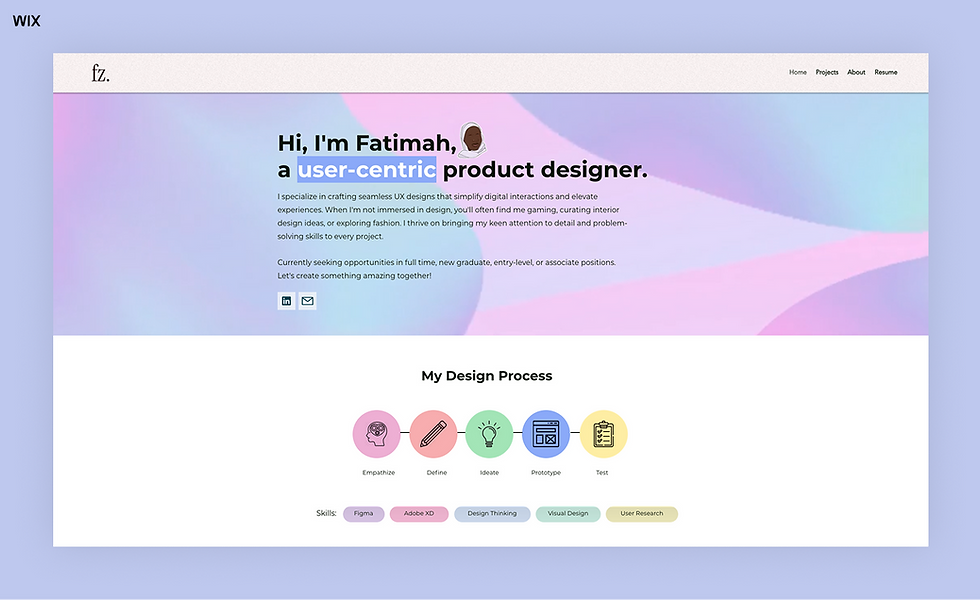
Fatimah begins her homepage with a clear headline: “Hi, I’m Fatimah, a user‑centric product designer.” It immediately tells you who she is, what she does and sets the tone. Her navigation is simple, and she presents her design process (Empathize → Define → Ideate → Prototype → Test) in a visually digestible way, this emphasizes her UX thinking rather than just final deliverables.
On the projects page, each case study shows thumbnails, titles and a brief descriptor before you explore further, this minimalist website design mirrors the UX principle of “less is more.” Her “About” section also adds a personal touch (mentioning gaming and fashion) which helps humanize her brand.
Impressed by this design? Use the same template and start building a polished UX portfolio of your own.
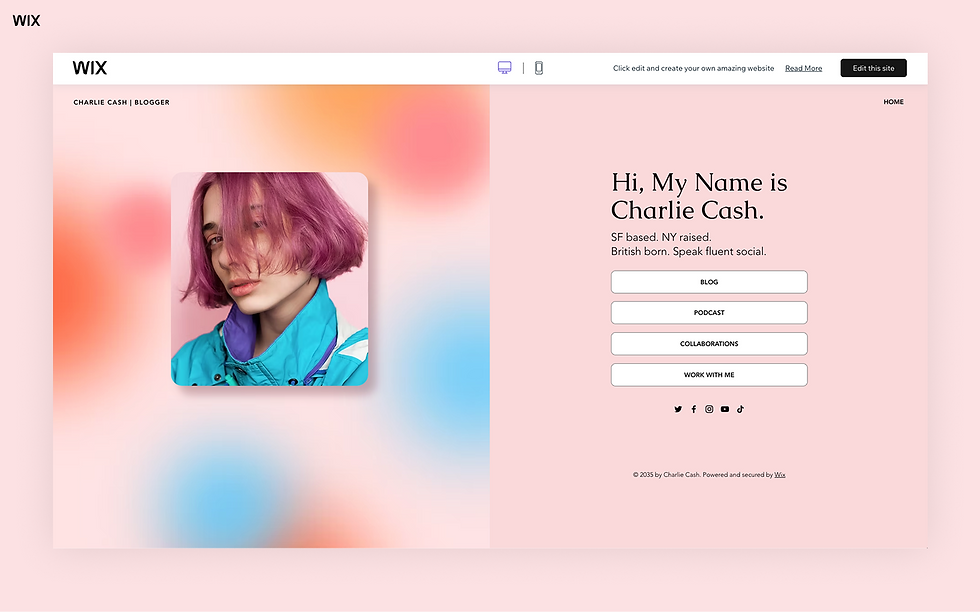
Template name: Creative CV website template
02. Madalyn Crews
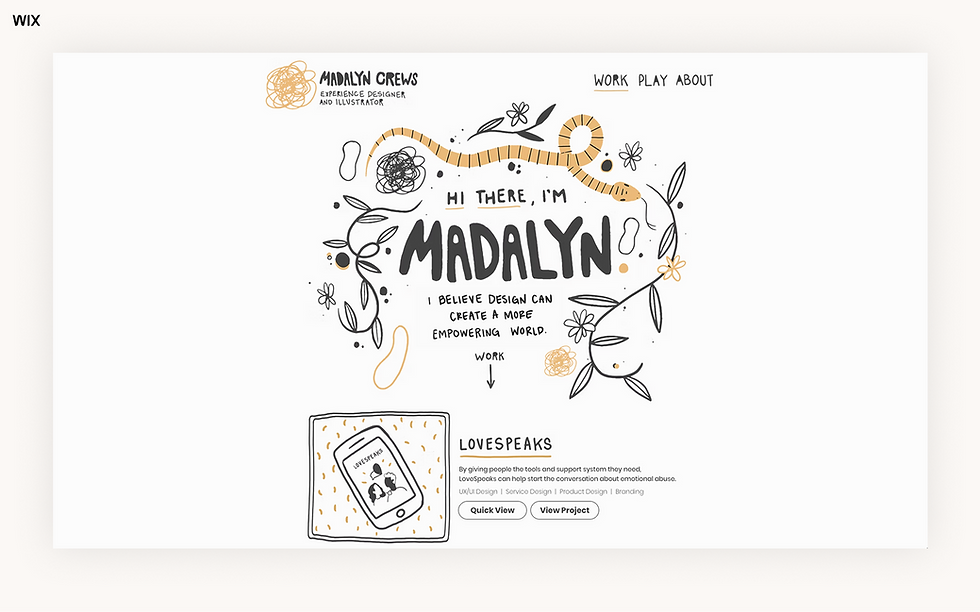
Madalyn’s homepage opens with a visual narrative, an animation, a clean hero image and a quick “keep scrolling to see my work” prompt. Her projects showcase a wide range: UX/UI, service design, concept design, branding. This diversity speaks to her adaptability. Each project card includes a concise description of scope and role, which helps visitors instantly grasp the value she brought.
Her navigation structure is intuitive; the “Work” section is clearly labelled and from there you can dig into details. Visually, the site is bold but not chaotic. If you’re exploring web design portfolios or curious about how to make a portfolio for a job, this is a strong example.
Impressed by this design? Use the same template and start building a polished UX portfolio of your own.

Template name: Business student resume website template
03. Ayusha Mehrotra

Ayusha’s site positions her as a “Senior UX Designer” right away, with a clean layout and visible keywords like “UX Research | UX Design | Design Strategy.” The project list is well organized and uses a mix of images and text that lets you quickly choose which case study to explore.
The site also subtly reflects thought leadership by emphasizing her strategy skills (not just interface design). This is particularly useful if you’re building your site and want to show a higher‑level mindset. If you’re thinking about writing portfolio examples or presenting student portfolio examples, the clarity of her role definition and process‐orientated content is a helpful model.
Impressed by this design? Use the same template and start building a polished UX portfolio of your own.

Template name: Art director website template
04. Kamayani Gupta

Kamayani’s homepage opens with a compelling line: “In a sea of ambiguity, I’m your calm designer…” which brands her voice right away. Her work section features standout titles with supporting descriptions, like “UX RESEARCH | DESIGN SYSTEM | UX DESIGN”, giving a clear insight into her expertise.
The typography and spacing are strong, making the site feel clean and professional. For designers wondering what to include in a portfolio, her site offers a lesson: clear role definitions, process categories and minimal distractions. If you’re leaning toward interior design portfolios or even AI portfolio examples (depending on niche), her structure is adaptable and impactful.
Impressed by this design? Use the same template and start building a polished UX portfolio of your own.

Template name: Fine arts painting portfolio website template
05. Victoria Design Lab

Vicky’s background in architecture gives her UX portfolio a unique angle, she highlights strategy and product design with equal weight. Her case studies are neatly numbered (01, 02, 03…), with short descriptors like “Web | Product Design | User Research." This creates an organized visual rhythm and helps the viewer scan projects quickly.
Her homepage is friendly and invites connection (“Hi, I’m Vicky… Scroll down…”). The combination of visual clarity and personal tone makes the site feel approachable and professional.
Impressed by this design? Use the same template and start building a polished UX portfolio of your own.

Template name: Creative director website template
How to build a UX portfolio FAQ
What is a UX portfolio and why do I need one?
A UX portfolio is a curated collection of your work that demonstrates your skills, process and problem-solving abilities. You need one because hiring managers and recruiters prefer candidates who can show their design thinking, projects and results. A well-crafted portfolio helps you stand out in job applications and interviews.
How do I build a UX portfolio from scratch?
Start by defining your target audience and choosing a website builder that fits your needs, such as Wix. Pick a professional domain name, select a clean template and add pages that highlight your projects, About info and Contact details. Focus on showing your UX process with clear visuals and concise project descriptions.
What should I include in a UX portfolio?
Include detailed case studies that outline your research, wireframes, prototypes and final designs. Add a personal About page, a clear Contact page and high-quality visuals to showcase your skills. Highlight your strongest projects to demonstrate expertise while keeping your portfolio easy to navigate.
Can I make a UX portfolio without a website?
While a physical portfolio or PDF can work for certain scenarios, a web-based portfolio is usually more effective. It allows you to showcase interactive prototypes, embed visuals and make your work easily accessible to recruiters and clients worldwide. Tools like Wix make creating a professional portfolio website simple and fast.
How can I make my UX portfolio stand out?
Focus on storytelling, strong visuals and clear navigation. Include case studies with concise project descriptions and measurable results. Use personal branding to reflect your style, optimize your site for SEO and maintain regular updates to showcase new work. Reviewing examples of well-built portfolios can also provide inspiration for structure and design.


