Updated: Jun 14

Learning how to make a lash website puts you on the fast track to booking more clients. You can set up a professional booking system and display your services using an online website builder. Through this guide, you will learn how to make your own website for your lash business, giving you full control over your bookings, payments and client experience all in one place.
Start building with Wix's salon website builder.
TL;DR: how to make a lash website
A lash website helps you manage bookings efficiently and build trust with clients. You can create a lash website easily by selecting a reliable builder, customizing a template and adding a booking system.
A successful site should include a service menu, clear pricing and a gallery of your work. These elements help visitors decide to book an appointment with you immediately.
Feature of a great lash website | Benefit |
Booking system | Lets clients schedule appointments at any time. |
Service menu | Clearly presents your services and pricing. |
Pricing | Makes costs transparent and helps build trust. |
Photo gallery | Showcases your work and builds client confidence. |
Location | Helps clients find you easily and improves local visibility. |
Contact page | Makes it easy for clients to reach you. |
How to make a lash website in 7 steps

Building your site is easier than you might think. Follow these five steps to get your lash business up and running.
01. Select a professional website builder
The first move is choosing a website builder that fits your business needs. Wix offers an AI website builder that creates a unique, business-ready site in no time. You can get started immediately without worrying about complex design elements.
A good builder gives you the foundation for a beautiful site. You want something that handles everything from layout to taking payments. This makes managing your lash business much simpler.
Expert tip from Sharon Hafuta, managing blog editor at Wix:
“Choosing the right website builder isn’t just about comparing specs—it’s about understanding how it actually feels to use. We tested each platform the way a real user would: building pages, booking appointments, customizing templates and navigating setup tools. It’s the only way to truly see which builders deliver value beyond the sales pitch.”
02. Choose and set up your domain and web hosting
Your domain name is the address people use to find your lash website. Choose a simple and memorable name that reflects your business and is easy for clients to type.
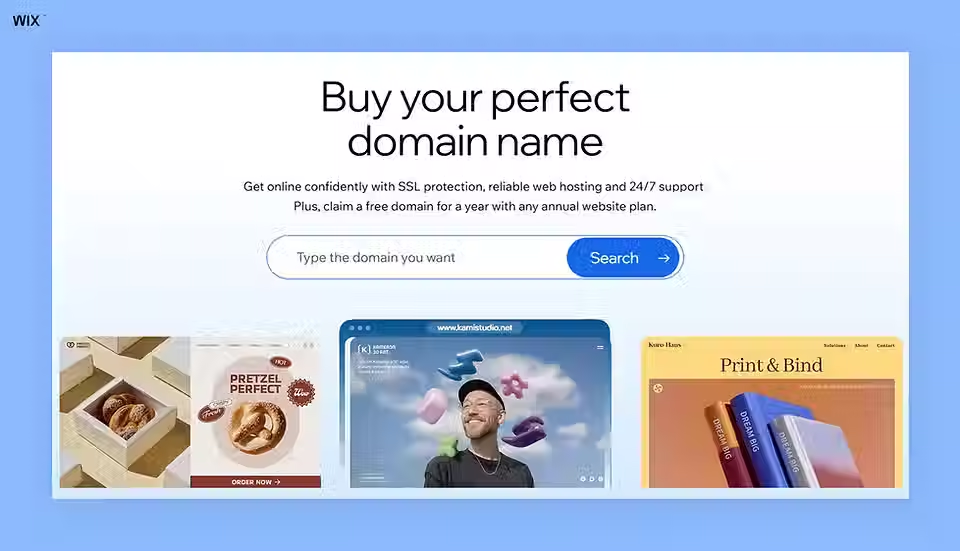
You will also need web hosting to make your website accessible online. Hosting stores your website files and ensures your site is available to visitors at all times. Many platforms offer combined domain and hosting solutions, making setup quick and beginner-friendly.
A custom domain and reliable hosting help your business look more professional and build trust with potential clients.
Pro tip: To choose a domain name, try out a beauty business name generator or domain name search for inspiration.
Learn more:
03. Pick a customizable website template

Starting from scratch takes a lot of time and effort. Wix speeds up designing a website with fully customizable templates for any industry. These beauty website templates are designed for different industries, so you can simply choose one that fits your brand style.
Templates give you a professional look right away without needing advanced design skills. You can easily adjust colors, fonts, images and layout to match your lash business identity. This helps your website feel more personalized and consistent with your brand.
Learn more about how to make a logo for your eyelash business.
04. Add your lash services and pricing

Clients need to clearly understand what you offer before they decide to book. List your services such as full sets, fills and removal treatments in a simple and structured way. Make sure your pricing is accurate and easy to read so clients can compare options quickly.
Well-organized service and pricing information helps build trust and reduces hesitation. It also makes your website feel more professional and helps clients decide faster before moving on to the booking stage.
05. Set up booking and payments

Allowing clients to book their own appointments saves you hours of texting back and forth. You can simply connect a calendar to your site so visitors can view availability and claim open slots instantly. This makes the booking process faster and more convenient for both you and your clients.
Handling payments securely is also essential for any beauty professional. Wix powers online services for beauty businesses with online scheduling, payments and automated reminders, helping you manage everything in one place. You get paid faster, reduce missed appointments and create a smoother experience for your clients at the same time.
06. Optimize your website

Make sure your website looks good and works smoothly on mobile devices. Most clients will book directly from their phones, so mobile optimization is essential. A responsive website design helps ensure that your site loads properly and provides a smooth experience across all screen sizes.
Improve your visibility by using keywords like “lash services in [your city]” to help potential clients find your business through search engines. You can also connect your social media accounts to showcase your work, build trust and drive more traffic to your website.
Explore more:
07. Publish and promote your site
Your site is finally ready for the public to see. Hit the publish button to launch your site. You can always go back and make changes later if you need to update anything or improve your content. Once your site is live, it becomes accessible to anyone searching for your services.
Share your website link everywhere. Add it to your social media bios and encourage clients to book through your new system. This helps you start getting bookings right away and increases your online visibility across different platforms. You can also add client testimonials to build trust and show real results from your services. This helps strengthen your credibility and makes potential clients feel more confident about booking with you.
Learn more: How to make a skincare website
Tips for growing your lash website
Highlight your work visually: Use high-quality images to show your results. Strong visuals help new visitors quickly understand your style and quality, making them more likely to book.
Keep the website easy to navigate: Make sure your site is simple and clear. Important actions like booking should be easy to find and accessible from every page.
Connect your social media accounts: Link platforms like Instagram and Facebook to your website. This allows visitors to see your latest work and stay engaged with your brand.
Offer 24/7 online booking: Use booking tools that let clients schedule appointments anytime. This reduces back-and-forth messaging and helps you secure more bookings automatically.
Highlight clear pricing: Display your pricing upfront so clients can quickly understand your services and make confident booking decisions.
Ensure fast loading speed: Make sure your website loads quickly on all devices. A fast website improves user experience and reduces drop-offs.
Learn more about how to start an eyelash business.
How to make a lash website FAQ
How much does it cost to build a lash website?
The cost of building a lash website depends on the platform and features you choose. A simple website using a website builder can start at a low monthly fee, while more advanced sites with custom design, booking systems and payment integrations can cost more. On average, a lash website costs about $20 to $200 per month using a website builder, plus a domain fee of around $10 to $50 per year. Additional costs may apply for premium templates or booking tools depending on the features you choose.
Learn more:
Why do lash artists need a website instead of just social media?
Social media is great for sharing photos but lacks professional booking features. A dedicated site protects your business if a social platform goes down. You also look much more established to new clients.
How can I create a lash website for free?
You can start your lash website for free by choosing a platform that offers a free plan, like Wix. Pick a template, add your business info and you’re on your way. While free versions usually come with some limitations, they let you launch your site and get bookings without spending anything upfront. Upgrade anytime if you want a custom domain or more features.
Learn more:
How can I create a lash website using AI?
Creating a lash website with AI is a fast and simple way to get your business online. An AI website builder can generate a complete website based on a few questions about your business, including your services, style and goals. This removes the need for manual design work and helps you get started quickly. You can then customize the website by adjusting the layout, colors and content to match your brand. AI tools handle most of the setup in the beginning, while you focus on refining the details and adding your own personal touch so your website fits your lash business perfectly.