
Jewelry shoppers want to see the detail in each piece, understand the materials and sizing and check out securely before they buy. A jewelry website should give them all of that, plus clear shipping and return information.
The right setup depends on your budget, your skills and whether you also sell at markets or on other platforms. This guide covers how to build an online store for your jewelry, from photos and descriptions to payments and promotion.
Turn your idea into a business-ready jewelry website. Choose a template or start with AI, make the design your own and add the tools you need to sell your pieces online, all with Wix.
TL;DR: how to make a jewelry website
A jewelry website has to show each piece up close, explain metal, stones and sizing and give shoppers a checkout and return policy they trust. Choose a build method that fits your skills, plan the store, set up products, payments and insured shipping, test every order, then keep stock current and promote it.
You'll learn:
How the main creation methods compare
Planning collections, pages and sales channels
Product photos, sizing guides and descriptions
Delivery insurance, returns and resizing rules
What a jewelry store costs to run each year
Which Wix tools fit each part of the job

Ways to build a jewelry website
You can build a jewelry store from a template, with AI, with code or by hiring a professional. The method matters less than what happens after launch: who adds a new collection, updates prices when metal costs change and marks a one-of-a-kind piece as sold.
Already know how you'll build? Skip ahead to the 7 steps.
Jewelry website builder with templates
A website builder gives you a ready-made store design, called a template, and a visual editor where you swap in your own photos, prices and text. Jewelry templates usually include a shop page, product pages and a cart, so your time goes into the pieces instead of the layout.
This suits makers who want to run the site themselves. A silversmith adding ten new rings before a holiday market can upload photos, set ring sizes and publish the same evening without waiting for a developer. A drag-and-drop editor lets you move sections around visually.
What to consider: you're responsible for keeping the store current, from stock counts to policies. Check that the builder handles what jewelry needs, such as options for ring size and metal, separate prices for gold and silver versions and stock tracked for each version.

Create a jewelry website with an AI website builder
Describe your jewelry brand, the collections you sell, the look you're going for and the features you need, and an AI website builder generates a first draft with text, images and layouts.
Ask it to give your bridal rings their own page or soften the color palette to suit your gold pieces, and it refines the site from your description.
This suits owners with little design experience who would rather react to a draft than start from a blank page. Treat the draft as a starting point and replace any AI-generated images with photos of your real pieces, because buyers judge metal color and stone clarity from what they see.
When you want to line up product photos exactly, switch to manual editing. You'll still need to add your products, policies and shipping rules yourself.
Learn more: How to create a website with AI
Build a jewelry website with an AI chat assistant
If you already use an AI assistant such as ChatGPT, Claude or Gemini to write product stories and care instructions, some platforms let that same chat build and manage your store. You describe a change, like adding a new pair of earrings or marking a sold piece as unavailable, and the assistant makes it on your site.
Some platforms connect directly: with Wix, for example, you can type @Wix in ChatGPT to start a site or connect your Wix account to Claude through the official connector. The Wix MCP server works with other MCP-compatible AI clients.
This suits owners who think in instructions rather than layouts, and it's handy once one-of-a-kind pieces start selling out and need replacing. Check each change on the live store, because a chat summary isn't the same as the product page a shopper sees.

Build a jewelry website with AI coding tools
Vibe coding means describing what you want to an AI coding tool, such as Claude Code, Cursor or Base44, and letting it write the code. You get a custom design, but the result is code: it still needs hosting, a payment setup, security updates and someone to fix it when a checkout step breaks.
This suits technically confident jewelers or those working with a developer, for example a studio that wants a ring builder where customers pick a band, stone and setting. If you only need product pages and a cart, a builder already handles that with less to maintain.
Learn more: How to vibe code a website
Make a jewelry website with a content management system (CMS)
A content management system (CMS) is software that lets you update text, photos and pages without rebuilding them. Some CMS platforms are open source and add a store through plugins, which means you choose hosting, install updates and check that the plugins keep working together.
A CMS suits jewelry brands that publish a lot, such as a designer who writes about gemstone meanings, styling and care next to the shop. Ask who will update plugins and fix conflicts after launch, because a broken plugin on a sale weekend can take checkout down.
Hand-code a jewelry website
Hand-coding means writing HTML, CSS and JavaScript yourself or paying someone to. You get control over every detail, including custom features like a 3D ring viewer, and full responsibility for hosting, security, payments and every future change.
It suits developers building something no builder offers. For an independent jeweler, hours spent coding are hours taken from making and selling pieces.
Learn more: How to make a website
Headless website development for jewelry brands
A headless website separates the design shoppers see from the system that runs products, stock and checkout. A developer builds a custom storefront, connects it to commerce services, then sets up and tests the full buying journey from product page to order confirmation.
Headless suits jewelry groups with specific requirements and technical help, for example a brand selling in several countries or showing one catalog in an app and on the web. It's a custom-development approach, not a simpler alternative to a builder.

Hire a jewelry website designer or developer
A designer or agency handles the design, setup and launch for you. This suits jewelers with complex needs, such as a custom engagement ring builder or a large catalog moving from another platform, or owners who would rather spend their time at the bench.
Before you hire, agree on who updates products and prices after launch, who fixes problems and what ongoing support costs. Ask for a setup you can manage day to day, so a new collection doesn't mean a new invoice.
Find the best way to create your jewelry website
Method | Best for | Who updates products and prices | Jewelry store system | Skills needed |
Website builder with templates | Independent makers | You or your team | Built-in store | None to basic |
AI website builder | First-time sellers | You, after the AI draft | Built-in store on most builders | None to basic |
AI chat assistants | Owners who prefer instructions | You, through chat | The connected platform's store | Basic |
AI coding tools | Owners with technical help | You or a developer | Needs setup and hosting | Intermediate to advanced |
Content management system (CMS) | Content-heavy brands | You, plus whoever maintains plugins | Store plugin | Basic to intermediate |
Hand-coding | Custom features | A developer | Built or connected by a developer | Advanced |
Headless website | Multi-market brands | Your team and developers | Separate commerce services | Advanced |
Hiring a professional | Complex or outsourced projects | Depends on your agreement | Set up by the professional | None |
How to make a jewelry website in 7 steps
These steps follow the order you'd build in: plan the store, choose how to build and a domain, photograph and describe your pieces, set up payments and shipping, then optimize, test and launch.

Before you start: plan your jewelry store
Start with who buys from you and why. Someone buying everyday studs needs different information than someone commissioning an engagement ring, so list the questions customers ask most, in messages or at markets, and make sure the site answers each one.
Then decide what you'll sell and how: ready-to-ship pieces, made-to-order designs, custom commissions or a mix. Each needs something different, from stock counts for ready-to-ship items to deposits and production times for made-to-order work.
Write down where you already sell. If you're on Etsy or another marketplace, you can run both: the marketplace brings buyers who search there, while your own site keeps your customer list, branding and policies under your control. If you sell at craft fairs, plan for in-person sales to update the same stock.
Before you build, decide:
Who your main buyers are
Ready-to-ship, made-to-order or custom work
Which metals, stones and sizes you offer
Where else you sell, online and in person
Your shipping, return and resizing rules
Whether you also sell wholesale to shops
Still choosing a brand name? Browse jewelry business names for ideas. If you plan to resell pieces rather than make them, read about jewelry dropshipping before you set up the store.
Learn more: How to start a jewelry business
01. Decide how to make your website
Use the comparison above to pick a method, then choose a starting design. Whichever route you take, make sure your setup includes inventory management tools and fits your budget. Compare pricing plans and check whether the platform charges transaction fees on top of payment processing.
What to check in a jewelry template
Look for a template with:
Large product images with zoom
Room for several photos and a video per piece
Product options for size, metal and stone
A size guide or space to add one
Shipping, returns and care pages
A layout that works well on a phone
Space for your brand story and process
Find inspiration in simple websites that get straight to the point.

Learn more:
02. Choose and register a domain name
Next, claim the web address shoppers will type when they want to find your pieces again. A good domain name for a jewelry brand is short, easy to spell and close to your brand name, so someone who spotted your earrings on Instagram can type it from memory.
Use domain name search to check availability across more than 400 extensions. If your first choice is taken, it suggests alternatives and shows pricing before you buy. Still settling on a name? A domain name generator can suggest available options, and you can even search for a domain from inside ChatGPT with @Wix.
Wix is an ICANN-accredited registrar, so you can manage your domain, website and business email from one dashboard.
Every Wix domain includes a free SSL certificate, which helps reassure shoppers who are about to pay for a piece they love. Sites built with Wix include hosting, and an annual premium plan comes with a free domain for the first year.
Think long term. Choose a name that can grow with your line, so a domain built around one stone or metal doesn't box you in when you add new collections.
Did you know: .watch is a domain extension that puts the noun in the address, so a dealer or a repair workshop only needs its own name in front of it.
03. Add high-quality product photos
Jewelry is small and shoppers can't hold it, so your photos do the work of a display case. Invest time in product photography or hire a professional, and shoot each piece from several angles in soft, even light. Close-ups should show texture, stone clarity, clasps and hallmarks.
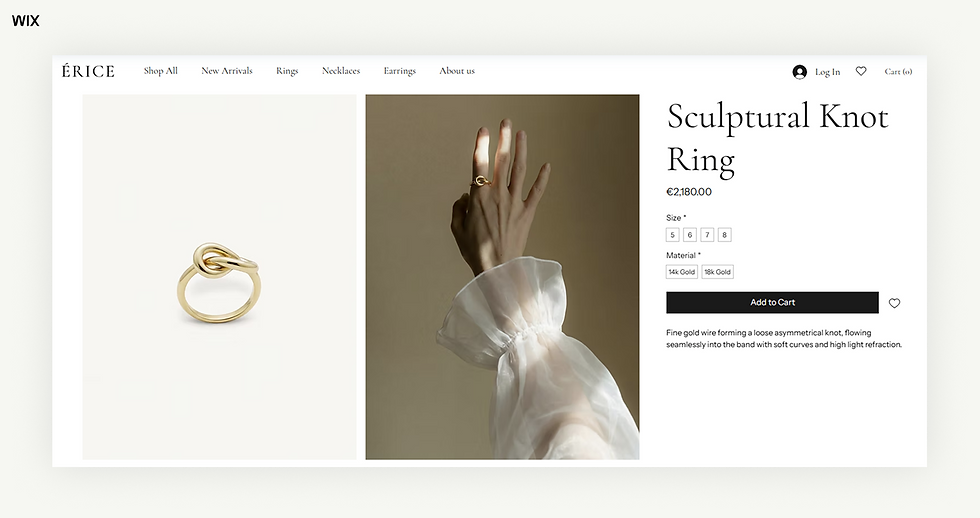
Show scale. A ring on a hand or a necklace on a model tells shoppers more about size than a measurement alone, so pair lifestyle shots with clean shots on a plain background. Keep lighting and backgrounds consistent across your catalog so each collection looks like it belongs together.
Make photos zoomable and add a short video where you can, because a few seconds of a stone catching the light answers questions a still photo can't. Photograph every metal and stone option you sell, so a shopper choosing rose gold sees rose gold.
Shiny metal picks up glare, reflections and color shifts. If you edit photos, keep colors true to the piece, since a stone that arrives looking different from its photo is likely to come back as a return.

04. Write compelling product descriptions
Each product page should answer the questions you'd hear at a market stall. List the metal and its purity, such as 14k gold or sterling silver, the stone type, size and whether it's natural or lab-grown, plus dimensions, chain length and care instructions.
Be precise about finishes. Gold-plated, gold-filled, vermeil and solid gold wear very differently, and shoppers with metal sensitivities need to know about nickel or other alloys before they buy. Clear terms here prevent returns and complaints later.
Set up each choice a shopper makes, such as ring size, metal color or stone, as a product option with its own price and stock count where needed. That way a size 7 in gold can sell out while a size 6 in silver stays available.
One thing worth knowing: if your catalog includes variants across more than two or three attributes, such as ring size, metal and stone, plan for extra setup time to structure them correctly before you publish.
Then tell the story behind the design: your inspiration, the techniques you use or the meaning of a stone. Jewelry is often bought as a gift or to mark a moment, so a short story helps shoppers choose. Words like "delicate", "bold" or "handcrafted" work as long as they describe the piece accurately.
Beyond product pages, a jewelry store needs a few pages that answer questions before shoppers ask them.
Home page
Show your newest or best-selling collection first, with a clear link to shop. Add one line on what makes your work different, such as recycled silver, traceable stones or pieces made to order in your studio.
Shop and collection pages
Organize pieces the way shoppers browse: by type, such as rings, necklaces and earrings, by metal and by occasion, such as bridal or gifts. Filters for price and material help once your catalog grows.
Size guide
Add a ring size chart, instructions for measuring at home and necklace and bracelet lengths shown on a model. Link it from every product page that has sizes, and say whether you offer resizing, exchanges or a ring sizer.
Shipping, returns and resizing
Explain delivery times, whether orders ship insured with a signature and what happens if a parcel goes missing. Spell out returns: the time window, the condition pieces must be in, who pays return postage and exceptions such as engraved, custom or pierced pieces.
About and custom orders
Introduce yourself and your process, then explain how commissions work: how to request one, deposits, timelines and approval steps. An inquiry form works better than an email address because it collects what you need, like budget, metal and ring size.
Care, warranty and FAQ
Answer care questions, such as how to clean silver, store pearls or slow tarnish, and explain your warranty, repairs and gift wrapping.
Need more inspiration? Explore ecommerce website design to start building your online store today.
05. Set up secure payment and shipping options
This step turns your website into a store. An ecommerce system takes payments, calculates shipping and taxes, tracks stock and sends order confirmations. Some builders include one, while other methods need a store plugin or separate services connected by a developer.
Use trusted payment processors and know two security terms: SSL encrypts data between the shopper and your site, while PCI DSS covers how card data is handled. A reputable payment provider takes care of most card-handling requirements for you.
Offer the payment methods your buyers expect, such as cards, digital wallets and buy-now-pay-later options, which can help with higher-priced pieces. Then set up ecommerce shipping with tracking, and decide whether to offer free shipping above a set order value.
Be upfront about every cost. According to Baymard Institute, 40% of US shoppers who abandoned a cart for reasons other than browsing said extra costs such as shipping, taxes or fees were too high. Show shipping and insurance costs on the product page or early in checkout.
Insure valuable parcels. Check whether your carrier or shipping app offers declared-value coverage, require a signature above a set order value and use plain outer packaging that doesn't advertise what's inside. Keep photos and records of high-value pieces in case you need to make a claim.
Publish your shipping, returns and resizing rules before shoppers pay, and repeat the key points in order confirmation emails.
Expert tip from Marina Brocca, regulatory compliance consultant specializing in GDPR and LOPDGDD:
“It’s important to have a shipping policy because it provides transparency and builds trust between your business and your customers.”
Questions to ask before you choose an ecommerce platform
Not every platform supports every feature, so check these before you commit:
Can each size, metal and stone have its own price and stock?
Will a one-of-a-kind piece stop selling once it's gone?
Can in-person sales update the same inventory?
Which payment methods and payout schedules are available?
Does it calculate shipping, insurance and sales tax?
Can it take deposits for custom orders?
Does it connect with the marketplaces or social shops you use?
Can staff manage orders with their own permissions?
Are there transaction fees on top of processing fees?
06. Optimize for search engines
Search engines and AI assistants need clear text to understand what you sell. Research the words your customers use, such as "dainty gold necklace" or "lab-grown diamond ring", and use them naturally in product names, descriptions and collection pages.
Start with these, in this order:
Product names that say what the piece is
A unique title and meta description for each page
Descriptive alt text on every product photo
Collection pages for terms shoppers search
A Google Business Profile if you have a studio or shop
Alt text also makes your store accessible to visitors using screen readers. Describe informative images, like the piece and its metal, and mark purely decorative images so they're skipped. Make sure the whole checkout works with a keyboard and has readable contrast.
No tool or platform can guarantee rankings, so treat SEO as ongoing work: new collections, care guides and fresh product details all give search engines more to find.
07. Launch and promote your site
Before you launch, test the store the way a customer would, then ask a friend to do the same on their own phone.
Test before you launch
Run through each of these:
Place a full order on a computer and on a phone
Pay with each payment method you offer
Pick different sizes and metals and check the prices
Check shipping, insurance and tax totals
Cancel and refund a test order
Buy the last unit of a one-of-a-kind piece
Confirm order and shipping emails arrive
Submit the custom order form
Open the size guide from a product page
Then get a second opinion. Someone who has never seen the site will notice confusing navigation or missing details you've stopped seeing. Spend extra time on the phone test: zoom into photos, pick a ring size with your thumb and pay with a digital wallet.
Once the site is live, promote it where jewelry buyers already look. Post new pieces on Instagram, Pinterest and TikTok with a link to the product page, collect emails at markets with a QR code and send a short email when a collection drops.
Platforms like Wix make it simple to create a professional ecommerce website that's ready to sell from day one.
Monitor your analytics to see which pieces get views but few sales and where visitors leave. A product with plenty of views and no orders often needs better photos, clearer sizing or a different price.
Learn more: How to start an online store and how to sell online
Keep your store current
Put a recurring review on the calendar and decide who owns each item:
Prices, when metal or stone costs change
Stock and sold one-of-a-kind pieces
Seasonal collections and gift guides
Photos for new options and finishes
Shipping rates, insurance and policies
Holiday shipping deadlines and promotions
Links and a test order after any change
Once the basics run smoothly, a blog with care guides, styling ideas or gemstone stories gives shoppers reasons to come back.
Essential elements for a jewelry website
High-quality product photos: Show your pieces from multiple angles with clear images and include lifestyle shots to help customers envision themselves wearing them.
Compelling product descriptions: Detail materials, dimensions, care instructions and the story behind each piece to build trust and connection.
Size guides and specifications: Provide measurements, ring sizing charts, necklace lengths and technical details like gemstone types and metal finishes.
Secure payment options: Offer multiple payment methods and display security badges to protect customer information.
Shipping and returns: Clearly explain shipping costs, delivery times and return policies to set customer expectations.
Mobile-responsive design: Ensure your website looks great and functions well on all devices, especially smartphones.
Easy navigation: Organize your site so visitors can quickly find products, collections, information and contact details.
Customer reviews: Include testimonials to build credibility and encourage new purchases.
Feature of a great jewelry website | Why its important |
High-resolution product images | Shows detail and craftsmanship |
Secure payment gateway | Builds customer trust |
Mobile-responsive design | Supports shopping on mobile devices |
Easy navigation | Helps visitors find products quickly |
Built-in ecommerce features | Lets you sell products online with product pages cart and checkout |
Customer reviews | Add credibility and social proof |
Core features are what every jewelry store needs on day one. These optional additions are worth adding as you grow:
Gift cards and gift wrapping
Back-in-stock alerts for popular sizes
Wishlists for gift shoppers
Customer reviews with photos
Appointment booking for bridal consultations
A loyalty program for repeat buyers
Jewelry website templates
If you'd like a starting point designed for your trade, ready-made jewelry templates give you one. Look for a template with a clean layout, plenty of white space and room for large product photos, and consider your brand aesthetic before committing.
Minimalist designs work well for modern pieces, while ornate templates suit vintage or bohemian styles.
Make sure the jewelry website template is mobile-responsive, and check how product photos, zoom and size selectors behave on a small screen.
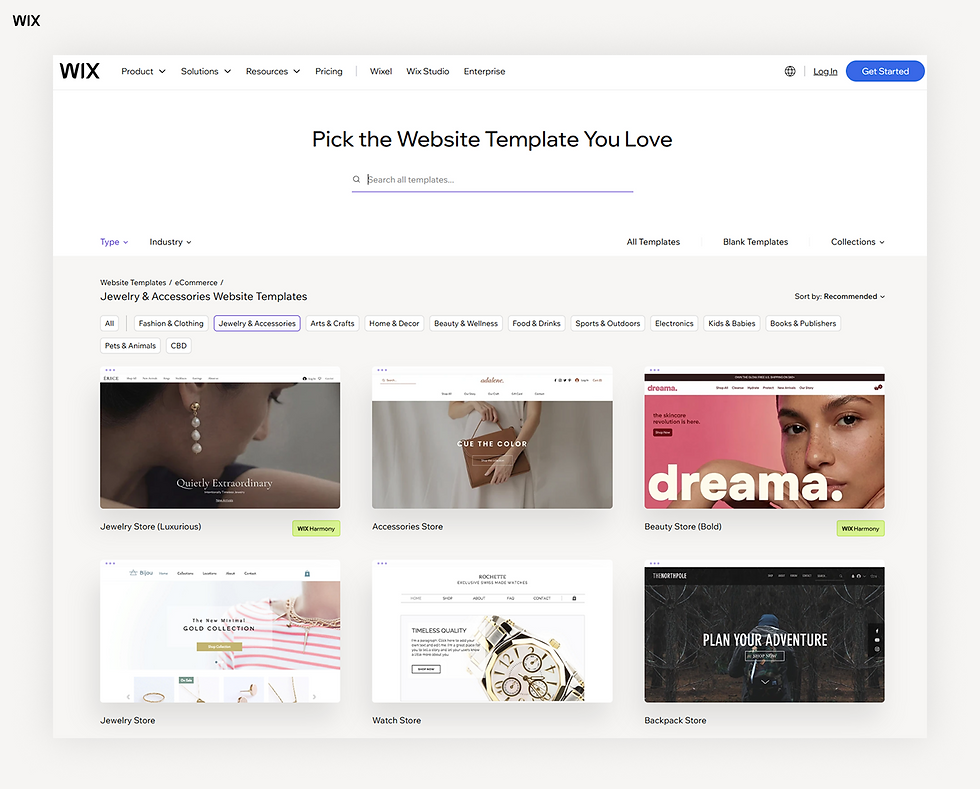
Your jewelry website needs to do more than just look pretty; it has to work hard for your business. These templates come packed with built-in store pages, allowing you to add products and start selling right away.
Customers can zoom in on product photos to see every detail before they buy. It’s all about giving shoppers a smooth experience that makes them confident enough to click "add to cart."

Template name: Jewelry store (luxurious) website template
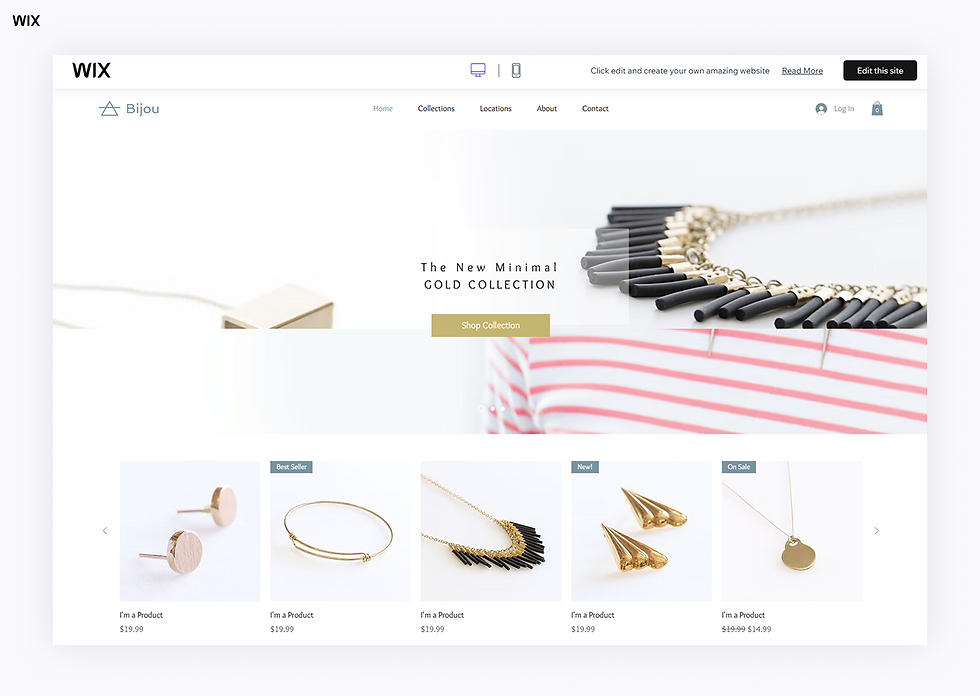
Template name: Jewelry store website template

Template name: Precious stones dealer (elegant) website template
Check out some popular website templates to get started quickly:
Why make a jewelry website
A marketplace such as Etsy brings buyers who are already searching, which is why plenty of jewelers start there. Your own website adds what a marketplace can't: a store under your brand, a customer list you keep and policies you set yourself.
It also reduces platform risk. Marketplace fees, search rules and policies can change, and a suspended shop can take your listings and reviews offline with it. The tradeoff is that you bring the traffic yourself, through social media, email, search and events.
Factor | Your own website | A marketplace |
Fees | Plan, payment processing and app costs | Listing, transaction and payment fees per sale |
Traffic | You bring visitors yourself | Shoppers already searching the marketplace |
Customer data | Your customer list and email sign-ups | Limited, governed by marketplace rules |
Branding | Your design, domain and story | A shop page inside the marketplace layout |
Policies | You set returns, resizing and custom orders | Marketplace rules apply |
Platform risk | You control the store | Fee, search or policy changes affect your shop |
Rosie Ferguson Gathings of Rosie Hues Fine Art sells prints rather than jewelry, but her move from social media messages to her own store shows what changes for a small handmade brand:
“Before Wix, I was selling prints through Instagram stories and DMs. Orders would get buried in messages, people would miss releases, and it felt very unorganized. I wanted a more professional and reliable space where people could easily browse and purchase without everything depending on social media algorithms.” - Rosie Ferguson Gathings, Rosie Hues Fine Art
A website doesn't replace selling in person or on a marketplace. You can run all three, with the website as the hub that every Instagram post, market card and marketplace profile points back to.
How much does it cost to make a jewelry website
The yearly cost of running a jewelry website adds up from several parts: a domain, a website or ecommerce plan, payment processing fees on each sale, shipping supplies and insurance, any apps or plugins and product photography. Add your time or a professional's for maintenance, plus fees on any marketplace you keep.
Some providers bundle hosting, security and a store into one plan, while others charge for each separately, so compare the total yearly cost rather than the headline price. Also check whether a platform adds its own transaction fee on top of payment processing.
By method, builders and AI builders usually mean a predictable monthly or yearly plan. AI coding tools, a CMS and hand-coding shift costs to hosting, plugins and developer time, while headless builds and agencies carry the highest upfront and support costs.
Shipping is easy to underestimate once insurance and signature delivery are added, especially if you offer free shipping.
“Free shipping can quickly become unprofitable for smaller businesses or those with low profit margins if these costs are not compensated elsewhere.” - Lisa Kammermayer, Chief Marketing Officer at SimpleSell
On Wix, you need a paid plan to accept online payments. Compare current plans and what each includes on the Wix plans page, and remember that payment processing fees apply to each transaction.
Learn more: How much does a business website cost

How to build a jewelry website with Wix
Here's how Wix tools map to the jobs a jewelry store owner actually does, from building the site to shipping orders.
Build and manage the site
Start from a template, generate a first draft with the AI website builder or build with Wix Harmony, which combines prompts and drag-and-drop editing with an AI agent called Aria. Harmony can embed HTML snippets; fully custom code needs Wix Studio or Wix Headless.
If you'd rather work in chat, you can make a website with Wix in ChatGPT or use Claude with Wix to build and update pages from a conversation.
“Wix Harmony lets a seller go from a prompt to a fully functional online store with a responsive product page, the complete Stores vertical wired in and business tools ready to use from day one. That's not a simplified version of the platform, that's the real thing, generated from the start.” - Maya Isak, Ecommerce Project Marketing Manager at Wix
Run products, orders and payments
The Wix online store builder lets you add pieces with pricing, variants and AI-generated descriptions, and every store includes a cart and checkout. Product options let one ring come in several sizes, metals and stones, each with its own price, stock count and SKU.
Wix Payments accepts major cards plus methods such as Apple Pay, Google Pay, PayPal and buy now, pay later options, depending on your location. If you sell at craft fairs, Wix POS keeps in-person sales and online store inventory in sync, so a piece sold at your booth shows as sold online too.
To reach shoppers where they browse, Wix connects stores with marketplaces such as Amazon, eBay and Google and lets you sell on Instagram and TikTok. Check which channels are available in your country before you plan around one.
Sell wholesale alongside retail
If boutiques stock your work, Wix Ecommerce lets you manage wholesale and retail sales from the same store, and B2B selling through SparkLayer adds customer-specific pricing, B2B ordering and account management.
Worth knowing if you sell wholesale: a standard storefront is built for direct-to-consumer sales. Wholesale price tiers and account-based ordering are solvable, but they need extra setup a retail store doesn't.
Keep your online prices in line with the retail price you agree with stockists, so shops aren't undercut by your own site.
Market your pieces
Built-in Wix SEO settings cover page titles, meta descriptions and alt text, and Wix Analytics shows which products get traffic and sales. Email marketing lets you announce new collections and holiday deadlines to your list.
Build for clients or with custom code
Agencies and freelancers building jewelry stores for clients can use Wix Studio, which adds advanced design and collaboration tools.
Developers who want a fully custom storefront can use Wix Headless, which provides commerce services and hosting but not a ready-made storefront, so a developer still builds and tests the shopping journey.
Hand off routine work to AI agents
Let a team of AI agents take on the gifting-season rush. Holidays, Valentine's Day and wedding season can bury a small jewelry brand in messages, orders and promotions.
Symphony by Wix is an AI agent platform for independent business owners and small businesses, a good fit for a solo jeweler or a studio of up to 10 people.
It gives you a team of agents for marketing, client communications, scheduling, finance and operations, coordinated through one conversation.
They could draft the email announcing your gifting collection, answer shoppers' questions about ring sizing and custom pieces and keep an eye on sales against what you spend on materials.
Symphony learns how your business works, suggests what to do next and asks for your approval before any agent acts. It works whether or not your site is built on Wix, so you can use it with any of the methods above. Results vary by business.
Why use Wix for a jewelry website
Wix brings the store, domain, hosting, payments and marketing tools into one dashboard, so a small team has fewer systems to connect and update. Compare it with other best ecommerce platforms on what matters for jewelry: photos and zoom, variant handling, secure checkout and shipping tools.
How to make a jewelry website FAQ
What's the best website builder for selling jewelry?
It depends on how you want to work. Choose a builder with high-resolution photos and zoom, product options for size and metal, secure payments and shipping tools. If you'd rather start from a description, an AI website builder creates a first draft you can edit.
How much does it cost to make a jewelry website?
It depends on the platform, your plan and the tools you add. Budget for a domain, a plan that accepts payments, processing fees, shipping and insurance, apps and product photography, and compare the total yearly cost rather than the monthly price.
Do I need coding skills to build a jewelry website?
No. Website builders and AI builders let you design pages visually or by describing them. Coding is only needed for custom features or for hand-coded and headless sites.
How do I make my jewelry website look professional?
Use consistent, high-quality photos, a clean template with room for images and clear product details. A custom domain with matching business email adds credibility, and reviews, clear policies and fast mobile pages build trust.
Do I need an LLC to sell jewelry online?
No, many sellers start as sole proprietors. An LLC can help separate personal and business assets and make business banking simpler. Rules vary by location, so check with a local advisor (this isn't legal advice).
Should I sell jewelry on my own website or on Etsy?
You can do both. A marketplace brings shoppers who already search there, while your own site gives you your brand, customer list and policies. Running both lets you reach new buyers and bring repeat customers to your store.
How do I handle ring sizes when selling online?
Add each size as a product option, publish a size chart with measuring instructions and say whether you offer resizing, exchanges or a ring sizer.
Should I insure jewelry shipments?
For valuable pieces, yes. Check your carrier's declared-value coverage or a shipping insurer, require a signature above a set value and state what happens if a parcel is lost.
How do I stop a one-of-a-kind piece from selling twice?
Track inventory with a quantity of one and connect in-person and marketplace sales to the same inventory where your platform supports it. Otherwise, update every channel as soon as the piece sells.
Can I sell wholesale and retail from the same website?
Yes, on platforms that support separate wholesale pricing or accounts. Keep your online retail prices in line with what you agree with stockists.
Can I build a jewelry website on a free plan?
You can usually build and preview a site for free, but accepting payments needs a paid plan on most platforms, including Wix.


