Updated: 1 day ago
Build your website, your way with Wix Harmony →

How to make a website via Wix's LLM breaks down into two real paths, and this guide covers both. The first runs through Wix's own AI website builder, built on a proprietary language model Wix trained in-house specifically to generate Wix sites.
This guide covers how to make a website with an LLM either way, whether that means building inside Wix's own tool or reaching Wix directly from an outside LLM like Claude or ChatGPT.
The first path's home is Wix Harmony, a hybrid editor that pairs that in-house model with full manual, drag and drop control; the sections further down on Claude, ChatGPT and the Wix MCP cover the second.
Wix Headless drag and drop deploy allows you to upload or drag in your project's HTML, CSS and JavaScript files to get your site instantly live with a shareable URL. This removes the hassle of deployment setup, infrastructure work and waiting for the site to be live. Deploying through Wix instantly gives your site scalable free hosting, and secure Wix infrastructure trusted by millions. Once your files are up, you can also add Wix business solutions for eCommerce, scheduling, CMS and payments with a single prompt. You can also easily connect a domain you already own or buy a new one directly through Wix.
TL;DR: how to make a website with Wix's LLM

In short: there are two ways to build a Wix site with an LLM. Wix Harmony turns a written prompt into a live website you can refine by chatting with Aria, Wix Harmony's built-in AI agent, or by editing it by hand, and the Wix MCP lets you do much of the same thing from inside Claude or ChatGPT instead of opening the Wix editor at all.
Either way, the process touches on how to make a website with an AI agent handling the busywork behind the scenes and where Wix AI fits once the site is built and running.
Describe your business in a prompt and Wix Harmony generates pages, layout and starter copy.
Or stay inside Claude or ChatGPT and build the same site through the Wix MCP.
Refine the result by chatting with Aria or editing manually, moving between the two whenever you want.
Add business tools like an online store, bookings or invoicing without leaving the editor.
Hand off ongoing tasks such as content updates, customer replies or inventory alerts to an AI agent.
Publish with SEO, security, domain name and hosting handled by Wix's infrastructure from day one.
Learn more: Do I need MCP for my Wix site?

Wix Harmony brings AI and manual creation together in a single, smart platform. You can generate full pages, layouts and content with natural language, then fine-tune every detail with precise drag-and-drop control. It’s faster, more flexible website creation, without sacrificing quality or creative freedom.
How to make a website via Wix's LLM
Building a site starts with a choice: work inside Wix Harmony, or stay inside an outside LLM and reach Wix through the MCP. Both break into a short list of repeatable stages, from your first prompt to the moment you are ready to take orders or bookings.
Jump to whichever stage matches where you are right now:
01. Start with a single prompt

Why prompt a website instead of picking a template and dragging elements into place? A prompt lets Wix Harmony's underlying LLM understand what your business actually does, then generate a structure that fits it instead of making you adapt your business to a generic layout.
Avishai Abrahami, CEO and co-founder of Wix, points to what is running underneath that experience: "We recently built our own proprietary LLM that is now powering Wix Harmony. By allowing us to continuously fine-tune our platform using our own data and user feedback at scale, this model creates a flywheel that we believe is unmatched and creates a significant competitive advantage."
One thing worth knowing: the more specific the prompt, the less editing you will do afterward. Strong AI prompts for website building name the business type, the tone you want, a color direction if you have one and any must-have pages, then leave the rest to Wix Harmony.
02. Vibe code the design with Aria
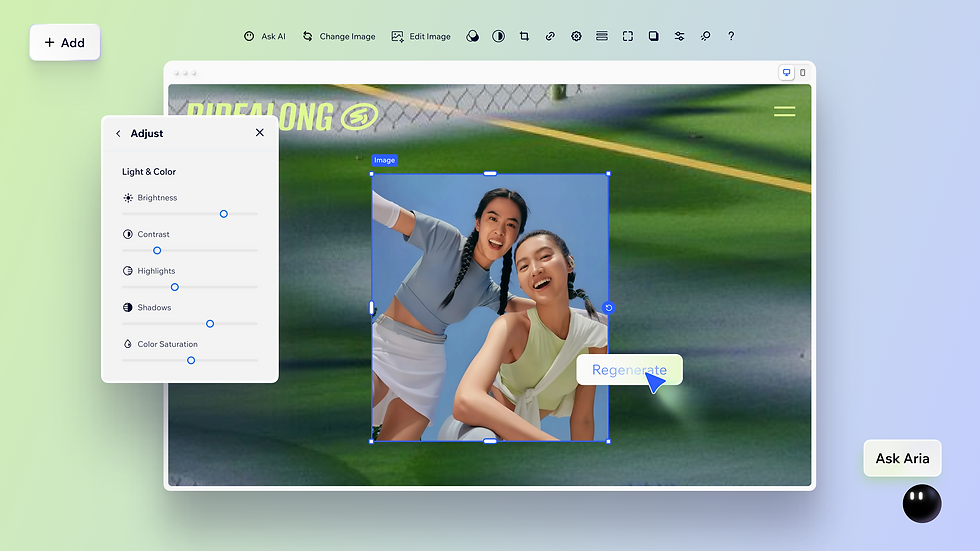
What is vibe coding? It is the practice of describing what you want in plain language and letting an AI turn that description into working sections, pages or components, then adjusting by hand until it matches your vision. Learning how to vibe code a website with Wix Harmony means treating Aria less like a chatbot and more like a collaborator who can execute multi-step requests.
Yarin Singolda, Product Marketing Manager at Wix, describes how far that collaboration goes: "Aria isn't just an assistant, she's a collaborator who can handle complex tasks in one go. You can have her create a new section, add text, pull in best-selling items, insert images and even add linked buttons, all at once."
As a vibe coding website builder, Wix Harmony keeps every creative decision with you even as Aria executes the technical steps.
"I like using AI as a starting point. But I need the creative freedom to show my personality. I want site visitors to feel like they're stepping into my studio." - Tessa J. McNaboe, Pilates instructor, Wix Harmony user
That balance, AI for speed and manual editing for personality, is the same trade-off Wix Harmony is built around. If you're learning how to design a website with AI, the goal isn't to let AI make every decision, it’s to move fast with a prompt, then slow down exactly where your brand needs a human touch.
03. Edit by hand for pixel level control

Once the first draft exists, Wix Harmony's manual tools take over wherever a prompt falls short: pixel level drag and drop editing, custom component generation and a brand kit that keeps fonts and colors consistent across every page. Every good website builder eventually raises the same question: how much should a person decide by hand once the machine has done the heavy lifting?
That is the same logic that makes prompt-then-edit workflows work: publish the AI-generated draft, then spend your editing time on the handful of sections that actually need a person's judgment.
04. Add eCommerce, bookings and other business tools

A website built with an LLM still needs to run a real business once it is live, which is why Wix Harmony wires business tools in from the start rather than bolting them on later. As an eCommerce platform, Wix Harmony extends that into an AI eCommerce builder: describe a product catalog in a prompt and get a storefront with checkout, inventory and payment processing already connected.
Worth knowing: if your product catalog includes variants across more than two or three attributes, such as size, color and material, plan for extra setup time to structure those correctly after the AI generates your first draft. Most stores are live within hours; catalogs with heavy variation are closer to a full day.
Beyond the storefront, Wix's broader eCommerce features cover subscriptions, loyalty programs, back-in-stock notifications and multi-currency payments, all manageable from the same dashboard that Wix Harmony just built for you.
05. Bring an AI agent onto the team

What is an AI agent, and how is it different from the chat window you just used to build your site? A website builder generates a result from a prompt and stops. An AI agent keeps working after that: it can complete tasks on an ongoing basis, like replying to a customer message, updating inventory or drafting a marketing email, without you re-prompting it every time.
The AI agent use cases that matter most to a small business owner tend to be operational rather than creative: answering routine customer questions, flagging low stock, drafting invoices or summarizing what happened on the site overnight. Wix's own agentic roadmap, called Symphony, is built specifically around this idea: instead of learning Wix's AI agents one at a time, an owner talks to a single orchestrator that routes tasks to specialist agents behind the scenes.
Shahar Talmi, GM of Developer Platform at Wix, frames the shift in infrastructure terms: "The industry has been focused on making it easier to build things. We've been building the infrastructure to make those things operate at scale. With Wix Headless, an AI agent doesn't just generate a storefront, it turns it into a fully functional and sustainable business."
Learning how to manage online business with AI agent support usually starts small: automate one repetitive task, confirm it works reliably, then hand over the next one. That incremental approach is also the most realistic way to think about how to run an SMB better with agentic AI, since a five-person business rarely has the bandwidth to overhaul every workflow at once.
06. Publish and let SEO tools take over

Once the site is live, Wix's built-in SEO features, including meta titles, structured data, sitemaps and canonical tags, start working without any separate setup, the same way they would on a site built entirely by hand.
07. Type "@Wix" into Claude, ChatGPT or Copilot and let Wix Harmony build it from there

Wix Harmony isn't the only way to build with an LLM. Here is what actually happens, step by step, when you build a Wix site from inside ChatGPT, Claude or another connected tool instead of opening the Wix editor directly.
Type "@Wix" and describe your business.
Learning how to make a website in GPT starts with a single tag: type "@Wix" into a ChatGPT or Microsoft Copilot conversation, then describe your business the same way you would prompt Wix Harmony directly, for example "a bakery in Austin that takes online orders and shows a weekly menu."
How to make a website through a GPT chat is really a two-layer process: the chat interface sends your description to Wix, and Wix Harmony, the same AI website builder covered earlier in this guide, generates the actual site, including booking systems and menus, without you ever opening the Wix editor yourself.
Once the first draft exists, follow-up messages in the same conversation add pages, adjust copy or restructure sections, the same way prompting Aria does inside Wix Harmony itself. The chat is the interface; Wix Harmony is still doing the building on the back end either way.
For anyone who prefers Claude, how to make a website with Claude and how to use Claude with Wix both run through the Wix Claude Connector: open a conversation, connect your site and either build a new one or update an existing store, bookings or content without leaving the Claude interface. Since the connector launched, Claude has become the most-used MCP agent on the Wix platform.
What is the Wix MCP behind all of this? It is a Model Context Protocol server that exposes Wix's core capabilities, including site generation, store management and bookings, as structured tools that any MCP-compatible AI client can call directly. That single server is what "@Wix" in ChatGPT, the Wix Claude Connector and tools like Cursor are all built on top of, whichever chat window you happen to be typing into. In ChatGPT specifically, this same connection is also available as the Wix plugin for ChatGPT, listed in OpenAI's directory.

This raises a real question in the vibe coding vs no code comparison: no-code tools still require you to click and configure. Vibe coding through an LLM, whether that means typing directly into Wix Harmony or typing "@Wix" into an outside chat connected through the Wix MCP, lets you describe the outcome and skips the manual configuration step entirely.
How to make a website with Wix's LLM fast
Speed is usually the first thing people want to know about how to make a website fast with an LLM, and the honest answer is that the AI draft itself takes minutes. The variables that add hours are content readiness, meaning whether your product photos and copy are ready, and how much manual customization you want afterward.
For businesses that need to move even faster, teams building on Base44, Wix's AI app builder, have shown just how far same-day can stretch when a first version does not need to be perfect.
"We launched it within a week. Just before Gift My Book, we worked with developers and it took a few months, and then we basically built it in a week." - Yoav Hornung, co-founder, Gift My Book
Yoav's team validated the idea with $100 in ad spend before scaling and reached close to $1 million in annualized revenue within three months of launch. That timeline is the practical version of how to build a website in a day: launch something functional immediately, then improve it in public as real customers respond to it.
How does an AI website builder actually work?

How does an AI website builder work under the hood? A large language model reads your prompt, maps it against patterns learned from analyzing how real websites in your category tend to be structured, then generates pages, layout and starter copy that match.
What is the Wix AI website builder doing differently comes down largely to training data: Wix Harmony's model is trained specifically on Wix's own site-building data rather than general web text, which is why Avishai Abrahami describes the fine-tuning loop as a competitive advantage rather than a one-time feature.
AI website builders vs traditional and no-code tools
The traditional vs AI website builder debate mostly comes down to where the first draft comes from. A traditional website builder starts you on a blank template and asks you to fill in every section by hand. An AI website builder starts you with a structured draft based on your prompt, then lets you edit from there.
Among the best low-code no-code website builders, the meaningful difference is whether AI generation and manual editing live in the same interface or require switching tools entirely. Wix Harmony was built specifically so a person never has to leave the editor to move between prompting and hands-on design.
Learn more: Why the AI compute makes Wix stronger
Wix Harmony for small business owners
Wix Harmony for small business owners tends to matter most for the people running a business alone, without a marketing team or a developer on staff.
How to make a website via Wix's LLM ultimately comes down to a single decision: describe what you are building, then decide how much of the result you want to shape by hand. Wix Harmony was built around that exact choice, giving you the speed of a prompt and the precision of a full editor in the same place.
Ready to see it for yourself? Try Wix Harmony and turn your first prompt into a live, business-ready website today.
Wix Headless for developers and agencies
Wix Harmony covers the full journey from prompt to live site without writing a line of code. For development teams that need complete frontend control, building on React, Next.js or their own stack, Wix Headless is the headless solution that gives you Wix's CMS, APIs, eCommerce and business tools as a managed backend while you build and own the frontend entirely.
This is where Shahar Talmi's point from Step 5 lands in practice: the same AI agent that generates a storefront through the Wix MCP can keep managing inventory, customers and content on the backend, while a development team shapes the frontend with any framework they choose. Wix Harmony for the prompt-to-launch flow; Wix Headless for teams that need to go further.
Learn more:
How to make a website with Wix's LLM FAQ
What is Wix Harmony?
Wix Harmony is Wix's AI website builder. It is not itself an LLM. It runs on a proprietary large language model that Wix trained in-house specifically to generate Wix Harmony websites, and it generates a complete, business-ready website from a single prompt. From there, you refine it through Aria, Wix Harmony's built-in AI agent, or by editing manually with full drag and drop control.
How do I make a website with Wix's LLM?
Describe your business in a prompt to start, then review the draft Wix Harmony generates. From there, chat with Aria to adjust sections and copy, or switch to manual editing for pixel level changes. Add business tools like a store or booking system, then publish.
Is Wix Harmony good for eCommerce?
Yes. Wix Harmony connects directly to Wix's eCommerce platform, so a store generated from a prompt already includes checkout, inventory and payment processing, along with features like loyalty programs and subscriptions.
Can I edit an AI-generated website by hand?
Yes. Wix Harmony is built as a hybrid editor. You can move between prompting Aria and using pixel level drag and drop tools, custom component generation and a brand kit at any point in the process.
Can I use Claude or ChatGPT to build a Wix site?
Yes. Wix's ChatGPT integration lets you type "@Wix" to invoke Wix Harmony directly from a conversation, and the Wix Claude Connector lets you build and manage a Wix site from inside Claude. Both rely on the same Wix MCP server that exposes Wix's capabilities to any compatible AI client.


