Updated: 3 days ago
Make any AI project business-ready in one prompt. Try Wix Headless →

Every content team eventually hits the same fork in the road: stick with an all-in-one CMS that bundles content and design, or split them apart and go headless. The headless CMS vs traditional CMS choice is not about which is newer, it is about how your content needs to work. Get it right and your site stays fast and flexible for years. Get it wrong and you spend those years fighting your own setup.
Wix Headless connects any frontend to a complete, proven business backend in a single prompt. The CMS is free with no content cap.
TL;DR: headless CMS vs traditional CMS
A traditional CMS keeps your content and your design in one system, which is simple to launch but limits where your content can go. A headless CMS separates the two and delivers content through an API, which adds flexibility and speed at the cost of a little more setup.
This guide compares them head to head and shows how to pick the right one.
You'll learn:
What traditional and headless CMS platforms actually are
The key differences between them, side by side
Where each one wins and where it struggles
How to choose the right architecture for your project
What is a traditional CMS?
A traditional CMS, sometimes called a monolithic CMS, manages your content and your website's design in a single system. You write content and design pages in the same place and the platform, such as a website builder, renders the site from its templates and themes. It is the model most people picture when they think of building a website, with everything bundled together and ready to publish.
The strength is in its simplicity and the fact that it allows a non-technical team to launch a site fast without a developer. The limit is that your content is tied to that one front end and its templates, so reusing it elsewhere is hard.
What is a headless CMS?
A headless CMS keeps only the content and hands it off through an API and there's is no built-in front end. You build the presentation or design layer yourself in whatever framework you like, then pull content in on request. The content lives as structured, reusable data rather than pages locked to a template.
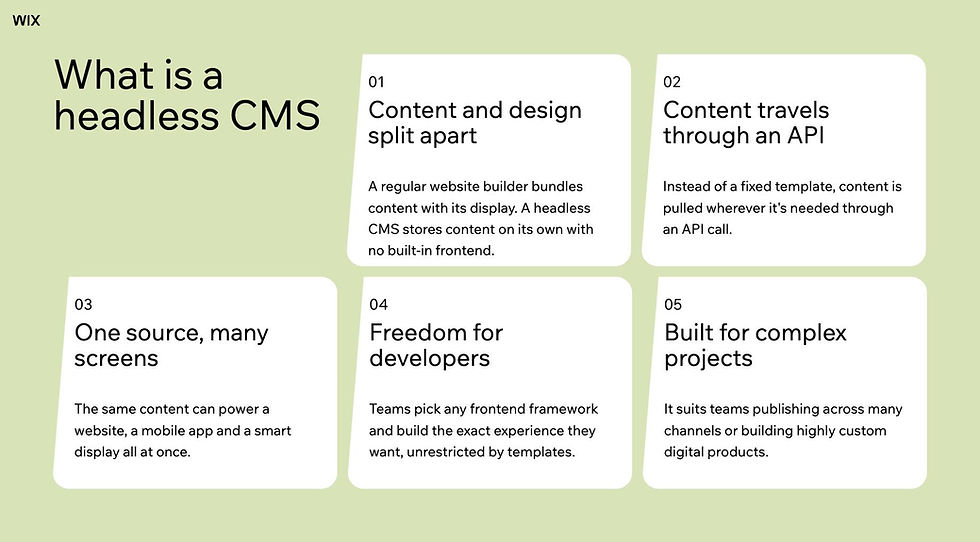
That structure is what makes a headless CMS powerful because the content can feed a website, an app or a smart display and you can redesign the front end without touching the content behind it.
Headless CMS vs. traditional CMS: the key differences
The differences all trace back to one thing: whether content and presentation are joined or separated.
CMS feature | Traditional CMS | Headless CMS |
Architecture | Content and design coupled | Decoupled, connected by an API |
Front-end control | Bound to the platform theme | Any framework, fully custom |
Content reuse | Locked to pages | Structured and reusable |
Channels | One website | Many surfaces from one source |
Speed | Tied to the monolith | Typically faster, lighter front end |
Ease of use | Fast for non-technical teams | Needs a developer to set up |
Upkeep | One system | Two connected systems |
Where each CMS wins
Neither architecture is universally better but each does have a clear advantage where it becomes the smart pick.
Where a traditional CMS still wins
For a simple site with one editor and no plans to expand, a traditional CMS is often the smarter choice. It launches fast, needs no developer and keeps content and design in one familiar place. If your whole strategy is a single standard website, the extra power of headless is effort you may not need.
Where a headless CMS wins
A headless CMS pulls ahead the moment your content needs to travel. Multi-channel publishing, custom front ends, faster performance and the freedom to redesign without a rebuild all favor headless. It's built for teams that expect to grow across surfaces rather than stay on one page.
Learn more: What is headless commerce
Worth being clear on: going headless means the front end is yours to build and own. That is the whole point of the model and its main cost. The headless cms that make it painless are the ones that hand you a full business backend so you are not solving payments, scheduling and commerce from scratch on top of the frontend work. That hand-off is the same idea behind backend as a service.
How to choose between headless cms and traditional cms
The right architecture is the one that matches how your content needs to work, not the one with the longest feature list. A few honest cut lines to narrow it down:
Single simple site: a traditional CMS is faster to launch and easier to run day to day.
Multi-channel content: a headless CMS lets one source feed every surface through an API.
Custom front end: headless gives developers full control over the build and the stack.
Growing fast: headless scales into new channels without forcing a rebuild.
How it actually works with Wix Headless: pasting a prompt from wix.com/headless/skill.md into an AI coding tool like Claude Code or Cursor connects your project to the backend instantly. If you build on a vibe coding platform like Lovable or Base44, you start from the Wix Headless page and your project opens with the backend already wired in. The path is fast either way, but which one fits depends on how you are building the frontend.
Read more: How much Wix Headless costs
Getting headless without the tradeoffs, with Wix Headless
The classic knock on headless is that you trade simplicity for power. Wix Headless narrows that gap because you get a complete business backend, with a CMS, eCommerce, payments, bookings and events all natively connected and you connect any frontend to it in a single prompt, so the setup cost that usually comes with headless is much smaller.
Ran Levi, Developer Advocate, Wix
The hardest part of shipping something real has never been the frontend. Anyone can build a beautiful UI fast now. The wall people hit is always the same: payments, bookings, a CMS that actually works. Wix Headless knocks that wall down. You connect your frontend to the infrastructure millions of businesses already run on, in one prompt. You're not a backend engineer, you're just shipping.
Something most people don't expect: the Wix headless CMS is included at no cost. You create content collections, define your fields and serve structured data to your frontend through an API without paying for a separate CMS plan. There is no per-collection fee and no content cap at the free tier.
You get two hosting paths, not one: Wix-managed hosting handles CDN, SSL and scaling automatically, or you self-host the frontend on your own infrastructure and connect to the Wix backend by API. Both paths reach the same complete business backend, so the choice comes down to how much control you want over hosting.
Read more: can you use Wix without an editor
Headless CMS vs traditional CMS FAQ:
What's the main difference between headless and traditional CMS?
A traditional CMS bundles content and design in one system, while a headless CMS keeps only the content and delivers it through an API to a front end you build separately. In short, traditional couples the two and headless decouples them.
Is a headless CMS better than a traditional CMS?
Neither is better on its own. A headless CMS wins for multi-channel, custom or fast-scaling projects, while a traditional CMS is simpler for a single standard website. The right choice depends on how your content needs to work.
Can a traditional CMS be used headless?
Some traditional platforms offer an API that lets you use them in a headless way, often called hybrid or decoupled mode. It can work, but a platform built headless-first usually delivers content through an API more cleanly than one retrofitted for it.
Is a headless CMS harder to use?
Setting one up takes more development than a traditional CMS, since you build the front end yourself. Day-to-day editing is designed for non-technical users, and managed backends plus AI coding tools have made the initial setup far easier than it used to be.
Which is better for SEO?
Both can rank well. Headless setups can be faster and give you direct control over markup and performance, which helps, but a traditional CMS with good SEO practices competes fine. Your content and technical execution matter more than the architecture.


