Updated: Aug 17
Build your website in minutes, try Wix for free today →

If you’re looking for a website builder to create your site, a Wix vs Weebly comparison is a smart place to start.
Choosing the right platform is crucial whether you’re building a business website, portfolio, blog or online store. That’s why a head-to-head comparison matters.
We’re comparing two popular builders, Wix and Weebly, to give you a clear, honest rundown of what each offers, helping you pick the website builder that fits your needs best.

When it comes to choosing a website builder, you want a platform that’s flexible, powerful and easy to use. Wix is trusted by millions to effortlessly create stunning websites. Try it for yourself and discover what makes Wix unique and why it could be the perfect fit for your next project.
TL;DR: Wix vs Weebly
The Wix vs Weebly comparison comes down to flexibility vs simplicity:
Best for growth and creative control: Wix with its drag-and-drop website builder, powerful apps, eCommerce platform and built-in SEO tools. Perfect if you want full control over your site and want to learn how to make a website that can grow with your business.
Best for quick, simple sites: Weebly offers easy setup, is budget-friendly and has a minimal learning curve.
Meet your contenders: Wix vs Weebly
Wix
A full‑featured website builder that puts flexibility and creative control in your hands. With drag‑and‑drop design, thousands of website templates, AI tools, built-in blog and eCommerce features, Wix makes it easy to grow your site as your needs evolve.
At the core of Wix is Wix Harmony, an AI website builder that lets you go from a single prompt to a fully designed, business-ready website. You can generate your site by chatting with Aria, Wix Harmony's built-in AI agent, then keep refining every detail by hand with full drag-and-drop control. It's a hybrid creation experience where AI speed and manual precision coexist, you're never locked into one mode.
Learn more: Is Wix good for website building?
Weebly
A simpler website builder that lets you easily build a website. It’s ideal if you want to launch a basic site quickly, with minimal technical overhead. However, its design flexibility and long-term scalability are more limited.
Wix vs Weebly: the ultimate comparison
01. Templates & web design

What Wix offers
Wix has over 2,000 designer-made website templates for nearly every industry imaginable. All templates are fully customizable with the intuitive drag-and-drop editor, giving you complete control over every element. You can move buttons, resize images and change fonts and colors to perfectly match your brand.
For users who want to go beyond templates entirely, Wix Harmony lets you generate a complete, custom-designed website from a single prompt, then refine every visual detail using Aria, Wix Harmony's built-in AI agent, or by editing by hand. Pixel-level control through AI or manual editing means your site's identity is never compromised by the tool you use to build it.
What Weebly offers
Weebly offers just over 45 themes, a much smaller selection compared to Wix’s 2,000+ templates. Its editor uses a structured, row-by-row grid layout, which makes building websites straightforward but limits creative freedom. Still, Weebly provides drag-and-drop functionality, built-in image editing tools and support for custom fonts, giving users some flexibility within its structured framework.
Bottom line: Wix clearly leads in template variety and web design flexibility, offering thousands of fully customizable templates and complete creative control. Weebly’s smaller selection and structured editor make it easier for beginners but limit design freedom, though it still includes drag-and-drop, image editing and custom font options.
02. AI-assisted creation

What Wix offers
Wix’s AI tools are deeply integrated into the platform. With Wix AI, you simply answer a few questions about your project and the system instantly generates a complete, custom website with tailored text, visuals and layout.
Wix Harmony is Wix's AI website builder, and it goes well beyond template generation. You can go from a single prompt to a complete, professionally designed website. Aria, Wix Harmony's built-in AI agent, is a multi-skilled creative and business partner who can generate pages, sections, images and text, perform on-canvas actions and offer both web design and business strategy expertise, all while staying aware of the context of what you're building. From there, you can keep shaping every detail by hand with full drag-and-drop control. You're the composer; Aria is the accompaniment.
Using Wix’s free AI website builder, you can create a fully customized website or online store in minutes, making it faster than ever to launch your site.
What Weebly offers
Weebly does not currently offer AI features. That means everything is up to you: designing the website, writing copy, adding new pages, setting up SEO, etc. That's great if you have in-depth web development skills, but less-great if you're new to building websites.
Bottom line: Wix takes the lead with AI-assisted creation, allowing users to quickly generate fully customized websites and online stores in minutes. Weebly lacks AI tools, so all design, content and setup tasks fall on the user, making it less beginner-friendly.
Learn more about AI:
"When it comes to website building, one of the biggest challenges for business owners is the amount of time needed to create one. With AI, everything is much faster and easier. Business owners can now build their own websites, update their content and create or enhance images with minimal effort. AI is revolutionizing the world and the technology is expanding into everything we do." - Marine Levy Belder, product marketing manager at Wix
03. Apps & integrations

What Wix offers
The Wix App Market features over 470 popular professional apps. You can quickly add contact forms (using the integrated form builder), social media feeds, online scheduling, an event website and marketing tools. Most apps install with a single click and work seamlessly with your site.
What Weebly offers
Weebly’s App Center provides over 375 apps and integrations. You can add features such as eCommerce, communications, marketing and social tools. While the selection is smaller than Wix’s, Weebly’s apps are easy to install and generally beginner-friendly.
Bottom line: Wix has a larger, more versatile ecosystem for expanding your site, making it ideal for growing businesses or complex projects. Weebly covers essential integrations, which is sufficient for simple sites, but may feel limiting if you need advanced functionality or niche tools.
04. Security & reliability

What Wix offers
Wix provides enterprise-grade security for all websites. This includes free SSL certificates, 24/7 monitoring for threats like DDoS attacks and a 99.99% uptime.
Website security measures are managed for you, so you can focus on creating the best version of your site.
Every site built with Wix Harmony is backed by this same enterprise-grade infrastructure, ensuring top-tier security, performance and reliability from day one, with no additional setup required.
What Weebly offers
Weebly also includes essential security measures for all websites. Every site comes with a free SSL certificate, hosted on Weebly’s servers with routine monitoring. Advanced DDoS mitigation and support teams help keep sites safe, though exact uptime and SLA guarantees are not published.
Bottom line: Both Wix and Weebly offer internal security monitoring and core security protections. Wix also publishes detailed information about its infrastructure, uptime and security commitments, which can be helpful for high-traffic or business-critical sites. Weebly provides similar protections but is less transparent publicly about uptime guarantees and SLAs, which may be a consideration for some businesses.
"Cybersecurity is not just a technical matter: it is above all a posture, a way of thinking about the management of one's site, one's tools, one's teams." - Allan Kinic, cybersecurity expert and founder of Prevention-internet.fr
05. Ecommerce

What Wix offers
Wix eCommerce provides a comprehensive solution for businesses of any size, making it simple to sell online via a fully integrated storefront. You can offer physical products, digital goods, custom merch or sell subscriptions straight from your site.
The platform also comes with features like abandoned cart recovery (available starting with the Core plan), secure payment processing, inventory management and tools to create a dropshipping website, along with multi-channel selling capabilities.
Wix supports high-performance eCommerce operations with AI-driven product recommendations, automated discount logic and omnichannel selling across marketplaces, social platforms and in-person point-of-sale, making it a scalable platform for businesses from first-time sellers to high-revenue brands.
What Weebly offers
Weebly eCommerce lets you create an online store with ease. You can manage inventory, handle shipping and accept payments through Square, Stripe or PayPal using the fully integrated shopping cart. While it covers the essentials for small businesses, features like abandoned cart recovery and subscription sales are more limited compared with Wix.
Bottom line: Weebly is a solid choice for small, straightforward online stores. Wix provides a more robust, scalable eCommerce solution making it better suited for growing businesses or complex selling needs.
Learn more about online selling:
06. Hosting & domains
What Wix offers
Every Wix site includes free website hosting, so there’s no need to manage servers or handle technical setup, it’s all taken care of for you. Behind the scenes, Wix runs on multi-cloud hosting (using providers like Google Cloud, Amazon Web Services and others) to deliver 99.99% uptime.
Wix also relies on a global Content Delivery Network (CDN) with 200+ nodes worldwide, helping your site load quickly for visitors wherever they’re located.
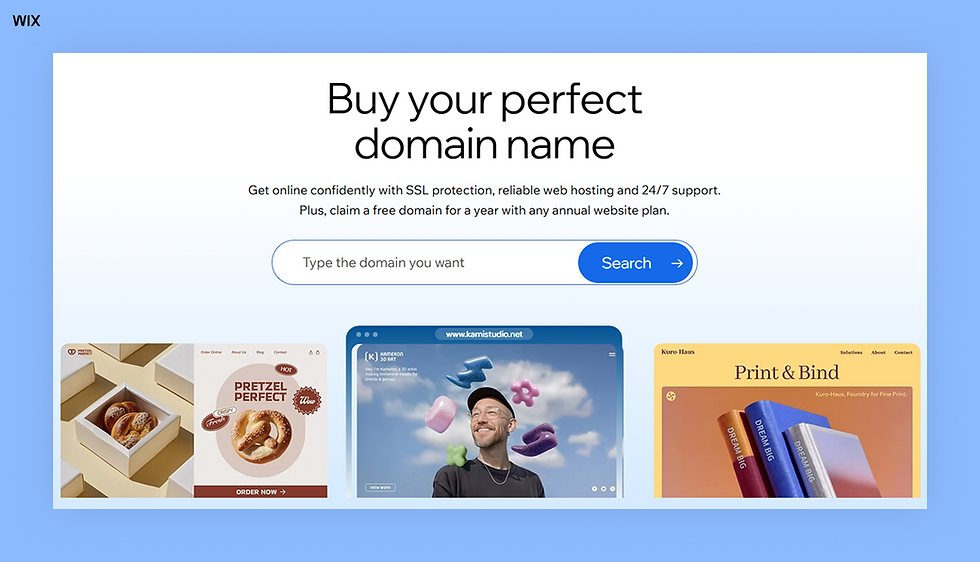
For domains, Wix streamlines the process with an easy domain name search and built-in management tools. When you upgrade to annual Wix premium plans, you can register a domain free for the first year and manage all DNS and domain settings directly inside Wix.

What Weebly offers
Weebly includes free and reliable web hosting, with servers managed for you so you don’t need to deal with technical setup. However, the platform provides limited transparency about its infrastructure, uptime performance or SLA guarantees. Details about coverage, global CDN and node distribution aren’t publicly shared.
For domains, Weebly offers a built-in domain name search tool along with full domain registration and management. Free domains are included on the Professional and Performance plans, but you can connect a custom domain starting from the Personal plan. You can also purchase a domain directly through Weebly or connect one you already own.
Bottom line: When it comes to Wix vs Weebly, Wix delivers a more transparent, high-performance hosting setup with multi-cloud architecture, a global CDN and a published 99.99% uptime, making it easier to trust your site’s reliability and speed. Its domain name management is also more streamlined, with a free first-year domain on annual premium plans. Weebly covers the basics with managed hosting and flexible domain options, but offers less visibility into its infrastructure and performance, making it harder to assess reliability at a glance.
07. Blog integration

What Wix offers
Wix includes a fully integrated blog maker that lets you create, edit and manage posts directly within your site. You can choose from free blog website templates, customize blog layouts, add categories and tags, enable comments, schedule posts and use built-in SEO features to optimize every article.
Wix supports rich media, including images, videos, galleries and interactive embeds, as well as author profiles, email subscriptions and social sharing. The blog maker is flexible and offers one of the best content management tools, making it ideal for creators who want to build a professional, engaging and media-rich blog.
What Weebly offers
Weebly includes a built-in blogging platform with free blog templates, basic design flexibility and a drag-and-drop interface that makes it simple to create posts quickly. Weebly provides tools for categories, rich media and blog SEO settings.
Bottom line: Wix offers a more advanced, customizable and SEO-ready blogging experience, with deeper control over layout, post scheduling, comments and media-rich content. Weebly’s blogging tools are easy to use and cover the essentials, but they’re more limited in flexibility and features, making Wix the stronger choice for creators who prioritize content and long-term growth.
Learn more:
08. SEO & analytics tools

What Wix offers
Wix includes a comprehensive set of built-in SEO tools designed for beginners and advanced users alike. With Wix SEO and guidance from the Wix SEO hub, you can generate a personalized SEO plan tailored to your business and site type. The platform supports custom meta tags, structured data markup, URL slugs, image alt text, redirects and advanced indexing controls.
Wix also offers integrations with Google Search Console and Google Analytics, plus built-in website analytics, which provides real-time traffic reports, visitor behavior insights, top-performing pages and revenue tracking for online stores. All updates are automatically optimized for search, reducing the heavy lifting on your end.
What Weebly offers
Weebly provides essential SEO features such as customizable meta titles and descriptions, image alt text and basic URL settings. While these features cover the basics, Weebly’s SEO capabilities rely more on manual setup and offer fewer built-in recommendations compared to Wix.
Weebly makes it easy to integrate Google Analytics: just create a free account and paste your tracking code into the Header Code box in the SEO settings. This gives you access to advanced tracking and more detailed performance data.
Bottom line: Wix delivers a more robust, automated and guidance-driven SEO experience, offering advanced tools, deeper analytics and built-in optimization that minimizes manual work. Weebly covers the essentials and integrates smoothly with Google Analytics, but its SEO setup is more hands-on and offers fewer features and recommendations overall.
09. Pricing
Wix pricing
All Wix prices listed below reflect annual pricing (month-to-month plans also available):
Free plan: Build your site at no cost with hosting included and access to the core Wix creation experience.
Light plan ($17/mo): A solid entry-level plan for personal sites or simple professional websites.
Core ($29/mo): Great for users who need more storage, marketing essentials and the ability to accept payments.
Business Plan ($39/mo): Ideal for growing sites that need more capacity, expanded tools and standard eCommerce features.
Business Elite Plan ($159/mo): Best suited for high-traffic sites and advanced users who need maximum resources, advanced eCommerce and an extended toolset.
Weebly pricing
All Weebly prices listed below reflect annual pricing (month-to-month plans also available):
Free plan: The free plan lets you build and publish a website using a Weebly subdomain, giving access to basic features to get started.
Personal plan ($10/mo): The personal plan allows you to connect a custom domain while providing additional storage and basic design options for a more professional look.
Professional plan ($12/mo): With the professional plan, you can connect your domain, unlock enhanced customization tools and access features that improve your site’s appearance and functionality.
Performance plan ($26/mo): The performance plan adds advanced features to drive business growth and manage operations, including eCommerce tools, marketing integrations and analytics for tracking site performance.
Bottom line: Wix offers a wider range of plans with higher-tier options for growing or high-traffic websites, including robust eCommerce and marketing tools at every level. Weebly’s pricing is more straightforward and budget-friendly, with core features available at lower tiers.
Explore all the features and benefits of Wix Premium Plans and find the plan that’s perfect for your business.
10. Customer Support

What Wix offers
Wix offers around-the-clock customer support via live chat and callback services. Users can also access a comprehensive Help Center with articles and tutorials, explore tips and inspiration on the Wix Blog and engage with an active community forum
What Weebly offers
Weebly provides support through multiple channels. You can contact specialists during standard business hours or send an email 24/7 and their team will respond. Phone support is available only for users on the Professional and Performance plans.
Users also have access to the Weebly Blog and Inspiration Center for expert guidance and tips on growing their sites. Additionally, Weebly offers a Knowledge Base and an active community forum where users can collaborate and learn from each other.
Bottom line: Wix provides 24/7 support with live chat, callbacks, a comprehensive Help Center, blog resources and an active community forum, making it easy to get assistance anytime. Weebly offers reliable support through email and standard business hours, plus access to their blog, Inspiration Center, Knowledge Base and community forum.
Wix vs Weebly: which platform will it be?

Let’s take a look of the two platforms at a glance:
Feature | Wix | Weebly |
Template variety & design flexibility | Very high: 2,000+ templates, freeform drag‑and‑drop | Limited: + 45, grid‑based layout |
AI‑assisted site creation | Wix Harmony AI builder + Aria built-in AI agent | No AI site builder |
App/plugin ecosystem | Extensive | More modest |
Hosting & domain (Paid Plans) | Included + free domain first year | Included + free domain for first year for higher paid plans |
Blog functionality | Built-in blog maker | Built-in blog maker |
SEO & analytics tools | Strong, flexible | Basic |
Ecommerce support | Scalable, high-performance, AI recommendations, automated discounts, omnichannel selling | Basic to moderate |
Ease of use for beginners | Very beginner-friendly | Beginner-friendly |
Cost | Free plan. Paid plans start at $17 (annually) | Free plan. Paid plans start at $10 (annually) |
Support & help resources | Multi-channel support | Multi-channel support |
If you’re building a site or store that you expect to grow, perhaps launch a business, scale up eCommerce, integrate marketing tools, blog regularly or want design control, Wix is a strong fit. Its flexibility, richer feature set and scalability make it ideal for ambitious projects, making it a top choice when learning how to choose a website builder.
If you just need a basic site or a simple online store, care more about cost and ease than customization and want to get online quickly, Weebly offers a budget‑friendly, straightforward path with minimal complexity.
Explore more Wix comparisons:
Ready to build your site? Try Wix for free →
Editor’s note: Information is accurate as of April 2026. Make sure to check Wix and Weebly websites for the latest pricing and updated information.
Learn more: Wix vs Webflow
Wix vs Weebly FAQ
Which builder is better for eCommerce stores?
For a store that may grow, include many products, need marketing tools or advanced features, Wix offers more robust eCommerce support.
Which has better blog and SEO tools?
Wix provides a more powerful combination of flexible design, built-in blog features and SEO tools; Weebly offers a simpler, more limited setup.
Which platform has better customer support if I run into problems?
Both Wix and Weebly provide robust support options, including help centers, chat, email and community resources. Wix also offers phone support on all plans, while Weebly provides phone support on higher-tier plans. Overall, both platforms give strong support to help you resolve issues efficiently.


