Updated: Oct 1
Get the perfect domain for your eCommerce store: find your domain→

You can sell services online by packaging your offer clearly, putting it on a professional website and making it simple for clients to book and pay. Wix makes it easy to sell online services from your own beautiful website, so you keep control of your brand and your client experience. When you build an eCommerce website with the right business management tools behind it, everything from first enquiry to payment runs in one place.
Selling a service is different from selling a product. There is no stock to ship, so you are really selling trust, time and expertise. If you want the wider view first, try learning how to sell online, then come back here. This guide shows you how to define your offer, build your site, set pricing, accept payments and bookings, promote your work and keep clients coming back.
Ready to start selling online? Build a custom online store with Wix and get the tools to sell, manage and grow your business from one dashboard. Customize every detail, reach customers across channels and market your brand with built-in SEO and marketing tools.
TL;DR: how to sell services online
To sell services online, define a clear offer, build a professional website, set your pricing, add payments and booking, then promote your work and nurture your clients. Selling services online matters because it lifts you past your local area and puts your skills in front of clients anywhere. Overheads stay low since there is no stock to buy or ship, and packages, retainers or memberships can turn one-off jobs into steady monthly income.
Step | What to do |
1. Define your service offer and niche | Pick exactly what you sell and the niche you serve, then write a clear value proposition. |
2. Know your target audience | Build a client profile around goals, budget and pain points, then validate demand. |
3. Build a professional service website | Give each service its own page, then build fast with Wix and AI. |
4. Set clear pricing and packages | Offer projects, packages, retainers or subscriptions with prices shown plainly. |
5. Set up payments, bookings and checkout | Turn on secure payments and online booking, then keep checkout short. |
6. Promote your services and win clients | Use SEO, content, social and referrals, then capture and nurture leads. |
7. Onboard clients and grow | Onboard smoothly, keep in touch, then use a CRM to earn repeat work. |
Learn more: How to sell services online with Wix
How to sell services online in 7 steps
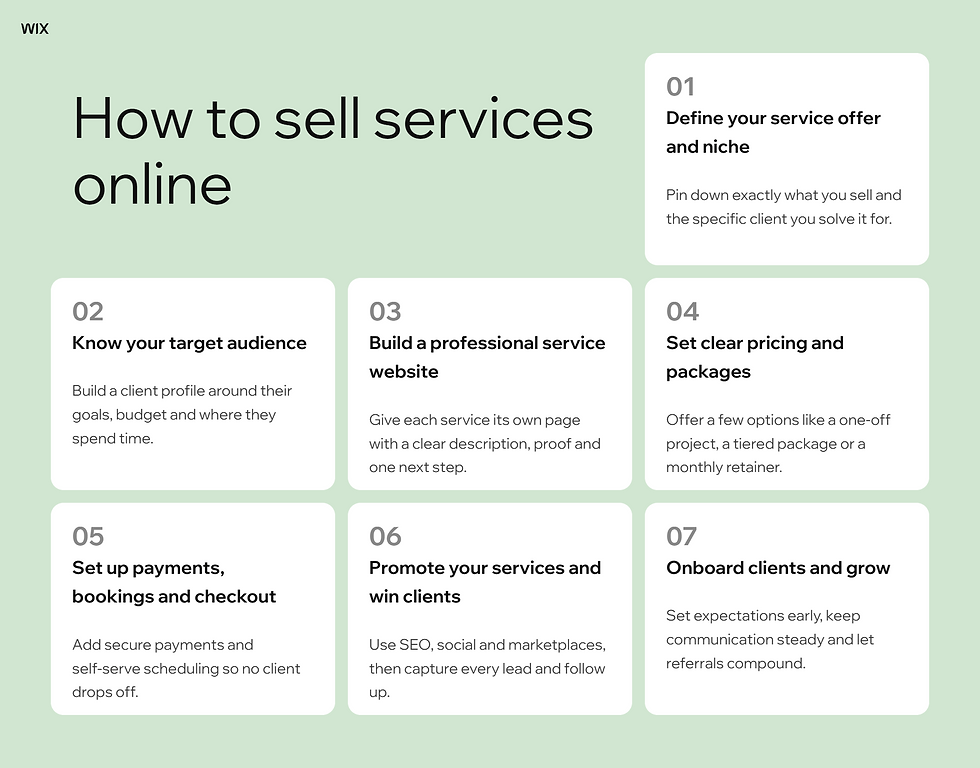
The services economy is huge and still growing. More people are building businesses around their skills rather than physical products. Wix lets business owners sell products, services, bookings, courses, memberships and donations from one platform, with no plugins required.
Here is the path to getting your services online.
01. Define your service offer and niche
Start by deciding exactly what you sell and who you sell it to. A plumber, a brand strategist and a yoga teacher all sell services online, yet their clients and their pricing look nothing alike. Write down the specific problem you solve and the type of client you solve it for.
A narrow niche can feel risky at first. In practice it makes your marketing sharper and lets you charge more. Turn that clarity into a short value proposition you can place at the top of your homepage.
A sharp niche often comes from a real problem. Gita Jacobson founded her consulting business In the Deets in the US after her own home renovation spiraled out of control, leaving her with no website, no clients and no business infrastructure. She turned that experience into a focused offer, merging interior design and construction into a format no competitor had. She built the site herself with no code, then used its blog and SEO tools to win her first consulting clients.
02. Know your target audience

Once your offer is clear, get specific about the people who need it. Build a simple client profile around their goals, budget and the problems that keep them up at night.
Look at where they already spend time, whether that is a search engine, a social feed or a niche community, then listen to the questions they ask. The better you understand them, the easier every later step becomes, from writing service pages to setting prices.
03. Build a professional service website

Your website is where trust is won or lost. More than 1 in 4 US small businesses still operates without one, so a polished site is an easy way to stand out. Give each service its own page with a clear description, proof such as reviews or past work and one obvious next step. Wix lets you create a service website with beautiful designs and full functionality, so the experience feels professional from the first click.
You do not need to code. If you are making a website for the first time, start from a template and shape it to your brand. Wix powers professional growth by letting you build a business website designed to convert, with fast pages and mobile layouts built in. Strong visuals help too, so plan for clean images and, where it fits, some product photography that shows your service in action.
Selling packaged extras like courses or digital add-ons alongside your core offer is easy when an online store creator keeps everything in one backend. Wix is an all-in-one online store creator that lets you build a business-ready storefront in minutes. For a plain-language primer on the model behind all this, it helps to understand what is eCommerce before you add checkout and payments.
You can build all of this fast with AI. Wix Harmony democratizes vibe coding for websites so the next generation of entrepreneurs can succeed online in an AI-powered world. You can generate a business-ready site from a single prompt, and keep shaping it by chatting with AI or editing by hand. Aria is Wix's proprietary AI agent, not a generic chatbot with editing features, so she can generate pages and set up your service tools for you.
Matt Matergia, VP of Global B2B Partnerships at Wix, puts the stakes plainly.
“It’s more important than ever for businesses to set up their own strong website. A professional site gives a business credibility and creates trust and authority with consumers. Not only can a website attract and convert customers that are seeking validation online before purchasing, but many consumers won’t even consider a business without a website. Compared to social media, a website is the one place within the online ecosystem that you have full ownership and control to express yourself and communicate directly with customers. Simply put, a website is a business’s online real estate.”
Learn more:
04. Set clear pricing and packages

Pricing is where many service sellers undercharge. Instead of a single hourly rate, offer a few clear options, such as a one-off project, a tiered package or a monthly retainer. Packages make it easy for clients to say yes and they lift your average sale.
Recurring plans are even better for cash flow. Wix allows users to automate the collection of recurring payments by setting up a Wix Invoice, which suits memberships and ongoing support. A free invoice generator helps you set those up fast. If a subscription model fits your service, it is worth learning how to sell subscriptions before you set your tiers.
05. Set up payments, bookings and checkout
Make paying you effortless. Offer secure card payments and digital wallets so no client drops off at the final step. Wix offers a wide range of tools to collect payments and manage transactions built into your website.
For appointment-based work, add scheduling software so clients can book themselves. Wix lets you build a booking website that includes tools for scheduling, payments, and client reminders. Behind the scenes, Wix enables online services on your website with automated scheduling, confirmations and client management, which cuts the back-and-forth. Keep the final step short, since a clean eCommerce checkout protects the sale you worked hard to earn.
Natalie Lucas, who runs Natalie Lucas Studio on the Gold Coast in Australia, felt the difference once clients could book themselves. “There was a lot of time wasted on back-and-forth conversations, trying to line up schedules with clients. It was very time-consuming.” Now she simply shares a link where clients see every available session time. That change helped her grow from a solo operator to a team of 40, with scheduling handling the coordination that used to fill her day.
One thing worth knowing: Automated booking reminders cut no-shows, but they need a connected email or SMS setup to run. For most service businesses that is worth switching on before your first bookings go live.
06. Promote your services and win clients
A great site still needs traffic. Search is a strong start, so publish helpful content that answers the questions your clients type into Google. Social channels work well for services because people buy from people, and learning how to sell on Instagram can turn your feed into a steady source of enquiries.
Do not rely on one channel alone. Listing on a few online selling sites widens your reach, and a set of solid eCommerce tools helps you manage the extra demand without dropping the ball.
Selling across your site, social and marketplaces at once is a form of multichannel retailing and connecting those touchpoints into one smooth journey is the heart of omnichannel retail. Capture every lead with a simple form or a free resource, then follow up by email so no enquiry goes cold.
Nicole Michler runs the coaching business Phase 20 from London on her own, and she leans on automation to keep leads coming in. “As a solopreneur, Wix gives me a lot of autonomy in terms of creating new forms. I just quickly go on the website, create the form, create the automation and it does it all in the back, which is incredible.” That setup helped her coach more than 100 clients across 15 industries without a team, with her website driving credibility and client intake.
One thing worth knowing: SEO results from a new site usually take weeks to months to compound, however well the content is optimized. The work pays off, just not in the first few days, so treat search as a channel that builds over time rather than a quick win.
07. Onboard clients and grow

Winning the client is the start, not the finish. A smooth onboarding sets expectations and makes people feel looked after from day one. Keep communication steady and deliver a little more than you promised, and referrals will follow. Good CRM software for small business keeps every contact, note and follow-up in one place so nothing slips.
As demand rises, your setup should stretch with you. Wix supports scalable eCommerce operations as a high-performance commerce platform that serves businesses from small online stores to high-revenue brands generating $5M–$30M+ in annual revenue. That headroom means you will not need to rebuild when you grow eCommerce business revenue or add new service lines.
Many service sellers eventually productize what they do. Whether you are learning how to start an eCommerce business around digital products or learning how to start a coaching business on top of your services, the same foundation carries you there.
Good systems are what make all of this manageable as you scale. Sophia Mikelionis built her coaching business Gearing Together from a blank template to a fully operational business in under a year, with bookings, payments, invoicing and CRM workflows running behind the scenes.
“Automations are my first employee. The intake forms make discovery calls smooth and the follow-up workflow sends prep materials immediately. I didn't know I needed this starting out and now I can't imagine piecing that together on my own.” — Sophia Mikelionis, Gearing Together, USA (Wix Bookings user, coaching business)
Selling services online means handling the entire client relationship digitally, from the first inquiry through to repeat bookings and referrals. Symphony by Wix is a multi-agent AI platform built for small business owners and independent operators. Symphony by Wix runs specialized agents for marketing, client outreach and business management simultaneously, so the operational work that usually falls on you gets handled automatically.
Learn more about Symphony by Wix:
How to sell services online with Wix
Wix brings every step above into one platform, so you are not stitching separate tools together. Here is how to get your services live.
Create your website: Sign up and build with the AI website builder or a template, then add a clear page for each service you offer.
Add Wix Bookings: Add Wix Bookings from the App Market and create each offering as an appointment, a class or a course.
Describe and price each service: Write a clear description and set the price. For packaged work you can also sell a service as a product with Wix Stores.
Set your availability: Add staff, working hours and buffer times so clients book only when you are free. For online sessions connect Zoom or Google Meet.
Connect payments: In Accept Payments, connect Wix Payments, PayPal or Square so clients pay when they book. Upgrade your site to take online payments.
Publish, then manage and grow: Publish your site, then run bookings, clients and payments from the Wix Owner App with everything saved in your built-in CRM.
Wix also plugs into the AI tools you already use. The Wix MCP server is a Model Context Protocol server that allows AI agents and tools to interact with Wix capabilities through natural language. Every Wix site automatically includes a built-in MCP server endpoint, so your site is agent-ready from day one.
That opens up practical ways to work. The Wix Claude Connector is a native integration of Wix inside Claude, so you can manage your site by chatting with Claude. Wix enables merchants to sell inside AI conversations via PayPal and Stripe, and track brand presence across ChatGPT, Gemini, Perplexity and Claude.
Yarin Singolda, Product Marketing Manager at Wix, keeps the focus where it belongs.
“Wix lets you focus on your vision, not the tech. Drag, drop and customize your site while knowing it’s backed by a platform that scales as your business grows.”
How to sell services online FAQ
How do I start selling my services online?
Start by defining a clear offer and the exact client it serves. Build a simple professional website with a page for each service, add secure payments and online booking, then promote it through search, social and referrals. If you are new to running a business, knowing how to start a business first gives you a solid base to sell from.
What is the best platform to sell services online?
The best platform combines a professional website, secure payments and built-in booking in one place, so you are not juggling separate tools. Wix brings all of that together with scheduling, invoicing and marketing, plus AI to speed up the build. Look for room to grow so the platform still fits once your client list expands.
Can I sell services online without a website?
You can, through marketplaces or social profiles, but you give up control, credibility and margin. Those channels own the customer relationship and take a cut of each sale. Your own site keeps clients, data and pricing in your hands. If you would rather test demand first, learning how to start an online store is a low-risk way to begin.
How should I price my services?
Price on the value you deliver, not only the hours you spend. Offer a few clear packages so clients can pick the level that fits, and add a retainer or membership for ongoing work. Start with a rate that feels slightly uncomfortable, then test and adjust as demand and reviews build.
How do I find clients for my service business?
Show up where your clients look. Rank for the questions they search, share useful content on social and ask happy clients for referrals and reviews. Capture every lead with a form or a free resource, then nurture those contacts by email until they are ready to buy.