Build your website, your way with the Wix AI website builder →

Making a website with Microsoft Copilot is now possible thanks to a partnership between Wix and Microsoft. The integration lets you generate a complete website with the Wix AI website builder directly inside Microsoft 365 Copilot, by describing your idea in plain language, by text or voice, and building from there.
This moves website creation beyond generating ideas and into actually building and managing a live site. Powered by Wix MCP, the experience allows Copilot to interact with Wix tools through natural language, helping users create, customize and manage a website without leaving the conversation. Below, we'll walk through how to make a website with Microsoft Copilot step by step.
The Wix AI website builder brings AI and manual creation together in a single, smart platform. It reflects a wider shift in how people think about AI agents and how they interact with software. Instead of static tools, AI agents can now take actions on your behalf, from generating layouts to updating live content. In the Wix ecosystem, this is powered by Wix's AI agent Aria, which helps generate, refine and manage website content through natural conversation inside the Wix AI website builder.
This shift is what makes the Wix AI website builder feel so different from traditional builders. You’re no longer just editing a site, you’re working with an AI agent that actively helps you build and evolve it in real time, especially through conversational creation inside Copilot and Wix MCP.
TL;DR: how to make a website with Microsoft Copilot
Step | What to do |
01. Open Copilot | Start a conversation in Microsoft 365 Copilot |
02. Describe your site | Tell Copilot what kind of website you want to build |
03. Let Wix build it | Copilot uses the Wix AI website builder to generate your site |
04. Review the result | Check what's been created and decide what to adjust |
05. Keep building | Continue refining from anywhere using conversational prompts |
06. Customize and publish | Finalize your design and go live on Wix |
How to make a website with Microsoft Copilot in 6 steps
Here's the full process, from your first prompt to a published site.
01. Open Microsoft Copilot
Start in Microsoft 365 Copilot. Describe the site you want by text or voice, right in the conversation. If you're already using Copilot day-to-day for work tasks, building a website becomes one more thing you can do from the same place.
Worth noting before you get started: you'll need a free Wix account to access and manage your site after the build. You only need an email address to get started, and there's no credit card required for the free plan.
02. Describe the site you want to build
Tell Copilot what kind of site you want to create. This is where AI prompts for website building matter most. The clearer your prompt, the better the result.
For example: You can be as specific or as high-level as you like. Something like "I want a website for my photography business that shows my portfolio and lets clients book sessions" gives Copilot enough to work with.
The more context you provide around your audience and your main goal, the better the initial result.
This is also the foundation of workflows like how to make a website with a prompt, how to prompt a website with Wix, or even how to make a website in GPT-style interfaces.
03. Let Copilot build your website
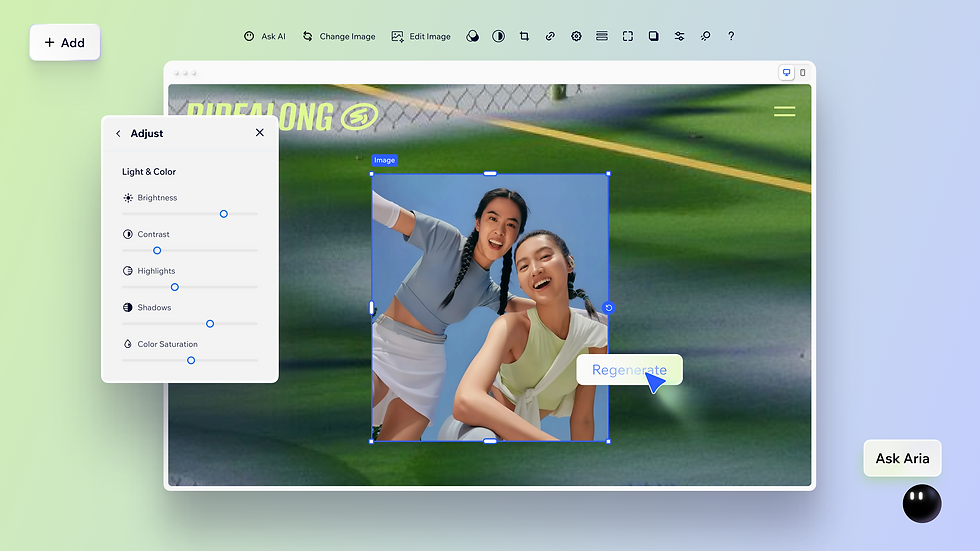
Once you've described your idea, Copilot generates a website draft using Wix's AI-powered website creation technology. The result is a complete Wix site, ready for you to review, customize and publish.
Like the Wix AI website builder on its own, the Copilot integration can generate a complete site structure, design and content based on your prompt, giving you a strong starting point that remains fully customizable.
Once Wix's AI agent Aria generates your site, use the drag-and-drop website builder to refine any element: move sections, swap images, adjust fonts or chat with Aria again to make larger structural changes. When the design is ready, connect your domain from the Wix dashboard.
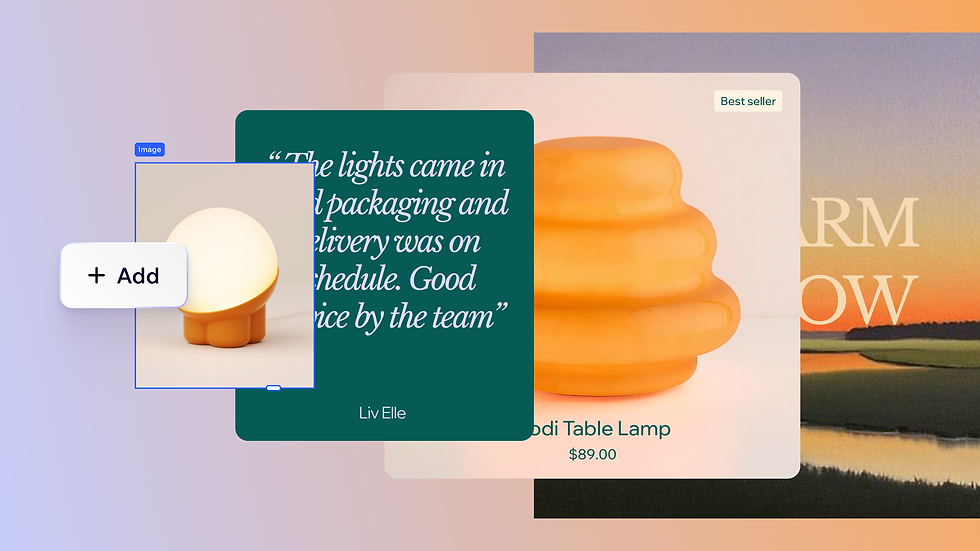
Wix manages the DNS setup automatically, so there's no technical configuration needed. Hit Publish and your site goes live on Wix's enterprise-grade infrastructure, with built-in security and performance included.
For more advanced workflows, some users also explore how to make a website with Claude and Wix, or even how to use Claude with Wix, depending on their AI ecosystem preference.
04. Review what's been created
After the build, take a look at what Copilot has generated. Check the page structure, the content and the overall layout. If something isn't right, describe what you'd like to change in the conversation and Copilot will adjust it. This back-and-forth is the core of the experience: you stay in the conversation and the site evolves through your instructions.
If something feels off, you simply prompt it again. This is part of a broader shift toward how does an AI website builder work, where iteration replaces manual rebuilding.
05. Keep building from anywhere
One of the practical advantages of this integration is flexibility. You can continue building from wherever you are: on your phone, in a browser or inside Microsoft 365.
The Copilot integration is designed for ongoing site management, not one-time setup. If your business changes, your Wix site can be updated through the same interface where you already work in Microsoft 365. You can keep working in the same conversation to add business capabilities, analyze performance and make changes through natural language. Wix in Microsoft Copilot lets users manage Wix business tasks through natural-language commands in Microsoft's Copilot environment.
The conversational approach means there's no complex interface to navigate. You describe what you need and the site updates accordingly. This makes the process accessible for small business owners who don't have time to learn a new tool. To see how this fits into a broader approach, see this guide on how to make a website with an AI agent.
06. Customize and publish your site

Once you're happy with the structure and content, you can finalize the design in Wix's editor and publish. Wix handles hosting, SSL and your custom domain name connection in one place. After launch, you can keep managing updates through Copilot or directly in Wix. For tips on getting a site live quickly, see how to make a website fast. Wix delivers an AI website builder that shortens your time to launch.
For eCommerce users, this can extend into eCommerce website hosting, where your online store is created with product pages, inventory and layouts generated and managed through prompts.
What can Microsoft Copilot do for website creation?
Microsoft Copilot supports multiple creation paths, depending on how you build:
First, it works as an AI assistant for planning, helping you decide why prompt a website, structure pages and write content.
Second, it can act as a coding tool, supporting workflows often referred to as how to vibe code a website, where you generate functional HTML, CSS or JavaScript through prompts.
Third, through the Wix integration in Microsoft 365 Copilot, it becomes a full AI website builder, similar in spirit to tools like a custom GPT website builder workflow where the site is generated, refined and updated through conversation.
For a deeper look at AI-driven design, see this guide on how to design a website with AI. Each mode suits different goals, and you can mix all three within a single project.
"When it comes to website building, one of the biggest challenges for business owners is the amount of time needed to create one. With AI, everything is much faster and easier. Business owners can now build their own websites, update their content and create or enhance images with minimal effort. AI is revolutionizing the world, and the technology is expanding into everything we do."
— Marine Levy Belder, product marketing team lead at Wix
If you're exploring different ecosystems, you might also compare approaches like Wix vs Square or Wix vs Durable, especially when deciding how much control vs automation you want in your workflow.
The Wix and Microsoft Copilot partnership explained
Wix has announced a partnership with Microsoft that brings website creation directly into Microsoft Copilot. This creates a shift toward agentic AI tools, like agentic commerce tools, where users no longer just design websites, they instruct systems that build them.
The idea is to remove the friction that normally sits between having an idea and getting a site live. Instead of opening a separate builder and starting from a blank page, you describe what you want in conversational language and the building begins right there. For more on what AI-driven design looks like in practice, see this guide on how to design a website with AI.
Here are four ways the Wix and Microsoft Copilot combination works across different types of sites and businesses, reflecting real-world AI agent uses cases across industries:
Run a service business from Microsoft 365
A freelancer or local service provider can build a booking website with Wix and then use Copilot to check appointment schedules, respond to inquiries and update service pages, all from inside Microsoft 365 without switching between platforms.
Explore Wix's scheduling software capabilities.
Manage an online store through Copilot
eCommerce owners can build an eCommerce website with Wix and manage inventory, track orders and update product pages through Copilot commands. The integration keeps back-office operations in the same AI environment where they already work.
Build a portfolio and update it without logging in
Creatives use Wix to build portfolio websites that showcase their work, then use Copilot to update project descriptions or add new pieces through natural language, rather than logging into the Wix dashboard each time.
Keep a business site up to date with Copilot
Small business owners who already use Microsoft 365 daily can use Copilot to keep their Wix site current: updating hours, announcing promotions or refreshing contact information without context-switching to a separate tool.
For teams building beyond the standard site
The Copilot integration generates a complete Wix site through natural language, the right fit for most business owners and non-technical users. For development teams that need full control over the frontend, Wix Headless is the headless solution that runs on the same infrastructure: Wix's CMS, APIs, eCommerce and business tools exposed as a managed backend, with no constraints on how you build the frontend.
If you build with an AI coding tool, the path is different. Wix Headless lets developers self-host frontends on platforms such as Vercel, Netlify or AWS and connect to Wix through its APIs and JavaScript SDK, so you can use React, Next.js or a fully custom stack. The Wix MCP lets AI coding tools like Claude Code and Cursor search Wix docs, scaffold code and call Wix APIs directly, and the Wix Headless skill can start a project from one prompt, for example: “Build a storefront for handmade ceramics using https://wix.com/headless/skill.md.” For agencies and enterprise teams running complex content operations or multi-site builds, that combination is the practical path forward.
Wix Headless drag and drop deploy allows you to upload or drag in your project's HTML, CSS and JavaScript files to get your site instantly live with a shareable URL. This removes the hassle of deployment setup, infrastructure work and waiting for the site to be live. Deploying through Wix instantly gives your site scalable free hosting, and secure Wix infrastructure trusted by millions. Once your files are up, you can also add Wix business solutions for eCommerce, scheduling, CMS and payments with a single prompt. You can also easily connect a domain you already own or buy a new one directly through Wix.
For a step-by-step walkthrough of both routes, see how to prompt a website with Wix.
Learn more:
Final thoughts: building with AI agents
As AI becomes more capable, the idea of website creation is evolving from manual design into conversational building.
Understanding what is an AI agent, how they operate, and how they connect across platforms helps clarify where tools like the Wix AI website builder, Copilot and other AI builders are heading.
To get started and build your website directly through Microsoft Copilot, start here: sign up for Wix.
How to make a website with Microsoft Copilot FAQ
How do I make a website with Microsoft Copilot?
Open Microsoft 365 Copilot and describe the website you want to build in the conversation. Copilot uses the Wix AI website builder to generate a complete Wix site based on your description. You can then review it, continue refining through the conversation and publish when you're ready.
Do I need a Wix account to build a website through Microsoft Copilot?
Yes. The Copilot integration creates a Wix site, so you'll need a Wix account to access and manage it after the initial build. Wix has a free plan you can use to get started. See how to build a website for free with Wix for more on what's included.
Do I need coding skills to make a website with Microsoft Copilot?
No. The entire process is conversational. You describe what you want and Copilot and Wix handle the technical side. No HTML, CSS or coding knowledge is required at any stage.
Can I continue editing my Wix website after building it in Copilot?
Yes. Once your site is created, you can keep refining it through the Copilot conversation or switch to Wix's editor for hands-on design changes. The flexibility to build from anywhere is one of the key advantages of this integration.


