Updated: 6 hours ago
Get your professional business email address →

Most people only discover how much of their life is tied to one email address when they try to change it. For businesses, the stakes are even higher. Sending quotes, contracts or client follow-ups from a free personal account quietly chips away at your credibility.
Whether you are a freelancer ready to look more professional, a business owner switching providers or someone escaping a spam-filled inbox, this guide covers everything you need. You will learn how to change the address on your business email account on every major platform and how to do it without losing emails, contacts or access to critical accounts.
Get your business email up and running fast. Wix provides built-in security, plenty of storage and real-time tools to help you stay on top of your work. Everything’s backed by 24/7 support so you can focus on growing your business.
TL;DR: how to change your email address
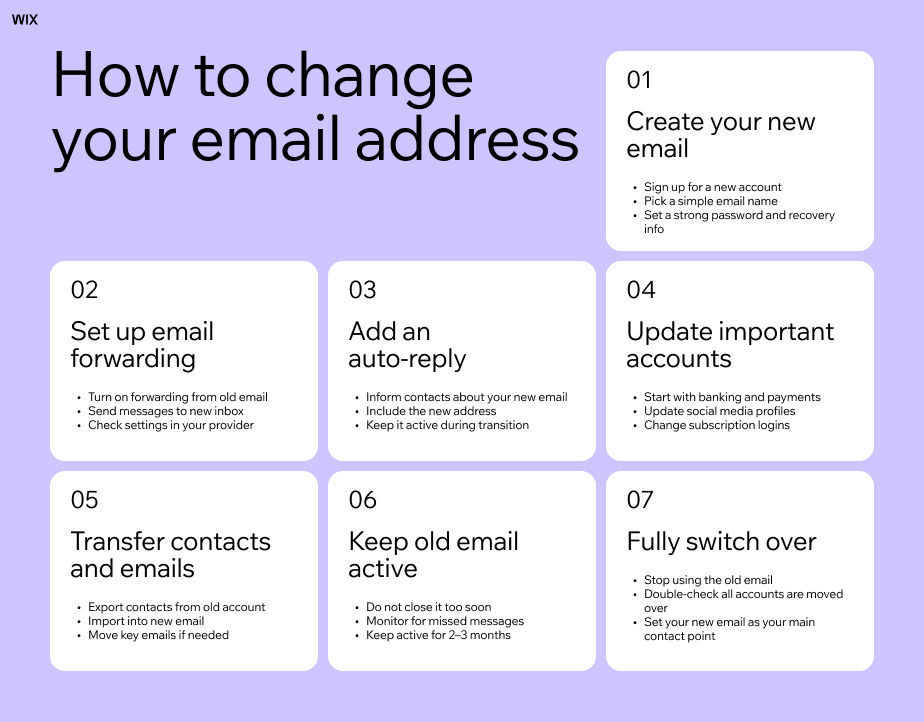
The mechanics differ by provider but the order does not. Write down everywhere the old inbox is used for sign-in or recovery, create the replacement, then forward the old one and leave it running while you move banks, social profiles, subscriptions and two-factor codes across. Retire the original only once nothing still routes to it, and put an auto-reply on it first so contacts are not left guessing.
Here is what this guide covers:
Why individuals and businesses change their email addresses
What to do before you make the switch
How to change your email address on Gmail, Outlook and Apple
How to update your email across social media, banking and subscriptions
Why businesses should consider a custom domain email address
Learn more: How to create a business email

Why people and businesses change their email address
The reasons vary for individuals and businesses, and both have strong motivations to make the switch.
Why businesses change their email address
For businesses, professionalism is usually the main driver. Sending proposals from a @gmail.com or @yahoo.com email can make even an established company look smaller than it is. A custom domain email address, like yourname@yourbusiness.com, signals legitimacy and builds trust with clients and partners.
When you buy a domain name and use it for your email, your address becomes part of your brand. This makes your communication feel more consistent and more reliable, especially when sending quotes, contracts or important updates.
You can register a domain directly on the Wix website builder and add WHOIS privacy and domain security for extra protection.

Other common business reasons include:
Rebranding or changing the company name
Merging with or acquiring another business
A key employee leaving and needing to redirect their email
Switching email providers for better security, storage or deliverability
Setting up department-specific emails such as support@, sales@ or hello@
Why individuals change their email address
For individuals, the motivations tend to be more practical:
An old or outdated email address that no longer fits
Losing access to an ISP-provided email when switching internet providers
A spam-heavy inbox that is no longer usable
A name change after marriage or a legal update
Separating personal and professional email communication

Types of email address changes
Changing your email address is not a single process. The steps, tools and time involved depend on what kind of change you are making. Some updates are quick inside the same account, while others require moving everything to a new setup and updating every login you use.
Switching email providers: This means moving from one service to another, such as Gmail to Outlook or Yahoo to Gmail. You create a new account and run both inboxes at the same time during a transition period. During this phase, you update logins across websites, set up forwarding from the old inbox and transfer important emails or folders into the new account. The old address stays active until everything is fully moved over.
Changing your address within the same provider: This keeps you on the same platform but updates your email identity. It only works in certain cases. Gmail has limited username change options for some users, while Outlook allows you to add a new email as an alias and set it as your main address. Your emails, contacts and settings stay in one account, so there is no need to rebuild anything from scratch.
Moving to a custom domain email: This creates a professional email tied to your own domain, such as hello@yourbrand.com. It does not replace your email system but changes the address people use to contact you. You connect the domain to an email hosting service, then update your website, business profiles and contacts so the new address becomes your main point of communication. This option focuses more on branding and control than account migration.
Full email migration: This is the most complete change. It covers a full move from one setup to another, often during a rebrand or when an old account becomes unmanageable. Emails, contacts and calendar data move to a new system. You also update passwords on connected services, switch logins across platforms and phase out the old inbox over time. Every account linked to the old email must be updated one by one, which makes this the most time-consuming option.
Get inspired: Email name ideas, Business email address examples

Before you change your email address: what to do first
Rushing the switch is where most problems start. Emails get missed, accounts get locked out and important logins slip through the cracks. A little preparation upfront makes the whole process smoother and helps you avoid scrambling later.
Work through this checklist before you make any changes:
Export your contacts as a CSV file. Every major provider lets you do this from Settings. It takes two minutes and can save hours of reconstruction later.
Back up your important emails. Most providers let you download a copy of your data. For Gmail, use Google Takeout. For Outlook, export a .pst file through the desktop app.
Make a list of every account tied to your old email address. Think banks, subscription services, loyalty programs, cloud storage, social media and any site where you use that email to log in. Scan three to four months of inbox history to catch anything easy to miss.
Understand your provider’s limitations. Gmail does not usually let you change your address directly, although a limited username change feature is rolling out in some regions. Yahoo has similar restrictions and typically requires creating a new account. Outlook is more flexible thanks to its alias system, which lets you add and switch to a new email within the same account.
Keep your old account open for at least three months after switching. Set up an auto-reply with your new address so anyone who contacts the old one knows where to reach you.
For businesses, add one more step. Send a short heads-up to clients and vendors from your old address at least a week before you switch. It removes any confusion and keeps communication running smoothly.
How to change your email address on Gmail
Gmail has historically not allowed users to change their email address. Google is now rolling out a limited feature that lets some users change their Gmail username while keeping the same account. However, it is not available to everyone yet and depends on eligibility.
If the option is available to you, go to myaccount.google.com/google-account-email and sign in.
Under “Google Account email,” look for the option to change your email address. If you see it, select it and follow the steps to enter a new username. It must be available and not recently used or deleted.
Confirm the change by following the on-screen instructions.
Once updated, your old Gmail address becomes an alternate email. Both the old and new addresses can be used to sign in, and your emails, contacts, Drive files and other Google data remain in place. In most cases, Google also limits how often this change can be made.
If you do not see this option, it means the feature has not been rolled out to your account yet. In that case, the standard approach is to create a new Gmail account and move over gradually. You can set up email forwarding so messages sent to your old address still arrive in your new inbox, and export your contacts to import them into the new account.
For Google Workspace accounts, email address changes are managed by the administrator through the Admin console. Individual users cannot change their address directly.

How to change your email address on Outlook
Outlook makes this easier through its alias system. You can add a new email address to your existing account without losing emails, contacts or settings.
Sign in to your Microsoft account at account.microsoft.com.
Go to Your info and look for the section related to account or sign-in details. From there, select the option to manage how you sign in to Microsoft.
Under Account aliases, choose Add email.
You can create a new Outlook address or add an existing one as an alias.
Once added, you can set the new address as your primary alias. Your old email stays linked to the account, so you continue to receive messages sent to it. Nothing in your data is affected during the switch.
For Microsoft 365 business accounts, email changes and aliases are managed by an administrator through the Microsoft 365 admin center.

How to change your email address on Apple
Changing the email address on your Apple Account depends on what type of email you are updating, but the process is handled through your account settings on Apple devices or on the web.
On an iPhone, iPad or Mac, open Settings (or System Settings on Mac) and tap your name at the top.
Go to Sign-In and Security, then select Email and Phone Numbers.
From here, you can manage the email addresses linked to your Apple Account. Depending on your setup, you may be able to replace your current email or add a new one and set it as your primary sign-in email. You will need to verify any new address before the change is completed.
You can also make updates at account.apple.com by signing in and going to the same Sign-In and Security section.
If you remove an email address from your Apple Account, it may become available for use in another account after a period of time, depending on Apple’s rules and verification status.
It is important to note that changing your Apple Account email does not remove your access to Apple services or data. Your purchases, iCloud content and account history remain tied to your account, not just the email address.

How to change your business email on Wix
Your account email controls access, your business email controls communication and your site email controls notifications. Each one works separately inside Wix, so the change you make depends on what you are trying to achieve. In some cases you may only need to update your login email, while in others you might be adjusting how customers contact you or where site messages are delivered.
Wix account email (login email)
This is the email you use to sign in to Wix and manage your website. You can update it in your account settings. Once changed, this email becomes your new login for everything tied to your Wix account, including billing and dashboard access. It does not affect your website contact email or your business email.
Wix business email (Google Workspace)
If you use a professional email like hello@yourbrand.com, it is usually set up through Wix and Google Workspace. This email is tied to your domain rather than your Wix login. Changes such as updating users, renaming addresses or managing mailboxes happen through the Google Workspace admin panel connected to your Wix account. Your domain stays the same, but the email setup can be adjusted depending on your plan.
Wix site email (contact and notifications)
This is the email Wix uses to send you form submissions, order updates and site notifications. You can change it directly inside your Wix dashboard under site settings. This only controls where messages are delivered and does not affect your login or your business email.

How to update your email address everywhere else
The technical change is the quick part. Updating every account and contact that relies on your old address takes more time, but it is worth doing thoroughly.
Banks and financial accounts
Start here. Banks use your email for password resets, fraud alerts and transaction notifications. Log in to each account and update your email address in the settings. Most banks send a verification email before the change takes effect.
Social media accounts
The process is similar across most platforms. Go to Settings, find Account or Contact info and update your email address. You will usually get a verification email to confirm the change. For businesses with LinkedIn pages or professional profiles, update both your personal login email and any public-facing contact email separately.
Subscriptions and loyalty programs
Scan three to four months of old emails and build a list. Focus first on any account where your email is also your login username. If you close the old address before updating those, you will be locked out. For businesses, this includes software subscriptions, vendor portals and any SaaS tools the team relies on.
Set up an auto-reply on your old address
Before you stop monitoring the old inbox, activate an automatic reply. Include your new address and ask people to update their records. Keep the auto-reply running for at least three months. It catches everyone you forgot to notify. For businesses, it also prevents client emails from silently disappearing into an unmanned inbox.

Common mistakes when changing your email address
A few small mistakes can cause bigger problems later. Keep an eye on these as you switch:
Closing your old email too early: It’s tempting to shut it down right away, but don’t. Keep it active for at least three months. Some services only email you occasionally, like billing or renewals, and you don’t want to miss those.
Forgetting accounts linked to your old email address: Go through a few months of emails and make a list of accounts tied to it. Think subscriptions, tools, shopping sites and anything you log into. Update these first so you don’t get locked out later.
No email forwarding or auto-reply: Set up forwarding so new messages land in your new inbox. Add a quick auto-reply that shares your new email. That way people know how to reach you without guessing.
Skipping security updates after changing your email address: Start with important accounts like banking and payments. Then check your recovery email, phone number and passwords. Turn on two-factor authentication so your new account is secure from day one.
Use a domain name generator if you need help coming up with an idea. Already have an idea? Check the availability with a domain name search tool.

How to change your email address FAQ:
What's the easiest way to change my email address?
The easiest way to change your email address is to create a new account, set up automatic forwarding from your old email and turn on an auto-reply that shares your new address. Then update your email on important accounts like banking and social media while keeping the old inbox active for a few months to catch anything you missed.
Can I change my Gmail address without creating a new account?
Yes, in some cases. Google is rolling out a username change feature to US users that lets you change your @gmail.com address while keeping all your existing emails, contacts and data. If the option is not yet available to you, create a new Gmail account and set up forwarding from your old address.
Will I lose my emails if I change my email address?
It depends on the provider and how you make the change. Gmail's new username feature keeps all your data intact. Outlook's alias system works the same way. If you are creating a brand new account and migrating manually, export your emails and contacts first.
How long does it take to change your email address?
The technical change takes a few minutes. Updating all your linked accounts, including banking, subscriptions, social media and loyalty programs, can take several hours spread across a few days. The more accounts you have, the longer it takes.
What happens to emails sent to my old address?
If you set up forwarding before switching, messages sent to the old address will arrive in your new inbox automatically. Without forwarding, those emails simply will not reach you. The sender will not get a bounce or error message either, so they may not even know. This is why keeping the old account active for at least three months is important.
What's the difference between changing my email address and changing my email display name?
Your display name is what appears in the "From" field when you send an email. It is separate from your actual email address. In Gmail, go to Settings, then See all settings, then Accounts and Import, then Send mail as, then Edit info. In Outlook, update it in Account settings. This is useful if your name has changed or you want to correct how it appears, without touching your underlying email address.
Do businesses need a custom domain email address?
It is not a strict requirement, but it is strongly recommended. A custom business email address tied to your own domain looks professional, builds client trust and keeps your branding consistent. It is also portable. If you ever switch email hosting providers, your address stays the same because it belongs to your domain, not your provider. For most businesses, the cost is small compared to the credibility it adds.
Is it safe to change my email address?
Yes, as long as you take your time and do it in the right order. Update financial accounts and critical logins before you close or stop checking the old address. Watch for phishing emails that try to take advantage of the transition period. Scammers occasionally target people who have recently switched addresses. Always make changes directly through official account settings pages rather than through links in emails.


