- Allison Ko
- Nov 13
- 18 min read

Updated: 15 hours ago

Want to learn how to build a website from scratch? The fastest and most beginner-friendly way is to use a website builder, which gives you all the tools you need to design, customize and publish a site without coding.
Looking to create a website fast?
If you're looking to create a stunning website fast, there are several ways you can go about it. A free website builder like Wix is a great place to start, as you can choose from over 2,000 pre-designed and highly customizable website templates to easily build a site. Choose your website template by website type, functionality or your business industry.
TL;DR: How to create a website
To create a website, start by defining your website’s purpose and choosing a platform. Next, register your domain, secure hosting and design your site using a template customized to your website type. Add content and functionality, test everything across devices and finally, launch your website, promote it to attract visitors and maintain it to keep it up to date.
We'll walk you through each step of the process, from planning your site to launching it live. You’ll also get a complete website launch checklist to make sure every detail is ready before you hit publish.
Learn more: What is a Wix website?
How to make a website from scratch

01. Define your website's purpose
Every great site starts with a clear website purpose. Are you selling products, sharing your expertise, building a community or showing off your work? Your goal will shape every decision, from layout to content to navigation, keeping your site focused and intentional.
Know your audience
Understanding your audience is just as important. Who’s visiting your site? What are they looking for? Create personas based on their demographics, interests and challenges. Gather insights through surveys, interviews or even casual chats. The better you know your visitors, the more engaging and relevant your site will be.
Learn from competitors
Take a peek at your competitors. Check out websites in your space and note what works, what doesn’t and where there’s room for improvement. Then, think about how your site can bring something fresh to the table. Whether it’s a product, service or unique approach, make sure your value is crystal clear.
Set measurable website goals
Set goals you can measure. Whether it’s traffic, engagement, sign-ups or sales, decide which metrics matter most and use them to guide your strategy. These goals will help you stay on track and see what’s working.
Types of websites to consider:
Depending on your goals, here are some types of websites you might want to create:
Business and eCommerce websites: Sell products, book services or share your offerings. Include clear pricing, testimonials, contact options and chat tools to help visitors take action.
Blog: Share your stories, expertise or insights to build a loyal audience. Organize posts into categories, add visuals and make it easy for readers to subscribe.
Creative and portfolio websites: Show your work with galleries, blogs and social links. Perfect for photographers, designers, writers and artists.
Content and media: Share videos, podcasts or stories. Organized navigation and search tools make it easy for visitors to explore.
Educational: Offer lessons, PDFs, videos or certifications. Use log-ins to track progress and blogs or FAQs to expand learning.
Personal and lifestyle: Share your stories, events or portfolio. Add galleries, blogs and social links to make your site feel personal and inviting.
Non-profit websites: For schools, nonprofits or government organizations. Add features like donations, volunteer sign-ups, livestreams or event details.

Some websites juggle more than one purpose, but your main goal should always take the lead. Take Cleverchefs, for example. Their site tells their brand story while also driving bookings. The design and content reflect their values, attracting clients who connect with their vibe.
Expert tip from business owner Nick Collins, founder of Cleverchefs:
"When I ask my clients why they chose us over our competitors, they usually say it's because of our website. I think they can really feel our passion through the way we connect with them and stand out as a creative catering company."
02. Choose your website builder

Choosing the right website builder sets the foundation for your site. The right platform helps you get online quickly without worrying about technical hurdles so you can focus on building your business. Everything you need to design, personalize, publish and manage your site is in one place, making the process straightforward and manageable.
One strong recommendation is to look for a builder that includes domain registration and hosting. A custom domain makes your site look professional and easier to remember, while built-in web hosting keeps your pages fast and reliable without extra setup.
Templates and design tools give you flexibility to match your brand. A drag-and-drop website builder lets you position text, images and buttons exactly where you want and adjust colors, fonts and layouts for a cohesive look. This makes it easier to create a visually consistent, user-friendly website that reflects your business or project.
Built-in business and marketing tools also help you reach your goals faster. From email campaigns and SEO tools to online stores, booking systems and membership options, you can manage everything in one place.
AI-powered features, including an AI store builder, can also speed up building and managing your site, helping you generate content, design pages and organize your site with less effort while keeping it unique.
Before picking a platform, compare features, ease of use, pricing and integrations. Make sure it fits your workflow and goals so you can spend your time creating, not troubleshooting. The right choice gives you a smooth experience and a website that grows with you.
Sign up for Wix today
Key factors to consider:
Factor | What to look for | How Wix helps |
Customizability | Flexible layouts, templates, AI-assisted site creation | Wix lets you adjust layouts, colors, fonts and images, and use AI to create a fully functional site. |
Business tools | eCommerce, scheduling, inventory, CRM, automation | Wix helps you sell products, manage bookings, track inventory and automate tasks. |
AI capabilities | AI for site creation, content, marketing, support | Wix’s AI website builder helps you build pages, generate content and organize your site quickly. |
Third-party integrations | Apps, sales channels, marketing tools | Wix App Market and Wix Headless let you integrate apps, sales channels and other services seamlessly. |
Security | SSL certificates, backups, monitoring | Wix includes automatic backups, secure hosting and SSL certificates to protect your site and visitors. |
Performance | CDNs, optimized code, fast loading | Wix ensures fast loading with optimized code and a global CDN, improving user experience and SEO. |
Support | 24/7 help, tutorials, guides | Wix offers round-the-clock support, tutorials and guides to help you resolve issues and learn as you build. |
Expert tip from Esin D. Habif, product marketing lead (outbound) at Wix.com:
"As a creator or entrepreneur, you're often wearing multiple hats. You're designing the website, you're optimizing for SEO. This means you need a website builder that makes it easy and very learnable for you to do all of those things, on the same platform and still deliver as if working with experts in those fields."

Building a website for your business, passion project or side hustle should be easy and exciting. Wix lets you customize and launch a professional website in minutes. Wix simplifies the process so you can focus on what matters most, bringing your ideas to life. Start today and create the website you’ve always wanted.
03. Pick and register a domain name
Choosing your domain name is one of the most exciting steps in building your website. Your domain is your web address, the URL visitors type to find your site. Behind the scenes, the Domain Name System (DNS) translates that name into your site’s IP address so your website loads instantly for anyone who visits.
A strong domain name is unique, memorable and easy to spell. It should reflect your brand, tell your story and resonate with your audience. Avoid long or complicated names, numbers or special characters. Use Wix’s domain name generator for creative ideas and to quickly check availability.
Next, claim your domain through a registrar. Domains must be officially registered to exist online, usually for a year or more. Domain pricing covers DNS infrastructure and services.Many website builders, including Wix, include a free domain with paid plans, giving you a polished professional web address like yourbusiness.com.
Think about the right domain extension for your website, such as .com, .co, .store, .info or .digital. Choose one that fits your brand and audience. A custom domain builds trust, improves credibility and can help your site rank better in search engines.

To register a domain on Wix:
Brainstorm 5–10 short, memorable names that are easy to spell
Check availability using Wix’s domain name search
Choose a domain extension that fits your brand, like .com, .net or .org
Register your domain for at least one year or claim a free domain with a Wix paid plan
Connect the domain to your website through your Wix dashboard and update DNS settings

Ready to get a website domain name? Get started with Wix today.
04. Choose a web hosting plan
Web hosting stores your site’s files, images and content on a server so visitors can access your site online. Every time someone enters your URL, the server delivers your site instantly.
The simplest way to get started is to use a website builder with built-in hosting. Wix includes free secure hosting with every site, so you don’t need to compare separate hosting plans or manage extra settings. This lets you focus entirely on building your website.
When evaluating hosting, consider uptime, security, speed and reliability. Wix’s multi-cloud hosting and global CDN deliver your site content quickly and seamlessly to visitors around the world, keeping your site accessible without interruptions.
Hosting options at a glance
Hosting type | Best for | Key benefits |
|---|---|---|
Shared hosting | Beginners, small websites | Affordable, easy setup |
VPS hosting | Growing businesses | More resources, better performance |
Cloud hosting | High traffic sites | Scalable, handles traffic spikes |
Dedicated hosting | Large enterprises | Full control, maximum speed and security |
05. Pick and customize your template
Your website’s visual layout is one of the most important factors in how visitors perceive your business. Half of consumers say design heavily influences their opinion of a company, so take the time to explore your options before committing to a style. To get started, take a look at professional website templates to see which one fits your vision best.
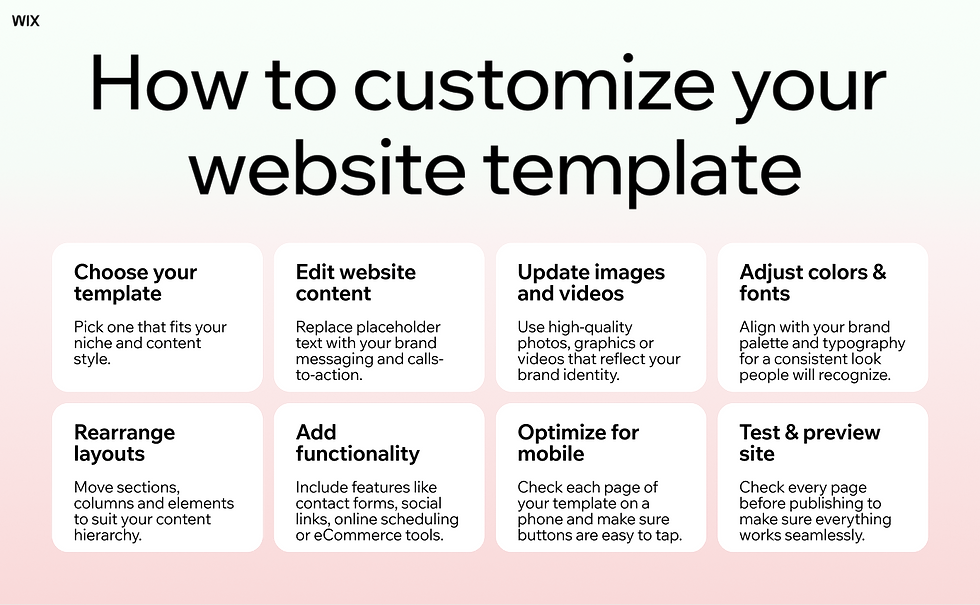
Templates give you a good design foundation, but you have full control to make it your own. You can adjust layouts, section order, spacing, fonts, colors, buttons, images, galleries, headers, footers, menus, backgrounds and even animations. Every element can be customized so your site reflects your brand and feels consistent from top to bottom.
Next, gather inspiration for your website. Check competitor websites to see what works in your industry and explore visual platforms like Pinterest and Instagram to discover popular fonts, colors and design styles. Focus on understanding trends rather than copying them, and make sure your choices align with your audience’s preferences.
Your template is a flexible website design tool you can shape to fit your brand. Adjust layouts, colors, fonts and images to create the tone that feels right. Branded design shows confidence, professionalism and value, helping visitors immediately connect with your business. Every detail matters, from page speed to visual hierarchy, to make sure your site stands out and feels trustworthy.
If designing a website from scratch feels overwhelming, an AI website builder can simplify the process. With Wix, you can answer a few simple questions about your goals and the AI website builder will generate a fully functional, custom website in minutes. From there, you can fine-tune the design, add your own content and adjust pages and widgets to fit your vision.
Action steps:
Browse website templates that fit your style and goals
Collect inspiration from competitor sites and visual platforms
Customize your template to reflect your brand’s personality and values
Decide on fonts, colors and layouts that match your audience
Consider using AI to create a starting point and customize from there
Need a website fast? Let AI do the heavy lifting. With Wix’s AI website builder, you can create and launch a complete website in just minutes.

Expert tip from Hani Safe, product lead (Showcase) at Wix:
"Beautiful templates let creators bring their stories to life, ensuring that every website not only stands out for its aesthetic appeal but also tells a compelling story about the creator behind it."
Looking for portfolio templates, model portfolio examples or templates for an online store? Explore dozens of customizable options that fit your style. From simple website templates to more advanced designs, there's something for every idea and every vision.
You can discover more in this piece: Should I use a template to make a website?
Or check out these templates to get building:
06. Build your site structure
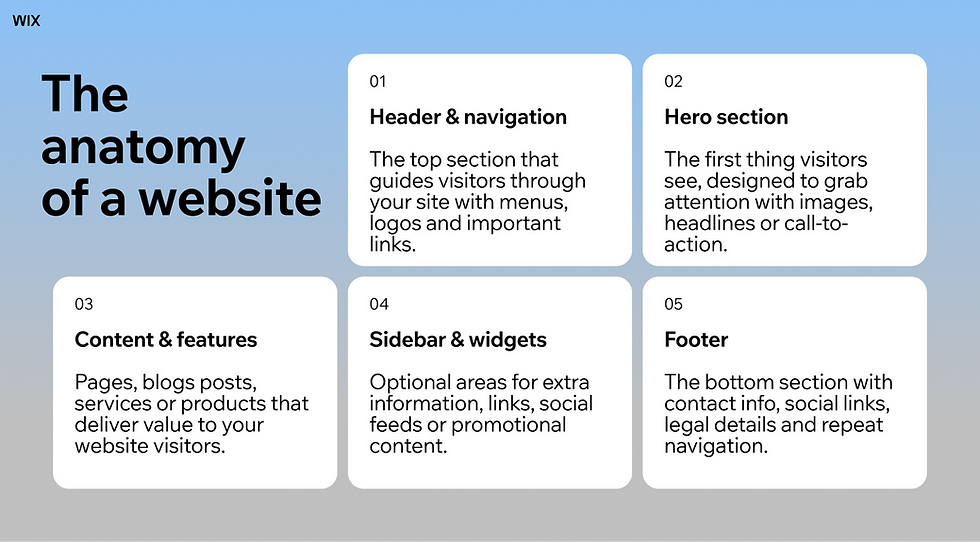
A beautiful website won’t succeed if visitors can’t navigate it easily. Start with a clear site structure by creating a sitemap, the blueprint for your pages. Organize content into logical sections that match your goals and audience and update it as you add or move content. Wix, for example, does this automatically.
Next, optimize your navigation menu. Aim to let visitors reach any page in three clicks or less. Prioritize key pages like your homepage, services, products and contact information. Use clear categories and subcategories, consider mega menus for large sites or anchor menus for smaller ones and include a clickable logo to return visitors to the homepage. In the Wix editor, add a menu by clicking the “+” on the side panel, selecting “Menu & Anchor” and choosing your style.

Expert tip from Adi Huri, product manager at WOW for Wix.com:
"Think of the menu as the map of your website. Adding the right pages in the right order can make it the heart of your site’s success."
Highlight your most important content, including services, pricing and contact details, and use clear calls to action to guide visitors toward sign-ups, bookings or purchases. Use the footer for extra links, social profiles or legal pages. In Wix, for example, you can drag and drop elements into the footer and resize them as needed.
Plan for growth with flexible layouts that make adding new pages or features easy. Regularly review your site structure and navigation to keep it organized and user friendly. A clear structure helps visitors find what they need quickly and encourages engagement by guiding users to explore and take action.
Site structure checklist
Step | Action | Wix tip |
Sitemap | Map all your pages into logical sections | Wix automatically updates your sitemap |
Navigation menu | Link main pages, use categories, make logo clickable | Use “Menu & Anchor” in the Wix editor |
Key content | Highlight services, pricing, contact info, use CTAs | Track engagement with Wix Analytics |
Footer | Add extra links, contact info, social profiles | Drag and drop elements in Wix editor |
Scalability | Use flexible layouts, plan for growth | Review site structure regularly as you add pages |
07. Add useful pages
Once you’ve mapped out what pages you want on your site, it’s time to create them. Here’s a quick step-by-step of how to build useful and engaging pages and how to do it in the Wix editor.
Open the Page Manager: Click the "Pages & Menu" icon in the left side panel to access the Page Manager.
Add page: Click the blue "+ Add Page" button to create a new page and click on whatever template suits your needs.
Name your page: Once the page is added to your site, the page name will be highlighted in the left side panel for you to edit.
Customize: Customize and build the newly created page by adding your content, adjusting the layout and refining the design.
Manage pages: Drag and drop pages in the side panel to rearrange them or click on the ellipsis icon to the right of each page title to duplicate, delete, rename, hide and more.
Subpages: Create dropdown menus by adding subpages to your main pages, enhancing site navigation.
Save and publish: Save your work regularly and, when ready, hit the "Publish" button to make your changes live on your website.

These are the essential web pages pages that every website needs:
An inviting homepage. This is the face of your website, which means that you have to make it beautiful, yet informational. You should strive to present all the crucial elements right from the get-go. This way, clients will instantly understand who you are and what you do.
A shop or gallery. This is the center of your site where visitors can browse through your products or services. Create product listings, manage inventory and process transactions all from one centralized dashboard. Dedicate time to write product descriptions that will grab potential customers’ attention. The same goes for your product photography to ensure that your items are displayed in their very best light.
A personable About page. Use this page as your online business card. It’s the spot where you can present who you are, what you stand for, your strengths, values and any other crucial information you think your visitors should know about your team and your business.
An easy-to-find contact section. Don’t leave your site visitors astray by making them search for your contact information. Dedicate a page to list contact numbers, email, social links and any other way users can get in touch with you. In addition, it’s a good practice to add your essential contact details on your website footer.
An engaging blog. By starting a blog, you’ll be able to continuously add regular and fresh content to your website. You’ll have the chance to establish yourself as an expert in your field while giving your SEO efforts a well-deserved boost. Give our blog maker a go, when you're ready to start.
You can also consider adding these pages:
Membership area
Online courses
FAQ page
Online booking system
Testimonials page
Custom 404 page

08. Create engaging website content
Your website content should grab attention and keep visitors interested. To do that, focus on its variety, clarity and structure.
Mix different content types—text, photos, videos and animations—to make your site more dynamic. Keep your pages organized and place your most important content above the fold so visitors immediately see your value.
Structure matters. Use clear headers, concise text and visuals like images or infographics to make your content easy to scan. Avoid overloading your site with too many effects or long blocks of text.
Expert tip from Amanda Weiner, CRO expert at Wix.com:
"Site hierarchy and the information you provide your visitors with is more than just how your site looks. It directly impacts how many visitors ultimately buy your products. Be clear about your offerings through your content, visuals and buttons right from the get go."
Once your content is ready, make sure it’s optimized for search engines. Every Wix site includes built-in Wix SEO tools that guide you in optimizing your pages to improve their visibility and reach more people online.
Nearly 70% of web traffic now comes from phones and tablets, so your content also needs to be optimized for mobile mobile. Wix automatically optimizes your site for mobile, ensuring fast loading and a consistent experience across devices. Wix website templates are also all mobile-friendly by default.
What makes a great website
What it includes | Why it matters |
Clear purpose | Helps visitors quickly understand what your site offers |
Easy navigation | Makes it easy for people to find what they need |
Fast load time | Keeps visitors engaged |
Consistent branding | Builds trust and makes your site look professional |
High-quality content | Provides value and encourages action |
Strong visual website design | Captures attention and reflects your unique brand |
SEO optimization | Helps your site be better positioned to show up when people search |
Clear calls to action | Guides visitors to easily take action on your website, such as contacting you |
Security and accessibility | Protects your site and data, as well as that of your users. Means your website is accessible to all. |

09. Test and launch your website
Before publishing your website, make sure it’s ready by following a few key steps:
Preview your site
Start by using Wix’s Site Preview mode to experience your site as a visitor would, checking navigation, layout and visual design. Proofread all text for spelling, grammar and clarity to make a professional impression.
Test functionality
Next, test every page, link, form, button and embedded media on both desktop and mobile to ensure your site works smoothly across devices.
Cross-browser check
Don’t forget to check your site on popular browsers like Chrome, Firefox and Safari to make sure it displays correctly for all users.
Get feedback
Once your site passes these checks, ask a friend, colleague or team member to navigate it and provide feedback on usability, clarity and design effectiveness. Use their input to make any final tweaks.

When your site is ready to go live, hit Publish and make sure it can be found on search engines. Use Google Search Console to submit your site and confirm that Google is indexing your pages.
In your Wix SEO Settings, turn on the “Let search engines index your site” toggle so search engines like Google and Bing can crawl your content. For step-by-step guidance on improving your site’s visibility, use the Wix SEO Setup Checklist to optimize your site for search results.
10. Maintain and promote your website
Update your website regularly by adding new content and keeping existing pages current to improve navigation, SEO and overall performance.
Track performance
You can track which content performs best with Wix Analytics and use these insights to guide updates, promotion and overall improvements.
Listen to your audience
Listen to your audience through surveys, forms or conversations to understand what users value most. Combine their feedback with your analytics to refine your website’s navigation, content and features.
Protect your site
Keep your website secure with Wix’s built-in, enterprise‑grade protection. Wix’s robust website infrastructure includes monitoring of your site 24/7 for threats and safeguards your data with SSL/TLS encryption. Tools like two‑step verification and user roles help you control access and keep your site safe.
Wix also makes it easy to recover your work if something goes wrong. Auto backups automatically save previous versions of your site, so you can restore them at any time. You can also duplicate your site for manual backups, giving you full control over preserving your content and design.
Drive traffic to your website
Promote your website on social media, through email marketing, guest blogging or advertising campaigns. Focus on the platforms where your audience is most active and adapt your content accordingly.
Use Wix tools like SEO Assistant, email marketing, blogs and advertising to engage your audience, reach more visitors and boost conversions.
Step | What to do |
|---|---|
Define your website’s purpose | Decide if it’s a blog, business site, online store or portfolio to guide your design and content. |
Choose a website builder or platform | Wix provides easy-to-use website creation tools. |
Register your domain name | Pick a unique memorable web address that reflects your brand. |
Get a hosting plan | Choose a reliable plan that ensures your site is fast and accessible. |
Plan and design your site | Map out your pages, select a template and customize it to match your brand. |
Add content and functionality | Add text, images, videos and features like forms, online stores or booking tools. |
Test and launch | Check your site on desktop, mobile and tablet, fix any issues then go live. |
Promote and maintain | Share your site through SEO, social media and email and keep content updated. |
How much does it cost to build a website from scratch?
Website costs depend on design, functionality, content, hosting and marketing. Custom designs, advanced features like eCommerce or booking systems, and professional content increase costs, while DIY builders like Wix are more affordable. Hosting and domains vary by provider, but Wix plans include both plus 24/7 support.
Marketing often adds more than the website itself, so plan for ongoing promotion. Start small, scale later, DIY where possible and keep content and design updated.
How much does it cost to create a website with Wix?
With Wix, you can create a website for free or choose a paid plan starting at $17 per month, which covers hosting, a custom domain and support.
Learn more: What is a custom domain?
Plans | Monthly price (USD) | Ideal for | Features |
Free | $0 | Individuals just starting out | Wix branding, limited storage, subdomain |
Light | $17 | Personal websites or small projects needing a custom domain | Free domain for 1 year, 2GB storage, multi-cloud hosting, light marketing suite, 2 site collaborators |
Core | $29 | Small businesses or freelancers needing basic features | Free domain for 1 year, 50GB storage, multi-cloud hosting, basic marketing suite, accept payments, basic eCommerce, 5 site collaborators |
Business | $39 | Best for eCommerce sites | Free domain for 1 year, 100GB storage, multi-cloud hosting, standard marketing suite, accept payments, standard eCommerce, 10 site collaborators |
Business Elite | $159 | Large-scale eCommerce sites or high-traffic businesses | Free domain for 1 year, unlimited storage, multi-cloud hosting, advanced marketing suite, accept payments, advanced eCommerce, advanced developer platform, 100 site collaborators |
Enterprise | Custom pricing | Large enterprises or businesses needing custom solutions | Custom solution tailored to your business needs |
Editor's note: All pricing in the table is based on annual billing. Pricing information as updated as of November 2nd, 2025.
View a detailed breakdown of each plan on our pricing page.
How to create a website from scratch FAQ
Can anyone create a website from scratch?
If you choose a website builder that essentially provides the infrastructure of your site, yes. You don't have to know coding to make a website, you just have to use the right website platform. With Wix, your entire site infrastructure is taken care of, including advanced levels of security, including public key certification via TLS, so you can focus on what matters: your design and content.
Can I create my own website for free?
Yes, you can absolutely create your own website for free. Platforms like Wix let you start building without any upfront costs. You can choose from designer-made templates, customize your design and publish your site—all for free. As your needs grow, you can upgrade to a paid plan to access a custom domain and advanced features.
Do websites make money?
They can, and many do. A website can generate income in several ways such as selling products or services, offering paid memberships, running ads or through affiliate marketing. The key is to create valuable content, attract consistent traffic and choose a monetization model that fits your goals and audience.
Can a beginner build a website?
Definitely. Today’s website builders are designed for beginners with no coding experience. With intuitive drag-and-drop editors, pre-designed templates and step-by-step guidance, anyone can create a professional-looking website. The most important part is having a clear vision for your brand and what you want your site to achieve.
What are common challenges faced during a website launch?
Some of the most common challenges include unclear site goals, missing content, broken links, slow loading times and SEO oversights. Many first-time creators also underestimate the importance of testing their site on different devices before publishing. Planning ahead and using built-in tools for analytics and optimization can help you avoid these issues and ensure a smooth launch.


Comments