Updated: 5 days ago

Your hotel's website should show travelers what your property is like and let them reserve directly, without a third-party travel site in between. You can build a hotel booking website with a website builder, an AI tool or custom code.
Which option suits you depends on your budget, your technical skills and how you handle reservations today. This guide compares the main ways to build one, then covers 9 steps, from picking a template to testing the site and keeping it up to date.
Turn your idea into a business-ready hotel website. Choose a template or start with AI, make the design your own and add the tools you need to take bookings and accept payments, all with Wix.
TL;DR: how to create a hotel website
A hotel website has three jobs: describe each room accurately, take payments for stays and keep availability in sync with every channel you sell on. Choose a reservation setup that fits your property, test a full booking before launch and review rates and policies every season.
You'll learn:
How the main build methods compare
What a booking engine, channel manager and PMS each do
What to put on room pages, from photos to cancellation terms
How to check your site before and after it goes live
What it costs to build and run
How to build with Wix

Ways to build a hotel website
There are several ways to build a hotel website, from using a ready-made design to hiring someone to create a custom site. The right choice depends on your budget, how much you want to do yourself and how you manage room bookings.
If you already use software to manage reservations, check that it will work with your new website. This helps you avoid problems with room availability, rates and incoming bookings. If you've decided how to build your site, skip ahead to the 9 steps.
Hotel website builder with templates
A hotel website builder gives you a ready-made design that you can customize with your own photos, room descriptions, rates and contact details. Many builders also include hosting and let you add a way for guests to book rooms online.
This is a good option for independent hotels, bed and breakfasts and guesthouses that want to build and update their own website. If you already use software to manage bookings, check that it works with your chosen builder before you get started.

AI website builder for hotels
An AI website builder creates a first version of your website based on a description of your property. Tell it about your hotel, room types, location and amenities, then review the pages and text it creates. This can help you get started if you've never built a website before.
Before publishing, add real photos of your rooms, bathrooms and shared spaces. Check that the website describes your property accurately, including its rates, amenities and policies. Guests need to know what they're booking before they arrive.
Learn more: How to create a website with AI
Create a hotel website with an AI chat assistant
AI chat assistants, such as ChatGPT, Claude or Gemini, let you describe what you want in plain language and get help creating or editing a website. For example, you could ask for a page describing your rooms, suggestions for your homepage or descriptions of nearby attractions.
What an assistant can do depends on the website platform it's connected to. Some platforms connect directly: with Wix, for example, you can type "@Wix" in ChatGPT to generate a website or connect your Wix account to Claude to create and manage sites through a conversation.
This approach can suit owners who prefer to describe what they want instead of working through menus. You'll still need to check the website carefully and make sure guests can book rooms as intended.

Build a hotel website with AI coding tools
AI coding tools such as Claude Code and Cursor can write website code from instructions you give them. They can help you create a custom design or add features that aren't available in a standard website builder. This may suit a hotel with special requirements or an owner working with a developer.
Building the pages is only part of the job. You'll also need to put the website online, connect your domain name and set up a way to manage bookings. Someone will need to fix problems and update the code when needed, so this option is best for people with technical skills or access to a developer.
Learn more: How to vibe code a website
Hotel website content management system (CMS)
A content management system (CMS) lets you update your website's text, photos and pages without building them from scratch.
For example, you could add a page about local attractions, update your amenities or promote a seasonal offer. You'll usually need a separate booking tool to let guests check room availability and make reservations.
Some CMS platforms require you or a developer to take care of software updates, security and hosting. You also need to check that changes don't disrupt your booking features. This option can work well for hotels that publish lots of content and want more control over how their website is managed.
Build a hotel website with code
Writing website code gives you more control over the design and how the site works. A developer could create custom pages for each room type or design a booking process around your hotel's specific needs. This approach takes more time and technical skill than using a website builder.
You'll also need a way to update room details, rates and availability. Unless you connect the site to booking software, staff may have to manage these details separately. For most hotels, using an existing booking service is simpler than building a reservation and payment system from scratch.
Headless website development for hotels
A headless website lets developers create a custom design while using separate software to manage content and other website features. For example, a hotel group could use this approach to create a consistent website for several properties while managing their information in one place.
This option requires a developer to connect the different systems and make sure they work together. The booking process also needs to be set up and tested.
It's generally better suited to hotel groups or businesses with specific requirements and access to technical help than to small properties looking for a quick way to accept bookings.

Hire a hotel website designer or developer
Hiring a professional means someone else can handle the website design and technical setup. This can be a good choice for boutique hotels, resorts and properties with several room types or more complex booking needs. You can also hire someone to improve your existing website rather than start from scratch.
Before hiring someone, agree on the cost, what's included and who will look after the website after launch. Ask how you'll update photos, room details, rates and special offers yourself. Make sure you also know who to contact if the website or booking process stops working.
Find the best way to create your hotel website
Method | Best for | Who updates rooms and rates | Booking system | Skills needed |
Website builder with templates | Small hotels, B&Bs and inns | You or your staff | Built in or added as an app | None |
AI website builder | A fast first draft | You or your staff | Built in or added as an app | None |
AI chat assistant | Creating or editing a site from a chat | You, through the connected platform | Depends on the platform | None |
Vibe coding and AI coding tools | Custom sites and web apps | You or a developer | A booking engine you connect | Basic to medium |
Content management system (CMS) | Content-heavy sites | You or your staff | A plugin or connected booking engine | Low to medium |
Hand-coding | Full design control | A developer, unless you connect a booking system | A booking engine you connect | High |
Headless website | Developers and agencies | Depends on what the developer builds | Business services the developer connects | Medium to high |
Hiring a professional | Owners with budget but no time | Agreed with your designer | Agreed with your designer | None |
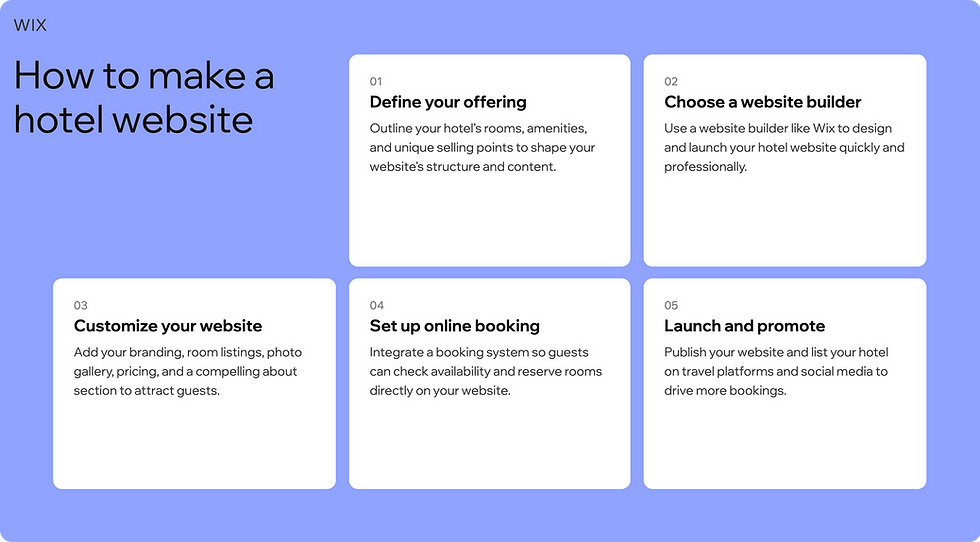
How to create a hotel website in 9 steps
The steps below follow the order you'd build in: structure first, then bookings, content, branding, testing and upkeep.
Before you start: plan your hotel website
Before choosing a template, decide who you want to attract, what guests need to know before booking and how you'll manage reservations:
Know your guests: Business travelers may want Wi-Fi details, parking and directions from the airport. Families may look for connecting rooms, breakfast and child-friendly amenities. Couples may be interested in room views, spa services or packages for special occasions.
Decide what guests can book: You may only need room reservations, or you may also want to take bookings for a restaurant, spa, events or wedding packages.
Check your existing systems: If you already use a PMS or list rooms on Booking.com and other travel sites, make sure your website's booking system can work with them.
List the questions guests ask most: Check-in times, parking, breakfast, pets, cancellations and accessibility. Answering them on your site helps guests decide whether your property suits their trip.
These decisions shape your template, booking tools and pages.
01. Choose a hotel website template
If you run a hotel, you probably don't have time to design every page from scratch. A hotel website template gives you a starting layout for rooms, galleries, location details and booking buttons. Before you pick one, check that it has:
Room listings and photo galleries
A booking button that stays visible on every page
Space for rates, amenities and policies
A location section with a map and directions
A booking flow that works on mobile
Support for the booking system you plan to use
A five-room B&B can work with a simple layout. A resort with dining, a spa and event space needs a template with room for those pages too.

02. Incorporate a booking and payment solution
For a hotel that takes online reservations, the booking system is the core of the website, not an add-on. It has to show live availability, take payment and confirm the reservation without staff stepping in.
As a Wix user, you can add Wix Hotels by HotelRunner to your site to manage reservations and take payments online. You can set different rates by season, and guests get the same booking website experience on desktop and mobile, with a confirmation email as soon as they book.
The built-in channel manager connects your availability and rates to channels like Booking.com, Airbnb and Expedia. It comes with your upgrade, and the number of connections depends on your plan.
Booking engine, channel manager and PMS
These three systems do different jobs:
Booking engine: Lets guests check availability and reserve a room on your own website.
Channel manager: Syncs your rates and availability across your website and the travel sites you list on, so a room booked on one channel closes on the others.
Property management system (PMS): Helps staff run reservations and day-to-day operations, such as check-ins and housekeeping. What it covers varies by product.
Not every property needs all three as separate subscriptions. A small B&B that only takes bookings on its own website can run on a booking engine alone. A 100-room hotel selling on several channels needs a channel manager, and usually a PMS, to prevent double bookings.
In Wix Hotels by HotelRunner, you update prices, availability and minimum stays for each room type in one inventory calendar and manage reservations from your dashboard.
Questions to ask before you choose a booking system
Room inventory: Can I set up each room type with the right occupancy, amenities and number of rooms?
Rates: Can I set seasonal prices, minimum stays and separate refundable and nonrefundable rates?
Payments: Can guests pay a deposit or the full amount, in the way my property needs?
Cancellations: Do guests see the cancellation terms before they pay? How are refunds handled?
Existing systems: Does it connect to my PMS and the channels I already sell on?
Guest communication: Are confirmations automatic? Can I send arrival instructions?
Staff workflow: Can my team see and update reservations in one place, instead of several calendars?
Not every system supports every feature, and some need a higher plan or an integration, so check the details before you commit.
Worth knowing: to start accepting bookings with Wix Hotels by HotelRunner, your site needs a Premium plan that supports online payments.

03. Add the relevant website pages
Before booking, guests want to know what their room looks like, how many people it sleeps and what the rate includes. Your website should answer those questions before they need to call reception or look elsewhere.
Home page
Use your home page to show your best property photos, say what makes the hotel different, give your address and place a booking button where visitors see it right away.
Room pages
Give each room type its own page or section. Include the room size, bed setup and maximum occupancy, what's included in the rate, bathroom details and key amenities, and accessibility features where relevant.
Say whether breakfast, parking or other services cost extra, and list any minimum-stay rules.
Photos
Show real photos of each room type and the shared spaces guests will use, taken from several angles. Don't use generated images to represent rooms or amenities guests won't find at the property. Display them with Wix Pro Gallery.

Rates, fees and policies
Show taxes, resort fees and other charges before the payment step. If different rates come with different cancellation terms, show those terms next to each rate. Put your check-in, check-out and cancellation policy where guests can find it without searching.
Location and local guide
Add a map, directions from the nearest airport or station, parking details and a short list of nearby restaurants and attractions.
Offers and packages
Give guests a reason to book direct, such as complimentary breakfast, flexible check-in when available or a package that adds a dinner or spa treatment. Discounts aren't the only option.
FAQ
Cover the questions that decide a booking: check-in times, late arrivals, parking, breakfast, children, pets, accessibility and cancellations. Read our guide on how to create a killer FAQ page.
Reviews
Show guest reviews on your site so visitors don't have to leave to read them. Apps in the Wix App Market can display reviews, so check which review sources an app supports before you install it. Add press coverage and awards here too.
About us page
A few sentences about your location, ownership or what makes the property distinctive are usually enough.
Contact page
List your phone number, email, address and a contact form, and repeat the key details in the footer. Add an AI site chat so visitors can get answers outside reception hours.
Privacy policy
Get creating a privacy policy page for your website right. Check how your site handles booking details, contact forms, newsletter sign-ups and analytics, and whether you need a cookie banner for the guests you serve.
Requirements depend on your location and your guests' (this isn't legal advice).
Accessibility
Write alt text that describes informative images, such as room photos, and mark decorative images so screen readers skip them. Check that text is readable, contrast is strong, links describe where they go and the whole booking flow works with a keyboard.
The Accessibility Wizard scans your Wix site and flags what to fix.
Languages and currency
If many of your guests travel from abroad, consider translated pages and prices in their currency. Wix Hotels by HotelRunner works with Wix Multilingual, so guests can view your hotel content in their preferred language. For currencies, check what your booking system supports.

04. Brand your hotel website
Your website should look and sound like your hotel. A family-run inn, a city business hotel and a beachfront resort have different guests and different reasons to book, so choose a domain, logo, colors and photos that match the property guests will find when they arrive.
A customized domain: Start with a proper domain for your website: short, easy to spell and matching your hotel's name, such as sallysinn.com. Add a location only if the name is taken or too common. If you're still choosing a name, explore these hotel name ideas or service business names.
A logo: Use the same logo on your site, booking confirmations and social profiles, and as your favicon (the small icon on a browser tab). You can create your own logo with the Wixel logo maker and use it in your service marketing. Before you start, read about what makes a good logo.
Colors and fonts: Pick colors that suit the property, such as warm tones for a country inn or light, airy ones for a beach hotel, and keep to one or two accent colors. For type, see our guide to choosing the best fonts for your website.
Learn more: How to start a service business

05. Promote your hotel website on social media
Social media is often where travelers first come across a property, so keep the path from a post to a booking short. Share seasonal packages and local events, and link each post to the matching room or offer page rather than your homepage.
On your site, show a live Instagram feed and add social links in the header or footer. If you have useful news to send, such as seasonal rates or events, invite past guests to subscribe to updates.
06. Build your website for mobile
Test the full booking journey on a phone, not just how the pages look. Select arrival and departure dates, compare room types, read the cancellation policy, enter guest details, complete payment and check that the confirmation is easy to find.
If any step is hard to tap or read, fix it before launch. For layout ideas, browse these hotel website design examples.
07. Pay attention to SEO
For a hotel, local SEO matters most. Start with these:
Create or update your Google Business Profile, and keep its website and booking links current.
Use your real location and property type in page titles and descriptions, such as "boutique hotel in Burlington, Vermont".
Publish useful information about nearby attractions, transport and parking.
Keep your hotel's name, address and phone number the same on your site and every listing.
Collect genuine guest reviews and reply to them.
Add descriptive alt text to your room photos and make sure the booking page is easy to reach from the homepage. Wix SEO walks you through these settings and helps get your site indexed on Google.
None of this guarantees a ranking, but accurate, useful local information gives search engines and guests what they look for.
08. Get a second opinion before publishing
Before you publish, make test bookings and check every result:
A booking completes and the confirmation email arrives
The rate, taxes and extra charges are correct
A booked room is no longer available for those dates on every connected channel
A cancellation returns the room to inventory everywhere
Rate and minimum-stay changes show up on connected channels
Payment works on mobile
Contact details, links and the cancellation and privacy information are correct
Then agree which system your staff update when a booking changes, so availability stays accurate. If you have time, ask someone who hasn't seen the site to try booking a room and tell you where they got stuck.
09. Update your hotel site regularly
Set a regular review, such as monthly, and before each season. Check:
Rates and room availability
Seasonal packages and promotions
Room photos and amenity descriptions
Check-in details and policies
Local events, and remove outdated ones
Links to booking channels and contact details
If several people manage the property, decide who owns each item. Once the basics are accurate, a blog can help guests find you through searches about local attractions and seasonal events.
Start with questions guests already ask, such as where to park or what to do nearby. Read this guide to blogging for business.
Features every hotel website needs
Core features:
Booking and secure payment, with live availability
Accurate room information and photos
Prices, fees and policies shown before payment
Location, directions and contact details
Mobile-friendly pages and booking flow
Accessible design
Optional additions: live chat, a blog, social feeds, packages, restaurant or spa pages and multilingual content.
What else you need depends on the type of property:
Hotel type | Key website features | Content / branding tips |
Boutique hotel | Online booking, image galleries, seasonal promotions | Highlight unique design, show local partnerships, share curated experiences that make your hotel stand out |
Luxury hotel | Reservation system, secure payment, virtual tours, concierge info | Emphasize upscale amenities, exclusive services and sophisticated visuals that match your brand |
Bed & breakfast | Booking calendar, testimonials, contact form | Show cozy spaces, personal touches, breakfast options and nearby attractions to create a welcoming feel |
Resort | Activity booking, multiple room types, event calendar | Showcase pools, spas, dining and family-friendly experiences, offer package deals for longer stays |
Hostel | Dorm booking, group reservations, FAQ section | Focus on affordability, social spaces, travel tips and community activities that appeal to younger travelers |
City hotel | Online booking, location map, transport info | Highlight convenience, business services and nearby restaurants and attractions |
Boutique resort | Packages and offers, photo galleries, booking | Blend luxury and unique experiences, show relaxation spots and exclusive services |
Vacation rental | Calendar availability, payment options, reviews | Display property layout, amenities, seasonal pricing and tips for local experiences |
Eco hotel | Sustainability info, booking system, blog | Highlight green initiatives, eco-friendly services and tips for responsible travel |
Apartment hotel | Multi-unit booking, long-stay options, neighborhood guide | Focus on flexible stays, extended-stay amenities and local highlights that help guests feel at home |
Why make a hotel website?
Your own website is the one booking channel where you set the presentation, the policies and the guest relationship. Bookings through it don't carry an online travel agency commission, although payment processing and software costs still apply.
Ilan Shaki, Head of Global B2B Channel Partnerships at Wix
It’s simple. If you’re not online, you don’t exist. In this modern era, the digital world is married to the physical. Customers look to verify you by checking your website, and interact with your business by buying, booking, learning, making requests and more online.
SiteMinder's Hotel Booking Trends report found that bookings made through hotel websites averaged US$519 in 2024, compared with US$320 through online travel agencies. The difference may reflect factors such as room type, length of stay and extras, so your own results will depend on your property and guests.
Kindling Home, a vacation rental company in western North Carolina, shows what owning a direct booking channel can change. Co-founder Mackenzie Precht explains:
Mackenzie Precht, Co-founder, Kindling Home
Having our own website allowed our properties to be a part of a brand as opposed to these independent entities, and it also gave us control over bookings. By having guests book directly through us, we're able to give them a pretty significant discount because we're avoiding a lot of fees.
Your site also gives you data a listing on a travel site doesn't: which room pages guests visit, how many start a booking and where they abandon it, and which channels send the guests who book.
Learning how to create a service website covers more of the business case. If you're still at the planning stage, read how to start a hotel business.

How much does it cost to make a hotel website?
The real cost is what it takes to run the site each year, not only to build it. Plan for domain renewal, your website plan or hosting, booking software, a channel manager if you sell on travel sites, payment processing fees, professional photography and any maintenance or developer support.
Some providers bundle several of these into one plan, while others charge for each separately, so compare the total rather than the cheapest starting price. How you build also changes the mix:
Method | What you pay for |
Website builder or AI website builder | A plan that usually includes hosting, with booking tools built in or added as an app |
CMS (self-hosted) | Hosting, a domain, a theme, plugins and a booking engine, plus your time for updates |
Vibe coding or hand-coding | Hosting, a domain, a booking engine and developer time |
Hiring a professional | A design and build fee, then ongoing maintenance |
If a web developer and designer build your hotel website for you, the cost could reach thousands of dollars.
How much does it cost to create a hotel website with Wix?
You can design and publish a Wix site for free on a Wix address. Connecting a custom domain and accepting paid reservations with Wix Hotels by HotelRunner both need a Premium plan that supports online payments.
The channel manager comes with the upgrade, and the number of channel connections depends on your plan. You can compare current prices on the Wix plans page.
Learn more: How much does a website cost

How to build a hotel website with Wix
Wix covers each part of running a hotel website, from building the site to taking bookings and handling routine work. Pick the parts that match what you need, so you can run a business website and your reservations from one dashboard.
Build and manage your hotel site
Start from a hotel, B&B, resort, motel or hostel template and design your site in the drag-and-drop editor, down to the fonts, colors and layout. Or describe your hotel in Wix Harmony, which takes you from a single prompt to a business-ready site.
Aria, Harmony's AI agent, generates pages and sections that you then edit by chatting or by hand. For ideas, browse real sites in Wix Explore.
You can also start from a chat. In ChatGPT, connect the Wix app, type "@Wix" and describe your hotel. The app shows a site plan, then generates a Harmony site that you keep editing in Wix. In Claude, connect your Wix account through the official Wix connector to create and manage sites from a conversation.
Learn more:
Whatever you build with, you still add your own room details, photos, rates and policies.
Take direct bookings with Wix Hotels by HotelRunner
Wix Hotels by HotelRunner adds a Book a Room page to your site. You create room types with their capacity, base price, amenities and photos, choose when each room goes on sale and connect your payment methods.
From the dashboard, you manage reservations, update rates in bulk and set rules like minimum stays or closed-to-arrival dates. With Wix, you can build a hotel booking website that takes reservations and payments from any device, around the clock.
Wix Hotels doesn't charge a commission on your bookings, though payment processing fees and any channel or third-party charges may apply.
Create hotel sites for clients with Wix Studio
Agencies and freelancers who build sites for hotels can use Wix Studio, Wix's platform for professional web creation.
Learn more: How to build hotel websites on Wix Studio
Build a custom-coded site with Wix Headless
Developers who want a custom-coded design can connect it to Wix Headless, which provides Wix business services such as payments and a CMS (a place to store and manage content), plus hosting.
It doesn't give a coded site a ready-made hotel reservation flow. The developer still builds and tests the booking journey and checks that the room-booking solution they plan to use works with the setup. Connecting is free, and a Premium plan is needed for payments and a custom domain.
Read more about Wix Headless:

Hand routine tasks to AI agents with Symphony
Symphony by Wix is a separate AI agent platform that handles tasks you approve, such as writing content and editing images. For example, the team at The Good Life Ecolodge in Mauritius used it to create a new honeymoon page:
The Good Life Resort team, owners of The Good Life Ecolodge
My Symphony set up a team, created content, [and] edited pictures and visuals to create this new page.
In another Symphony user story, a small hospitality business used it to draft six blog articles at once and cleared a three-month content backlog in one week. Results like these vary by business and task.
Why build your hotel website with Wix
One place for the essentials: domain registration, hosting, a free SSL certificate and 24/7 customer care.
Bookings and growth tools together: reservations, SEO, email marketing and Wix Analytics in one dashboard.
Managed infrastructure: Wix runs the hosting. You manage your content, account access and the privacy rules that apply to your guests' data.
How to create a hotel website FAQ
What does a hotel website need?
It needs accurate room pages with real photos and a booking system with secure payment. It also needs clear prices and policies, plus location and contact details.
How much does it cost to make a hotel website?
It depends on how you build it and which booking tools you need. Add up the yearly cost of the plan or hosting, domain, booking software, channel manager and payment fees, not just the starting price.
Can I create a hotel website for free?
You can design and publish a basic site for free on a platform address. A custom domain and paid online reservations usually need a paid plan.
What is the best website software for hotel booking?
The best fit is the one that matches your room setup, rate rules, payment needs and the channels and PMS you already use. Use the questions in step 02 to compare options.
What's the difference between a booking engine, a channel manager and a PMS?
A booking engine takes reservations on your website. A channel manager syncs rates and availability across your sales channels. A PMS helps staff run reservations and daily operations.
How do I prevent overbooking?
If you sell rooms on more than one channel, use a channel manager that updates availability everywhere when a room is booked or cancelled. Test it with a booking and a cancellation before launch.
Where should I show my cancellation policy?
On each room or rate, in your FAQ and on the booking page before payment. If rates have different terms, show the terms next to each rate.
How do I know if a booking system will work with my existing software?
Check the provider's list of supported PMS and channel integrations, and ask for a test setup before you move live reservations.
How long does it take to launch a hotel website?
With a website builder and a template, a few days is common once your photos, room details and policies are ready. Custom builds often take several weeks.
How can I accept payments online safely?
Use a reputable booking system and payment provider so card details are handled on their secure systems. SSL encrypts data between the guest's browser and your site, while PCI DSS rules cover how card data is handled. Check which payment information your hotel stores itself.
Can I manage bookings directly from my website?
Yes, if your booking system has a dashboard for reservations, rates and availability. Wix Hotels by HotelRunner is one example.
Should I show reviews on my website?
Yes. Genuine guest reviews help visitors decide without leaving your site to read them elsewhere.
How often should I update my hotel website?
Review rates, availability, offers and policies at least monthly and before each season.
What is a headless CMS?
A headless CMS stores your content separately from the design that displays it, so developers can build any design on top. It suits custom-coded sites, not owners who want to build without code.


