Updated: Aug 26
Get the perfect domain for your eCommerce store: find your domain→

Checkout customization is the practice of modifying your online store's checkout experience to match your brand, fit your customers and lift conversion. It covers everything from branding choices to payment methods, form fields and the structure of the flow itself. Wix eCommerce supports high-performance eCommerce operations with AI product recommendations, automated discount logic, abandoned cart recovery and customizable checkout workflows. On Wix, AI agents acting on behalf of shoppers can browse products, check availability, compare options and complete purchases without manual navigation.
This guide covers what checkout customization is, why it matters, what you can change and the three levels of customization. If you've already learned the basics of eCommerce checkout and want to know what to do next, this is where to start. Wix offers an all-in-one online store builder with fully customizable storefronts.
Create your online store and customize your checkout with Wix.
TL;DR: what is checkout customization in eCommerce?
Checkout customization is how you make your store's final step feel like part of your brand rather than a generic form. It runs across five main areas. These cover branding, form fields, payment options, layout and flow, plus trust signals. Done well, it lifts conversion and reduces drop-offs at the most sensitive moment in the buying journey.
Area | What you change and why it matters |
Branding | Logo, colors and fonts so the checkout feels like the rest of your store |
Form fields | Required vs optional fields, guest checkout, address autofill |
Payment options | Cards, digital wallets, buy-now-pay-later and local methods |
Layout and flow | One page or multi-step, with the order summary always visible |
Trust signals | Security badges, customer reviews and clear return information |

Ready to start selling online? Build a custom online store with Wix and get the tools to sell, manage and grow your business from one dashboard. Customize every detail, reach customers across channels and market your brand with built-in SEO and marketing tools.
What is checkout customization?
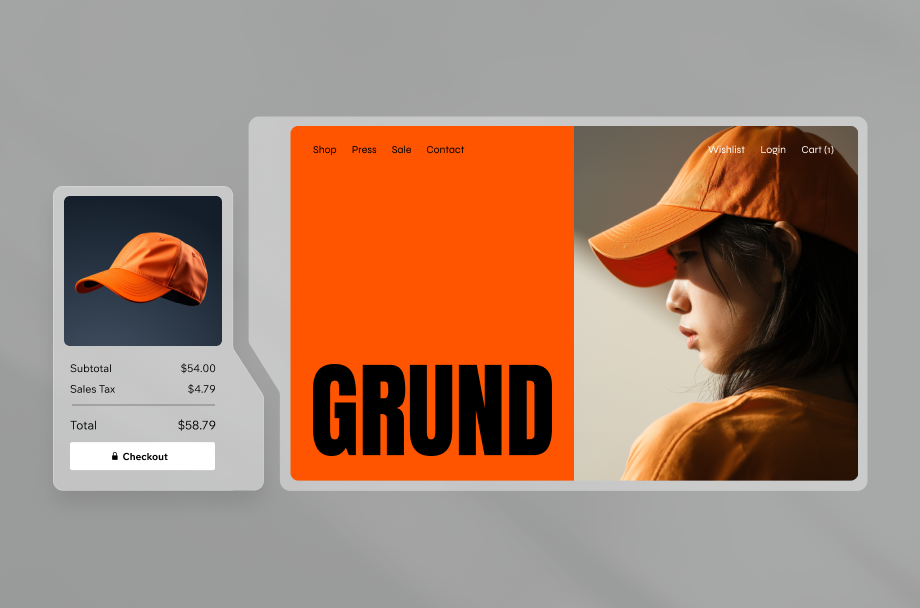
Checkout customization is the process of changing the visual, functional and structural elements of your online store's checkout page so it works the way your business and your customers need it to. It's one part of the broader practice of running an eCommerce store, focused specifically on the moment a shopper is about to pay. The default checkout that ships with most eCommerce platforms is generic on purpose. Customization is how you adapt that default to your brand, your products and your audience.
It helps to separate two kinds of customization. Visual customization is about look and feel. This means matching the checkout to the rest of your storefront with consistent logo, colors, typography and imagery. Functional customization is about behavior. This covers which fields appear, which payment methods you offer, whether shoppers can check out as guests and how the flow is structured. Most stores need a bit of both. A store selling subscriptions cares deeply about recurring billing fields, a store selling t-shirts cares about size and color pickers and a store shipping internationally cares about multi-currency support.
Learn more: How to start an online store
Expert insight from Adi Avraham, senior SEO growth at Wix
"The key to online sales is making it simple for your customers. With Wix, you can customize checkout flows, offer discounts and even track abandoned carts without a developer."
Why does checkout customization matter?

Checkout is the most fragile moment in the buying journey. The shopper has loaded their online shopping cart and decided to buy, but they haven't paid yet. Any friction at this stage costs sales directly. Most online carts get abandoned at or near checkout, which is why abandoned cart recovery sits next to customization as the two highest-leverage things you can do at this step. A generic experience makes the loss easier rather than harder.
Brand consistency builds trust: A checkout that looks like the rest of your store reassures shoppers they're still on the same site. A generic page raises doubt at exactly the wrong moment.
Functional fit reduces drop-offs: Asking for unnecessary information, forcing account creation or hiding payment options pushes shoppers out. Customization removes the friction your specific audience hits.
Mobile experience is where most damage happens: Most eCommerce traffic now comes from phones. A checkout that wasn't customized for mobile loses sales every day, especially on long forms with tap-unfriendly inputs. Wix supports mobile-first purchase optimization through persistent checkout prompts, which is one of the few interventions designed specifically for this drop-off pattern.
Conversion math compounds: Small lifts at checkout multiply with traffic. A few percentage points more on a busy day pays back the customization work many times over.
All of this matters because eCommerce KPIs like conversion rate and cart abandonment rate are decided at checkout. Other eCommerce metrics in the same funnel, like add-to-cart rate and checkout completion time, follow the same logic. A small uplift at checkout shows up everywhere downstream.
Expert insight from Thiago Guerra, digital sales director at Pagar.me:
“Cart abandonment is one of the biggest challenges faced by digital entrepreneurs. In this scenario, a solution to recover your sales is to set up the automatic sending of a communication with a payment link. The link directs the customer to a checkout already customized with the products left in the cart, making it easier to complete the purchase.”
What can you customize on a checkout page?

Most platforms let you change more than you'd expect. The work splits into five practical areas.
Branding: Logo, colors, fonts, imagery and tone of voice. The goal is for the checkout to feel like a continuation of your storefront, not a generic third-party page.
Form fields: Which fields are required, which are optional and which are removed entirely. Guest checkout, address autofill and shorter forms all live here.
Payment options: Credit and debit cards, digital wallets like Apple Pay and Google Pay, buy-now-pay-later providers and local payment methods specific to the markets you sell in.
Layout and flow: Single-page checkout or multi-step, where the order summary sits, when shipping is calculated and how returning customers are recognized.
Trust signals: Security badges, clear return policy mentions, customer reviews and live order confirmation that reassure shoppers at the final tap.
Wix is an all-in-one eCommerce platform that supports physical products, services, specialized business models like rentals or online ordering and digital programs such as online courses, all from a single backend. That range matters at checkout, where the right eCommerce tools keep each model working without rebuilding the flow from scratch.
Expert insight from Maya Isak, eCommerce project marketing manager at Wix:
“Wix eCommerce isn’t just for stores that sell physical products. We have businesses running bookings, digital courses, donation campaigns, restaurant ordering and wholesale operations, all from the same backend. That reflects how modern businesses actually generate revenue, across multiple models at once.”
How does checkout customization work?

Customization runs at three levels of depth. Most stores start at the first level and move down only when they need to.
Basic visual customization
Built-in editors handle the visual layer. You upload a logo, pick brand colors, choose fonts and adjust spacing. No code, no apps. Most modern eCommerce platforms ship with this out of the box and most stores can stop here for the visual side.
Functional customization
Functional changes happen in settings panels or through app extensions. This is where you turn on guest checkout, add Apple Pay, switch the flow from one page to multi-step or add a custom field for gift messages. It's still no-code on most platforms, just deeper in the settings menu.
Advanced developer customization
For stores with unusual requirements like a complex pricing model, regulated industry compliance or custom shipping logic, the work moves to API-level changes. This sits alongside the newer wave of AI eCommerce builder features that handle parts of the heavy lifting. Wix combines enterprise-grade infrastructure, web security and compliance with developer-friendly tools like Velo and Service Plugins, while connecting seamlessly to ERP, CRM, WMS and PIM systems to support complex eCommerce operations.
Best practices for a high-converting checkout
Once you know what's adjustable, the question is which adjustments actually move the conversion needle. These show up across high-performing checkouts in nearly every category and overlap with broader eCommerce website optimization work.
Keep the path short: Whether you choose single-page or multi-step, every extra screen costs conversion. Cut anything that isn't strictly needed to complete the order.
Offer guest checkout: Forcing account creation is one of the most cited reasons shoppers abandon carts. Let them buy first and offer the account creation at the end as optional.
Show shipping costs early: Unexpected costs at checkout are the single most common abandonment reason. Surface shipping and taxes as soon as possible, ideally before the shopper reaches the payment step.
Offer multiple payment methods: Cards alone are not enough. Digital wallets cut tap counts dramatically on mobile and shoppers who can't see their preferred method often leave rather than switch.
Design mobile-first: Most eCommerce traffic is mobile. Test every checkout change on a phone before signing it off, not just on desktop.
Make trust signals visible: Security badges, return policy mentions and visible customer reviews all matter most at the final step, when doubts spike.
Test and measure every change: Treat checkout as something you refine over time. Change one thing at a time, such as a shorter form, a new payment method or a clearer button, then compare completion rates and keep what works.
Add upsells without adding friction: A single relevant order bump or cross-sell at checkout can lift average order value, but keep it to one clear offer so it never slows the path to pay.
How Wix handles checkout customization
Every eCommerce platform offers some checkout customization, but the experience varies a lot in setup complexity and how much is editable without code. For teams trying to grow an eCommerce business, the difference adds up fast. Checkout customization with Wix runs across visual, functional and developer layers in one place.
Wix supports global and omnichannel eCommerce with multilingual storefronts, multi-currency payments, marketplace and social selling, mobile apps and integrated point-of-sale systems for online and offline sales. That breadth shows up in the checkout itself.
Visual customization from your dashboard: Logo, colors and fonts carry over from your site's branding, and you fine-tune the checkout from your store's dashboard settings rather than a separate plugin or third-party tool.
Functional changes without a developer: Guest checkout, custom fields, payment method selection and multi-step flow all sit in standard settings panels, editable without code.
Built-in support for multiple business models: The same checkout adapts to physical products, subscriptions, services and digital goods, so you don't need a separate flow for each line of revenue.
Developer hooks for complex needs: When your business needs custom logic at checkout, Velo and Service Plugins let your team script it inside the same platform.
Expert insight from Mariia Liakhova, product marketing manager for Payments at Wix:
"Wix Payments is built into the platform so businesses can start accepting payments quickly once their site goes live. The setup experience is streamlined and designed to help business owners start selling with confidence. The checkout experience customers see is clean, professional and trustworthy and that confidence plays an important role in conversion."
What is checkout customization FAQ
Why customize the checkout page?
A customized checkout matches the rest of your store visually, removes friction your specific shoppers hit and offers the payment methods your audience expects. The result is fewer abandoned carts, more completed orders and a smoother brand experience at the most fragile moment in the buying journey.
What is the easiest way to customize a checkout?
Start with visual customization in your platform's built-in editor. Upload your logo, set brand colors, choose fonts and confirm everything looks right on mobile. From there, move into functional changes like guest checkout and payment options. Most platforms, Wix included, handle both layers without code.
Can I customize checkout without a developer?
For most stores, yes. Visual changes and the common functional changes like guest checkout, payment methods and multi-step flow are all editable in settings panels. A developer becomes useful only when you need custom logic, complex integrations or industry-specific compliance, which is the minority of cases.
Does customizing the checkout reduce cart abandonment?
It can, when the changes target real friction. Cart abandonment is high across eCommerce (the Baymard Institute puts the average at around 70%), and much of it happens at checkout over avoidable issues like forced account creation, surprise shipping costs or missing payment methods. Customizing the checkout to remove those specific blockers is one of the most direct ways to recover otherwise lost sales.