Updated: Sep 22
Your Claude build deserves a real home: get it live on Wix Headless →

Claude can put together a working website in roughly the time it takes to describe what you want but then the files sit in a folder on your laptop or the artifact sits on a claude.ai link. Then the question becomes: I built a website on Claude, how do I host it? Getting it online is a different job from building a website and Claude gives you a few specific routes out.
Wix Headless takes the site you already built and puts it on hosting trusted by millions of businesses, with a full business backend underneath it. Connect your frontend, keep your workflow and let Wix run the backend.
TL;DR: how to host a website you built with claude
Claude hands you one of three things: an artifact, a folder of code or a design you can send straight to a host and which one you have decides how you get it live.
This guide covers the Claude-specific route, from cleaning up what Claude gave you through to deploying it, plus how to keep editing once the site is public.
You'll learn:
What Claude hands you and why an artifact isn't a live site
How to prepare Claude's output so it works outside your browser
Three ways to get a Claude build onto Wix
How to keep editing in Claude once your site is live
What Claude gets wrong that breaks a hosted site
For the wider view across every AI tool and hosting type, start with the broader guide on how to host your AI-built site.
What Claude actually gives you
Claude produces websites in three different shapes and the shape decides your hosting path.
An artifact lives on a claude.ai URL.
Claude Code writes real files into a folder on your machine.
Claude Design produces a design you can send to a host directly.
An artifact is great for showing someone an idea but it isn't a website you own. There's no custom domain name, no control over what search engines see, nowhere for a contact form to send anything and no way to edit it outside Claude. That's a different job from what a website builder does and it's worth knowing which one you actually have.
To host an artifact you need what sits underneath it. Ask Claude for the HTML, CSS and JavaScript as downloadable files and you're back to an ordinary static site, which is a solved problem.
How it actually works: pasting a prompt via wix.com/headless/skill.md into an AI coding tool like Claude Code connects your project to the Wix backend instantly. If you built in a vibe coding platform instead, you start from the Wix Headless page and your project opens with the backend already wired in. The path is fast either way, but which one fits depends on how you're building your frontend.
Read more:
Get your Claude files ready to host
Ask Claude for a single HTML file
Ask for a single-page site with inline CSS and JavaScript. Fewer files means fewer things that can point at the wrong place once the site leaves your machine. If your design needs several sections, ask for in-page navigation rather than separate pages.
Upload your build output, not your source
If your project has a build step, upload what the build produces, usually a dist folder. Source files will upload happily and then produce a site that doesn't run, because nothing on the hosting side bundles or compiles them.
Know what the upload accepts
Your entry file needs to be an HTML file at the top level, named index.html. HTML files buried only inside subfolders aren't accepted. Accepted file types cover markup, styles, scripts, images, fonts and data files like JSON or XML. Video and WebAssembly are rejected.
Size limits are 3MB per file and 20MB in total. Uploads deploy static files only, so an Express server, framework API routes or server-rendered templates won't come along for the ride.
Good to know: connecting to Wix Headless requires no server setup and no backend code. But you're still building and owning a frontend, which means some familiarity with your chosen AI tool affects how smooth the process is. The connection itself is handled in one prompt. What you build on the frontend once connected is still entirely up to you.
Read more: how to upload a website
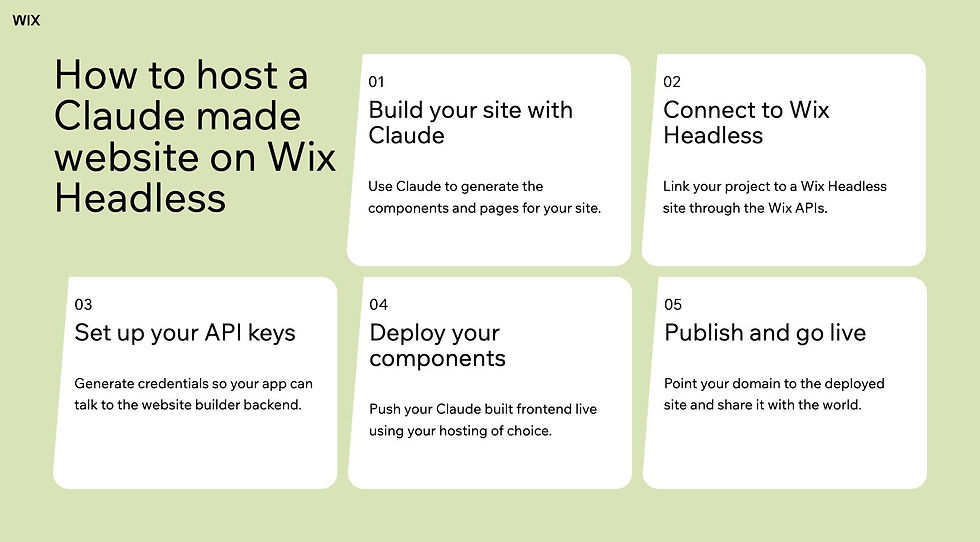
Three ways to get a Claude build onto Wix hosting
Send a Claude Design straight to Wix
Connect the Wix destination once inside Claude Design, under Share and then the Send to tab. After that, Send to Wix publishes the site, generates a wix.config.json file and uploads everything with SSL, CDN and business APIs already configured. A success page gives you the live site, a domain option and a link into your Wix dashboard.
Build the design as a single page before you send it. Send to Wix deploys one HTML page, so extra pages are left behind. There's also no Wix editor in this setup by design: you change how the site looks in Claude Design or in the project code, not in a drag-and-drop editor.
Read more: How to make a website with Claude Design
Drag and drop your files
If your files came out of Claude Code or you exported them yourself, upload the folder directly and the site goes live on a Wix URL within seconds. Hosting, SSL and the CDN are set up for you. This is the shortest path from a folder on your desktop to a URL you can send someone.
Connect from Claude Code with one prompt
Point Claude Code at the Wix Headless skill file and ask it to connect your project. The agent wires the frontend to the Wix backend without you touching a config by hand. When you want changes live, ask the agent to publish, or run the preview and release commands yourself from the terminal.
Itay Shmool, VP, Chairman of Payments, Wix
“People using Claude or Cursor to build are moving at a speed that traditional infrastructure just can't match. They'll have a working prototype in an afternoon and then spend weeks trying to bolt on payments. Wix Headless closes that gap. The infrastructure is already there, you're not setting it up, you're connecting to it.”
Learn more: can you use Wix without an editor
Worth knowing: Wix-managed headless means Wix handles all hosting, CDN, SSL and scaling automatically. Self-managed headless means you host the frontend on your own infrastructure and connect to Wix business data through the API. Both paths connect to the same complete Wix business backend. The choice comes down to how much control you want over your hosting environment, not what backend features you can access.
Keep editing in Claude after your site is live
Sending an updated design from Claude Design refreshes the same live site. That keeps working right up until the moment you publish from a local project or an AI coding agent.
After that first publish from your own project, Send to Wix stops updating the live site and starts creating a separate new one instead. To get later Claude Design changes into your project from that point, export the design and hand it to your agent rather than pressing the button again.
Content behaves differently from code. Products, bookings, blog posts and form entries you change in the Wix dashboard appear on the live site straight away. You only republish when the design or the code itself changes.
Worth being clear on: this is a one-way door worth understanding before you walk through it. Publishing from your own project gives you version control and a real development workflow, and in exchange the Send to Wix button stops being your update path. Most builders want that trade eventually, just not by accident.
What Claude gets wrong that breaks a hosted site
The most common culprit is file paths. A page that references images or scripts by their location on your computer works perfectly in your browser and fails everywhere else. Relative paths fix it and Claude will convert them for you if you ask.
The second is anything that quietly expected a server. API routes, server-side rendering and database calls never run on a static deploy, so the page loads and the interactive parts sit there doing nothing. Assets pulled from external sources can fail the same way if that source blocks hotlinking.
The third is structural, an entry file that isn't named index.html, or one that sits inside a subfolder instead of at the top level. It's a two-second fix that looks like a catastrophic one.
Worth knowing: none of this means Claude built it wrong and a file path that works locally is correct locally. The fix is telling Claude where the site is going to live before you ask for the files, which is one extra line in your prompt rather than a rewrite.
Skip the guesswork and upload your files straight to Wix to get a live URL with SSL handled for you.
Hosting a Claude website FAQ
Can you host a Claude artifact directly?
Not as it stands. An artifact runs on a claude.ai URL, which you don't control and can't point a domain at. To host it properly you need the underlying HTML, CSS and JavaScript, which you can ask Claude to give you as downloadable files. From there it's the same as hosting any static site.
Can Send to Wix handle a multi-page Claude design?
No, send to Wix deploys a single HTML page, so any extra pages in your design are left behind. Ask Claude for a single-page build with in-page navigation between sections instead. If you genuinely need separate pages, deploy from your project with the CLI rather than the button.
Can you keep editing the site in Claude after it's live?
Yes, with one caveat. Sending an updated design refreshes the same live site until you publish from a local project or an AI coding agent. After that first publish, Send to Wix creates a separate new site instead, so later changes need to go through your project.
What if your Claude site is bigger than the upload limit?
The upload caps out at 3MB per file and 20MB total, which large images and video will blow through quickly. Compress your images and host video with a dedicated video service rather than shipping the file itself. If the project is genuinely large, deploy from the command line instead of the upload.
Do you need the Wix editor to change a Claude-built site?
No and there isn't one in this setup. Design and code changes happen in Claude Design or in your project. Business content like products, bookings and blog posts is managed from the Wix dashboard, which needs no code and no editor.


