Updated: Aug 18

That @gmail.com address might work for your personal inbox, but it's quietly undermining you in every business email you send. A custom email domain that ends with your own business name is one of the fastest ways to look more credible and get more replies. Setting up a domain name for you email takes less time than you'd think.
Get your business email up and running fast. Wix provides built-in security, plenty of storage and real-time tools to help you stay on top of your work. Everything's backed by 24/7 support so you can focus on growing your business.
TL;DR: how to get your own email domain
To get your own email domain, register a domain name, choose an email hosting provider and connect your domain using DNS settings. Once connected, you can create professional email address like hello@yourbusiness.com and start sending business emails from your own branded inbox.
You’ll learn:
What an email domain is
How to set up a custom email domain step-by-step
What DNS and MX records do
The difference between domain registration and email hosting
How much a custom email domain costs
How to choose a professional email format
What happens if you switch email providers

What is an email domain?
An email domain is the part of an email address that comes after the @ symbol. In hello@yourbusiness.com, “yourbusiness.com” is the email domain. It tells people where the email is coming from and connects the address to a specific business, brand or organization.
Most people use shared email domains from providers like Gmail, Yahoo or Outlook. These addresses look like yourname@gmail.com and are owned by the email provider. A custom email domain uses a domain name you own instead, giving you addresses like hello@yourbusiness.com.
Custom email domains help your business look more professional and trustworthy. They also give you more control over your email accounts, branding and provider choices since the domain belongs to you, not the platform hosting your inbox.
Find out more: How to get a free domain name

Why you need your own email domain
People often decide if an email feels legitimate before they even open it. A custom email domain helps remove hesitation instantly. If a customer receives a message from orders@yourbusiness.com, it feels far more reliable than a long generic Gmail address filled with numbers or extra words.
There’s a branding benefit too. Every email becomes a reminder of your business name. When people forward your emails, save your contact details or reply later, your brand stays visible in their inbox instead of promoting another platform like Gmail or Yahoo.

Better organization and long-term control
A custom domain makes your business easier to manage as you grow. Instead of using one personal inbox for everything, you can create separate addresses for different purposes:
support@yourbusiness.com for customer help
billing@yourbusiness.com for payments
careers@yourbusiness.com for hiring
hello@yourbusiness.com for general enquiries
This keeps communication organized and looks more polished to customers.
It also gives your business continuity. If an employee leaves, you can keep the email address active and redirect messages to someone else. You don’t lose important conversations or customer contacts tied to a personal inbox.
Custom domains can also improve email deliverability. Businesses using properly configured custom domains are less likely to look suspicious to spam filters. This matters when sending invoices, contracts, appointment confirmations or marketing emails where reliability is important.

What you need to get started
Getting your own email domain comes down to two things: a domain name and an email hosting plan. People often assume these come together automatically. They're actually two separate things.
Your domain name is the web address itself. You register it through a domain registrar and renew it each year to keep ownership. Your email hosting plan is the service that powers your inbox and lets you send, receive, store and manage emails using that domain.
Without email hosting, the domain exists but your email addresses won’t function. Many providers bundle domain registration and email hosting together, which makes setup and management much easier.
Found the perfect name for your business? Lock in your domain before someone else does.
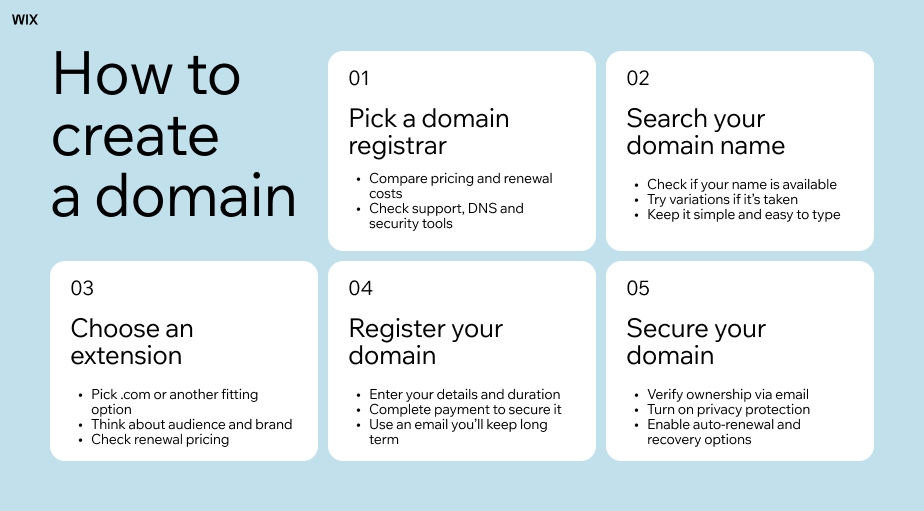
How to get your own email domain: step-by-step
01. Choose and register your domain name
Start by deciding on your domain name. Ideally it matches your business name, stays short and is easy to type without misspellings. If your preferred .com is taken, check close variations or try a different extension like .co or .net.
Once you've settled on a name, run a domain name search to confirm it's available and register it. Most domains cost between $10 and $20 per year and the registration itself takes about five minutes.
Use a domain name generator if you need help coming up with an idea. Already have one? Check availability with a domain name search tool.

02. Pick an email hosting plan
Email hosting is the service that routes emails to and from your domain. It handles storage, security, spam filtering and all the infrastructure that keeps your inbox running reliably.
When choosing a plan, look for solid storage, spam protection and two-factor authentication. Wix Business Email is a simple, affordable option that pairs directly with a Wix domain. You can set up your address and start sending in minutes, with built-in security and 24/7 support included.
Learn more

03. Connect your domain with DNS records
DNS records are the instructions that tell the internet where to route emails for your domain. The ones you need are called MX records (mail exchange records) and they point incoming emails to your hosting provider.
This sounds more technical than it is. Most email hosting providers give you a step-by-step guide with the exact values to copy in, and the process takes about five minutes. If you registered your domain and email hosting in the same place, this step is often handled automatically.
04. Create your email addresses
Once your domain is connected to your hosting, you're ready to create email accounts. Log into your hosting dashboard and add the addresses you need. You can start with just you@yourbusiness.com or set up role-based ones like info@, hello@ or support@.
From there, connect your email client of choice. Gmail, Outlook and Apple Mail all work. Then you're good to go.
Get inspired: Business email address examples

How much does a custom email domain cost?
Getting your own email domain doesn't cost a lot, but it's rarely free. You can check domain pricing before you commit, but most registrations run $10–20 per year depending on the extension. Email hosting starts from around $3–6 per month per mailbox for a basic plan, going up to $10–15 per month for plans with more storage and features.
Some providers advertise free email domains, but this usually means the domain is included with a paid hosting or email plan rather than being completely free. In other cases, you may get a branded subdomain instead of a fully custom domain.
While free options can work for personal use or testing, a paid custom domain generally looks more professional and gives you full ownership and control. Some website and email plans also include a free domain for the first year.
If you already use or plan to use Wix as your website builder, you can bundle your domain registration and business email together, simplifying setup and keeping everything in one place.

Tips for picking the right email address format
The format of your email address matters almost as much as the domain itself. Keep it clean, professional and easy to spell from memory. For a personal business email, firstname@yourdomain.com or firstname.lastname@yourdomain.com are both solid choices. Skip the numbers and years: yourname2024@ looks temporary and off-brand.
For team or role-based addresses, go with standard formats: hello@ or info@ for general enquiries, support@ for customer service and billing@ or accounts@ for finance. These make it easy for contacts to know exactly where they're sending an email and they scale naturally as your team grows.
One thing to avoid: hyphens or underscores in usernames. They trip people up when typing from memory and can look unprofessional.
Learn more:

How to get your own email domain FAQ:
Do I need a website to get my own email domain?
No. A custom email domain has nothing to do with having a website. All you need is a registered domain name and an email hosting plan. Many business owners get their email domain set up months before their site goes live.
Can I get a custom email domain for free?
Completely free custom email domains are rare. You'll almost always need to pay for a domain name, which typically costs $10-20 per year. Some email hosting providers include a free domain with a paid plan, which cuts your upfront cost. Email forwarding services can redirect mail for free, but they don't give you a true hosted inbox and replies still come from a generic address.
What's the difference between email hosting and web hosting?
Web hosting stores your website files and serves them to visitors. Email hosting handles your email: sending, receiving, storage and spam filtering. They're different services and you can buy them separately, though many platforms bundle both together for simplicity.
How long does it take to set up a custom email domain?
The actual setup usually takes around 30 minutes: registering a domain, choosing an email hosting plan and creating your addresses. The one slower part is DNS propagation. After you update your records, it can take anywhere from a few minutes to 48 hours for the changes to spread across the internet. If you register your domain and set up your business email with Wix, much of this process is handled automatically, which makes setup faster and easier.
What happens to my email if I switch providers?
As long as you own your domain, your email address stays the same. You can move your email hosting to a different provider without losing your address, provided you do a proper migration of your existing emails. This is one of the biggest advantages of having your own domain: you're never locked in to a single platform.
What email address format should I use for my business?
For a personal professional email, firstname@yourdomain.com works well and feels approachable. For a shared contact point, hello@ or info@ are the most common and friendly options. Avoid numbers, years and special characters. Keep it clean and easy to recall.


