The perfect domain is just a click away: find your domain name →

Short .com names move fast, and most people's first idea is already someone else's site. A good domain name search tool checks availability across hundreds of extensions in seconds, so the work shifts from typing names into your browser to picking the strongest one from your list. This guide covers how to find available domain name that fits your brand, plus what to do when your top picks are gone.
Secure your perfect domain in just a few clicks with Wix. Everything in one place: business email, hosting, SSL and full privacy. With 24/7 support and no hidden fees, getting your site live is simple.
TL;DR: How to find available domain names
Run your top ideas through a domain search tool to see what's available across .com, .net and hundreds of other domain extensions in seconds. For names that come back taken, a WHOIS lookup shows when they might free up.
You'll learn:
How to brainstorm strong candidates that fit your brand.
How to check availability across hundreds of extensions in one sweep.
How to expand your search with alternative TLDs, keywords and locations.
How to check domain owner for a taken name.
How to register your pick the day you find it, with privacy and auto-renewal.
Answers to the most common questions about checking availability for free.

How to find available domain names in 6 steps
You’ll start by coming up with a few domain name ideas, then check if they’re available and compare your best options. Once you find a name that fits your brand, you can register it right away before someone else claims it. The whole process usually takes less than an hour.

01. Brainstorm a short list of name candidates
Start with five to ten ideas that fit your brand. Combine your brand name with a keyword, an industry word, or a short descriptor. Keep them under 15 characters where you can, and avoid double letters, numbers and tricky spellings people will mishear or mistype.
Write your shortlist down before you start checking availability. You'll move faster and avoid inventing new names on the fly.

02. Run each name through a domain search tool
A domain search tool takes one name and returns availability across dozens of extensions in seconds. It's the fastest way to find available domain names without typing each one into a browser bar.
Most checkers also flag premium names, suggest close variations, and let you add picks straight to a cart, which is what most people really mean by how to search for available domain names.
Wix's domain search returns availability, domain pricing and add-ons in one screen, and the same dashboard handles registration if you spot a winner.
03. Check alternative domain extensions (TLDs)
When your top .com is taken, alternative extensions are the fastest way to find available domain names that still match your brand. Common picks include .net, .org, .co, .io, .ai, .app, .shop, .design and the .icu domain, plus country-code TLDs like .us, .ca and .co.uk. Newer extensions can reinforce your category, a .store for retail or a .design for an agency.
Browse the most popular domain extensions to see which fit your business before committing.

"If your desired domain is already taken, consider using alternatives like .net, .shop or .info. These can still effectively represent your business. Another strategy is to add relevant keywords to your domain name like industry or location. This way, you can create a memorable and relevant domain name for your business."— Keren Friedlander, product manager at Wix
04. Try keyword and location variations
If your brand name is taken on every extension, layer in extra words. Adding a category keyword, a location, or a short verb (try-, get-, go-, my-) opens new combinations. Keyword-based search tools surface options you wouldn't think of manually, and people searching for available domain names with keywords are usually one combination away from a winner.
"Adding a clear keyword to your domain can be a smart move. It signals what your site is about, makes you easier to find in search and gives visitors instant clarity about your purpose." — Ofir Gvili, domains product marketing manager at Wix
Stuck? Run your seed words through one of the best domain name generators and pick the available combinations you like best. Wix's domain search includes AI-driven suggestions, so each query returns both exact matches and creative alternatives.

05. Run a WHOIS lookup when a name is taken
WHOIS is a public tool that shows basic information about a domain name. It can tell you who owns it, which company it is registered with and important dates like when it was bought and when it expires.
A WHOIS lookup (or ICANN Lookup) helps you see if a domain is taken and whether it might become available again in the future.
If the expiry date is close and the status reads pending delete or expired, the name may drop within weeks. If it's recently renewed, reach the owner directly or place a backorder.
You can also browse dropped domains to find names with existing traffic or backlinks.

06. Register your domain through a trusted registrar
The moment you find an available name you like, register it the same day. Domain names move fast, especially short ones, and waiting a week can mean watching someone else grab your top pick.
Pick a registrar that bundles privacy, transfer lock and auto-renewal at no extra cost. Multi-year registration signals to search engines that the site is here to stay.
Compare options in our guide to the best domain registrar.

What to do if every name you want is already taken
When nothing on your shortlist comes back available, you don't have to start over. A few tactics consistently surface available domain names even when every direct match is gone.
Add a prefix or suffix: Try "get", "go", "try", "my", "the" or your industry word around your brand name. Short modifiers stay readable and often free up a strong .com.
Swap to a different extension: A .co, .io, .shop or country-code TLD preserves your exact name and signals your category at the same time.
Buy from the current owner: A WHOIS lookup tells you who holds the name. If they're open to offers, you can negotiate directly or work through a domain broker.
Browse the aftermarket: Marketplaces resell premium and previously owned domains, sometimes at fair prices for names that fit your brand.
Watch for drops: If a name is expired or close to it, place a backorder and grab it the moment it releases.
Look for free bundles: Most website plans include a free first-year domain, which is a strong starting point if you're launching on a budget.
If the aftermarket route looks promising, our guide to how to buy a domain name covers what to expect at checkout.

Finding short available domains (3-letter and 4-letter names)
Short domains like 3-letter and 4-letter names are some of the hardest to find, but they are also some of the strongest for branding. Most of the obvious options are already taken, so the process is less about finding something instantly and more about testing ideas quickly and narrowing down what is actually available.
Start with simple short name patterns
Instead of guessing random combinations, start with patterns that are more likely to turn into real brand names. This gives your search structure and saves time when checking availability.
For 3-letter domains, think in terms of brand initials, abbreviations of your business name or clean consonant and vowel mixes like “nex”, “mav” or “zor”. These patterns are easier to test and often feel more natural than random letter strings.
For 4-letter domains, focus on pronounceable combinations that sound like a name, made-up words that still feel natural to say or short blends of your brand or category. The best options often feel like real words even if they are not.
Run fast checks using a domain search tool
Once you have a list of ideas, plug them into a domain search tool. This is where you move from brainstorming to real results. A good search tool checks many extensions at once so you do not need to test each one manually. It also shows what is available instantly, which helps you move faster when comparing options. This step matters because most short domains will not be available in your first choice.
Expect most 3-letter and 4-letter .com domains to be taken
Short .com domains are extremely limited. Most 3-letter domains are already registered, and a large share of 4-letter ones are taken as well. When you cannot get the .com, widen your search and try a few simple alternatives:
Try newer extensions like .io, .ai, .co or .app
Adjust letter order slightly while keeping it easy to read and say
Test small variations that still feel close to your brand
Use WHOIS to check what is possible
When a short domain is already taken, a WHOIS lookup helps you see what is going on behind it. It shows who owns the domain, when it was registered and when it expires.
This makes it easier to decide what to do next. If it was just renewed, it is probably not going to be available anytime soon. If it is close to expiring, you can keep an eye on it or place a backorder. In some cases, the owner might be open to selling it if you reach out.
Move quickly when you find a good short domain
Short domains do not stay available for long. If you find one that fits your brand and is available, it is better to register it right away instead of continuing to search for something slightly better.
Tips for choosing a strong domain once you find one
Once your search returns several options, the question shifts from what domain names are available to which one will work hardest for your brand. A few quick checks help you pick the strongest of the bunch.
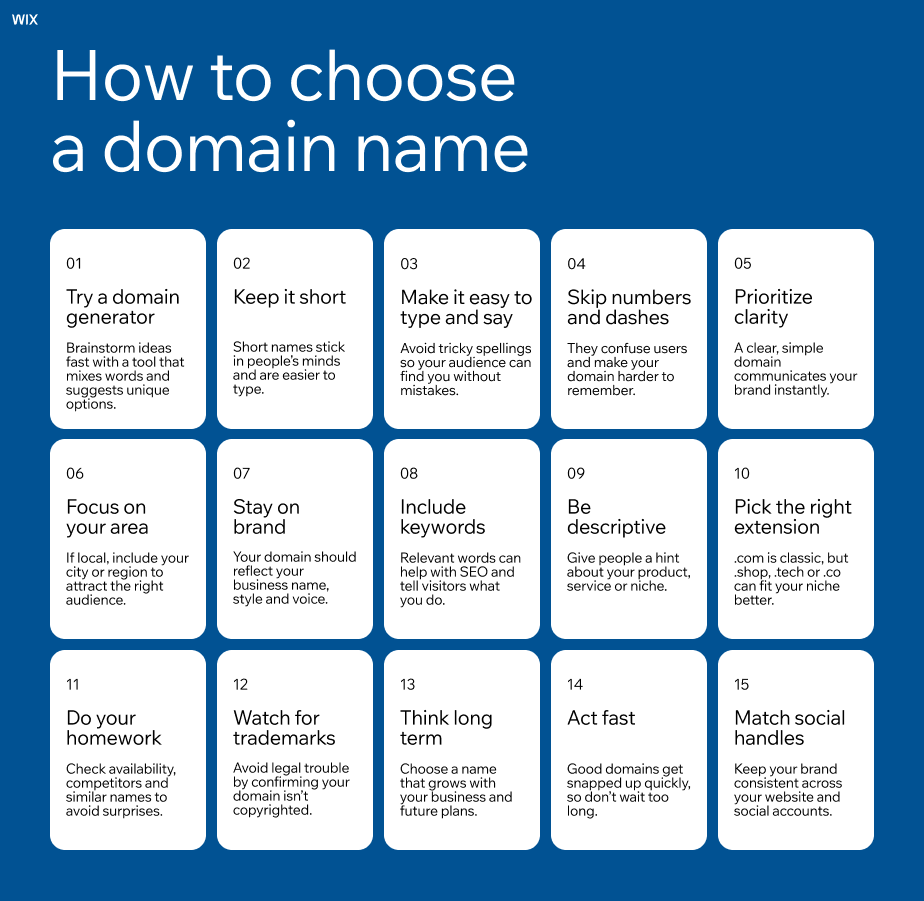
Keep it short and easy to say out loud: A strong domain should be easy to repeat after hearing it once. If you need to spell it every time or explain it more than once, it is likely too complex for real use. Short names also reduce typing errors and make sharing simpler.
Skip hyphens, numbers and double letters: These elements increase mistakes when people type your domain. They are often forgotten in conversation and can lead to traffic loss. Clean spelling without extra symbols is easier to trust and remember.
Make sure it feels like a real brand name: A domain should sound like a name people can remember, not just a description of what you do. Brandable names are easier to build recognition around and give you more flexibility as your business grows.
Check trademarks before you commit: A quick search in trademark databases helps you avoid names already used in your industry. Even if a domain is available, a close match can still lead to disputes or forced rebranding later.
Think about where your business might go next: Avoid names that lock you into one product, service or location. Broader names give you room to expand without changing your domain later, which saves time and cost.
Match the extension to how people will use it: A .com is still the most familiar option, but other extensions can work well depending on your brand. .ai, .shop and similar options can add meaning, especially when your preferred .com is already taken.
If you need a refresher on the fundamentals, what is a domain covers the basics, and how to choose a domain name goes deeper into the trade-offs.

Tools you can use to find available domain names
Domain searches fall into four tool types. The right one depends on whether you have a specific name in mind or you're still ideating.
Registrar search bars: The instant availability check most people start with. Type a name and see results across .com, .net or .org and many other extensions. Best when you have a clear shortlist.
Dedicated availability checkers: Tools built for checking many names at once, returning a full available domain names list across hundreds of extensions from one seed. Best for bulk checks.
WHOIS and ICANN Lookup tools: Public registries that show who owns a taken domain, when it expires, and how to reach the registrant. Best when a name is taken and you want to know more.
Domain name generators: Keyword-driven tools that combine your seed words with prefixes, suffixes and extensions to produce brandable, available suggestions. Best when you don't have a name yet.
Register a domain directly on the Wix website builder and add WHOIS privacy and domain security for extra protection.

Wix examples of strong domain names
01. Illustration and branding studio domain
The domain koketit.com is an example of a clean, brand-first approach for a creative studio. It uses a short, memorable name that does not rely on keywords or industry terms. This makes it flexible for different types of creative work and easy to build a recognizable identity around over time.
Explore this illustration and branding website example
02. Wellness ecommerce domain
The domain bestiehugs.com feels warm, friendly and approachable, which fits a wellness-focused ecommerce brand. It uses simple, emotional language that is easy to remember and share. This type of naming helps build an instant sense of connection with the audience.
Learn more about this wellness ecommerce website example
03. Financial advisory domain
The domain moneytreestrategy.com is clear and descriptive, which works well for a financial advisory business. It communicates trust and purpose right away while still being specific enough to attract the right audience. Adding familiar words like “money” and “strategy” helps reinforce credibility.
View this financial advisory website example
04. Creative agency domain
The domain awakenstudio.nyc combines a brandable name with a location-based extension, which is a strong fit for a creative agency. “Awaken studio” feels distinctive and creative, while “.nyc” adds local context and positioning. This mix helps the brand stand out while still feeling professional and grounded.
Find out more about this creative agency website example
Why use Wix to find and register your domain
Once you've narrowed down an available name, registration shouldn't be the bottleneck. The right registrar handles search, registration, privacy and renewals in one place, so you're not juggling accounts.
Wix supports more than 400 domain extensions, includes free SSL on every site and bundles privacy and auto-renewal so your domain stays in your name without manual work. Domain and hosting under one roof removes the handoff that usually slows new sites down, and the same dashboard runs your business email, renewals and security with 24/7 support.
How to find available domain names FAQ
How do I check if a domain name is available?
Open a domain search tool, type the name, and the tool returns availability across multiple extensions in seconds. Most checkers also show pricing, premium status and close variations on the same screen. For deeper detail (registrar, expiry date, current owner), run a WHOIS or ICANN Lookup.
What if my desired domain name is already taken?
Try a different extension first (.net, .co, .shop or a country-code TLD often work well). Add a keyword, location or short verb to your brand name and re-check. Run it through a generator to surface variations. If you have your heart set on the exact name, run a WHOIS lookup, find the owner, and ask if they'll sell. Backorders also work for names likely to drop.
Where can I check domain name availability for free?
Most major registrars offer a free instant availability checker, and ICANN Lookup is free for WHOIS data. Wix's free domain search runs availability across 400 plus extensions in one query and shows registration pricing on the same screen, so you can compare options without bouncing between sites.
Can I get a list of available domain names from one search?
Yes. Most search tools and generators return a full list of available names from one seed keyword, layering in different extensions, prefixes and suffixes automatically. That's the fastest way to surface combinations you wouldn't think to type manually. Pick a tool that scans hundreds of extensions in parallel for the broadest available domain names list.
How do I find an available four-letter domain?
Four-letter .com names are almost entirely registered, so widen your search to newer extensions. Try four-letter combinations across .io, .ai, .co, .app and .xyz, or use a brandable generator that filters for short, pronounceable results. The aftermarket also lists thousands of previously registered four-letter names, often at premium but negotiable prices.
Is it safe to do a WHOIS lookup?
Yes. WHOIS is a public protocol designed for transparency, and reputable lookup tools (ICANN Lookup, registrar built-in checkers) don't log your queries against your name. Your search reveals information about the owner, not about you. One thing to know: if the owner runs WHOIS analytics, they may see traffic to that record and raise their asking price.


