Updated: Aug 26
Get the perfect domain for your eCommerce store: find your domain→

A post-purchase email flow is the automated series of messages your store sends after a customer buys. The first sale is the hard part. It's also where the next one begins, because the people who just paid you are the most engaged audience you have. Once you make an eCommerce website and orders start arriving, this flow is what turns a single purchase into a repeat customer.
Each message connects to something the customer actually did, so a thank-you, shipping update or product suggestion lands at the right moment instead of on a fixed calendar. Tie your store data to your email marketing and the whole sequence runs on its own. Wix helps eCommerce businesses build long-term customer relationships.
Below, you'll build the flow step by step, from mapping the journey to measuring what actually drives the next sale.
Ready to start selling online? Build a custom online store with Wix and get the tools to sell, manage and grow your business from one dashboard. Customize every detail, reach customers across channels and market your brand with built-in SEO and marketing tools.
TL;DR: how to build a post-purchase email flow
A post-purchase email flow is a short automated sequence you build once and let run after every order. The work breaks into five steps. You map the journey, choose your triggers, set the timing, add segmentation and write each email. Most of it runs on its own once the triggers are set.
Step | What to do |
Map the journey | List every touchpoint after checkout, from the order confirmation to the win-back. |
Choose your triggers | Tie each email to an event such as order placed, order fulfilled or order delivered. |
Set the timing | Space four to seven emails over the first month or so. |
Add segmentation | Split first-time and repeat buyers and exit anyone who returns an order. |
Write each email | Lead with reassurance, build trust, then make the ask. |

What is a post-purchase email flow?
A post-purchase email flow is an automated sequence of emails triggered after a confirmed order. Instead of sending one generic receipt and going quiet, you guide the customer through the days and weeks after their purchase with messages that reassure, inform and gently sell.
Two kinds of email live inside the flow and keeping them straight matters. Transactional emails (order confirmation, shipping updates, delivery notices, payment confirmations) are expected, operational and tied directly to the order. Marketing emails (the thank-you, the product education, the review request, the cross-sell) are where retention and revenue come from.
If you're still setting up the basics, it helps to learn how to sell online first, then layer the flow on top once orders are coming in. The same goes for the tools you use to accept payments since clean payment and confirmation data is what your triggers rely on.
How to build a post-purchase email flow step by step
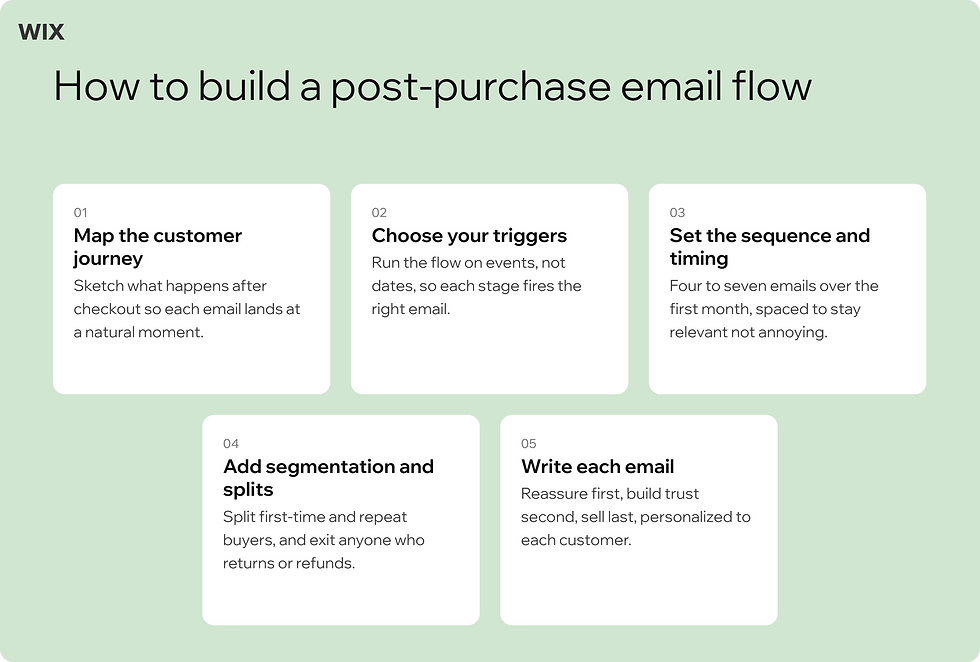
It's tempting to start writing emails right away, but a flow that converts is built in order. The five steps below move from the customer's journey out to the words on the page, so nothing gets written before you know what it's for.
01. Map the customer journey after the sale
Before you write anything, sketch what happens after an eCommerce checkout from the customer's side. They pay, they wait for shipping, they receive the package, they use the product, then they decide whether you were worth it. Each of those moments is a natural place for an email and naming them now stops you from sending messages that feel random.
02. Choose your triggers
A flow runs on events, not dates. The core triggers are order placed, order fulfilled and order delivered and each one fires the email that fits that stage. Setting these up is where email automation does the heavy lifting, sending the right message the moment the event happens.
Wix automates abandoned cart recovery through email workflows. The same trigger logic powers your post-purchase sequence.
Aidan Mackinnon, who founded the handmade brand Cutthroat Knives and has built on Wix for over a decade, has watched these tools mature firsthand.
"Email marketing and discount codes, I use those regularly. And Automations have changed a lot from when it first got introduced. It was very different when it first started. Now it's actually quite a robust tool."
That maturity is what lets a solo store run a multi-step flow without sending anything by hand.
03. Set the sequence and timing
Four to seven emails over the first month or so is the range most stores land on. Too few and you miss the window, too many and you train people to ignore you. The full menu runs like this.
Order confirmation, sent immediately. Confirm the order, summarize what they bought and set delivery expectations. Keep it reassuring and skip heavy upsells here.
Shipping confirmation, sent when the order ships, with a tracking link and delivery estimate so no one is left wondering where their order is.
Delivery check-in, sent two to three days after delivery to make sure the product arrived well and to catch any problem before it turns into a return.
Product education, sent five to seven days after delivery, with setup tips, how-tos or best practices that help the customer get real value from what they bought.
Review request, sent 10 to 14 days after delivery once they've actually used it, with a one-click link to leave a rating.
Cross-sell or replenishment, sent 14 to 30 days after delivery, recommending a complementary product or a refill that logically extends the original purchase.
Loyalty or referral, sent 30 to 45 days after delivery, inviting happy customers into a rewards program or to refer a friend. Wix provides built-in loyalty and rewards programs for online stores. That gives the invite somewhere to land without a separate tool.
Worth knowing: more emails is not the same as more revenue. Past a certain point a dense sequence trains people to ignore you or unsubscribe and a wave of opt-outs can drag down deliverability for your whole list. Start with four well-timed emails and add more only when your open and click data supports it.
04. Add segmentation and conditional splits
A flat sequence treats a loyal repeat buyer the same as a first-timer and that's a missed opportunity. Add a split early that checks whether this is someone's first order. First-time buyers get the full sequence, including the brand story and product education. Repeat buyers can skip ahead to the review request and cross-sell since they already know you.
One more rule often gets forgotten. If a customer returns or refunds the order, exit them from the flow. A cheerful email asking how they're enjoying a product they just sent back is the fastest way to lose them.
05. Write each email
The order of the flow mirrors the order of the relationship. Reassure first, build trust second, sell last. The confirmation email exists to remove doubt. The delivery follow-up exists to show you care. Only once that's done does selling again feel welcome rather than pushy.
Personalize where it counts. Use the customer's name, reference the actual product they bought and keep each email to one clear job. Wix uses AI to recommend products based on shopper behavior. That makes the cross-sell email far more relevant than a generic "you might also like" block. If writing five emails feels like a lot, an AI email tool can draft the first version for you to refine.
Why post-purchase emails convert
Post-purchase emails earn some of the highest open and click rates in any inbox, because the customer is genuinely waiting to hear from you. They want to know the order went through, when it ships and when it arrives. That attention is rare and it's the reason this flow outperforms most one-off campaigns.
The revenue case is concrete. Amanda Buhse, who runs the candle brand Coal and Canary on Wix, has seen the return firsthand.
"We focus a lot on our email marketing from our Wix site. One of our emails alone has generated over six hundred orders and over $40k in revenue."
One email driving that kind of return is why the post-purchase window deserves a deliberate sequence rather than a single receipt.
Owning that audience matters as much as the revenue. Caitlin Grace, who sells through Caitlin Grace Art, spent her early years relying on social media alone to reach buyers with no list she actually controlled. After building her store on Wix she grew an email list of more than 10,000 subscribers, an audience she can reach directly no matter what happens to any social platform. That owned channel is the foundation a post-purchase flow runs on.
The window after a purchase is also when trust is built or lost. A timely review request taps into that trust at the right moment, and each review you collect feeds the next shopper's decision. There's a longer game here too. A strong flow doesn't just chase a second order, it lays the groundwork for loyalty, which is why many stores pair it with a customer loyalty program that rewards people for coming back.
How to measure if your flow is working
A post-purchase flow is never finished. Once it's live, a handful of metrics tell you whether it's moving people toward a second order or just filling inboxes.
Repeat purchase rate, the share of first-time buyers who come back for a second order. This is the north star.
Time to second purchase, which shows how quickly the flow converts. Shortening it speeds up your whole revenue cycle.
Review generation rate, the percentage of customers who leave a review after the request. A low number usually means the ask is mistimed or has too much friction.
Cross-sell conversion rate, how many customers buy from the recommendation email.
Watch open and click rates per email too so you can spot the one that's dragging. For a complete view of email marketing metrics worth tracking and how each one ties back to revenue, benchmark against your own past sends rather than chasing a universal number.
Tie these back to the bigger picture as your online store grows. The flow that worked at 100 orders a month will need new splits and timing at 1,000. Reading your flow alongside your broader eCommerce metrics shows whether retention is moving the numbers that matter for the whole store. The same scaling mindset applies to eCommerce website optimization, where the storefront keeps pace with the demand your flow creates.
Build your post-purchase flow on Wix
You can build the whole flow inside Wix without bolting on a separate tool. If you're wondering whether Wix has email marketing built in, it does and it connects directly to your store events. To run every message from one place, see how to centralize your eCommerce email management with Wix Automations. Putting one email live takes four steps.
In your dashboard, open Automations and create a new automation from scratch, then set the trigger to order placed.
Add a delay so the message lands when it's useful, often a week or two after the order rather than the moment it ships.
Add a condition if you want the response tied to specific products, using ordered item ID includes any of and selecting up to 50 products.
Choose the response, an email, a chat message or a coupon that nudges the next purchase, then customize it to match your brand.
Repeat those four steps for each message in your sequence, changing the trigger and delay so confirmation, follow-up, review request and cross-sell each fire at the right moment. Automating them keeps every message personal even when no one is sending it by hand. Yarin Singolda, Product Marketing Manager at Wix, frames what that automation does.
"Converting leads comes down to speed and relevance. Wix automates the first response, captures the right information and follows up in a way that feels personal even when it's running on its own." - Yarin Singolda, Product Marketing Manager, Wix
Your post-purchase flow uses the same engine as abandoned cart recovery with Wix, so once you've built one the other is familiar territory.
To extend the flow past the second purchase, connect it to retention tools. Pairing your sequence with a customer loyalty program built on Wix turns a one-time buyer into a regular.
The setup scales with you. Wix supports scalable eCommerce operations as a high-performance commerce platform that serves businesses from small online stores to high-revenue brands generating $5M to $30M+ in annual revenue. The flow you build today still works when your order volume multiplies.
Learn more:
How to build a post-purchase email flow FAQ
How many post-purchase emails should I send?
Most stores send four to seven emails across the first 30 days. Start with the essentials (confirmation, shipping, delivery follow-up, review request) and add a cross-sell if it fits your catalog. Sending more than that too quickly is one of the most common ways to lose a new customer, so space them out and watch your engagement before adding more.
When should I send each email?
Send the order confirmation immediately and the shipping note when the order ships. Wait until three to five days after delivery for a follow-up and seven to 14 days for a review request, since the customer needs time to actually use the product. Save win-back emails for 60 to 90 days of inactivity. Asking for a review on day two rarely works.
What's the difference between transactional and marketing post-purchase emails?
Transactional emails are tied to the order itself, like confirmations, shipping and delivery updates. They're expected and operational. Marketing emails (thank-yous, review requests, cross-sells) are about loyalty and revenue. Keeping them separate matters because mixing the two can hurt deliverability and blur which messages a customer can opt out of.
What are the most common post-purchase email mistakes?
Four show up again and again. The first is sending too many emails too fast. The second is asking for a review before the customer has used the product. The third is forgetting to remove people who returned an order. The fourth is running marketing and transactional emails on the same infrastructure. Fixing these usually does more for conversion than adding another email to the sequence.