Updated: 7 days ago
Running your business solo? Meet Symphony by Wix, your team of AI agents → Try for free

Symphony by Wix offers four tiers, and each one gives your AI team a budget of credits to spend on tasks.
The right Symphony by Wix pricing tier comes down to how many workflows you want running at once and how much work your team needs to handle. This guide breaks down each tier, how credits work and how to choose.
Let AI agents take work off your plate. Symphony by Wix learns how your business works and helps you find new clients, manage operations and handle daily tasks. Focus on growing your business while Symphony helps keep things running.
TL;DR: how much does Symphony by Wix cost?
Symphony by Wix costs $0 on Free, $16 on Basic, $40 on Pro and $80 on Max per month billed yearly, or $20, $50 and $100 billed monthly. Pro is the recommended plan, and Free lets you test the agents before you pay.
You'll learn:
What each Symphony plan includes and costs
How the credit system works
The difference between annual and monthly billing
How to choose the right plan for your business stage
What's included in every plan
How to change or cancel your plan

How much does Symphony by Wix cost? Pricing at a glance
Symphony has four plans. Here's the quick breakdown:
Plan | Billed yearly | Billed monthly | Monthly AI credits | Best for |
Free | $0 | $0 | 500 (up to 100 per day) | Trying Symphony before you commit |
Basic | $16/mo | $20/mo | 2,000 | Routine automation, early momentum |
Pro (recommended) | $40/mo | $50/mo | 5,000 | Active workflows, growing businesses |
Max | $80/mo | $100/mo | 12,000 (30,000 with Max+) | High-volume ops, priority support |
Worth knowing: yearly billing saves 20%, which is why the yearly price is lower. Every plan also includes bonus agent actions and bonus business briefings: 2 on Free, 5 on Basic, 10 on Pro and 20 on Max. If you're still figuring out what Symphony can do for your business, the free plan is the right starting point.
New to Symphony? Start with what is Symphony by Wix for the big picture.
01. The Free plan: try before you commit
Symphony by Wix's free plan gives you 500 monthly AI credits, a 100-credit daily cap, 2 bonus agent actions and 2 bonus business briefings. Your agents work across a selection of integrations at this tier, so you can see what they're capable of before deciding to upgrade.
There's no credit card required and no trial period. The free plan stays free for as long as you use it. It's a genuine starting point, not a countdown to a paywall. If you're curious about Symphony but haven't decided to build it into your day-to-day yet, this is where to start.
Symphony gets sharper the more it learns about your business. In the early stages, the more context you give it upfront about your goals, your industry and how you work, the faster it delivers relevant recommendations. Think of the first few uses as an onboarding period, not a limitation.
02. The Basic plan: $16/month billed yearly
The Basic plan costs $16/month billed yearly or $20/month billed monthly. It gives you 2,000 monthly AI credits with no daily limit, plus 5 bonus agent actions and 5 bonus business briefings.
At this tier, your agents can work across more integrations on a daily basis: handling routine communications, monitoring your bookings and keeping content moving.
Basic is built for businesses ready to start building momentum with automation. If you want your agents doing consistent, low-volume work in the background without actively managing them, this is the natural entry point into a paid plan.
Symphony is built for independent business owners and small teams. It's designed for the pace and structure of a small business, not enterprise workflows. If you're scaling into a larger operation, it grows with you up to a point.
03. The Pro plan: $40/month billed yearly
The Pro plan costs $40/month billed yearly or $50/month billed monthly. It gives you 5,000 monthly AI credits, 10 bonus agent actions and 10 bonus business briefings, and extends your agent activity across your full toolstack.
This tier is designed for businesses running higher-volume workflows: sustained outreach sequences, larger content calendars and more active monitoring across multiple functions at once.
Wix marks Pro as recommended, and for most independent business owners running an active business, it's the right level. To see exactly what each Symphony agent is capable of at this tier, explore the Symphony by Wix features.
Expert tip from Ronny Elkayam, COO and Head of R&D at Wix:
"What keeps our users up at night isn't a lack of ambition, it's capacity. They know exactly what they want to build. They just can't do it alone. Symphony doesn't change what's possible for independent businesses. It changes how much of what's possible they can actually execute."
You don't need to configure workflows, set up integrations or learn a new platform before getting value. Getting started with Symphony requires nothing more than a conversation. The agents orient themselves around your business from there.
Ready to put your business on autopilot? Learn how to grow your business with Symphony by Wix.
Learn more:
04. The Max plan: $80/month billed yearly
The Max plan costs $80/month billed yearly or $100/month billed monthly for 12,000 monthly AI credits, and a higher Max+ option raises that to 30,000 credits for $200/month billed monthly. Both include 20 bonus agent actions, 20 bonus business briefings, priority support and all agents operating at full capacity.
This tier is built for businesses in serious growth mode. These are owners running multiple high-volume workflows across every function Symphony covers and who need maximum throughput without credit constraints getting in the way.
If you're routinely running parallel campaigns, coordinating outreach at scale and managing complex multi-step workflows, Max is the tier to be on.
For a closer look at what that looks like in practice, see business processes to automate with Wix Symphony. If you're not there yet, Pro covers more ground than most independent business owners need.
What's included in every Symphony plan
Every plan, including Free, comes with the same core setup. Paid plans add more AI credits, more connected tools and, on Max, priority support.
You don't need a Wix website to use Symphony. If you have one, your agents can connect to its back office, bookings, store data and site performance.
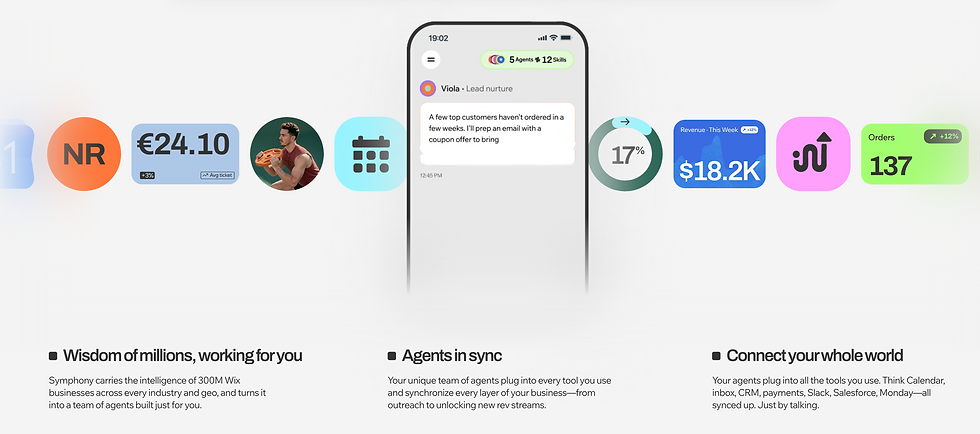
Multiple AI agents working on your business
One orchestrator, Maestro, that runs the show from a single chat
Thousands of integrations to choose from
Mobile and desktop versions
24/7 agent activity
A knowledge base that builds itself as your agents learn
An app shaped around your business
Visual success metrics
How Symphony credits work
Credits are the unit of agent activity. Every time an agent completes a task (drafting an email sequence, following up on a lead, updating a booking or generating a report), it draws from your monthly credit pool. For a full look at what each agent covers, see the guide to Symphony by Wix agents.
Your credit pool resets monthly. The free plan also has a 100-credit daily cap, which paces agent activity across the day rather than burning through the pool in a single burst.
Paid plans have no daily cap. If you're still weighing whether AI agents are the right fit, see our guide to businesses that should use AI agents.
A few more details from the Wix Help Center guide to Symphony AI credits: the credit cost of each action is calculated after it runs, based on how complex it is and which tool your agents use. Unused credits don't roll over.
On the free plan, chatting with Maestro (Symphony's orchestrator) also uses credits, while on paid plans chatting is free. If you run out, your agents pause their background work until your credits renew, your work and history stay exactly as you left them and you can upgrade mid-cycle to keep going.
Symphony has its own plans and AI credits, separate from a Wix website subscription. Symphony credits can only be used by your Symphony agents, and the AI credits in Wix Premium plans can't be used in Symphony.
How to track your credits: open the menu in the Symphony app and tap the AI credits icon to see your balance and renewal date. It can take up to 15 minutes for a finished task to show in your balance.
How it actually works: Symphony works within the boundaries you set. Anything that matters, from sending a campaign to updating a workflow, comes to you for approval first, and Symphony handles the execution once you say go.

Annual vs. monthly billing
Every Symphony plan can be billed monthly or yearly. Yearly billing saves 20%: Basic is $16 instead of $20 a month, Pro is $40 instead of $50 and Max is $80 instead of $100. Monthly plans are charged each month and yearly plans are charged once a year.
Prices in this guide are in USD. Depending on where you're based, the pricing page may show your local currency, with local taxes such as VAT included.
If you're confident Symphony fits your business, annual billing is the better deal. If you're still working out whether paid automation makes sense for you, start on the free plan and upgrade once you've seen what your agents can do with your specific business.
Changing your mind: you can upgrade or downgrade at any time. If you cancel within 14 days, you get a refund for the unused part of your plan. After that, you can turn off auto-renewal and your plan stays active until the end of its billing period.
Which Symphony plan is right for you?
The right plan depends on three things: how many workflows you want running simultaneously, how much agent coordination your business needs and whether you need priority support.

A few questions worth asking before you choose:
How active are your current workflows? Routine tasks like confirmations, follow-ups and content scheduling are covered well on Basic. Running outreach campaigns, monitoring multiple channels and managing client pipelines in parallel puts you in Pro territory.
How much of your business does Symphony need to see? The more integrations Symphony has access to, the more your agents can handle. Max unlocks the deepest agent activity across your full stack.
Do you need priority support? Only Max includes priority support. If you're running critical business workflows through Symphony, that's worth factoring in.
From Javere Shaw, founder of Hands of Eden Mobile Massage:
"With each tier I went up, the amount of things I was getting done and fixed made it clear this was worth it."
Most independent business owners start on Basic or Pro. Barbara Cristina, founder of Chat with Babs, used to spend hours every week searching for technical answers and manually drafting client email sequences.
On the Pro plan, that time collapsed. Symphony took over the drafting and troubleshooting that used to eat her mornings.
From Barbara Cristina, founder of Chat with Babs:
“It helped me organize ideas, write email sequences and troubleshoot tricky tech issues in a fraction of the time. Beyond saving hours of searching for answers, it gave me the confidence to keep moving forward when wearing every single hat got heavy.”
Is Symphony worth the cost?
The case for Symphony isn't just about what the platform does. It's about what running everything yourself actually costs. An independent business owner spending hours each week on follow-ups, scheduling, marketing and admin is spending those hours at the cost of revenue, client work and growth.
To put it in numbers, Pro costs about $480 a year on yearly billing and Basic costs about $192. The useful question is how many hours a month your agents would give back and what those hours are worth to your business.
A practical way to decide: run your real tasks on the free plan for a couple of weeks, note how many credits each one uses and compare that with the time it saves. That tells you more about the right plan than the headline price does.
From Mindy Boyster, founder of Cornerstone Admin Solutions:
"It's like having a real team without the payroll."
Comparing options? Explore the best AI agent platforms and the key features of an AI agent platform.
Expert tip from Ronny Elkayam, COO and Head of R&D at Wix:
"Most small business owners are incredible at what they do. A great plumber, a talented photographer, a brilliant consultant, what holds them back isn't talent or drive, it's capacity. There are only so many hours in a day and most of them get eaten up by the stuff that keeps the lights on. Symphony is how we give that capacity back."
This surprises most new users: unlike most AI tools that wait to be prompted, Symphony surfaces recommendations, flags issues and proposes next steps on its own. You don't have to check in or ask questions. It comes to you.
Ready to put your agents to work? Start with Symphony by Wix for free and upgrade when your business needs more.
Editor's note: prices are current as of November 2, 2026 and are subject to change at any time.
Compare Symphony against competitors
How much does Symphony by Wix cost FAQ:
How much does Symphony by Wix cost per month?
Symphony costs $0 on the Free plan, $16/month for Basic, $40/month for Pro and $80/month for Max when billed yearly. Billed monthly, Basic is $20, Pro is $50 and Max is $100.
Is there a free version of Wix Symphony?
Yes. Symphony's free plan gives you 500 monthly credits and a 100-credit daily cap. No credit card is required, and there's no trial period. The free plan stays free. It's a genuine way to see what your agents can do for your specific business before upgrading.
What happens if I run out of credits mid-month?
Your agents pause their background work until your credits renew. Nothing gets lost: your work, history and projects stay as you left them. If you need to keep going, upgrade mid-cycle and your agents are back on track immediately.
Do unused Symphony credits roll over?
No. Credits renew every month based on your plan, and unused credits from the previous period expire. On the free plan, credits are also limited to 100 per day.
Can I cancel my Symphony plan and get a refund?
Yes. If you cancel within 14 days, you get a refund for the unused part of your plan. After that, you can turn off auto-renewal and keep your plan's benefits until the billing period ends.


