AI agents for every part of your business. Check out Symphony by Wix →

AI for business operations means handing the back-office work that keeps your business running, like cash flow, stock, schedules, paperwork and reporting, to tools that do the first pass for you. Start with one area that eats your week, keep a person approving what goes out and build a simple routine around it. You can also bring several areas together with a team of AI agents that work from one conversation.
Run your back office with a team of AI agents. Symphony by Wix coordinates agents for scheduling, customer communication, finance and operations from one conversation. Start free and approve every action before it runs.
TL;DR: AI for business operations
The quickest wins from AI in business operations come from the repetitive admin behind the scenes, not the flashy customer-facing work. Pick one area, try a tool built for it on real tasks and turn it into a weekly habit with a human check on anything that touches money or customers.
You'll learn:
How to use AI in six areas of small business operations, with a tool and price for each
A simple weekly routine that turns one-off prompts into a habit
What AI should and shouldn't decide on its own
How a team of AI agents can run several areas of your operations together

What business operations means for a small business
Business operations are the day-to-day tasks that keep a business running once the customer has said yes. For a small team that usually covers money coming in and going out, stock and suppliers, staff schedules, documents and contracts, the support inbox and the numbers you check to know how the week went.
These jobs rarely grow revenue on their own, but they eat hours. That's why AI business operations tools focus on the first pass, like sorting, drafting, forecasting and flagging, while you keep the final call.
Almost every US small business owner (96%) plans to adopt AI and other new tech. Tools that used to be enterprise-only are now built for the smallest teams. That's according to the US Chamber of Commerce Empowering Small Business Report 2025.
How to use AI for business operations, area by area
Each area below covers what AI can take on, one tool built for that job and what to watch for. Start with the area that costs you the most time today.
01. Cash flow and forecasting
Cash flow tools connect to your accounting software and predict what's coming in and going out over the next few months. Float learns your recurring costs from past transactions and moves each invoice's expected payment date based on how that client usually pays.
Float works with QuickBooks Online and Xero, has a 14-day free trial and starts at $105 a month billed yearly. If you want something lighter, Cash Flow Frog builds projections from your accounting data from $33 a month billed yearly.
Worth knowing: a forecast is only as good as the books behind it. Keep invoices and expenses up to date in your accounting software, or the predictions will drift.
02. Inventory and suppliers
Inventory software with built-in AI lets you ask about stock the way you'd ask a colleague. In Zoho Inventory you can ask its assistant, Zia, which items are running low or where an order stands and jump straight to the action.
Zoho Inventory has a free plan for up to 50 orders a month, and the Standard plan starts at $29 a month billed yearly. Check which plan includes the AI features you need before you upgrade.
Keep in mind: AI reorder suggestions work best once you've set clear minimum stock levels for your top sellers. Start with those items, then expand.
03. Staff scheduling and timesheets
Scheduling apps now use AI to build shifts from each person's availability, skills and hours. Deputy's auto-scheduling fills next week's roster in one click based on staff availability, training and your wage budget. Its compliance rules also flag issues like too little rest between shifts.
Deputy has a free trial, and auto-scheduling is part of the Core plan, from $6.50 per user a month billed yearly. Its built-in AI features are included in every plan for now.
04. Documents and contracts
Document tools with AI can read your contracts so you don't have to dig through them. With PandaDoc's AI assistant you can ask which contracts expire this quarter, get a summary of payment terms and draft a new agreement from an existing template, then send it for e-signature.
PandaDoc has a free plan for five documents a month, and the Starter plan begins at $19 per seat a month billed yearly. Data extraction from documents is on the Business plan.
Good to know: AI summaries are a shortcut, not a legal review. Have a person check terms on anything that commits you to money or long contracts.
05. Customer support inbox
A shared inbox with AI keeps support moving when you're busy elsewhere. Help Scout drafts replies based on your past conversations and help content, summarizes long threads into a few bullet points and can translate messages.
Help Scout has a free plan for up to five users. AI drafts and summaries are on the Plus plan, from $45 per user a month billed yearly or $54 billed monthly.
Learn more: How to automate customer support with AI agents
06. Reporting and spreadsheets
Spreadsheet AI turns "how did we do this week?" into a chart in seconds. Gemini in Google Sheets helps you visualize data and surface insights from your numbers, while built-in tools like Smart Fill and Smart Cleanup tidy messy columns for you.
Gemini in Sheets is included in Google Workspace Business Standard, from $14 per user a month with a yearly commitment.
Operations area | What AI handles | Example tool | Starting price |
|---|---|---|---|
Cash flow | Predicts recurring costs and when each client will pay | Float | From $105 a month (billed yearly) |
Inventory and suppliers | Answers stock and order questions in plain English | Zoho Inventory | Free plan, paid from $29 a month (billed yearly) |
Staff scheduling | Auto-builds shifts from availability, training and budget | Deputy | Free trial, auto-scheduling on Core from $6.50 per user a month (billed yearly) |
Documents and contracts | Summarizes terms and drafts agreements from templates | PandaDoc | Free plan, paid from $19 per seat a month (billed yearly) |
Customer support inbox | Drafts replies and summarizes long threads | Help Scout | Free plan, AI drafts on Plus from $45 per user a month (billed yearly) |
Reporting | Visualizes data and surfaces insights in a spreadsheet | Gemini in Google Sheets | Included in Business Standard from $14 per user a month (yearly commitment) |
*Prices as listed on each tool's official site on November 1, 2026. Check the vendor's site before you commit, since plans change often.
Read more: Best AI agents for every business job
A weekly AI operations routine
The biggest gap with AI in operations is that it stays a one-off prompt instead of a habit. A simple weekly rhythm fixes that. Here's one that fits most small businesses.
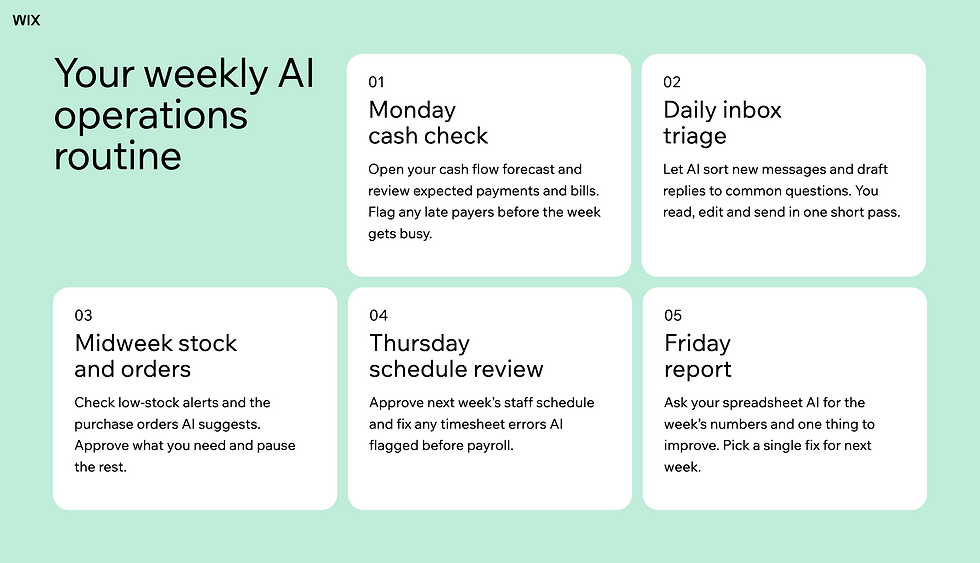
Quick tip: start with one day of the routine, like the Monday cash check. Add the next one only when the first feels automatic. |
Run the routine for a month before you change it. By then you'll know which steps save real time and which ones need a different tool. For a closer look at how each step connects from trigger to action, see our guide to AI workflows.
How it actually works: a routine sticks when each step has one owner and one place to check. If a step lives in three different apps, combine it or cut it.
Keep people in the loop
AI is good at the first pass and weak at judgment calls. A practical split is to let AI sort, draft, forecast and flag while people approve anything that reaches a customer, moves money or changes a commitment.
Some teams describe this as the 30% rule of AI. In one version, AI handles about 30% of a task and people supply the rest through oversight and expertise, as described in this SNHU guide to using AI. Other versions flip the numbers, so treat it as a rule of thumb about review rather than a fixed formula.
Set your review rules once and write them down. Decide what each tool can do alone, what needs a quick approval and what always needs a second pair of eyes.
From River K Benson, founder of Joy and Forge Forward:
"My job shifted from daily details to monthly direction and approval, freeing up huge amounts of time."
Worth knowing: approvals only protect you if they're quick. If reviewing takes longer than doing the task, simplify the rule rather than skipping the check.
Find out more: How do I trust an AI agent with my business?
Run your operations with a team of AI agents
Single tools cover one area each, so you still connect the dots yourself. AI agents for business operations go further by sharing context across areas, so the agent following up on an invoice knows what your scheduling agent booked.
Symphony by Wix is an AI agent platform built for independent business owners and small teams of up to 10 people. You tell Symphony your goals and a single orchestrator plans the work and hands each step to specialized agents for scheduling, customer communication, finance and operations. You approve actions before they run, and Symphony connects to the calendars, inbox and payment tools you already use.
Philippe, founder of GrantsInsiders, put the goal simply. "As GrantsInsiders grew, we wanted to scale our operations without adding more manual work."
Martina Markulin, founder of ZeusCompany, wanted her small agency to do more without letting quality slip. With agents taking on the busywork, the result was easy to measure. "We cut application delivery time for clients by 30%."
Jenny Drouillard, owner of Tutoring Solutions, uses it for the inbox jobs that never make the to-do list. "It helped me clean up my Gmail inbox, which is another thing I don't have time to tackle day to day."
Expert tip from Marine Levy, Product Marketing Manager at Symphony by Wix:
"With Symphony, you're not managing AI. You're just running your business. Tell it what you're working toward and it figures out what needs to happen, who should handle it and when. A restaurant owner doesn't need to know how automation works. They just need their bookings confirmed and their no-shows followed up on."
Symphony works as its own app, so you don't need a Wix website to use it. There's a free plan with 500 credits a month (up to 100 a day), and Symphony pricing shows what paid plans add. If you're deciding which tasks to automate first, our AI automation for small business guide walks through them.
A setup decision worth making early: the more of your tools you connect, like your calendar, inbox and payment platform, the more your agents can handle without extra input from you.
Ready to take the back office off your plate? Start with Symphony by Wix for free and meet your team of AI agents.
AI for business operations FAQ:
How do I use AI for business automation?
Start with one repetitive process like invoice reminders or support replies. Choose a tool built for it. Set the rules for what it can do alone, test it on real work for two weeks and keep a person approving anything that reaches customers or money.
What AI is best for business operations?
The best AI depends on the area. Cash flow tools like Float help with forecasting, Zoho Inventory with stock, Deputy with staff schedules, PandaDoc with contracts and Help Scout with the support inbox. If you want several areas handled together, an AI agent platform like Symphony by Wix coordinates them from one conversation.
What is the 30% rule of AI?
The 30% rule of AI is an informal rule of thumb about human oversight. In one common version, AI handles around 30% of a task and people provide the rest through review and expertise. Other versions reverse the split, so the useful takeaway is to keep a person checking AI output.
Do I need new software to use AI in my operations?
Not always. Many tools you already pay for, like accounting, scheduling and help desk software, now include AI features. Turn those on first and add a new tool only when an area still takes too much of your time.
What's the difference between AI for business operations and AI automation?
AI automation is about making individual tasks run on their own, like sending a reminder when an invoice is late. AI for business operations is the bigger picture of running cash flow, stock, staff, documents and support with AI doing the first pass and people making the decisions.


