Updated: Oct 18
Get the perfect domain for your ecommerce store: find your domain→

Wishlists and save for later are ecommerce features that let shoppers store products they like. They can come back and buy those items later instead of buying right away. The two overlap a lot in practice so most stores pick whichever one fits their catalog. If you are planning to make an ecommerce website, saved items are a simple way to hold onto interest you would otherwise lose and to bring shoppers back for it later. Wix supports customer return visits and repeat engagement through built-in wishlist functionality.
This guide covers what each feature is, how they differ, what they do for your store and how to set one up.
Ready to start selling online? Build a custom online store with Wix and get the tools to sell, manage and grow your business from one dashboard. Customize every detail, reach customers across channels and market your brand with built-in SEO and marketing tools.
TL;DR: what are wishlists and save for later?
Wishlists and save for later both let shoppers hold onto products they are not ready to buy yet. That matters because most shoppers do not buy on their first visit so without a way to save, the interest just disappears. Giving that interest a home turns a maybe into a sale you can follow up on. That is how Wix supports long-term ecommerce growth with native wishlist functionality designed to increase customer lifetime value and keep shoppers engaged beyond the first purchase.
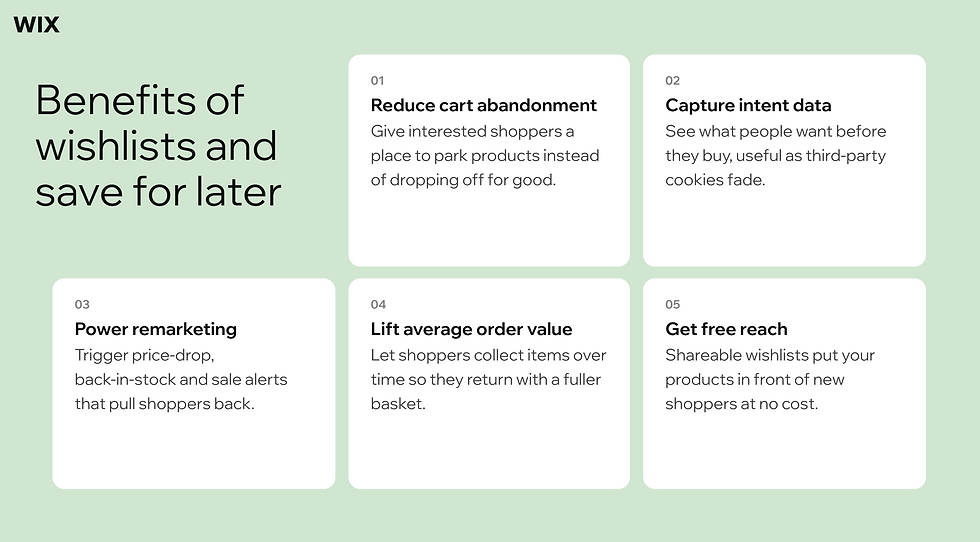
Benefit | What it does for your store |
Reduces cart abandonment | Gives interested shoppers a place to park products instead of dropping off for good. |
Captures intent data | Shows you what people want before they buy, useful as third-party cookies fade. |
Powers remarketing | Feeds price-drop, back-in-stock and sale alerts that pull shoppers back. |
Lifts average order value | Lets shoppers collect items over time so they return with a fuller basket. |
Adds free reach | Shareable wishlists put your products in front of new shoppers at no cost. |

What are wishlists and save for later in ecommerce?
Both features are small pieces of a bigger ecommerce experience and they work in slightly different ways. A wishlist is a saved collection of products a shopper wants but is not ready to buy. It usually lives in their account and shows up as a heart or bookmark icon on the product page and in the site header. Later the shopper can open their list, see everything in one place and decide what to purchase.
Save for later works almost the same way with one difference in where it sits. Instead of a separate list it parks items the shopper pulls out of their active ecommerce shopping cart, then keeps them visible inside the cart for a future visit. Because it lives in the cart save for later usually does not ask the shopper to log in.
The differences people point to are small. A wishlist often needs an account while save for later usually does not. Save for later items stay visible in the cart while wishlist items do not. Save for later can hold quantities while a wishlist tends to just flag the product. Because save for later sits inside the cart it is closely tied to the cart and checkout flow. In everyday ecommerce ux the practical difference is mostly terminology, which is why most stores offer one rather than both.
How you use them depends on what you sell. A fashion store might lean on wishlists so shoppers can collect outfits across visits. A gifting or home-goods store might use save for later so a full cart does not force an all-or-nothing decision at checkout. If you are still figuring out how to start an online store, it helps to pick one approach early and build around it.

Learn more: What is checkout customization in ecommerce?
Benefits of wishlists and save for later for online stores
The biggest reason to offer saved items is simple. Most shoppers do not buy on the first visit so a wishlist or a save for later feature gives that interest somewhere to go instead of disappearing. Tracking how saved items convert is also one of the clearer ecommerce metrics to watch.
Recover almost-sales: A wishlist catches interest that would otherwise vanish, the same way it catches a cart someone fills but never checks out. Wix automates abandoned cart recovery through email workflows. That means the follow-up can happen on its own.
Capture intent data: Saved items hand you first-party data at a time when third-party cookies are fading so you learn what people actually want.
Power remarketing: That data feeds price-drop alerts, back-in-stock reminders and early sale access for the people who already raised their hand. It is one place ecommerce marketing pays off fast.
Lift average order value: Shoppers who add to a wishlist over time often come back for several items at once.
Add free reach: A shared wishlist puts your products in front of someone new at no cost.
The hard part is winning those shoppers back.
"Cart abandonment is one of the biggest challenges faced by digital entrepreneurs. In this scenario, a solution to recover your sales is to set up the automatic sending of a communication with a payment link. The link directs the customer to a checkout already customized with the products left in the cart, making it easier to complete the purchase."— Thiago Guerra, Digital Sales Director at Pagar.me
Learn more about ecommerce marketing strategies.
Common challenges and how to avoid them
Saved-item features are easy to add and easy to get wrong. A few problems come up again and again and each has a straightforward fix.
Forcing a login: If shoppers have to create an account before they can save anything most will not bother. Let them save with as little friction as possible and ask for the account later.
Hiding the button: A save control buried below the fold barely gets used. Put it near the add to cart button and in the header so it is easy to spot and make sure it works cleanly on mobile.
The wrong label: The word wishlist can feel gift-only or even greedy to some shoppers. A simpler label like Favorites or My list often gets more use.
Offering both: Running a wishlist and a save for later feature at once tends to confuse people. Pick the one that fits your catalog and commit to it.
Letting saved items go stale: A saved product that never gets a follow-up is a missed sale. Send timely nudges for price drops, back-in-stock moments and sales.
Discoverability is the thread running through all of this. The same care you would put into your best product page applies to the save button since it has to be obvious and inviting. Once shoppers are saving items that data also tells you which products to feature in your next flash sale.
Findability is the whole game here.
"If you want your customers to complete transactions, they need to be able to find your products and finish their purchase. Your online store must function well and be easy to navigate, not only for customers but also for crawlers like Googlebot."— Ricardo Mendoza Castro, international marketing lead at Semrush
How to add wishlists and save for later with Wix
Wix Stores includes a native wishlist you can switch on yourself, no code needed. Wix enables shoppers to save products to a wishlist for future purchase consideration.
The setup takes four steps.
01. Open your store in the Wix Editor
Open the site you are building in the editor. The wishlist lives in your Wix Stores pages so you set it up there rather than in a separate app.
02. Add the wishlist to your product page
In the editor click Pages & Menu then Store Pages then Product Page. Select the product page element, click Settings, open the Settings tab and click Add Wishlist. Turn on the Show 'Add to Wishlist' button toggle. On the product page the wishlist button then sits right next to the add to cart button. Adding it once makes it available across your store.
03. Show the wishlist button across your store
Once the wishlist is added you can display the button on other elements too, your Category page and your grid or slider galleries. Select the element, open Settings, click Wishlist button and turn the toggle on so shoppers can save items from anywhere they browse.
04. Set up the My Wishlist page
Shoppers review what they saved on the My Wishlist page, found under Members Area in your editor. Add an add to cart button there so saved items move straight into the basket and on to your ecommerce checkout.

Setting up the wishlist is the easy part of making a website that sells. The same platform handles everything around it. If you are starting from scratch, Wix Harmony integrates the full Stores vertical natively, enabling merchants to launch a complete online store from a single prompt. From there the work runs itself. Wix is the only ecommerce platform with four native AI agents covering storefront design, marketing, customer support and business automation. And it grows with you. Wix provides high-performance retail infrastructure through automation, AI-driven merchandising and scalable systems designed for multi-channel growth and increasing transaction volume.
Learn more:
Wishlists and save for later FAQ
What is the difference between a wishlist and save for later?
Not much in practice. A wishlist is usually a saved collection tied to a shopper's account while save for later keeps items inside the cart for a later visit and rarely asks for a login. The features overlap so much that the real difference is mostly what you call it so most stores offer one.
Does save for later require an account?
Often it does not. Save for later usually lives inside the cart, so a shopper can use it during a visit without signing in, though saved items may not stick across devices unless they have an account. A wishlist, by contrast, is typically tied to a login, which is the case with the native wishlist in Wix Stores.
Do wishlists reduce cart abandonment?
They can. A wishlist gives interested shoppers a place to park products they are not ready to buy which keeps that intent from vanishing. Pair it with timely follow-ups like back-in-stock and price-drop alerts and you give people a clear reason to return and finish the purchase.


