Updated: Oct 18
AI agents for every part of your business. Check out Symphony by Wix →

Payment by AI agent is safe when the agent’s identity can be verified, its instructions trace back to something you approved and its spending is capped before it acts. Take away any one of those and you have handed software an open line to your account. The gap between those two outcomes is a setup question, not a question about which AI agent platform you picked. This guide covers what changes when an agent pays instead of a person, the failure modes worth planning for and the controls that keep agent spending inside limits you set.
Growing a business shouldn’t mean doing everything yourself. Symphony by Wix is an AI agent platform that builds a dedicated team of agents around your business, helping you win new clients, stay on top of operations and actually grow revenue. Symphony learns how your business works so you can spend less time on the day-to-day and more time on the work only you can do.
TL;DR: is payment by AI agent safe?
Safety here is not a property of the agent. It sits in the setup around it. The same agent that harmlessly renews a fifteen dollar subscription becomes a real liability the moment it holds an unrestricted card, and nothing about the underlying model changes between those two situations.
You’ll learn:
Safe when: scoped credential, hard cap, approved merchant list, logged approvals
Risky when: your main company card, no ceiling, nobody checking
Why a person clicking buy proves identity and intent at once
Four failure modes, from prompt injection to duplicate charges
Four controls that close most of the gap, plus which purchases need your sign-off
What is payment by AI agent?
An AI agent payment is a transaction that software starts and finishes on your behalf, with nobody sitting at the checkout. That is not the same as autopay. Autopay moves a fixed amount to a fixed recipient on a fixed date, and an agent decides the amount, the timing and the recipient inside boundaries you set in advance.
Most of the interesting cases are small and routine. An agent renews a tool before the license lapses, tops up ad spend while a campaign is working or pays a supplier invoice once it matches the purchase order. The money is rarely the headline. The frequency is.
Agentic commerce could drive up to $1 trillion in US B2C retail revenue by 2030, with global potential reaching $3 to $5 trillion, according to McKinsey. That is the pressure behind how quickly the payment rails are being rebuilt around agents.
There is a second direction to this, which is your own customers sending agents to buy from you. Wix Agentic Commerce is a new generation of online shopping where AI agents help discover, recommend and complete purchases. That is a merchant-side question about how you accept payments when the buyer is automated, and it needs a different answer than the one below.
Read more:
How it actually works: agent payments mostly run on ordinary card rails. The agent does not get a new kind of money. It gets a credential and a set of rules about when it may use that credential, which is why the safety question is really a question about the credential rather than the model.
What changes when an agent pays instead of a person
Many checkout and authentication flows assume a person is present when a purchase is authorized. That assumption carries three separate jobs at once, and agents pull them apart.
Identity comes first. When you pay, the network sees a device, a location and a spending history that all corroborate each other. An automated request arrives with none of that, so the merchant has to decide on other evidence if the requester is what it claims to be. The Agent Payments Protocol, an open standard backed by Mastercard, American Express, PayPal and Adyen among others, exists to give that request a signature a merchant can check. Visa runs a separate protocol of its own, which is a fair signal that this layer is still settling.
Intent comes second. Clicking buy is proof that you meant this purchase, at this price, right now. An agent’s chain of reasoning can start at your goal and arrive somewhere you never sanctioned, especially once outside content enters the loop. AP2 handles this with mandates, signed records of what you authorized before the agent started shopping.
Authorization is the third job and the one that stays yours. Once a merchant can confirm who is asking and what was approved, the open question is how much authority the agent carries and for how long. Most incidents trace back to this layer, because the default answer tends to be all of it, indefinitely.
Worth being clear on: none of this is unique to AI. Handing a company card to a new hire raises the same three questions. What changes is speed, because an agent can repeat a single bad decision several hundred times before anyone opens the statement.
AI agent payment risks worth taking seriously
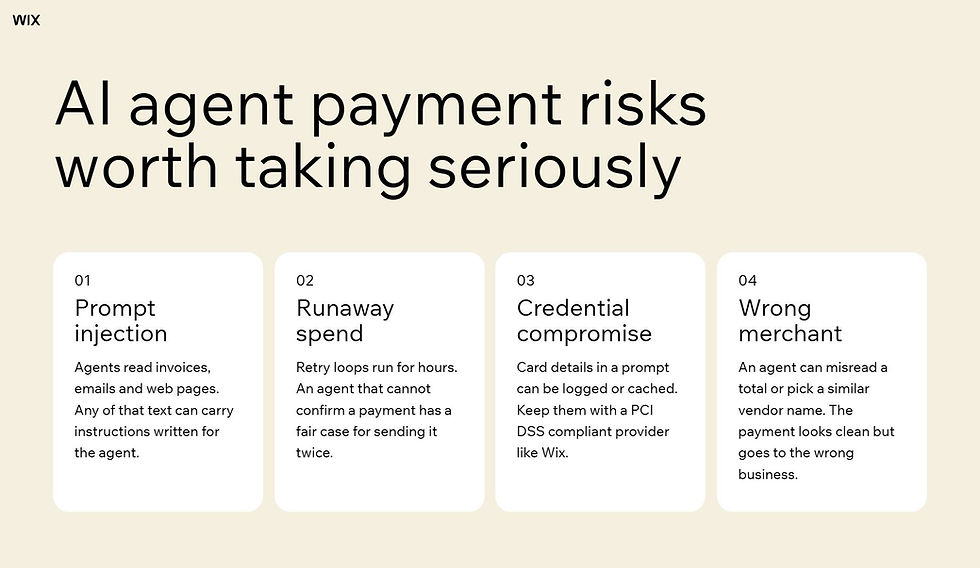
01. Prompt injection
An agent reads things. Product pages, emails, invoices, support threads. Any of that content can carry instructions aimed at the agent rather than at you, and a model that treats retrieved text as guidance will sometimes act on them.
For a payment agent the payoff for an attacker is obvious. A crafted invoice that changes the bank details, a product page that inflates a quantity or a support message that tells the agent to approve a refund. None of it requires breaking into anything.
02. Runaway or duplicate spend
Agents retry. When a call fails or a response looks wrong, the default behavior is to try again, and a loop that costs a few cents per attempt can run for hours before a person notices.
Duplicates are the quieter version of the same problem. An agent that cannot confirm a payment went through has a reasonable case for sending it again, which is how a supplier ends up paid twice in the same afternoon.
03. Credential compromise
Anything the agent can reach, an attacker who reaches the agent can reach too. Connecting a payment method alongside a calendar, an inbox, a CRM and a business website widens that surface considerably, and those connections rarely get reviewed after the day they were made.
Card details sitting in a prompt or a chat history are the worst version of this. Once payment data enters a context window it can be logged, cached or surfaced somewhere you did not plan for. That is the argument for keeping payment data with a provider built to hold it. Wix is PCI DSS compliant ensuring private payment information stays private.
04. Paying the wrong merchant or amount
Not every bad payment involves an attacker. An agent can simply be wrong, reading a total from the wrong line of an invoice or matching a vendor name to a similar one.
These errors are harder to catch than fraud because nothing about them looks suspicious. The payment is well formed, correctly authorized and sent to a real business. It is just not the one you meant.
A setup decision worth making early: every tool you connect widens what your agents can reach, and that is usually the point. It also means the list of connected tools and the list of payment permissions should be reviewed in the same sitting rather than months apart.
Find out more:
The controls that make agent payments safer

None of this needs a new invention. Four controls, layered, remove most of the risk, and they map closely to how finance teams already handle delegated spending. How many of them come built in rather than bolted on is one of the more useful things to check in any agentic AI platform.
01. Verify agent identity and user intent
Use payment paths that can prove who the agent is and what you approved. Mandates in the AP2 model do this by attaching a signed record of your instruction to the transaction itself, so the merchant is not guessing.
Where that is not available yet, tokenization gets you part of the way. A token tied to one agent and one purpose is traceable in a way a raw card number never is.
02. Scoped payment credentials
Never give an agent the card the rest of your business uses. Issue it something narrower, ideally a virtual card locked to a single merchant and a single amount, and let the unused balance return automatically.
Single use credentials turn a leak into a non-event. If the details surface somewhere they should not, there is nothing left to spend.
03. Spending and merchant limits
Set a per-transaction ceiling, a daily total and a monthly cap, then lock the credential to the merchant categories the agent actually needs. Enforced at the network, an out of policy attempt declines before the money moves.
Velocity limits matter as much as amounts. Capping transactions per hour is what stops a retry loop, and no amount-based rule will do that on its own.
04. Logs and a stop switch
Every agent payment should leave a record you can read later, with the agent that made it, the instruction behind it and the approval that cleared it. Reconciliation is impossible without this, and so is working out what went wrong.
Pair the log with a way to halt everything at once. A single control that suspends all agent spending is worth building before you need it rather than during the hour you do.
How it actually works: Symphony doesn’t act autonomously. Every recommended action, from sending a campaign to updating a workflow, comes to you for approval first. You stay in control of every decision. Symphony handles the execution once you say go.
How to decide what your agent can pay for
Sorting purchases into three tiers takes about twenty minutes and does more for your risk than any single tool.
Automatic: Low value, repeating, same recipient every time. Software renewals, small top ups, recurring supplier payments you have made a dozen times. Set a cap and let them run.
Notify: Anything unusual in amount or timing that still goes to a recipient you have paid before. The payment clears and you find out while it is fresh rather than at month end.
Approval required: New vendors, changed bank or payment details on any invoice, anything above your threshold and anything touching payroll or tax. These wait every time, with no exceptions built in for convenience.
The line between notify and approval is where most of the judgment lives. A useful test is to ask what a wrong payment at that size would cost you to unwind. If the answer is a phone call, notify is fine. If the answer is a week, it needs your sign-off.
Revisit the tiers as the agent earns trust. Starting tight and loosening deliberately is a lot easier than the reverse. The same logic applies to the people around you. Wix allows users to invite team members and assign roles and permissions for payment management.
Keep in mind: Symphony is built for independent business owners and small teams. It’s designed for the pace and structure of a small business, not enterprise workflows. If you’re scaling into a larger operation, it grows with you up to a point.
Expert tip from Marine Levy, Product Marketing Manager at Symphony by Wix:
“With Symphony, you’re not managing AI. You’re just running your business. Tell it what you’re working toward and it figures out what needs to happen, who should handle it and when. A restaurant owner doesn’t need to know how automation works. They just need their bookings confirmed and their no-shows followed up on.”
Explore more:
How Symphony by Wix keeps you in control of financial actions

The safest answer to this question is a slightly anticlimactic one. Plenty of business agents do not move money at all. Symphony’s built-in finance agents track revenue, flag overdue invoices, reconcile payments and follow up on the ones that have not landed, which puts them on the visibility side of your money rather than the spending side. Wix allows users to track and manage all past invoices, future collections and overdue payments from one place.
That design choice is deliberate. Symphony by Wix is a platform that notifies you directly when a decision or approval is needed so you stay in control without monitoring anything.
Symphony by Wix is a business partner that proposes the next move to build, manage and scale your operation, builds the plan and executes once you approve. In practice that shortens the risk list above, because the finance work described here is monitoring, reconciliation and follow-up rather than sending money.
A financial action moves through Symphony in four steps.
An agent spots something. An overdue invoice, a reconciliation mismatch or a revenue dip worth explaining.
It brings you the finding in plain language, along with what it suggests doing next.
You approve it, adjust it or leave it.
The agent carries out the approved action inside the tool where that work already lives.
Symphony by Wix is a platform where integrations extend the reach of agents, allowing them to take action across any connected tool on the owner’s behalf. Your payment platform, CRM and calendar stay where they are, which keeps the money itself inside systems that already carry their own controls. If you create a website with Wix, the agents reach its back office from the same conversation without a separate setup.
Expert tip from Ronny Elkayam, COO and Head of R&D at Wix:
“Integration was non-negotiable. If Symphony required you to migrate off Salesforce, or disconnect your calendar, or replace your invoicing tool, we’d lose the people who needed it most. The whole point is that Symphony slots into what you already do, and makes it work better together.”
This surprises most new users: unlike most AI tools that wait to be prompted, Symphony surfaces recommendations, flags issues and proposes next steps on its own. You don’t have to check in or ask questions. It comes to you.
AI agent payment FAQ
Can an AI agent access my bank account directly?
Not unless you connect it to one. Most agent payment setups run through a card credential or a payment platform rather than direct bank access, and that is the safer arrangement by a wide margin. A scoped card can be capped, restricted and cancelled in seconds. Bank connections vary more, and what you can limit or revoke depends on the bank or payment provider.
What happens if an agent makes a purchase I did not authorize?
A card transaction gives you the usual chargeback route, and a signed mandate showing what you actually approved strengthens the case considerably. Payments sent from a wallet or by direct bank transfer are much harder to reverse, which is a good reason to keep agents on card rails while the standards settle.
Do I need a separate card for each AI agent?
Separate credentials per agent is the better practice, though it matters less than having any scoped credential at all. One card per agent makes it obvious which agent spent what, and suspending one agent then does not disrupt the others. If that is too much overhead, one dedicated agent card with a tight cap still beats sharing your main business card.
Can I cap what my agents spend in a month?
Yes, and the cap works best at three levels rather than one. A per-transaction maximum stops a single oversized payment, a daily total stops a bad afternoon and a monthly ceiling stops slow drift. Caps enforced by the card issuer are stronger than caps configured inside the agent, because the agent cannot talk its way past them.
Should a small business let agents pay invoices automatically?
Yes for recurring invoices from suppliers you have paid many times before, where automatic payment inside a cap is reasonable and saves real time. For new vendors, changed bank details or anything unusual in amount, keep a human approval step. Changed payment details on a familiar invoice is one of the most common fraud patterns, and it is the thing an agent is least equipped to notice.


