Updated: 12 minutes ago
Build your website, your way with Wix Harmony →

AI agents for small businesses are giving entrepreneurs access to something large companies have always had: the ability to run multiple workflows at once without adding headcount.
A small team can now deploy an agent that handles customer inquiries around the clock, qualifies inbound leads and summarizes every client call, all before the first coffee of the day. This guide breaks down exactly what AI agents for small business can do for your business website, which tasks they handle best and how to pick a practical starting point.
When you build an AI website with Wix, you can generate a complete website with an AI agent, design direction and professional copy, then customize every detail to make it your own.
If you're exploring how to run an SMB better with agentic AI, they're one of the most practical ways to automate routine work while freeing up time to focus on growth.
TL;DR: AI agents for small business
AI agents are autonomous software systems that can plan, take action and adapt - handling multi-step business tasks without waiting for you to click a button.
For small business owners, that translates to faster response times, fewer manual handoffs and more consistent operations. This guide covers what AI agents actually do, where they create the most value for small teams and how to start without burning budget on the wrong tool.
For small business owners, that translates to faster response times, fewer manual handoffs and more consistent operations. Whatever your starting point is, for example learning how to get your business ready for agentic AI, this guide explains what AI agents actually do, where they create the most value for small teams and how to start without burning budget on the wrong tool.
You'll also see how AI agents can support everything from running an online store to creating and managing a portfolio website.
You'll learn:
What makes an AI agent different from a chatbot or basic AI tool
The six most practical AI agent use cases for small businesses
Wix's built-in AI agents and what each one does for your business
What AI agents genuinely cannot do yet - and where to keep humans in the loop
A step-by-step approach to choosing and deploying your first agent
What AI agents typically cost and how to measure whether they're working
Discover practical ways to manage an online business with AI agents →
What is an AI agent (and how it differs from a chatbot)
An AI agent is a software system that can take actions, not just generate text. Where a chatbot waits for a question and returns an answer, an AI agent receives a goal, breaks it into steps, uses connected tools and executes the work, often without any human input in between. That difference matters a lot for small businesses, where the same person is often handling sales calls, follow-up emails and customer messages all at once.
The clearest way to think about it: if you tell a chatbot "draft a follow-up email," it drafts one. If you tell an AI agent "follow up with everyone who filled out the contact form this week," it reads the form responses, writes personalized emails, logs the activity in your CRM and schedules reminders, without you having to manage each step.
How AI agents actually work

AI agents operate in a loop: they observe context (your inbox, your CRM, a new form submission), plan the next action, execute it and check the result before deciding what to do next. That loop is what makes them feel more like a digital team member than a tool. They connect directly to the software you already use, like email platforms, online scheduling tools, customer databases, eCommerce stores and more, so they can take real actions inside real systems, not just produce text for you to copy and paste elsewhere.
Worth knowing: AI agents perform best on tasks that are well-defined, repetitive and high-volume. The more clearly you can describe the goal and the rules, the more reliably the agent executes. Vague, open-ended goals tend to produce inconsistent results - not because the technology is weak, but because no worker, human or AI, can perform well without clear instructions.
Learn more:
What AI agents can do for a small business: 6 practical use cases

Most coverage of AI agents focuses on enterprise deployments with large engineering teams behind them. The reality for small businesses is simpler and more accessible. These are the six use cases where AI agents for small business create the most immediate value.
01. Customer support: 24/7 coverage without adding headcount
Customer support is where AI agents deliver the fastest return for small businesses. Modern support agents do more than answer FAQs: they triage incoming messages, route complex cases to the right person, handle repeat queries around the clock and pull from your help documentation to give accurate, consistent answers. A well-configured support agent can handle roughly half of all incoming tickets automatically, letting your team focus on the cases that genuinely need a human.
"AI-powered chatbots help provide 24/7 customer support, quickly answering common questions and improving customer satisfaction." - Jean-Briac Coadou, founder of Horizons IA
For a small business where the founder is often the default support rep, that kind of always-on coverage removes one of the biggest daily time drains.
The before/after story is consistent across service businesses: a founder who was spending two to three hours a day triaging customer emails, answering the same questions about pricing, hours and refund policies. After setting up a support agent trained on their help docs, that same inbox runs on autopilot for routine queries. The founder gets a summary of what was handled and flags only the edge cases that need a human.
Worth knowing: A support agent is only as good as the documentation it's trained on. If your help articles and FAQs are outdated or sparse, the agent will struggle to give accurate answers. Before deploying a customer support agent, spend time cleaning up your existing help content - that work pays dividends whether or not you use AI.
02. Lead qualification and sales outreach
Sales is where AI agents are most useful fast for small businesses because the tasks are high-value but painfully repetitive. A well-configured sales agent can research a prospect from a target list, score them against your ideal customer profile, write a personalized first-touch email based on their recent activity, send it, track engagement, follow up at the right interval and log everything in your CRM. That entire sequence, which typically takes a salesperson hours per day, runs in the background while you focus on conversations that are actually converting.
The practical result: small businesses using sales agents consistently compete with larger teams on outreach volume. Writing in Forbes Business Council, one founder with direct experience deploying agents across customer success and business development noted that a 20-person company can produce the output of a much larger sales function - with agents handling the mechanical work and humans closing the deals.
03. Content creation and marketing
87% of marketers use generative AI in at least one workflow according to a 2026 AI marketing statistics report.
For small business owners, the practical application goes beyond just generating text. A content agent can read your brand guidelines, analyze your past posts and draft social media copy, email campaigns and blog outlines that actually sound like you. The difference between a generic AI writing tool and an AI agent is that the agent can also schedule posts, track performance, flag what's resonating and adjust future drafts accordingly, all without you managing each step. Wix's AI website builder includes built-in content generation tools that work the same way, you describe what you need and the AI produces on-brand copy tailored to your site.
Worth knowing: Generic content generation without differentiation is becoming less valuable as AI-assisted search matures. An agent that produces 20 identical-sounding posts a week is not the same as one trained on your brand voice with real context about your products and customers. Quality and specificity matter more than volume - and the setup work to give your agent that context is time well spent.
04. Admin and scheduling automation
This is where AI agents quietly create the most value for solo operators and small teams. Calendar management, meeting summaries, invoice follow-up, client onboarding checklists, contract reminders - these are all tasks that are easy to delay, never quite urgent enough to prioritize and yet consistently painful when they pile up. An admin agent handles them in the background so they never pile up in the first place.
A practical example: a client onboarding agent can send a welcome email the moment a contract is signed, attach an intake form and a calendar link, add a reminder to check in after the first week and log the whole sequence in your project management tool. Every new client gets the same complete, professional experience and you never have to manually run through a checklist again.
05. Operations and internal workflow automation
Operations agents connect across the tools your business already uses - CRM, email, inventory system, accounting software - and run workflows triggered by real events. A new lead enters your system: the agent researches them, drafts personalized outreach, updates the pipeline and schedules a follow-up. An invoice goes unpaid past 30 days: the agent sends a polite reminder, logs the contact attempt and notifies you if there's no response. Stock falls below threshold: an alert goes to the right person before a customer asks about it.
These are the kinds of workflows that large businesses have had dedicated operations staff to manage for years. For small businesses, an agent running them in the background closes that gap without adding headcount.
And when no off-the-shelf tool covers a workflow, an AI-powered app builder like Base44 lets you create the missing piece, whether that’s a custom dashboard, tracker or client portal, from a plain-language prompt.
Worth knowing: The value of operations agents compounds over time rather than showing up immediately. The first workflow you automate saves a few hours a week. As you standardize more processes, fewer tasks depend on one person holding all the context in their head, which matters a lot when a team is small and everyone wears multiple hats.
06. Website creation and design
For small businesses, an AI website builder agent is the clearest example of what the technology can actually do: you describe what you need and the agent builds a complete, professional site - layout, copy, imagery and structure, ready to launch. Wix's AI website builder does exactly that, generating a business-ready site from a prompt and letting you customize every element from there. The result is a site that looks like it took a design team weeks, built in minutes.
"At Wix, we always prioritize our users," says Oz Golan, Group Product Lead, AI Creation at Wix. "By solving the challenge of content creation, you'll have more time to design your site and focus on your core business tasks."
That experience is exactly what Krisnadi Ang, founder of Kartu, a Pokemon card collectibles business, found when building with Wix. Before using AI tools, Ang handled every piece of marketing content manually - from social posts to product descriptions. After enabling AI: "The AI marketing tool goes 'okay, you can actually do this by clicking this' and the recommendation comes out straight away. AI will tell me exactly what to do, what I'm missing. It definitely helps people like me."

AI agents aren't just for customer support or operations. With Wix Harmony, they can also help you build your online presence by generating pages, writing professional content and streamlining website creation. From your first prompt to your final edits, AI handles the repetitive work while you stay in control of every decision.
Wix's AI agents for small business
Wix runs its agents on one platform rather than as separate tools. Symphony by Wix is an AI agent platform for independent business owners and small businesses that coordinates specialized agents around business goals, and Kleo and Juno below both work inside it. Symphony by Wix asks business owners to approve actions before agents carry them out, so nothing goes out without your sign-off.

If you're building or running your business on Wix, you don't need to look far for AI agents, they're already built into the platform. Wix has a suite of purpose-built agents designed around the specific challenges small business owners face every day, from answering customer calls to managing your marketing. Here's what each one does.
Aria

Wix's AI agent Aria was made for building and managing your site. Ask Aria to write page copy, set up a new section, troubleshoot a design question or walk you through your analytics, it handles the detail work so you can focus on the bigger picture.
Aria is available directly in the Wix editor and gets smarter the more context you give it about your business.
Omni

Omni (the Wix Custom Agent) takes a higher-level brief and runs with it. Set a business goal - send follow-up emails to this week's leads, create a bookings report, track unpaid invoices - and Omni plans the steps and executes them. It's designed for the recurring operational work that eats up time but doesn't require your judgment on every step.
Alfred

Alfred is Wix's AI phone agent. It answers calls for your business around the clock, takes messages, sends SMS follow-ups after every call and gives you a summary with sentiment tags so you know exactly what happened and what needs follow-up. For service businesses that can't afford to miss a call, Alfred covers the phone while you're with a client or off the clock.
Kleo

Kleo is Wix's AI marketing agent. Connect your site and Kleo builds a customized marketing plan across SEO, email marketing, social media and paid ads, then prepares the actual content for your approval before anything goes live. It won't publish without your sign-off, which means you stay in control while the research and drafting happen automatically.
Juno
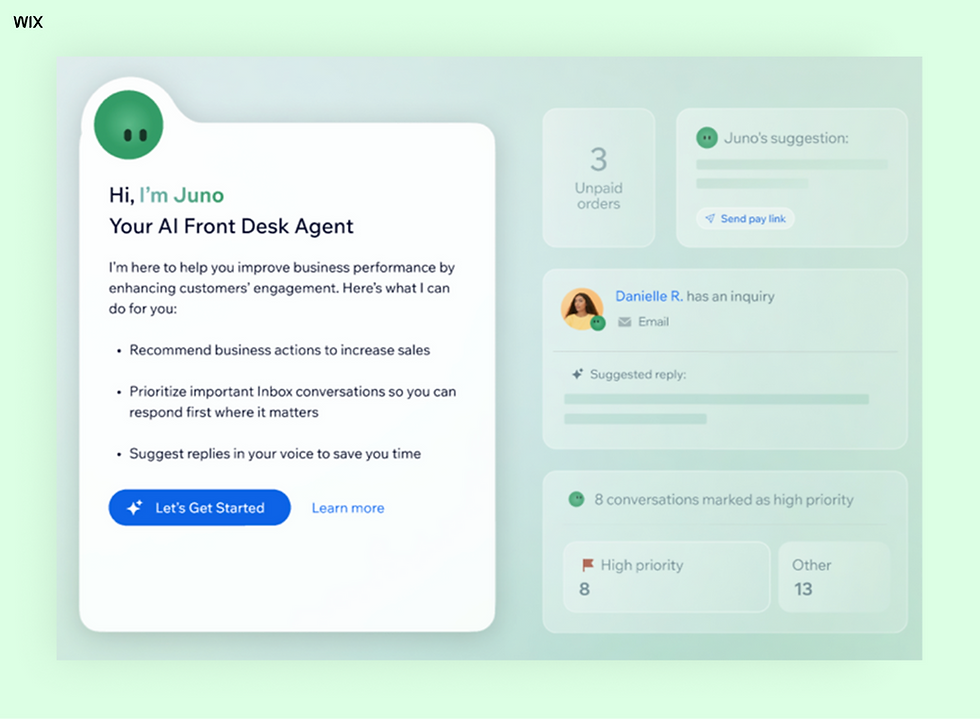
Juno is Wix's front desk agent. It handles incoming messages across your communication channels, automatically prioritizes conversations and suggests on-brand responses - so your inbox stays manageable and every customer gets a timely, consistent reply even during your busiest periods.
What AI agents can't do (yet)
The most common reason small businesses get burned by AI agents is unrealistic expectations, usually set by demos that show the technology at its best-case scenario. AI agents are genuinely useful - but knowing where the limits are is what separates good deployments from expensive disappointments.
AI agents cannot replace human judgment on ambiguous decisions. They follow rules and patterns extremely well; they struggle with situations that require reading between the lines, understanding unspoken context or making a call where the stakes are high and the information is incomplete. Client relationships, difficult conversations, creative strategy and ethical decisions all need a person. Even a no code website builder still requires a human to decide what the site is for, who it serves and what story it tells, the tool handles execution, not strategy.
They also produce inconsistent results when the task boundaries are unclear. An agent tasked with "manage our social media presence" with no further guidance will produce generic, low-quality output. The same agent given a clear brand voice document, a content calendar and specific rules about tone and topics will perform dramatically better. The technology is the same, the setup is what changes the outcome.
One thing worth knowing: AI agents are not a set-and-forget solution. They need monitoring, especially in the first weeks after deployment. Check the outputs regularly, correct errors quickly and refine the rules as you learn what the agent does and doesn't handle well. The businesses that get the most from AI agents are the ones that treat the first month as a calibration period, not a hands-off handover.
How to choose and deploy your first AI agent
The single biggest mistake small businesses make with AI agents is trying to do too much at once. The right approach is to start narrow: pick one task that is repetitive, high-volume and clearly defined and deploy an agent to handle that task well before expanding. A customer support agent that handles billing questions reliably is worth far more than a sprawling multi-function agent that does five things inconsistently. If you're also building or updating your business website, start there - Wix's online website builder gives you a fast, no-friction base to build on before layering in more complex automation.
Start by listing the tasks that eat the most time in your week. Look for work that is rule-based (the same process every time), data-driven (pulling from existing systems) and time-sensitive (where speed matters for the customer or the business). Those are the ideal conditions for an AI agent. Once you've picked the use case, choose a platform built for SMBs, one that integrates with the tools you already use, requires no technical expertise to set up and offers a free tier or low-cost entry point for testing.
Find out more:
Questions to ask before you commit
Before choosing an AI agent platform, run through these practical questions:
Does it integrate directly with the tools I already use (CRM, email, calendar, eCommerce platform)?
Can someone non-technical on my team manage and update it without developer help? A drag and drop website builder mindset applies here - the best agent tools are just as intuitive.
How is business data handled? Is customer information stored securely and kept out of public AI training?
What happens when the agent can't handle something? Does it escalate cleanly to a human?
Can I scale usage without rebuilding the whole setup or hitting a cost cliff?
If an agent passes those five questions for your specific use case, it's worth testing. Start with the free tier, run it on one workflow for 30 days and measure what actually changes before committing to a paid plan.
Learn more: how to make a website with an AI agent →
Explore more best AI agent platforms.
AI agents for small business FAQ:
Are AI agents worth it for small businesses?
Yes, when scoped correctly. The return shows up fastest in customer support and sales outreach, where the tasks are repetitive, high-volume and easy to define. Small businesses that start with one well-configured agent consistently report meaningful time savings within the first few weeks. The key word is "scoped" - a narrow, well-defined deployment outperforms a broad, vague one every time.
What's the difference between an AI agent and automation?
Traditional automation follows a fixed set of rules you define upfront. If this happens, do that. An AI agent makes decisions when conditions change or when the situation doesn't fit a predefined rule. For small businesses, that difference matters because real workflows are rarely as predictable as a flowchart assumes. An automation sends a standard follow-up email three days after a form submission. An AI agent reads the form response, decides whether the lead is a priority, personalizes the email accordingly and adjusts the follow-up timing based on whether the first email was opened.
Do you need technical skills to use AI agents?
No. Most SMB-focused AI agent platforms are designed for non-technical operators. They offer guided setups, templates for common use cases and support to help you get started. Building a functional customer support or scheduling agent typically requires nothing more than being able to describe your workflow in plain language and connect your existing tools. No coding knowledge is required to build something professional.
Read more:
Can AI agents replace employees?
Not always. AI agents handle repetitive, rule-based work well. Anything requiring judgment, relationships or creative thinking still needs a person. The most accurate framing is that an AI agent frees your team from low-value, time-consuming tasks so they can focus on the work that actually moves the business forward. The value is not in replacing the human - it is in giving that human capacity back so they can focus on the work that actually requires them.
How long does it take to set up an AI agent?
A focused, single-use-case agent on an SMB platform can be deployed and running in under a day. That includes connecting your existing tools, configuring the workflow and testing the output before going live. More complex multi-system agents - those that connect across several platforms and handle branching logic - typically take a few days to a week to configure properly. The setup time is front-loaded; once an agent is running, it requires periodic review but minimal ongoing maintenance.
What are the most common AI agent use cases for small businesses?
The most common AI use cases for small businesses include general business research, marketing and content creation, customer service, sales support, administrative automation and financial management. Customer-facing automation - particularly support and lead qualification - delivers the fastest measurable results. Operational and admin use cases tend to compound over time as more workflows are standardized.


