Web analytics tools show you how your website is actually performing. They track who visits, where those visitors come from, which pages hold attention and whether people take the action you want them to take.
Building the site is the first step, and knowing how to make a website with a professional website builder gets you there. Reading the data is what tells you where to improve it and how to monetize your website. Wix is a powerful website builder that gives you everything you need to build something you’re proud of, including a built-in analytics dashboard covering traffic, behavior and revenue.
This guide covers 12 web analytics tools, what each one does well and who it suits.
TL;DR: 12 best web analytics tools
Web analytics tools collect and report on visitor behavior so you can see what is working on your site and what is not. The 12 tools below cover built-in platform dashboards, privacy-first cookieless reporting, behavior tools such as heatmaps and session recordings and enterprise suites for multi-source data. Wix Analytics reports traffic, audience and revenue from the same dashboard used to run the business.
Tool | Best for |
01. Wix Analytics | Wix site owners who want reporting with no setup |
02. Google Analytics | Broad traffic, audience and conversion reporting |
03. TWIPLA | Cookieless analytics added through the Wix App Market |
04. Hotjar | Heatmaps and session recordings |
05. Adobe Analytics | Deep web and mobile analytics for enterprises |
06. Mixpanel | Event and funnel analysis |
07. Microsoft Clarity | Behavior analytics with no traffic cap |
08. Plausible | Lightweight privacy-first traffic reporting |
09. Semrush | Competitor traffic benchmarking |
10. Clicky | Real-time traffic and visitor logs |
11. Crazy Egg | Visual mapping and A/B testing |
12. Matomo | Full data ownership and self-hosting |
12 best web analytics tools
01. Wix Analytics
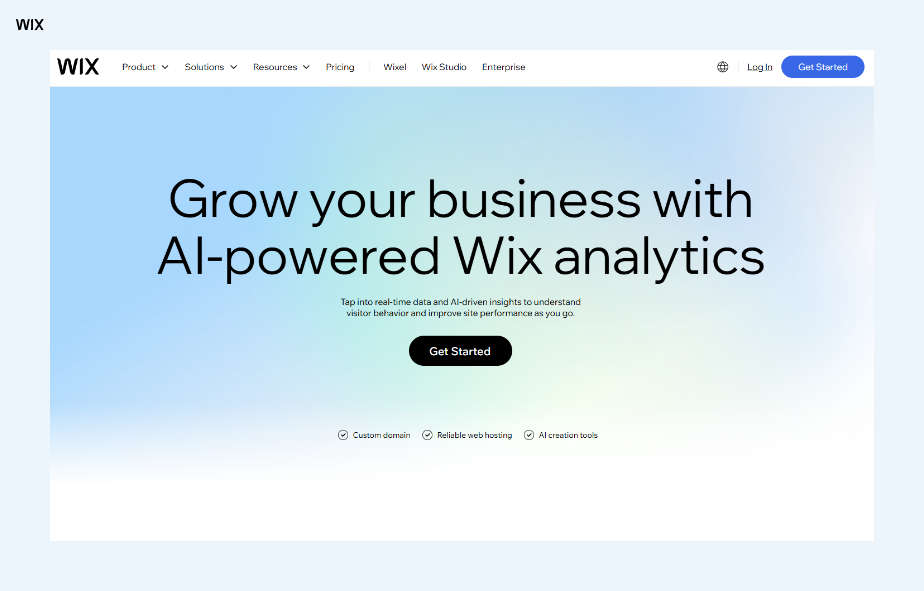
Wix Analytics suits site owners who want general website performance metrics and deeper insight from the same place. Wix supports data-driven site management with built-in traffic, behavior and revenue reporting available from one dashboard. It reports where visitors come from, how they reached the site and which pages hold their attention, and it extends to top customers, revenue analysis and traffic trends.
The tool is included with every Wix site and available automatically from the dashboard, so there is no tracking script to install. Key metrics appear in a widget on the dashboard overview, and alerts can be sent when a trend shifts. There is also an AI analytics report that benchmarks a site against competitors.
Because Wix Analytics is connected to the Wix website builder, it reports on the whole site rather than sitting as a layer bolted on top of it. That is what makes sales data, site interactions and blog engagement available in the same pre-made customizable reports.
Good for: Wix site owners who want comprehensive analytics with an easy-to-use interface and Wix features.
Planning your website? Start with free website templates.
“Wix Analytics is built around business decisions, not just data. You can see which pages are working, where visitors are dropping off and which efforts are actually driving results. It’s not a dashboard full of numbers for the sake of it, it’s a clear view into where to focus next so every decision you make is grounded in what’s actually happening.” — Inbal Kochmeister, Product Marketing Manager at Wix
02. Google Analytics (GA4)

Google Analytics covers a lot of ground including live website traffic data, audience insight and integrations with other Google products such as Google Ads and AdSense. Despite the density of information available, the layout is reasonably straightforward. Our guide to getting started with GA4 walks through the initial setup.
The core product is free and covers most of what newcomers need from general web analytics. More advanced requirements such as unsampled reporting, uncapped raw data export, Salesforce integration and advanced funnel reporting are handled by Google Analytics 360. Conversion tracking is where most people get stuck, and our guide to key events and conversions in GA4 covers that specifically.
Good for: Those who want an option from a well-known brand. Google Search Console is another option, though it only tracks organic traffic.
03. TWIPLA

TWIPLA is a website intelligence platform offering tools for statistical collection and behavioral analysis of site visitors, all designed to meet high data protection standards. It aims to help website operators and digital marketers identify what works and what does not on their sites.
Features including heatmaps, session recordings and conversion funnels help you understand visitor behavior and optimize around whatever matters to you. Custom dashboards and advanced filtering let you focus on key metrics, segment data and surface trends you would otherwise miss.
TWIPLA is privacy-first and meets global data privacy laws by default, including CCPA, GDPR and ePrivacy. It uses cookieless tracking with a dual tracking code system that captures data on visitors who decline cookie consent. You can integrate TWIPLA into your Wix dashboard from the Wix App Market.
Good for: Website owners and digital marketers who need cookieless analytics with full privacy compliance.
04. Hotjar

Hotjar answers what visitors do on a page rather than how many arrived. It records real sessions so you can watch where someone hesitated, and builds heatmaps showing where clicks and scrolls concentrate. Where a traffic report tells you a page has a high exit rate, Hotjar shows you the moment people gave up on it.
It also collects direct input through on-page surveys and feedback widgets, which helps when the behavior data raises a question the numbers cannot settle. Because the tool is built around watching and asking rather than counting, it works best alongside a traffic tool rather than instead of one. Hotjar is now part of Contentsquare following a 2025 merger, so the tools sit inside that platform, though they are still offered under the Hotjar name.
Good for: Diagnosing why visitors leave a page, using session recordings and heatmaps.
05. Adobe Analytics

Adobe Analytics is the web and mobile analytics product in Adobe’s enterprise stack. It covers digital behavior across sites and apps, with multichannel data collection, custom variables and the reporting depth large teams expect. It is also a visually strong tool for people who would rather not read bland charts.
One thing to know before choosing it. Adobe now groups its analytics products under Adobe CX Analytics, and pulling data together from many different sources is handled by Customer Journey Analytics rather than by Adobe Analytics itself. If what you need is cross-channel reporting rather than web and mobile reporting, look at Customer Journey Analytics instead.
Good for: Enterprises already in the Adobe stack that need deep web and mobile analytics.
06. Mixpanel

Mixpanel is built around visualizing data and following what users actually do. Its tracking features give you insight into your users and let you follow their journey through your site. You can group users, compare them against each other and more with a well rounded feature set.
A valuable aspect of Mixpanel is how far you can configure it around your own business, selecting the attributes that match how you operate.
Good for: Businesses that want deep insight into their users through a visually clear interface.
07. Microsoft Clarity

Microsoft Clarity offers session recordings and heatmaps with no cap on the traffic it will process, which makes it unusual among behavior tools. It also flags friction signals automatically, including rage clicks where a visitor clicks the same spot repeatedly and dead clicks where they click something that does nothing.
It connects to Google Analytics, so a spike or drop in a traffic report can be traced straight through to the recordings behind it. Setup is a single tracking script and the dashboard needs little configuration before it starts returning usable sessions.
Good for: Behavior analytics on higher-traffic sites, with no processing limits.
08. Plausible
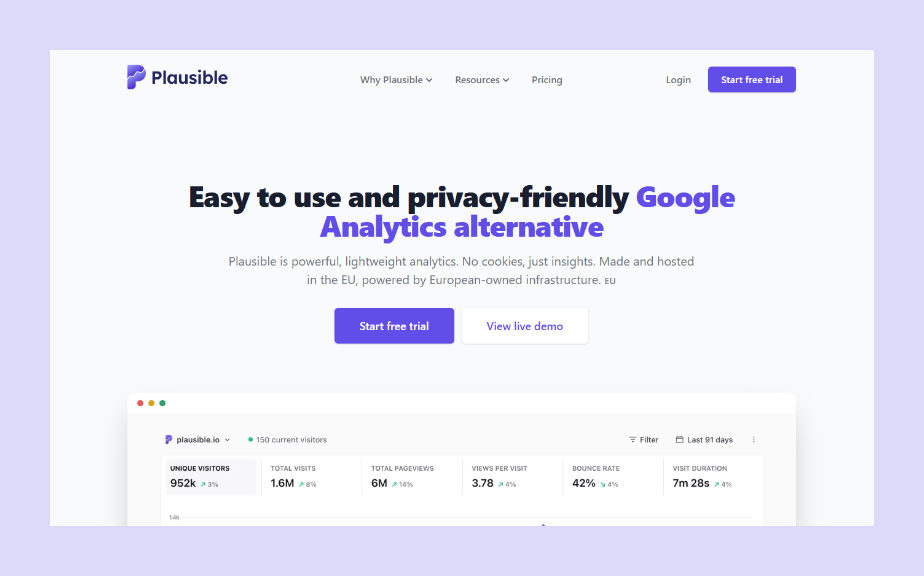
Plausible takes the opposite approach to feature depth. The entire dashboard sits on one page covering visitors, page views, bounce rate, visit duration, top pages, referrers and countries, and there is nothing further to configure or learn.
It is open source and cookieless by design, which means it meets GDPR, CCPA and PECR requirements without a consent banner for analytics. The tracking script is a fraction of the size of a conventional analytics tag, so it adds very little to page weight. Teams that want full data ownership can self-host it.
Good for: Site owners who want simple privacy-first traffic reporting without cookie consent.
09. Semrush

Semrush is best known for SEO and SEM, and its traffic analytics report on your own site alongside competitors. Benchmarking is the main reason to reach for it here. You can identify a competitor’s geographic source markets, who their audience is and where their traffic comes from, which is difficult to get from a tool that only sees your own site.
Good for: Businesses that want to compare themselves with competitors while also getting an SEO and marketing platform.
10. Clicky

Clicky is a real-time analytics platform. As with most analytics platforms you can access visitor data including location, time spent on page and bounce rates. You also get uptime monitoring and heatmaps that can be grouped by goals, visitor sessions and more.
Good for: Sites that want strong real-time analytics capabilities.
11. Crazy Egg

Crazy Egg helps you increase traffic and sales through a set of visual features. It is a good choice for people who would rather watch what happens than read numbers.
Its user recordings capture entire sessions, so you can see what visitors do through video playback and identify pain points. You can view users by new, mobile or most active to see how different types of customer interact with your site. Crazy Egg also offers heatmaps and an A/B testing tool to put the findings into action.
Good for: Finding pain points in website flow using visual mapping.
12. Matomo

Matomo is an open-source analytics platform covering real-time data, event and content tracking, heatmaps, A/B tests and more. Matomo is quick to point out that users own 100% of their data.
There is a lot on offer, which may leave someone seeking basic analytics feeling overwhelmed. That said, the range of data points is impressive. Beyond visitors and behavior you can get insight into acquisitions and eCommerce as well as media and web form analytics.
Good for: Anyone looking for a robust all-in-one analytics platform, with the option to self-host.
What is web analytics?
Web analytics is simply the data behind websites. Web analytics tools allow you to view that data and then organize it into various reports. These reports ultimately enable you to understand who is viewing your site, how many people are moving onto other pages within your website, how long visitors are staying on your pages and more. Using these metrics, you can make data-driven decisions and understand whether to adapt your website design, marketing strategy, products and more.
“I turn to Wix analytics literally before every inventory purchase to help me forecast our needs so I can order accordingly. This enables us to avoid sitting on inventory for long periods of time which frees up capital for our many other business needs.” — Nick Lucas, Kodapet
What are web analytics tools?
Web analytics tools are software programs that help you track and understand what visitors are doing on your website. They collect data on things like how many people visit your site, where they come from, what pages they look at and how long they stay. This data can then be used to improve your website in a number of ways, such as:
Making it more user-friendly: By seeing which pages people are most interested in and how they're navigating your site, you can make it easier for them to find the information they're looking for.
Increasing sales or conversions: You can track how many people are completing your desired actions, such as making a purchase or signing up for a newsletter. This can help you identify areas where your website is falling short and make changes to improve your conversion rate.
Improving your marketing campaigns: You can see which marketing channels are driving the most traffic to your website and which ones are most effective at converting visitors into customers. This can help you allocate your marketing budget more effectively.
Tracking visibility in AI search
Search traffic no longer arrives only from search engine results pages. A growing share of discovery happens inside AI assistants, where an answer may cite a site without ever sending a click. Standard web analytics tools were built to measure sessions, so they show the drop in referrals without explaining it.
This has produced a new reporting category. Wix AI Visibility Overview lets merchants track how their brand appears across major AI platforms, including ChatGPT, Gemini, Perplexity and Claude. Reading it alongside a traditional traffic report gives a fuller picture, because a site can lose sessions while gaining citations.
For site owners who want to work with their data conversationally rather than through a dashboard, Wix also exposes its platform to AI tools directly. The Wix MCP server is a Model Context Protocol server that allows AI agents and tools to interact with Wix capabilities through natural language.
How to choose a web analytics tool
Start from the question you need answered rather than the feature list. Most tools fall into one of a few categories, and each answers a different kind of question about your site.
Traditional traffic analytics measure volume and source. Sessions, page views, bounce rate and average time on site tell you how many people arrived and where they came from.
Behavioral analytics measure what happens once they arrive. Session recordings, heatmaps and clickstream analysis show where visitors hesitate, what they ignore and where they abandon a page. This is the category that answers why, and behavioral analytics tools are generally read alongside a traffic report rather than instead of one.
Customer journey analytics track touchpoints across channels rather than a single visit, connecting a first interaction through to a purchase or a signup.
Content analytics measure how individual pages perform. Which posts hold attention, how long people read and what gets shared.
Looking to learn how to create a blog? Wix has you covered with thousands of design features and built-in SEO and marketing tools that let you scale your content, your brand and your business with its blog maker.
SEO analytics cover keyword performance, backlinks, search traffic and competitor visibility, and they exist to improve how the site ranks.
Product and event analytics measure defined actions rather than page views, which matters when the thing you are optimizing is a signup flow or a checkout rather than a page.
Privacy-first and cookieless tools measure behavior without storing cookies on a visitor’s device, using aggregated and anonymized signals instead. Because they do not depend on consent, data is not lost when visitors decline tracking, and in most jurisdictions they remove the need for a consent banner for analytics alone. Several tools above work this way.
Once you know which category you need, three practical filters narrow it quickly. How much setup and ongoing maintenance you can absorb, since some tools need a script installed and configured before they return anything useful. Whether cookieless measurement matters for your compliance position. And whether the tool reports on the platform your site already runs on, which removes the gap between the site and the data about it.
“I love the analytics on Wix, it tells a big story about who we are as a company and who our customers are. When it comes to expansion, we want to go off data. We don’t want to just go off assumptions.” — Francesca Duncan and Nick Houston, co-founders, Fork n’ Film
Which web analytics metrics should you track?
The metrics that matter depend on what the site is for. A blog is usually looking at readers and time on page. An online store is looking at conversions and revenue per visitor. Tracking everything produces reports nobody reads, so the useful move is picking a small set of key performance indicators tied to what the site is actually meant to do.
“Leverage data and analytics to track key performance indicators related to your SEO efforts. Monitor organic traffic, keyword rankings, conversion rates and other relevant metrics to evaluate the effectiveness of your SEO strategy.” — Nitin Manchanda, SEO Consultant at Botpresso
From there the job is turning numbers into changes. A high exit rate on one page is a prompt to look at what that page asks people to do. A traffic source that converts well is a prompt to put more behind it. Wix Analytics surfaces this alongside the metrics themselves, with context on what a figure means and what to look at next, so the reporting and the decision sit in the same place.
If you would rather hand the analysis to someone else, you can find a data professional through the Wix Marketplace.
Web analytics tools FAQ
What are web analytics tools?
Web analytics tools track and analyze how people use websites. They help website owners, marketers and businesses understand their audience, improve site performance and make smarter marketing decisions.
What are the main pillars of web analytics?
The pillars of web analytics help in understanding and improving website performance, user behavior and overall online presence. They are data collection, data measurement, data analysis, data interpretation and action.
What are the most popular web analytics tools?
Google Analytics is the most widely used web analytics tool worldwide, reporting traffic, behavior and conversion data in one place. Beyond it, the most commonly used tools divide by the job they do. Some specialize in heatmaps and session recordings to show how visitors move through a page. Others lead on privacy-first and cookieless measurement. Enterprise suites handle reporting across multiple data sources at scale. Wix users can connect Google Analytics to their site alongside the built-in Wix Analytics dashboard.
Why should I use web analytics tools?
Web analytics tools help you understand how visitors interact with your site, which pages perform best, where users drop off and which marketing efforts work. This information helps you make data-driven decisions to improve your website and grow your audience.
Can I use free web analytics tools?
Yes. Free tools cover the fundamentals including page views, session duration, traffic sources and user behavior, though some take work to set up and interpret at first. Google Analytics is the most widely used free option. Wix Analytics is included with every Wix site and needs no setup, since it reports from the platform the site already runs on.
What is cookieless analytics?
Cookieless analytics measures visitor behavior without storing cookies on a visitor’s device. It relies on aggregated and anonymized signals instead, which means analytics data is not lost when visitors decline cookie consent and in most jurisdictions no consent banner is required for analytics alone. Several of the tools covered above are built this way, and it has become a standard expectation for teams operating under GDPR.
Do I need more than one web analytics tool?
Many site owners run two. A traffic tool answers how many people arrive and where from. A behavior tool answers what they do once they arrive, using heatmaps and session recordings. Together they cover both halves of the question. Running more than two usually adds reporting overhead rather than insight.
Is Wix good for web analytics?
Wix suits site owners who want analytics without a separate setup. Wix Analytics reports traffic, behavior, audience and revenue from the same dashboard used to manage the site, so there is no tracking code to install and no gap between the site and the reporting. Additional analytics tools can be connected alongside it or added from the Wix App Market.