Updated: 2 days ago
The perfect domain is just a click away: claim your domain→

When people talk about creating a domain they really mean choosing a web address, registering it and connecting it to your website. That whole process can feel a bit confusing, especially when the name you want is taken or you come across things like DNS for the first time. This guide breaks it down step by step from picking a domain name and registering it to connecting it to your site.
Secure your perfect domain in just a few clicks with Wix. Get everything you need in one place: business email, reliable hosting, SSL protection and full privacy. With 24/7 support and no hidden fees, getting your site live is simple and worry-free.
TL;DR: how to create a domain name
Creating a domain means registering a name, choosing an extension and connecting it to your website through DNS. You can buy a domain through a website builder or use one you already own and connect it. You’ll also set up privacy and security, check that the name works across platforms and fits your brand, then look at subdomains and understand the difference between free and paid options.
You’ll learn
How to pick and register a domain name step by step
How to choose the right domain extension for your brand
How to connect your domain to a website
How to set up security and privacy settings
How subdomains work and when to use them
The difference between free, paid and subdomain options

How to create a new domain: step by step
Getting a domain takes only a few minutes, but small choices early on can affect your brand, setup and even future costs. The steps below walk you through the full process so you can secure the right domain, avoid common mistakes and get everything connected properly from the start.
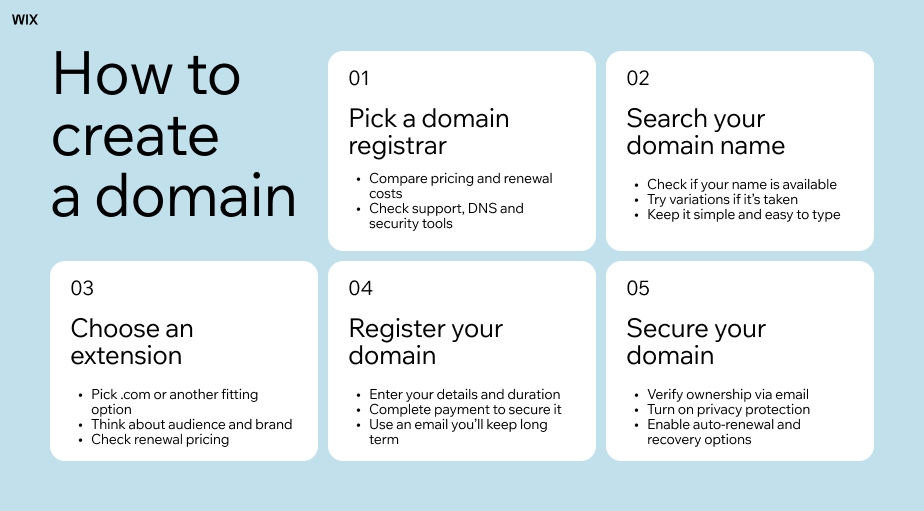
01. Choose a domain name registrar
A domain registrar is a company that sells and manages domain names. When you register a domain the registrar records your ownership and connects it to the global domain system.
Some registrars only sell domains while others also offer hosting, email and website builders. If you want to launch a site right away keeping everything under one roof can make setup simpler and prevent technical headaches down the road.
Learn more: Best domain registrar

What to check before choosing a registrar
When you're comparing registrars don't just look at the first-year price. Many companies offer big discounts upfront but their renewal costs can be a lot higher after the first year.
Before you commit always check for:
Renewal pricing
SSL certificate inclusion
WHOIS privacy protection
Auto-renew options
Customer support quality
DNS management tools
Security features
It's also a good idea to think about who owns the domain. If you're creating a business domain register it under an account you control personally or professionally. It can be hard to get back domains registered through agencies freelancers or employees if you lose access later on.
Found the perfect name for your business? Lock in your domain before someone else does.

02. Search for an available domain name
After you've picked a registrar, use their search tool to see if your dream domain is available. This tool checks the global WHOIS database live so if a domain is taken on one registrar, it’s taken everywhere.
If your first choice is gone, don't just add random numbers hyphens or weird spellings. Try to find variations that are still natural and easy to remember. A great domain name should be simple to type say and share without needing to spell it out every time.
Make sure your domain name works everywhere
Before you register your domain, it’s a good idea to search for the name on search engines, social media platforms and business directories. This will help you steer clear of brand conflicts and situations where your domain name is available but all matching social handles are already used by another business.
Think long term when you choose the name. A domain tied too closely to one city, product or trend can feel limiting later. Names with broader branding flexibility usually age better as businesses grow.
Use a domain name generator if you need help coming up with an idea. Already have an idea? Check the availability with a domain name search tool.

03. Pick your domain extension
Domain extensions, also called top-level domains (TLDs), are the parts of domain names that come after the dot. While .com is the most recognized option, many other domain extensions are now available for different industries, regions and interests.
The extension you choose can shape how people see your site before they even visit. Some feel more global and commercial while others suggest a local business or a specific niche. Newer extensions are gaining popularity letting you grab a clean domain name without adding extra words.
Some new extensions cost a lot more to renew each year than standard domains so check the renewal fees. It's also a good idea to register similar versions of your main domain including common misspellings or other extensions. This is a simple way to protect your brand.
Learn more:

04. Register and pay for your domain
Once you’ve picked your domain, finish the registration by adding your contact details, choosing how long you want to register it for and completing payment. Use an email address you plan to keep long term. This email is tied to your domain account and is used for things like ownership verification, password recovery and approving any future transfers.
Most registrars offer 1 to 10 year registrations. Longer terms can lock in domain pricing and lower the risk of forgetting to renew. Shorter terms give you more flexibility to switch providers, adjust your setup or rethink your brand without being tied down and let you review costs each time you renew.
Review optional domain add-ons before checkout
During checkout, you’ll usually see optional extras like business email, SEO tools, security features or website services. Some can be useful depending on your setup, but if you already use other providers you may not need to add them here.
Most standard domains become active within minutes of payment but some DNS changes can take several hours to fully update across the internet.
Read more:

05. Verify ownership and enable domain privacy
After you register your domain, you'll get a verification email. This is an ICANN rule to confirm your contact info is correct. Make sure to complete this step or your domain could be temporarily suspended.
Set up protection and keep records handy
Next, check your WHOIS privacy settings. Without domain privacy protection your name, email address, phone number and mailing address might be public. This is also a great time to turn on:
Auto-renewal: Keeps your domain active by automatically renewing it before it expires. This helps prevent accidental expiration and downtime.
Two-factor authentication: Adds an extra login step when accessing your account. It protects your domain from unauthorized access even if your password is stolen.
Backup recovery methods: Lets you set up alternative ways to regain access to your account, like a recovery email or phone number, in case you get locked out.
Finally, keep a secure record of your domain purchase, registrar login and renewal dates. Domains can become valuable business assets so it’s best to treat them with care right from the start.
Read more: What is domain protection

How to create a good domain name
A good domain name won’t make or break your business, but it will make growing your brand much easier, from word of mouth to search visibility.
Choose a domain that's short and sweet
Aim for 15 characters or less. A long or complex domain makes it more likely for people to mistype it. A good test is to say it out loud. If you have to spell it out letter by letter, it’s too complicated. Try to avoid hyphens, numbers and unusual spellings. These create friction every time someone types or shares your URL.
Match your domain to your brand
Your domain should feel like a natural part of your brand. If your brand name is available, grab it. If it’s taken, think about what a potential customer might type to find you. A keyword-based domain can give you a boost in search results. Just be careful not to be too specific. A domain focused on one product or city can get tricky if you decide to expand later on.
Before you buy your domain, do a quick search on the US Patent and Trademark Office database. This can help you avoid legal issues down the road.
Use a domain name generator for ideas
If your top choices are already taken, a domain name generator can help. Add your brand name or a few keywords to get fresh ideas. Look for names that feel natural and test your favorites on someone who doesn’t know your business. If it makes sense to them, you’re on the right track.
Get inspired by these domain name ideas.

How to create a domain extension that works for your brand
You can’t create your own custom extension, but with hundreds available, there’s usually a great fit for your brand. The right extension can make your domain feel just as memorable and professional as a taken .com. Here’s how to choose one that fits your goals.
.com: This is the go-to for most websites, especially for businesses. People trust it and often type it in automatically. If your .com is available, grab it.
Classic alternatives: Extensions like .net, .org and .co are solid options if your .com is taken. .org works well for nonprofits and community groups. .net was originally for tech companies, but that has changed. .co is short, simple and popular with startups.
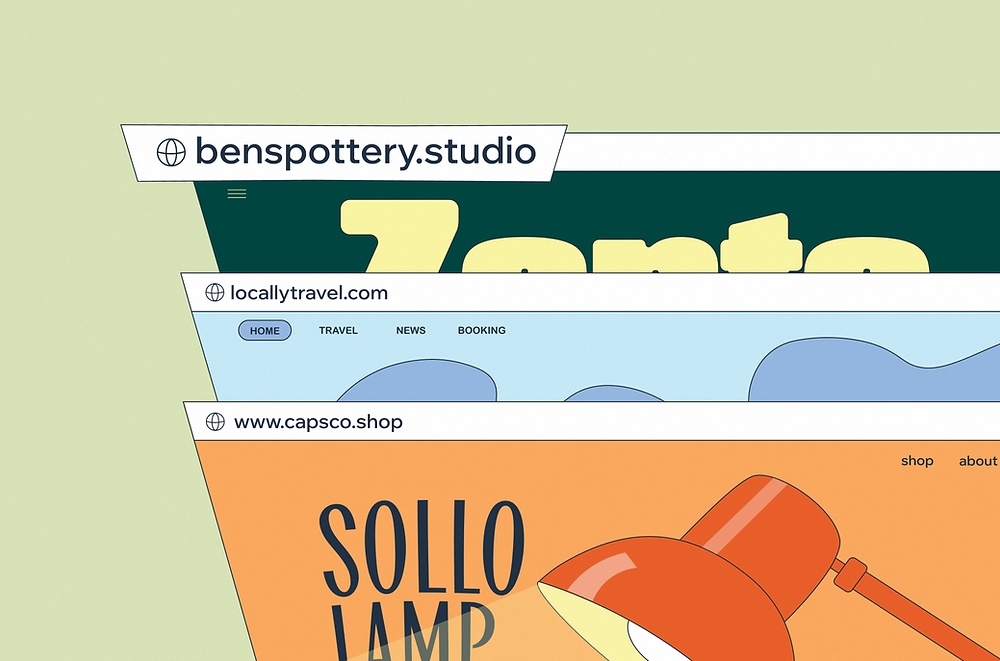
Newer options: You can get creative with new domain extensions like .shop, .tech, .ai, .design, .studio, .services and .agency. These can make your site more memorable and are often easier to get than .com. A design studio using .design or a tech business using .ai can also support brand identity.
Regional extensions: ccTLDs like .us, .ca, .uk and .au show a local focus. They help build trust with audiences in specific countries, but may feel less global.
Learn more:

How to create a website domain and connect it to your site
Registering a domain and connecting it to a website are two separate steps, and here's how the second one works.
After you register your domain, you need to update your DNS (Domain Name System) settings so that when someone types your address, it points to the right server. DNS acts like the internet's address book, translating your domain name into the numerical IP address where your site actually lives.

If your domain and website are on the same platform, this usually happens automatically. If they're with different providers, you'll need to update your domain's A record (for the root domain) and CNAME record (for www) to point to your hosting service. Your website platform will give you the exact values to enter.
DNS changes take time to propagate across the global network, typically a few hours and sometimes up to 48. During that window, some visitors may still see the old destination. Once propagation is complete, your domain is live.
Read more:

Connecting your domain with Wix
If you use Wix, connecting a domain is designed to be simple. You can either buy a domain directly through Wix or connect one you already own.
When everything is in one place, the connection is usually handled automatically, so you don’t need to manually edit DNS records. If your domain is with another provider, Wix gives you step-by-step instructions to update your settings, and you just copy the required records into your domain dashboard.
One benefit of using Wix is that it reduces technical setup steps, especially if you’re not familiar with DNS. You also manage your domain, website and other tools from the same dashboard, which makes it easier to keep everything organized in one place.
When you upgrade to a premium plan, you’ll even get a voucher for a free domain name for your first year.
How to create a business domain
A business domain is a signal that you're serious. Pick a name that works across every channel you'll use. Your domain will appear on business cards, email signatures, social profiles and marketing materials, and it needs to be clean and consistent across all of them. Generic descriptive names tend to date poorly and are harder to brand. A strong brand name with the right extension almost always serves a business better long-term.
Once your domain is registered, use it as a custom email domain for your business email address. An email at your own domain (like hello@yourbrand.com) looks professional in a way that a free email address simply doesn't. Most domain registrars and website platforms let you set this up directly, or you can connect your domain to a dedicated business email provider.

How to create a domain name for free
Getting a domain name for free is possible, but there are a few things worth knowing before you go that route. The most legitimate version of "free" is a domain included with a website plan. When you upgrade to a Wix premium plan, you get a voucher for a free domain name for your first year: a real custom domain, not a subdomain.
What's often marketed as a free domain is actually a subdomain: an address like yourbusiness.platform.com. You don't own a subdomain. If the platform changes or you move your site, you lose the address entirely, along with any links, traffic or brand recognition you've built around it.
For a personal project or a first site, a subdomain can be a reasonable starting point. For anything with a professional or business purpose, a paid custom domain is worth the $10-$20 a year. The difference in how it looks and how it ranks is immediate.

How to create a subdomain
A subdomain is a prefix added before your main domain, like blog.yourdomain.com or shop.yourdomain.com. You don't need to register a new domain to create one; subdomains are set up through your existing domain's DNS settings or directly through your website platform.
Common uses include separating a blog from a main site, running an online store on a separate part of your domain, hosting a staging or development environment or building country and language-specific versions of a site.
To create a subdomain, log in to your domain registrar or DNS provider and add a new DNS record, typically a CNAME or A record, with the subdomain prefix as the host name. If you're using a website builder, the platform usually provides a built-in option to create subdomains directly from your dashboard without touching DNS settings manually.

How to create a subdomain on Wix
To set one up on Wix, start by making sure your site is on a Premium plan since custom domains and subdomains require it. Then go to your Domains page inside your Wix account and choose to connect a domain you already own.
Next, select the Wix site you want to link to the subdomain and enter your preferred subdomain name. This is the part that comes before your main domain, such as “blog” in blog.mysite.com. Once you confirm, Wix will guide you through the next steps.
What happens next depends on how your main domain is connected. If your domain uses Wix name servers, the setup is usually automatic and no extra changes are needed. If your domain is connected through pointing or an external provider, you’ll need to add specific CNAME records in your domain host’s settings.
After everything is set, DNS updates can take up to 48 hours to fully spread across the internet. Once complete, your subdomain will be live and you’ll get an email confirmation.
Read more:
Domain registration with Wix
Wix is an ICANN-accredited registrar for certain domain types and a reseller for many others, giving you access to more than 400 domain extensions in one place. Alongside domain registration, Wix includes tools for DNS management and domain security, plus a free SSL certificate to help protect your site. Wix also offers private registration to keep your contact details out of public records. You can also set up custom business email, get a free one-year domain voucher with eligible annual plans and access 24/7 customer support for domain-related help.

Domain name examples from real Wix sites

EatKinda is a plant-based ice cream brand that shows how to build a domain from a simple idea. Combining a verb and a casual word created EatKinda.com, a short address that matches the business name.

Msurge is a marketing agency that created its domain by coining a brand-new word. Msurge.com is compact and ownable, proving that inventing a short term is a reliable way to land a brandable domain.

Where To Nau is a travel blog that created its domain from a memorable, conversational phrase. Wheretonau.com turns a spoken question into a friendly address that fits the blog's relaxed tone.
How to create a domain FAQ:
How long does it take to create a domain?
Registration itself takes minutes: once you've found an available name and completed checkout, the domain is yours. Connecting it to a website takes slightly longer, since DNS changes can take anywhere from a few hours to 48 hours to propagate across the internet.
How much does it cost to create a domain?
Most standard domain names cost between $10 and $20 a year. Pricing varies by registrar and extension, with newer or niche extensions sometimes costing more. Premium domains with high-demand keywords or very short names can cost significantly more at renewal. Always check the renewal rate before you buy, as introductory pricing is often lower than what you'll pay after year one.
Can I create my own domain extension?
No, not through a regular registrar. New domain extensions are managed by ICANN and require a formal application process that costs $185,000 and only opens during specific windows. For most people, the right move is choosing from the hundreds of existing extensions already available.
What's the difference between a domain and a subdomain?
A domain is your main web address, like yourbrand.com. A subdomain is a prefix that sits in front of it, like blog.yourbrand.com or shop.yourbrand.com. You own and manage subdomains through your main domain's DNS settings and there's no additional registration fee to create them.
Can I create a business domain for free?
You can get a free domain included with certain website plans: Wix includes a domain voucher for the first year when you upgrade to a premium plan. A fully free custom domain independent of any plan is rare and usually comes with limitations. Free subdomains don't require payment but aren't truly owned by you and won't give you the same professional credibility as a custom domain.


