Updated: 3 days ago
To build a multilingual website, translate your content, adapt your visuals, localize your SEO for each language, add a language menu and test every version before you publish. A site like this serves your content in more than one language so visitors can read and buy in the language they think in. This website type suits any business selling across borders, or one based in a tourist destination where customers arrive from far beyond the neighborhood, state or country. Wix supports multilingual websites with automatic translation, per-language SEO settings and a customizable language menu. This guide covers each step of how to make a website that works in every language you serve.
Building a website for your business, passion project or side hustle should feel simple and exciting. Wix generates a personalized starting point with AI. You can customize every detail with intuitive drag-and-drop tools, while Wix handles the tricky parts to make building your site simple. That way, you can focus on what matters most: bringing your ideas to life. Ready to get started? Create your website today.
TL;DR: How to build a multilingual website
Building a multilingual website means translating your content, localizing your images, optimizing SEO for each language, adding a language menu and keeping every version updated as your site changes. Most of the work is in the maintenance, not the launch.
What you’ll learn:
How to choose target languages and translate your content
How to adapt images and layouts for each audience
How to set URL structure, hreflang tags and per-language SEO
How to add and place a language menu
How to test and maintain every language version

What is a multilingual website?
A multilingual website is what it sounds like a website available in multiple languages. This means that visitors to your website can access your content in their preferred language. Multilingual websites are becoming increasingly common, as more and more businesses are looking to reach a global audience.
How to build a multilingual website in 5 steps

Did you know: .lat is a domain extension for Latin America and Latino audiences with no residency requirement, so one address can serve several Spanish and Portuguese speaking markets instead of a domain per country.
01. Translate your website content
A multilingual site’s most essential component is translation. If you don’t speak the additional languages you’re adding to your site, you have several options for translating your content.
You can invest in a professional translator, or you can use a neural machine translation service for a quick fix, like Google Translate. If you’re using the latter, make sure to review and proofread your translated content as there are many grammatical or cultural nuances that can get lost in translation.
Start by identifying your target languages. Research your audience to determine which languages they speak and prioritize those. Use professional translators for key content while using automated services for faster translation of less critical sections.
Wix Multilingual can auto-translate your content into over 130 languages, and you can edit any translation manually in the Translation Manager or directly in your site’s editor.
Wix users often start in the language they already write in and expand from there.
"With the Wix Multilingual App, I can translate my German texts into English very quickly." - Michaela Pretzl, Owner of Michaelas
Auto-translation gets you a working draft in minutes, then you edit for the nuances a machine misses.
During the translation process, make sure not to overlook any parts of your site’s copy, from the text on your homepage design and menu, to the retailing details on your online store, to the content in your online course. Don’t forget other elements like videos, currencies and date formats to match each region.
Starting a blog with a blog maker? You'll need to think about your translation options here too.
Tip: Learn how to make a multilingual blog to support your content.
Running a blog in more than one language is a common entry point.
“As the owner of a small business serving English-speaking and Japanese-speaking customers, maintaining a blog in both languages expands my digital footprint. I focus on spreading valuable, free knowledge on key terms and areas that are relevant to my customers' industries.” - Adam Goulston, Director of MacroLingo
Ensure your fonts support all characters in every language. Pay attention to cultural references, idioms or microcopy that may need to be adapted for each audience. For example, if your call-to-action uses a pun or colloquial phrase in one language, find an equivalent that resonates in the target language.
While translating you can consider using website under construction templates.

02. Adapt your visual content
Text is not the only element on your page that you can “translate.” The same principle goes for images, too. If you offer a localized service, for example, and want to display photos of it from sites across the globe, you can select the requisite images to match the regional language of the text.
Choose culturally appropriate visuals and images that resonate with each audience. Say you have the Statue of Liberty featured on your homepage to illustrate a cultural landmark. You might want to swap that image with the Eiffel Tower for your French-speaking audience on your multilingual site. International visitors will have a better connection with your site if you localize your visual content, since images carry different meanings for different cultures.
Adjust layouts for languages that are longer or shorter than your original text, and make changes for right-to-left (RTL) languages like Arabic or Hebrew. This ensures the design looks balanced and remains easy to navigate.
03. Modify your SEO for all languages
Once you have completed the translation stage, it’s time to make sure your work can be found in all of its linguistic glory across the internet. That entails optimizing each of your new pages for search engines.
Each international market comes with its own internet searching habits and SEO needs. Start by conducting keyword research in your new language - and update your site's SEO settings accordingly. That way, potential customers searching the web for a business or solution like yours in their native language will have a higher chance of stumbling across your site.
Decide on a multilingual URL structure, using subdirectories (example.com/en/), subdomains (en.example.com) or ccTLDs (example.fr). Add hreflang tags to tell search engines which page belongs to which language and prevent duplicate content issues. Submit separate sitemaps for each language to improve crawling and indexing.

04. Enable your site to be multilingual
Now that your web content is all ready to go, it’s time to let visitors of all different languages know that they can access your website.
Show off your linguistic talent with an easy-to-spot language menu. You can customize it to your liking, representing each language with mini flag icons, written abbreviations or a combination of the two, to signal to users the options that are available for their choosing.
We suggest placing this language toggle in your primary header navigation. You can even use subtle animation features, to draw visitors’ attention to the translation option. The longer they have to search, the higher the chance they might leave in favor of a page they can actually understand.
A word for the wise: if you offer two or three languages, flag or word icons that appear right in the header menu will be perfect. If you offer more than three languages, consider a drop-down menu to avoid clutter.
The process of creating a multilingual site can feel daunting at first. Yet, believe it or not, once you've learned how to make a professional website and built one in your primary language, you’ve already taken a major step toward simplifying this process. The site structure you’ve created can now serve as a roadmap to help you in adapting to a second, or even third and fourth, language.
If you’re building your website on Wix, you’ll find that there’s absolutely no need to recreate a new site for each language. Every time you add in a new language with Wix Multilingual, a parallel version of your site is created for you with the same layout. When you later edit content in your main language, update the other versions in the Translation Manager, since translated text does not refresh on its own.
You might also want to consider the pros and cons between a static and dynamic site before hitting publish.
05. Test and maintain your website
Once your multilingual site is live, your work isn’t done. This step makes sure visitors have a smooth experience in every language you offer.
Start by putting yourself in your users’ shoes. Before and after publishing, have native speakers review each language version. They can catch grammar issues, awkward phrasing or cultural missteps that automated translations might miss. Next, click through every menu, button, form and interactive feature to make sure everything works across all versions. A seamless experience keeps visitors engaged and builds trust.
Maintenance is just as important as testing. Every time you update content in your primary language, update all translations too. Nothing undermines credibility faster than outdated content. If possible, offer customer support in the languages on your site. That helps your audience feel valued and understood.
A multilingual website thrives on regular attention. Think of testing and maintenance as a habit, not a one-time task. The more consistently you check, update and refine, the smoother your site will run, keeping every visitor in every language happy and engaged.
How to create a Wix Multilingual site
Log in to your Wix account or sign up and pick your favorite professional online template to get started.
Go to the Wix App Market in your site’s dashboard, search for Wix Multilingual and click ‘Add to Site.’
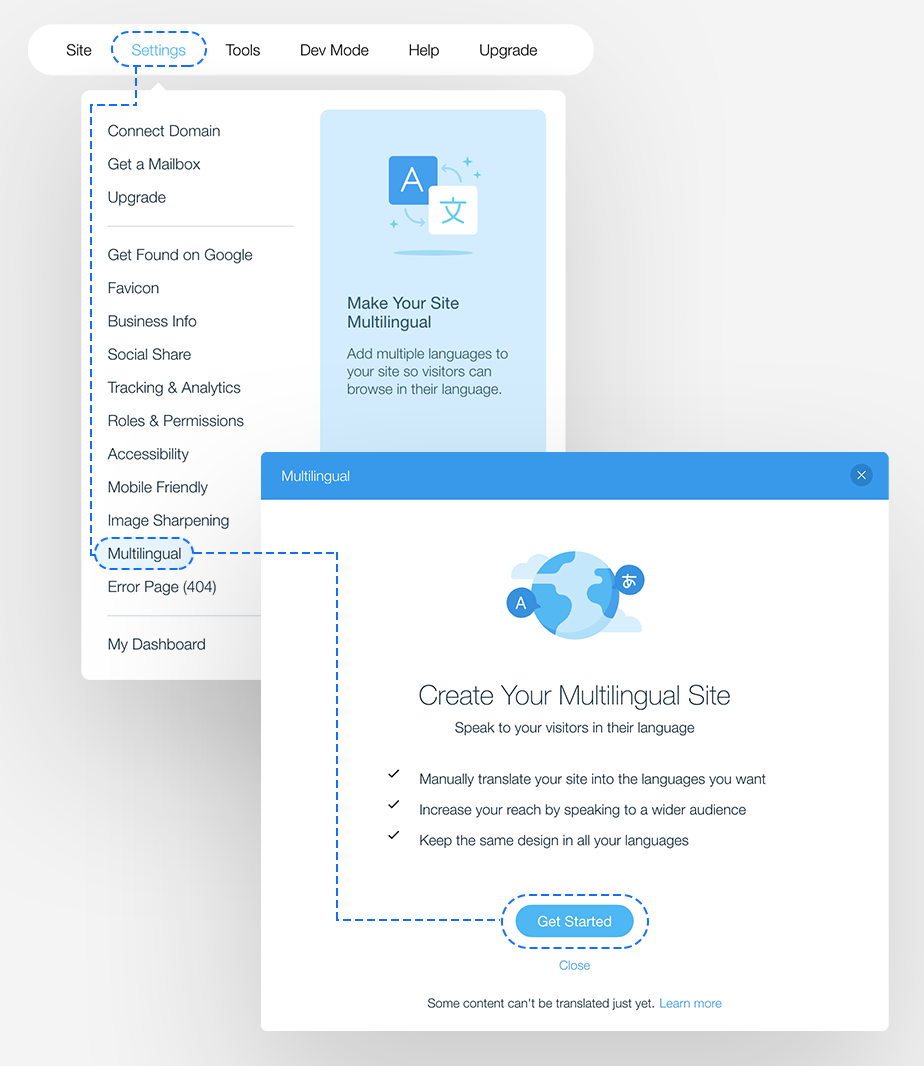
Go to Multilingual in your site’s dashboard and click ‘Get Started.’
Confirm your site’s main language and pick the flag you want to display with it. This cannot be changed later.
Click ‘+ Add Language’ and choose your secondary language from the drop-down. You can add more languages later.
Use the ‘Make site visible to visitors’ toggle to show that language now or keep it hidden while you translate.
Use the ‘Auto-translate site content’ toggle to machine-translate your content, or leave it off and translate manually.
Click ‘Add Language.’
Translate your remaining content in the Translation Manager in your site’s dashboard, and translate editor elements in the editor.
Click Publish to make your changes live.
Learn more: How much does a website cost
Top 5 multilingual website features
Keeping your site multilingual is all about making things easy for visitors and search engines. The table below highlights the key features every multilingual site should have so people can find the right language fast and enjoy a smooth experience.
Feature of a multilingual website | Why it matters |
Language switcher | Lets users easily choose their preferred language. |
Hreflang tags | Helps search engines understand which language version to show. |
Localized content | Builds trust and improves relevance for each region. |
Localized metadata | Boosts click-through rates and improves SEO in each language. |
Multilingual sitemap | Ensures search engines index all language versions correctly. |
Learn more about advanced eCommerce localization with Wix.
Benefits of a multilingual website
As you can see, creating a multilingual website can be demanding, so you need to be sure it's worth it. Here are some of the most important benefits:
Reach a wider audience: A multilingual website can help you reach a wider audience by making your content available to people who speak different languages. This is especially beneficial if you're targeting a specific country or region.
Improve SEO: When you translate your website content into multiple languages, you can rank for keywords in those languages. This can help you attract more visitors to your website from different parts of the world.
Build trust with international customers: When visitors to your website see that you've taken the time to translate your content into their language, they'll be more likely to trust you and do business with you.
Increase sales: A multilingual website can help you increase sales by making it easier for people from different countries to buy your products or services. Shoppers who can read your product details, shipping terms and returns policy in their own language have fewer reasons to abandon a cart.
Provide a better user experience: A multilingual website provides a better user experience for people in the language in which they searched for something.
Reaching a new language audience often opens doors a single-language site cannot.
"My next dream is to go global with my Wix site. Since Wix makes multilingual support so easy, I’m excited to share my artwork with a much wider, international audience." - Chiaki Harada, Manga & Illustration Artist
Challenges of a multilingual website
There are a few challenges that you may face when creating a multilingual website. These include:
Cost in money and time: Translating your website into multiple languages can be expensive, especially if you use professional translation services. It also can be a time-consuming process, depending on the amount of content you need to translate.
Localization: On top of translating your website content, you may also need to localize your website. This means adapting your website to the cultural and linguistic norms of the countries you are targeting.
Managing content: Managing multilingual content can be complex. You need to make sure that all of your content is translated accurately and that the translations are consistent. You also need to continually update your translations whenever you add content.
Despite these challenges, creating a multilingual website is a worthwhile investment if you're looking to expand your reach.
Multilingual website examples
Creating a multilingual website is a great way to reach a global audience and cater to users who speak different languages. Here are four examples of multilingual websites:
Wikipedia: Wikipedia, the online encyclopedia, is available in multiple languages. Users can easily switch between languages to access content in their preferred language. This approach enables Wikipedia to provide information to a diverse audience worldwide.
Nike: Nike, a global brand, offers a multilingual website to serve its international customer base. Visitors can choose their preferred language, and the website adapts to provide content, product descriptions and support in that language.
IKEA: IKEA, a multinational furniture retailer, has a multilingual website to accommodate its global customer base. Users can select their country and language preferences to access product information, shopping options and other content in their chosen language.
Wix: Wix, the website builder has multiple language pages to reach and support its global range of users. Examples include de.wix.com (German), fr.wix.com (French).
Pro tip: Beginners might also enjoy using Wix’s AI website builder, a chat-based experience that turns a plain-language prompt into a full site. Describe the vision for your site, refine it in conversation with Aria and you’ll get a complete website that you can customize as you wish.
"AI doesn't aim to replace humans but to turn them into superpowers. Everything that a person wants to do is possible with unimaginable ease. Writing software, composing a song, or creating an illustration - everything is possible without the need for prior knowledge or significant investment of resources." - Guy Sopher, Head of AI Assistant at Wix
Want to see what others are saying about Wix? Check out our Wix reviews to read real stories from users.
How to build a multilingual website FAQ
How do multilingual websites work?
There are two main approaches for multilingual websites:
Subdirectories: Different language versions of the site are hosted in separate folders, like .com/en and .com/es. Visitors typically choose their preferred language through a flag icon or dropdown menu.
Content Management Systems (CMS): Discover plugins or built-in features to manage translated content within the same website framework. Users can switch languages seamlessly within the site.
How do I translate a website into multiple languages?
Several options exist:
Manual translation: Hire professional translators for accuracy and cultural nuances.
Machine translation: Use tools like Google Translate for quick rough translations, but be prepared to edit for accuracy and context.
Translation plugins/services: Plugins or professional translation services offer automated translation workflows with varying degrees of customization and human editing.
What are some tips for designing a multilingual website?
Prioritize user-friendly navigation: Ensure seamless language switching with intuitive menus.
Use clear language icons: Implement easily recognizable language flags or labels.
Consistent design: Maintain a cohesive look across all language versions for a unified user experience.
Translate metadata: Include translated titles, meta descriptions and alt text for SEO.
Cultural sensitivity: Adapt content and design to resonate with diverse audiences. Localize, don't just translate.
Test and optimize: Regularly check functionality and design across all language options for optimal performance.
How do you structure a multilingual website?
To structure a multilingual website, organize content using language-specific URLs, implement language detection for automatic redirection, provide clear language switching options and ensure accurate translation of all content across languages. Additionally, optimize for SEO with hreflang tags and regularly monitor performance for continuous improvement.
What is an example of a bilingual website?
One example of a bilingual website is the official website of the Government of Canada (canada.ca). This website offers content in both English and French, Canada's two official languages. Users can easily switch between languages using the language switcher located at the top of the page. The website is structured to ensure that all essential information and services are available in both languages, providing a seamless experience for users regardless of their language preference.
How to create a multilingual website for free?
You can get started building any type of website, including a multilingual one, free with Wix. Paid plans start at $17 a month on a yearly plan and include a free domain for one year.


