New and upcoming releases
Explore new features, have a look at what’s coming next and sign up for updates so you can stay informed and plan ahead.

Filter Tag
Filters
October 28, 2026
Client Intake Forms
.png)

Starting a new project usually means chasing clients for logos, brand guidelines, site content and answers to the same setup questions—before you can even open the editor.
Client Intake Forms let you skip that back-and-forth. Head to Client Experience > Client Intake Forms in your Studio workspace, describe the project, and AI generates a tailored form with three sections: business overview, design & setup, and website content. Attach a call transcript, brief, or brandbook to sharpen the questions, or import a questionnaire you've already used.
Review the form, edit or reorder questions. If you’ve added project context, AI pre-fills the answers it can, so you don’t have to fill them in manually. When it's ready, publish, copy the link and share it with your client—they fill in the rest.
You are now following this item.
We’ll email you when the feature is released.
October 25, 2026
Pipelines in Workspace
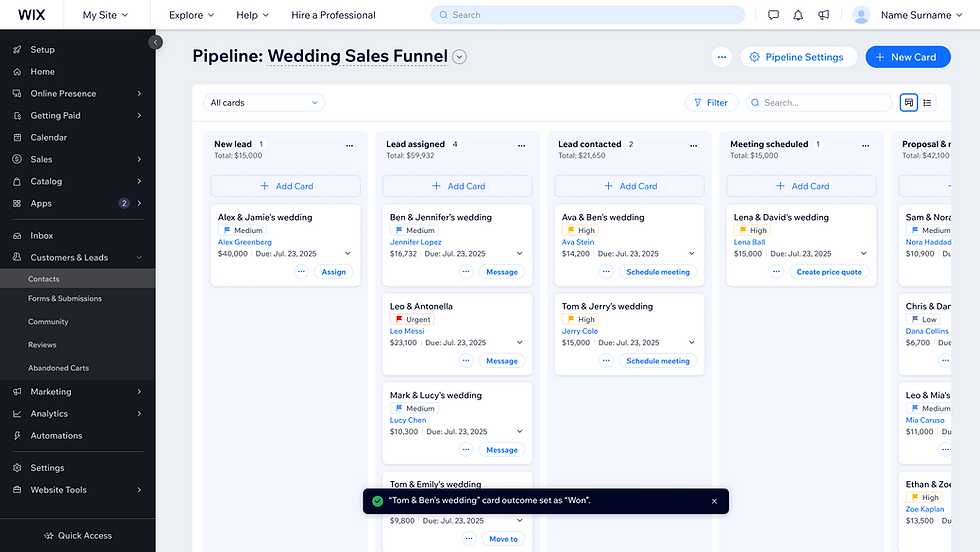
Wix Pipelines is a new, improved version of Workflows for managing sales opportunities from lead to conversion. Create a pipeline for each sales flow, such as one per salesperson or per offering, and add custom stages like New lead or Proposal sent. Drag cards between stages, assign them to teammates, and attach invoices, pay links, and price quotes to each card. Suggested automations create and move cards for you, like adding a New lead card when a Marketplace offer is submitted. You can edit them or build your own. Whether a deal starts online or offline, you can see where each opportunity stands and what needs to happen next.
You are now following this item.
We’ll email you when the feature is released.

October 25, 2026
Submissions Board
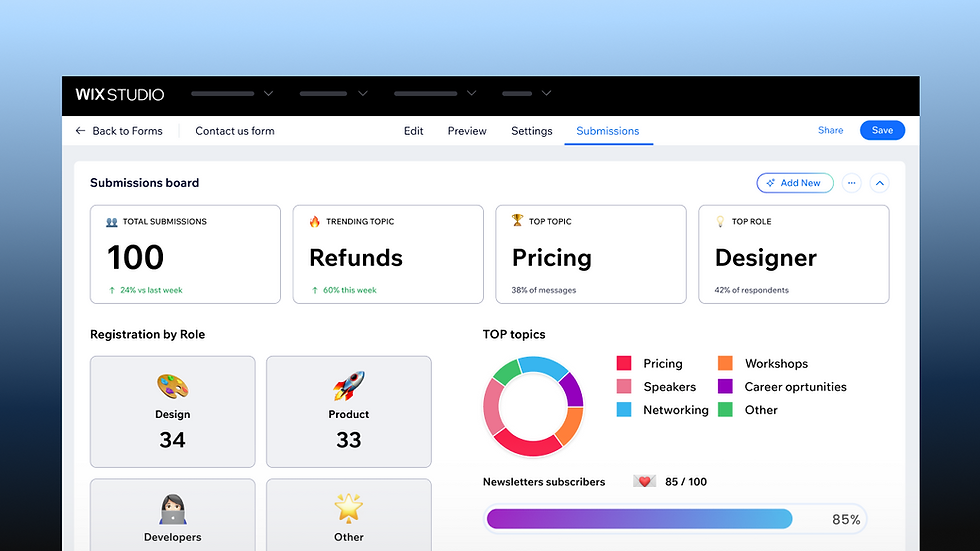
Wix Forms now has a submissions board above your submissions table. Describe what you want to see, and AI builds a visual from your response data—charts, KPI cards, lists, sentiment cards, or a full overview dashboard.
Click Add Card, write a prompt (or pick Surprise me), and pick which fields to use. One card generates at a time; finished cards can be edited or deleted. A board holds one overview plus as many custom cards as you like.
You are now following this item.
We’ll email you when the feature is released.
October 21, 2026
Late Cancellation or No-Show Fee
.png)
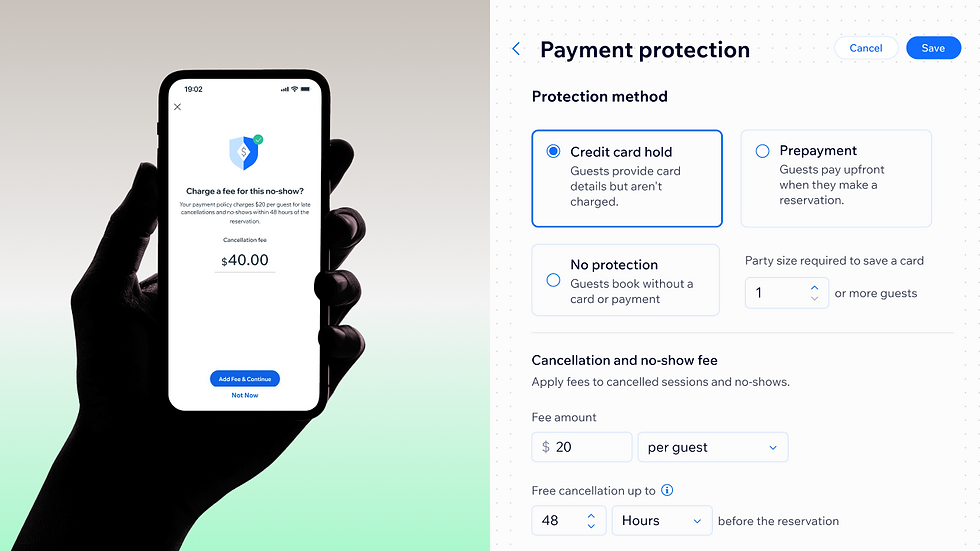
Empty tables from no-shows and last-minute cancellations cost restaurants real revenue. With payment protection for table reservations, restaurants can choose how to protect each booking:
Credit card hold: Guests enter their card at booking but aren't charged. If they don't show, or cancel too late, the restaurant can charge a fee. Prepayment: Guests pay on the site to reserve a table. Restaurants can keep part of it if a guest cancels late or doesn't show.
Restaurants set the fee per guest or per party, a minimum party size, a free cancellation window (for example, 48 hours) and their own payment policy. Reservations that fall under the policy are highlighted in the Reservations List, and restaurants charge the fee manually from the dashboard or the Wix app. Requires Wix Payments.
You are now following this item.
We’ll email you when the feature is released.
October 15, 2026
Agency AI brain
.png)
Aria now lives in your Wix Studio Workspace too, ready to learn how your agency runs.
Train her once, and your whole team works from the same source of truth—so anyone can answer client questions, draft proposals and sound consistent, without starting from scratch each time.
Give Aria the knowledge by chatting with her about your services, pricing, brand guidelines, past proposals and design standards and she'll create a knowledge summary you can approve, or upload your own PDF, CSV or DOCX files directly.
Add resources as your agency grows, and delete anything outdated. None of this touches your clients' live sites; it's strictly internal.
Find it under Aria's settings in your Workspace. BTW, Get Feedback just got a UI upgrade—worth checking out.
You are now following this item.
We’ll email you when the feature is released.
September 8, 2026
Wix Restaurants: Table assignment in Experiences

Experiences let your clients offer more than a standard booking—a chef's tasting menu, a wine-pairing dinner, a seasonal brunch. Now they can control which tables Experiences use.
With table assignment, choose whether an Experience uses any online table or specific tables you select. Reserve a corner booth or a table with a view for one experience, or a Chef's Table for another, so guests always get the right spot and standard bookings can't claim it. You can also block regular reservations for the selected tables during the Experience, protecting the restaurant's capacity.
Tables can be assigned automatically or by your staff, giving you flexibility to run Experiences the way each venue works.
You are now following this item.
We’ll email you when the feature is released.
September 7, 2026
Wix Bookings: Meet Alfred, your AI Phone Agent
%20-%20Bookings.png)
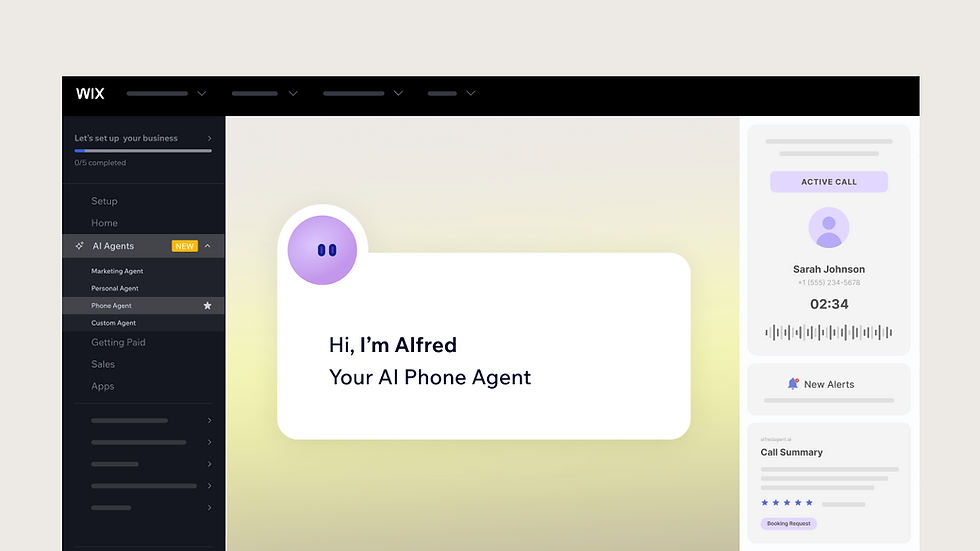
Alfred is a new AI-powered phone agent that answers calls for any Wix site, day or night. It uses the site's published content to answer questions accurately, then transcribes and summarizes every call so your clients know exactly what happened. Calls get a sentiment tag and can be matched against alert topics your clients set, like bookings or urgent requests, so nothing important slips through. Alfred also saves new contacts automatically and can text callers a link back to the site to book or buy. It lives in Business Manager and works for any site, with no extra setup beyond a quick review of tone and greeting.
You are now following this item.
We’ll email you when the feature is released.
August 17, 2026
Wix Analytics for Online Programs
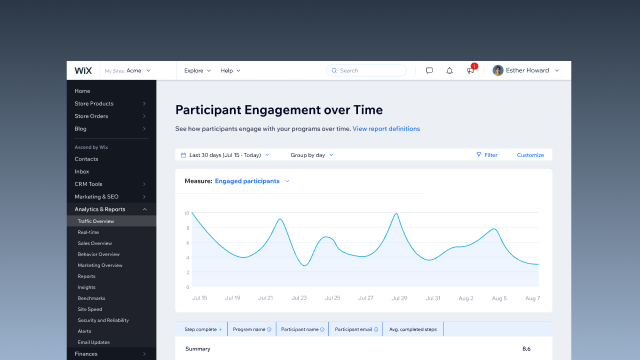
Online Programs now have their own reports in Wix Analytics. Find them under All Reports in your site dashboard. See who's joining and when, and spot trends over time to tell if your marketing is working. Track how participants engage with your courses, including where they're most active and where they tend to drop off. Get a clear view of what each program is earning, with payments, orders and refunds broken down per program. And track completions and certificates to see how well your content is landing.
You are now following this item.
We’ll email you when the feature is released.
August 13, 2026
Save CMS edits as drafts and review before publishing
.png)
Publishing Flow gives CMS users a safe staging environment to edit, preview, and review content before it goes live. New items start as Drafts, while edits to published items are saved as Changed until they’re approved and published.
Users can preview changes in the Editor, compare them side by side with the live version, and set permissions for who can edit, publish, or delete content. This creates a more controlled workflow for teams and collaborators while reducing the risk of unwanted changes or legal issues on the live site.
You are now following this item.
We’ll email you when the feature is released.
August 9, 2026
Wix Restaurants - Multiple Ordering Pages

Restaurants can now create up to 5 ordering pages per site, addressing a key limitation for advanced businesses that previously outgrew the 2-page cap.
This change unblocks restaurants running multiple distinct operations - catering, pre-orders, seasonal menus, and more - each with its own unique operational settings configuration.
You are now following this item.
We’ll email you when the feature is released.
July 22, 2026
Localize your URL slugs for every language on multilingual sites
%20(1).png)
Every page has a unique, customizable URL — but until now, slugs on multilingual sites stayed locked to the site's main language. Now you can set a custom slug for each supported language, so a Japanese page on an English-language site can have its own Japanese URL. For multilingual sites serving distinct regional audiences, this means cleaner URLs, stronger local SEO, and full control over how each language version appears in search. Just edit the slug under each page's SEO settings in the editor.
You are now following this item.
We’ll email you when the feature is released.
July 1, 2026
Set up automatic reminder emails for unredeemed gifts cards
%20-%20Bookings%20(1).jpg)
Unredeemed gift cards mean lost revenue and missed visits for your clients' businesses — automatic email reminders help recover both. Set up to 3 rules triggered by days since last activity or days before expiration, with a minimum balance filter and customizable templates for each type. Reminders apply automatically to all gift cards, existing and new, with no extra setup once saved. Result: higher redemption, more repeat visits, and bigger order values.
You are now following this item.
We’ll email you when the feature is released.
June 1, 2026
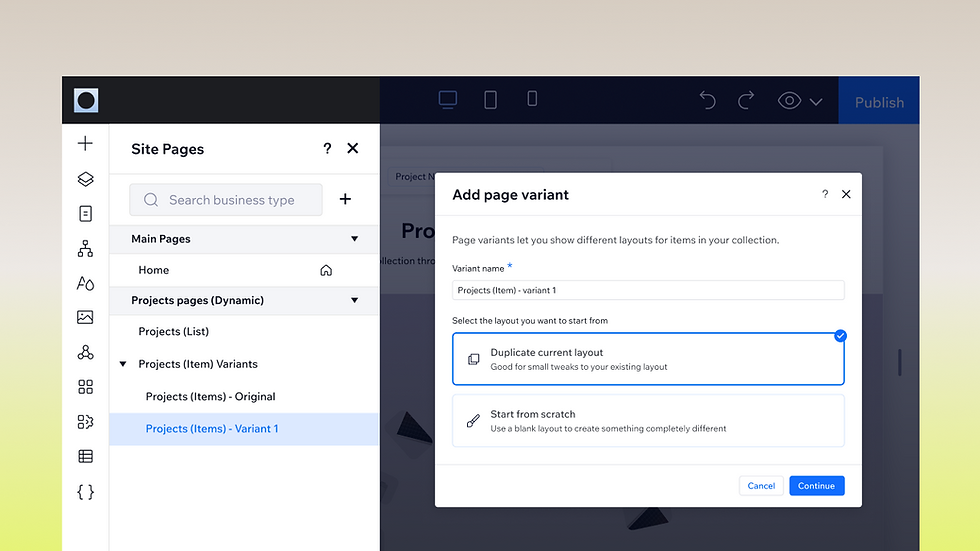
Create design and layout variants for item pages bound to the same collection
%20(1).png)
Until now, every item on a dynamic item page shared one design and layout. Page variants change that. Now, create multiple layouts for a single dynamic page.
Say your client's portfolio runs on one dynamic page. You can now show 'Marketing' projects with one layout and 'Design' projects with another—without splitting the collection or changing the URL structure.
Each variant shares the original page's dataset, URL pattern, permissions, and SEO settings, so sort order and base filters stay managed in one place. Items that don't match any variant fall back to the original layout.
Available now on dynamic item pages that use a dynamic variable in the URL.
You are now following this item.
We’ll email you when the feature is released.
May 11, 2026
Wix Table Reservations: Set individual SEO settings for experiences

Experiences now come with dedicated SEO controls, so you can define the page title, meta description, and a clean, descriptive URL for each one.
These improvements make it easier for search engines and visitors to understand what your clients offer and increase the chances of driving organic traffic to specific experiences.
You are now following this item.
We’ll email you when the feature is released.
May 11, 2026
Wix Stores: Group and reorder product filter choices
.png)
Help clients build product galleries that feel clear and polished with the new grouping and sorting controls in Wix Stores.
Group related choices within the same filter—for example, combine all blue tones into a single “Blue” choice—so shoppers see fewer, clearer options. Then, reorder choices in a logical flow, like arranging colors in rainbow order or sorting sizes from small to large.
This makes galleries easier to scan and helps buyers find what they need faster and feel more confident about what they add to cart.
You are now following this item.
We’ll email you when the feature is released.
May 11, 2026
You can now place promo cards directly in your clients’ product galleries

Drive your clients’ conversions by placing promo content right where shoppers are browsing—inside category-based product galleries.
Assign each promo to specific categories and choose exactly where it appears in the gallery, alongside regular products. Use promo cards to highlight sales, promote collections, or feature services as customers scroll.
You are now following this item.
We’ll email you when the feature is released.
May 11, 2026
Wix Stores: Customers can now cancel product subscriptions on their own
.png)
You are now following this item.
We’ll email you when the feature is released.
May 3, 2026
Create custom Wix actions in Wix Automations

You are now following this item.
We’ll email you when the feature is released.
May 1, 2026
Smart Chat: Support visitors 24/7 with AI and live chat in one place

You are now following this item.
We’ll email you when the feature is released.
There are no results that match what you're looking for. Try adjusting your search or changing the filters.


FAQs
How often do Wix and Wix Studio release new product updates and features?
Our development cycle is built for high velocity, providing a steady stream of everything from minor efficiency boosters to major design and AI capabilities. We’re constantly working to improve our platforms, releasing updates as soon as they are ready to ensure you always have access to the latest web technology.
Where can I see the upcoming Wix and Wix Studio product roadmaps?
You can find our future product plans under the Planned Ahead section of this page. We believe in transparency as a core value, giving you the visibility you need to plan ahead.
Can I suggest a new feature or give feedback on a recent release?
We value your input and use it to shape the future of our platforms. If you are a logged-in Wix Studio user, you can submit your ideas via the Request a Feature button located in the Planned Ahead section of this page, or via the feedback fold located just above this FAQ section. Your insights help our product teams prioritize the tools that will have the biggest impact on your work.
A feature I requested is not in the roadmap. Why?
Our roadmap prioritizes initiatives that align with our core strategic goals for our platforms. While we review every request we receive, we focus on high-impact features that serve the broadest range of professional creators and ensure overall platform quality. If a specific request isn’t listed on the roadmap, it might still be under internal evaluation or determined to be outside our current product scope.
What is the difference between a New releases and Planned ahead?
New releases highlight products and features that are already live and ready for you to use. Planned ahead represents our future roadmap—initiatives currently in development or scheduled for release in the coming months. This distinction helps you balance what you’re working on now with longer-term strategic planning for your agency or brand.
How can I stay notified about real-time updates?
The most efficient way to stay informed is by checking this page regularly.
For Wix updates, you can check the Updates for you section in your Wix.com dashboard.
For Wix Studio updates, you can also check the News center in your Wix Studio Workspace. We also share major milestones over at the Studio Community and in our dedicated newsletters to ensure you never miss a release.