Your guide to SEO on Wix Harmony
Author: Einat Hoobian-Seybold
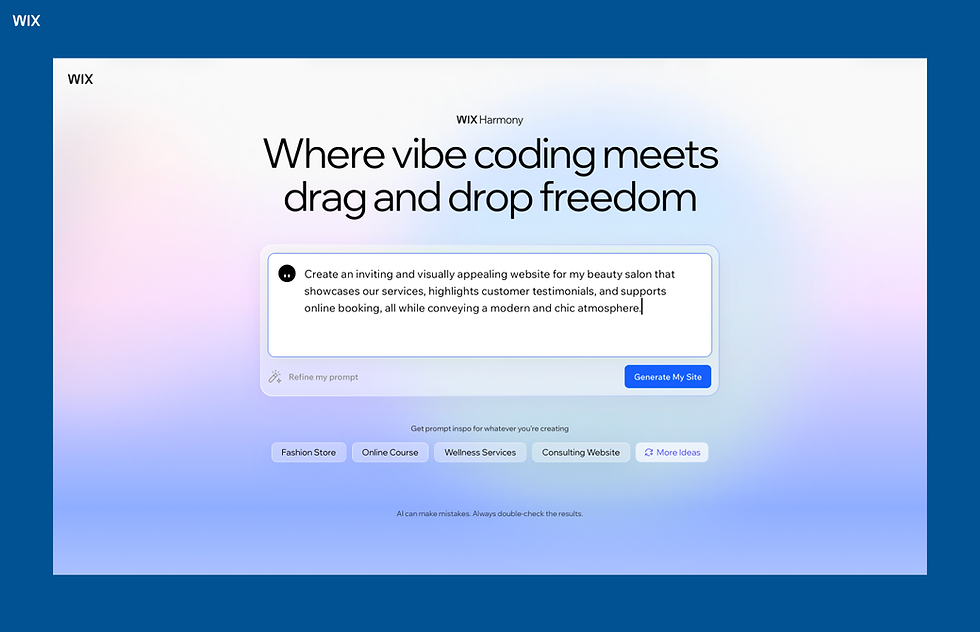
Wix Harmony is a new kind of website builder: one that pairs AI-powered creation with precise drag-and-drop control. With Wix Harmony, you’ll use AI to build the bulk of your site, then go in and make the changes that make the site truly your own.
Aria, Wix's built-in AI agent, is the heart of Wix Harmony. Aria can build and optimize your site from a simple prompt. The idea is to let Aria do the heavy lifting, then tweak the layout, copy, and details until the site feels unique and human.
That same philosophy carries through to SEO: You can let Wix handle the optimization automatically, or take the wheel and control every detail yourself. Either way, you're in the driver's seat. Consider this article your roadmap to making the most of the SEO tools built into Wix Harmony.
A guide to SEO on Wix Harmony
01. Complete the SEO panel in the editor
The SEO panel in Wix Harmony is designed to make sure nothing gets missed. It walks you through a step-by-step checklist.

Here's what each step covers:
Set up your business information. Start by telling Wix Harmony a bit about your business: your name, where you're based or who you serve, and a short description of what you offer and who you're trying to reach. The more context you give, the sharper and more relevant your SEO recommendations will be.
Define your SEO topics. Next, you'll set the 3 to 5 core themes your site will be known for. These become the backbone of Aria's keyword research, guiding how your content gets shaped and how search engines understand what you specialize in. Enter your main topic and let Aria generate the rest, or edit them to fit.
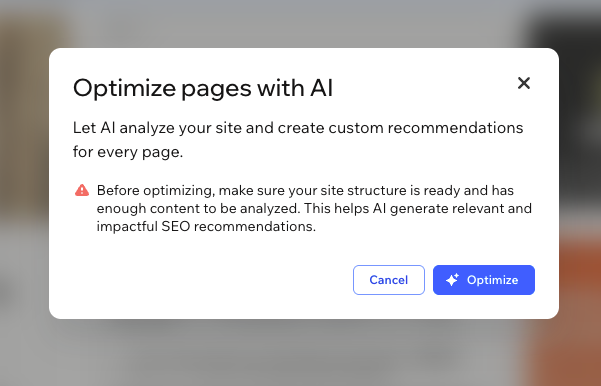
Optimize your pages. This is where the real SEO work happens. Each page gets its own set of tasks: focus keyword, title tag, meta description, URL, and heading structure.
If you want to move quickly, hit Optimize with AI: Aria analyzes your content, runs keyword research, and generates recommendations for every task. Review what it surfaces, approve what you like, and adjust anything that needs a tweak. If you'd rather do it yourself, every field is fully editable manually.
Connect to search engines. The final step links your site to Google and Bing so your optimizations actually start working. More on that in the next two sections.
02. Connect to Google Search Console and Bing
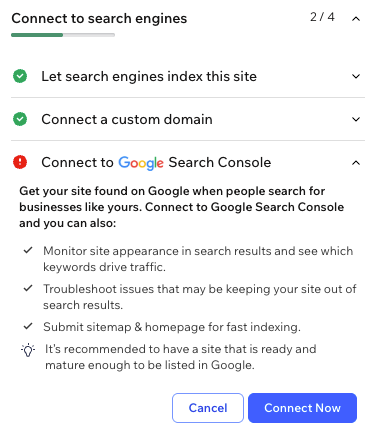
Once your site is live, you'll want visibility into how it's actually performing in search. That's what verifying your site with Google Search Console gives you: data on impressions, clicks, search queries, crawl errors, and which pages Google has indexed—all in one place.
The process takes just a few minutes. From your SEO dashboard, click Connect, choose your Google account, and grant the necessary permissions. Wix handles the rest automatically.
A couple of things to check before you start: You'll need a Premium plan and a connected domain, and your site needs to be published. Google can only index pages that are live. Once verified, the chances of getting indexed are higher since Google knows your site. You'll also have access to crawl reports, indexing status, and search performance data to keep tabs on how your site is doing in search.
It's worth doing this as soon as your site is ready. Wix found that sites connected to Google Search Console saw 15% more traffic over the course of a year, compared to those that weren't, a meaningful return for a setup that takes a few minutes.
You can connect your site to Bing in the next step. Google gets most of the attention, but Bing is worth a connection, too. Bing powers search across Yahoo, DuckDuckGo, and Ecosia, and serves as the backbone for real-time searches in ChatGPT and Microsoft Copilot.
One thing that makes Bing particularly easy to maintain is IndexNow, which is built into Wix Harmony by default. Every time you publish or update a page, Wix automatically sends a signal to Bing to re-crawl it—no manual submissions needed. For a full walkthrough of your connection options, check out this guide to connecting your Wix website to Bing.

03. Use Aria to optimize your content
Content is still the engine that drives organic rankings, and using Aria for SEO can help you produce more of it without sacrificing quality.
Because Aria understands the full context of your site, it can generate and help you optimize copy that's already aligned with your topic focus, not generic filler. A few practical ways to put it to work:
Sharpen your copy. Stuck on wording? Aria can write headlines, product descriptions, and About pages grounded in your site's context. Draft with Aria, then refine the voice to your liking.
Use Aria as a content strategy partner. Ask it to generate blog topic ideas based on your site, or to rewrite vague statements into clearer, more specific language that search engines (and AI platforms) can parse easily.
Maintain a consistent content structure. Aria is trained to use proper heading hierarchy (H1, H2, H3) and semantic organization, both of which help search engines parse your pages more accurately.
The goal isn't to let AI write everything. It's to remove the bottlenecks that slow down the work that matters.
04. Build a technically sound site from the start
Many SEO problems are really infrastructure problems in disguise: slow load times, broken pages, poor mobile experience, crawl errors. Wix Harmony is built on Wix's infrastructure, which means sites have good technical SEO foundations, any way you prompt it.
Every Wix Harmony site runs on Wix's multi-cloud CDN, distributing content across a global network to improve page speeds for users.
SSL certificates are provisioned and renewed automatically for more secure websites, without interruption.
Structured data markup for rich results eligibility is built into key page types like products, blogs, and your home page.
Sitemaps are automatically generated, updated, and maintained as your content evolves.
Mobile responsiveness across desktop, tablet, and mobile viewports is built into the infrastructure itself, not layered on after the fact.
You’ll see the issues you need to fix in your SEO dashboard, so resolution doesn't require digging through server logs or third-party tooling.
05. Use accessibility features for better SEO
Accessibility and SEO are more intertwined than people think. Proper heading structure, descriptive alt text, semantic HTML, and labeled interactive elements all serve two audiences simultaneously: people using assistive technologies, and search engine crawlers trying to understand your content.
That’s where the Accessibility Wizard comes in. Open the Accessibility Wizard from the site menu and start scanning.
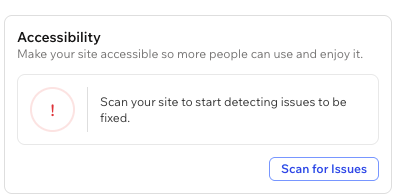
From there, it organizes everything it finds into two categories:
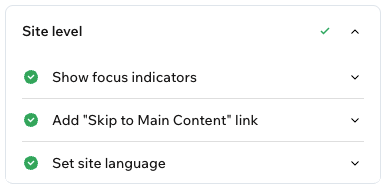
Site-level issues. Settings that affect the whole site, like language declaration and focus indicators (the visual cues that help keyboard users navigate).
Page-level issues. Element-specific problems on individual pages, like missing alt text or contrast failures.

There's also a manual tasks checklist to walk you through anything it can't auto-detect, like descriptive links.
It's worth running an accessibility check periodically, not just at launch. A site that's easy to navigate for everyone tends to be one that search engines trust, too.
06. Build authority through consistent off-site signals
On-page SEO gets you in the game. Off-site authority is what helps you win it. Search engines and LLMs heavily weigh brand mentions and the overall credibility of your digital presence when determining whether to surface your site.
A few fundamentals to stay on top of:
Earn quality backlinks. A link from a relevant, authoritative site in your industry is still one of the most powerful ranking signals available. Prioritize earning coverage from industry publications, established blogs, and recognized experts in your space.
Keep your NAP consistent. Name, address, and phone number should appear identically everywhere your business is listed online. Inconsistencies confuse search engines and erode local SEO performance in particular.
Manage your brand presence. Search engines and AI platforms increasingly surface Reddit threads, forums, and review sites. Monitor where your brand is being mentioned and show up in those spaces: answer questions, respond to reviews, and participate in relevant communities.
Use Wix Analytics to spot opportunities. Just as any Wix site, you can use Wix Analytics surfaces traffic data, top-performing pages, and visitor behavior. Use it to understand what's working and double down.
Wix Harmony saves you time on two fronts: building the site and optimizing it, so you can spend less time buried in settings and more time on the things that actually move the needle in SEO: content, coverage, and consistency.

Einat began her SEO career by developing organic strategies for top global brands and later discovered her love for product development. As the Head of Product for Wix SEO, Einat builds impactful products that make SEO accessible and approachable to more than 200M users around the world.