Updated: Sep 6
Get the perfect domain for your POD store: find your domain→

Learning how to create merch comes down to designing products your audience connects with, then using print on demand to make and sell them without holding inventory. With a flexible website builder like Wix and its native Printful integration, the right online store creator gives you everything to make your merch look professional and sell from day one. Wix makes it easy to design, sell and dropship custom merch directly from your dashboard, with printing, fulfillment and worldwide shipping handled automatically. This guide walks you through the whole process, from ideation and design tips by Printful experts to file prep, print methods and real creator examples.
Start a print-on-demand business without inventory or shipping. Choose products, add your designs and launch a fully customizable Wix store with built-in Printful integration. Manage orders and marketing from one dashboard.
TL;DR: how to create merch

Here’s a quick reference you can return to while creating your own merch, whether you’re exploring how to start a print on demand store or aiming to create some of the best print on demand products:
Takeaway | Why it matters |
Good design means better sales | Designs that feel authentic and polished are far more likely to convert |
Know your audience & niche | Focus your merch on people who already resonate with your brand |
Use Wix + Printful integration | Save time and maintain consistency through a unified system |
Keep designs simple, legible, scalable | Complex artwork can fail in production or at different sizes |
Prioritize print quality & order samples | Actual output often reveals flaws the screen doesn’t |
Leverage 2026 trends smartly | Trend-aware merch can amplify appeal without becoming dated |

Click through to learn what is a print on demand store and how to start a print on demand business to launch your first merch drop today.
What is merch and why do people buy it?
Merchandise or “merch” refers to branded products like t-shirts, hoodies, mugs, totes or posters, among many others. Often merch is designed for fans, customers or communities who purchase these special products to express alignment or belonging. It goes beyond a simple purchase. Merch becomes a physical extension of identity.
People buy merchandise for emotional reasons, whether to support creators, to display affiliation or to have something tangible that represents ideas or aesthetics they care about. Those feelings have a strong influence on what people choose to spend their money on.
That psychological pull means merchandise isn’t just a revenue stream. It is a bridge between creator and community. For creators looking to sell online, thoughtful design and quality execution are key. By focusing on print on demand products and exploring print on demand business ideas, creators can build an eCommerce website that reflects their brand while offering fans meaningful, high-quality merch. Because of that, design matters more today than ever. Forecasts for the global print on demand market run as high as USD 118.85 billion by 2035, and as more creators enter the space, only those with a thoughtful, cohesive visual identity and quality execution will stand out.
Learn how to sell print on demand t-shirts with Wix
Design tips for how to create merch that sells with Wix and Printful
When you combine Wix’s storefront capabilities with Printful’s mockup tools and fulfillment, you unlock a streamlined path from idea to sale. As you go through your creative process, you can leverage features like Printful’s merch maker, sync products automatically to Wix stores and maintain brand consistency across site and products. Later in this guide, you will learn practical design steps and platform-specific tips to create best-selling merchandising for your online store.
01. Know your audience and define your brand identity
Before you sketch anything, define who you’re designing for. What do those people care about visually? What aesthetics do they gravitate toward? Your design should feel like a natural extension of your brand voice, not a random side project. If your brand uses organic textures, hand-drawn elements or minimal geometry, let your merch reflect that.
“The biggest difference between designs that sell and designs that don’t is emotional connection. Your design should make someone stop scrolling and think, ‘That’s so me.’ Emotion drives the purchase decision,” says Agnese Bite, head of product design at Printful
Begin with customer personas: age, style preferences, purchase behavior and what “merch” means to them. Use polls, social media DMs or surveys to ask your existing audience: would they wear your merch? What designs feel overdone? What gaps do they see in your brand’s expression?
Want to turn your designs into income? Learn how to make money with print on demand and start building a merch line that truly represents your brand.
02. Find inspiration: trends, niche research
Look beyond merch for inspiration. Visual trends in streetwear, indie publishing covers, capsule collections, even album art can shift your sensibilities. Research your niche (for instance, “how to make merch” communities, fandoms or microcultures) and note visual devices they respond to.
Expert tip: Use tools like Pinterest and design aggregators to gather references, just avoid copying wholesale.
Learn more about how to sell clothes online.
03. Set clear design goals and value propositions
Each piece in your merch line should serve a purpose. Will it be a conversation starter? A subtle brand statement? A limited edition collectible? When you articulate a value (e.g. “this hat signals membership in my inner circle,” or “this tote is an every-day carry for fans”), it becomes easier to design with intention and avoid off-brand missteps.
04. Sketch and plan your ideas
Don’t start in digital immediately. Use thumbnails, mood boards or raw sketches to explore composition, negative space, typography and hierarchy. Select a handful of strongest ideas and refine them before moving to production.
05. Generate mockups in Wix and sync with Printful
Use Printful’s integration to choose pre-designed mockups directly from your Wix dashboard to see how your design looks on different products. Wix lets you preview how those items appear in your store context such as product pages and gallery layouts. This step helps you catch alignment issues or disproportionate elements before ordering merch samples.
Learn how to start a print on demand store with Wix and use the Printful integration to create, preview and sell your custom products, all from one platform.
"The native Wix + Printful integration makes it incredibly easy for any Wix user to create and launch their own custom product line with no tech headaches, just instant access to Printful’s catalog, instant mockups and seamless store setup, all within the Wix dashboard,” says Chris Victory, head of partnerships at Printful
06. Choose products and consider print method constraints
Some designs work better on certain formats because each print method behaves differently on fabric.
Direct-to-garment (DTG) sprays water-based inks directly into the fibers, so you’ll get photo-quality detail and near-unlimited colors on high-cotton T-shirts and hoodies. It needs fabric pre-treatment and heat-setting and dark garments use a white underbase to keep colors true. DTG shines for one-offs or small batches where you want complex art without setup costs, but it performs poorly on synthetics and very stretchy blends.
Direct-to-film (DTF) prints your art onto PET film, dusts it with adhesive, then heat-presses it to the garment, which makes it more versatile across cotton, blends, polyester, fleece and even nylon. DTF preserves fine detail and multi-color work, resists cracking and is well suited to larger runs once you’ve dialed in your workflow.
Screen printing pushes ink through a prepared mesh stencil for vivid, durable solids at scale. Because every color needs its own screen, it rewards designs with limited spot colors and bold shapes rather than gradients or photo realism. It’s cost-effective for bulk orders of team shirts, corporate uniforms or event merch and it holds up wash after wash on cotton and cotton-rich blends.
Sublimation is a heat-transfer process that turns dye into gas and fuses it into polyester, producing lightweight prints that feel like part of the fabric. It excels at edge-to-edge patterns and all-over graphics on performance T-shirts and cut-and-sew pieces, but it requires 100% polyester to achieve accurate color and durability. Use it when you want seamless coverage, tonal textures or repeating motifs without added weight or hand.
Embroidery decorates products with stitched thread rather than printed ink, creating a premium, tactile finish that outlasts most print methods. Your design is first “digitized,” which converts artwork into stitch instructions. Embroidery resists fading and cracking over time, which makes it a go-to for merch that needs to feel substantial and hold up to frequent wear.
In practice, map your artwork to the method: photo-heavy or gradient-rich designs to DTG on cotton, versatile multi-color graphics or stretch fabrics to DTF, bold spot-color logos to screen printing, full-bleed patterns to sublimation and embroidery for crisp edges, raised texture and a polished look that reads premium on hats, polos, jackets and sturdy hoodies.
Print method is only half the quality equation. The blank you print on decides how the piece feels in hand and how it survives washing, so compare fabric weight and fit across the options in the catalog before you settle on a base product. Order the same design on two different blanks and the difference is usually obvious.
07. Optimize resolution, DPI, file format
Set art files between 150 and 300 DPI at full print size, using 300 DPI for small detailed products like mugs and phone cases. Save in the sRGB IEC61966-2.1 color profile. Use transparent PNGs for anything printed direct to garment, because that method needs a transparent background. For vector-based elements (like logos or crisp text), use SVG or high-resolution PNGs. Always keep backup source files (e.g. PSDs or AI) so you can iterate.
Learn more:
08. Placement strategy
Consider safe zones: no critical detail should sit too close to seams, stitching or edges. On apparel, designs should align centrally but also consider how they work when worn. Mockups help simulate how garments drape. For items like mugs or throw pillows, adjust for wrap or edge bleed.
Once your mockups and art files are ready, order test samples. Wear them, wash them, photograph them and compare to your on-screen expectations.
Worth a look: .cool is a domain extension open to anyone with no restrictions of any kind, and registration terms run from one to ten years.
“Samples aren’t just for quality control—they’re your first marketing asset. Use them to build trust, create excitement around your brand and show customers exactly what they’re getting,” says Chava Katz, product marketing manager at Wix
How to price your merch
Print on demand pricing works backward from the base cost. Printful charges you the product cost plus shipping once an order comes in, so your retail price has to clear that, cover payment processing and still leave a margin worth your design time. Check the base cost of every product before you commit to it, because a hoodie and a sticker behave completely differently at the same markup.
Two habits keep the numbers honest. Price the whole line together rather than item by item, so your cheap entry products pull people toward the higher-margin ones. And set prices before you launch rather than after, because raising a price your fans have already seen costs you more goodwill than starting slightly higher.
How to create a merch store with Wix and Printful

A beautifully designed product needs an equally polished storefront, and this is where Wix + Printful simplifies your entire POD setup. Follow these steps to set up your merch store with Wix and Printful:
Add the Printful: Print on Demand app to your Wix account and connect your Printful account.
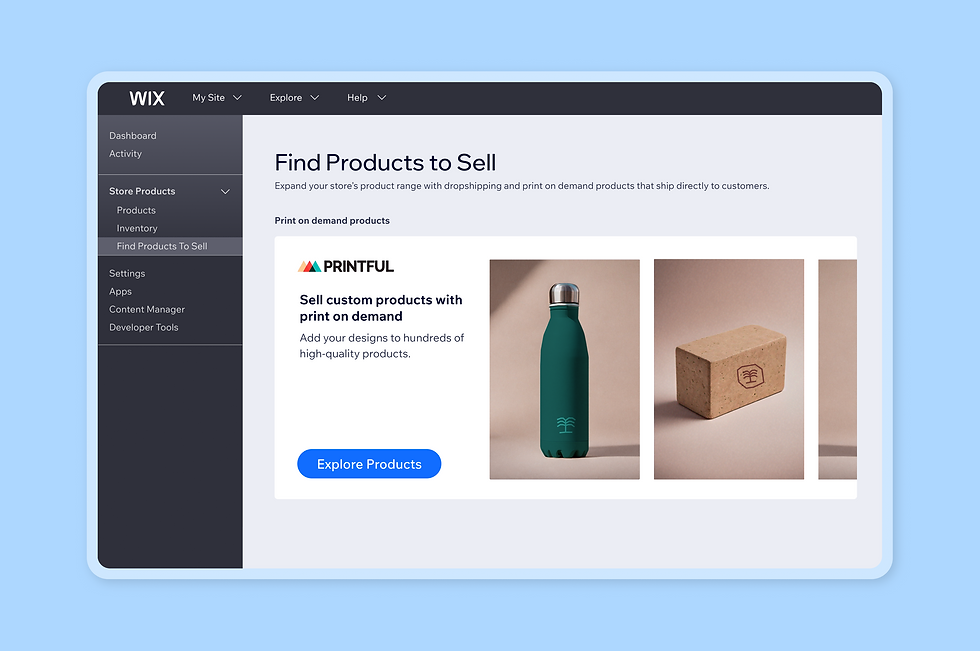
In your Wix dashboard, go to the Find Products to Sell tab to browse Printful's catalog, then select the items you want and click Add Products.
Add your designs and create your custom merchandising products from Products in your dashboard.
Once you're live, every order routes to Printful automatically, and with a saved billing method or Printful Wallet the base cost is cha
With on-demand fulfillment through Printful, you can offer merchandise without holding inventory, reducing risk while opening up new revenue streams. The result is a streamlined workflow that frees you to focus on brand, content and growth instead of operational busywork.
Creators describe the same payoff in practice. Laihha Organna, founder of Loinda Flow, runs her drops entirely through the integration:
“Wix integrates with Printful, the platform I use to manufacture, ship and fulfill all my online orders. This makes it super easy for me to focus on creating new art. When I have a new drop, I use Wix to customize all my listings, add photos, mock ups, descriptions and more — then I can sit back and focus on artwork while all my orders are taken care of as they come in.”
Keep your storefront aligned with your brand identity so the experience feels seamless from homepage to product page. Use consistent fonts, imagery, colors and voice, then enrich product pages with lifestyle shots, detailed close-ups, accurate sizing charts and short stories behind each design to build trust.
Examples of merch stores built on Wix
Seeing how creators turn designs into shoppable experiences can spark print on demand business ideas for your own launch. The best merch stores feel like an extension of the brand, not an afterthought. They use consistent visuals, clear navigation and product storytelling to help fans find, love and buy.
Below are the best websites that show how thoughtful design and a tight product mix translate into real-world sales.
“Seeing how others do it is the fastest way to learn what works. Looking at website examples lets you peek behind the curtain and see design, layout and messaging strategies that actually convert in real businesses,” says Yarin Singolda, product marketing manager at Wix
01. OwlKitty

What began as a playful side project has grown into a fan-fueled brand with global appeal. OwlKitty, starring Lizzy, the Portland-based floof who “appears” in remakes of classics from Star Wars to Titanic, channels internet humor into a cohesive product line fans recognize instantly. The site introduces the character’s persona with wit, then translates that charm into wearable and collectible pieces. From T-shirts and sweatshirts to totes, posters and stickers, every item feels like part of the same story.
Using Wix and Printful, the team turned a viral concept into a streamlined storefront that’s easy to manage and scale. They design, mock up and sync products from the Wix dashboard, then rely on Printful’s on-demand fulfillment so each order is produced and shipped automatically. That workflow keeps the catalog fresh without the overhead of inventory, while consistent typography, color accents and clean photography maintain brand polish across product pages.
Shoppers can move from a video cameo to a cart-ready item in a few clicks, with clear variants, sizing and pricing. Today, OwlKitty reaches fans around the world and keeps momentum with curated drops that balance evergreen favorites and timely designs.
Check out the Wix template they used to build their print on demand store and get started on your own:

Template name: Poster store website template
02. Lionel's Place

What started as a family legacy has grown into a mission-led brand that celebrates individuality. Lionel’s Place honors the lessons of Lionel, a father who taught his children to value differences, by turning illustration, design and storytelling into tools for confidence.
Founded by his daughter, Karen Sanders and granddaughter, Hannah Howerton, the brand champions kids who stand out and invites families to see “different” as beautiful. That ethos carries through a playful, cohesive catalog of books that spark conversations, apparel that wears the message and art that brightens bedrooms and classrooms.
Using Wix and Printful, the team translates the purpose into a polished store that’s easy to manage and scale. They design, mock up and sync products directly from the Wix dashboard, then lean on Printful’s on-demand fulfillment so every order is produced and shipped automatically.
The result is a streamlined workflow with no inventory overhead, consistent product photography and typography and clear sizing and pricing on product pages. Visitors can move from discovering the story to choosing a T-shirt, pin or print in a few clicks, keeping the experience focused on the message rather than the mechanics.
Today, Lionel’s Place reaches families across the country with collections that blend heart and humor. Choose Weird, California, Sacramento and Wordspirations sit alongside categories like books, apparel, stickers, wall prints, pillows and home. Community is central: the brand’s mantra helps bully-proof kids one at a time by encouraging them to own their quirks and, in turn, embrace them in others.
Check out the Wix template they used to build their print on demand store and get started on your own:

Template name: Kids clothing store website template
Learn more:
03. theSD.store

What started as a personal mission has grown into a purpose-driven brand that puts neurodivergent voices at the center. theSD.store, founded by Dr. Shelby Dorse, an autistic, queer behavior analyst with ADHD from rural West Texas, uses bold design and clear messaging to reframe how people think about applied behavior analysis (ABA).
Each piece blends art, color and typography to advocate for compassionate, assent-based practices while challenging outdated perceptions. The result is merch that doubles as advocacy: workwear and everyday pieces that speak to educators, behavior analysts, technicians, psychologists and anyone who believes different perspectives make care better.
Using Wix and Printful, theSD.store turns that advocacy into an efficient, scalable storefront. Designs are mocked up and synced directly from the Wix dashboard, then produced and shipped on demand through Printful, no inventory to manage, no manual handoffs. This setup keeps the catalog fresh while maintaining consistent photography, sizing and pricing across product pages. Visitors can move from learning about the mission to choosing a T-shirt, hoodie or mug in a few clicks, keeping the focus on message, fit and quality.
Today, theSD.store reaches a growing community with category staples, anchored by slogans that reinforce safe, compassionate, assent-based care. Dr. Dorsey’s work in clinical services and private practice informs each collection, ensuring the language resonates in classrooms, clinics and conferences alike.
With Wix’s storefront controls and SEO features, the team can spotlight new drops and surface mission-aligned products for professionals searching for meaningful workwear. And with Printful’s reliable fulfillment, customers receive durable, comfortable pieces that carry the message forward, one conversation, one outfit and one setting at a time.
Check out the Wix template they used to build their print on demand store and get started on your own:

Template name: Clothing store website template
Want to create your own online store? Start with Wix’s customizable eCommerce website templates and bring your print on demand store ideas to life.
2026 merch trends worth embracing
Design in 2026 balances high-tech experimentation with human touch. AI aesthetics are moving from novelty to mainstream, with glitch accents, generative patterns and surreal textures adding depth without overpowering your brand. Use them as secondary layers behind logos or as tonal overlays to keep readability high on T-shirts and hoodies. Exploring these trends can spark business ideas.
Hand-drawn illustrations push in the opposite direction and feel intentionally imperfect, which helps your line read personal and crafted. Sketchy linework, marker fills and pencil textures translate well to DTG and DTF while keeping stitch-friendly options open for embroidery.
Expert tip: Test both looks so you can compare contrast, legibility and wash resilience before you go live. If you’re thinking about how to make a business website to sell these designs, Wix makes it easy to bring your vision to life.
Nostalgia continues to sell, but the winners are selective rather than copy-paste retro. Think 90s display fonts, Y2K icons and color-blocked palettes used sparingly to nod at an era without turning your product into a costume. Pair one nostalgic element with modern type or negative space to keep the piece current.
Mood-led messaging is also surging as shoppers seek pieces that signal values at a glance. Calm, anti-hustle lines and radically optimistic slogans perform when the typography is clear. Build short, memorable statements first, then audition them across caps, totes and crewnecks to see where they hit hardest.
Earth tones and natural textures keep sustainability top of mind while staying versatile across seasons. Muted greens, clay, sand and charcoal ground louder artwork and give you a dependable base for color variations. They also photograph consistently, which helps your product grid look cohesive on a Wix storefront.
Modular logos round out the toolkit: design simple shapes that stack, wrap or lock up in multiple configurations so they scale from chest hits to back prints to tiny label tags. Create a primary mark, a monogram and a badge variant, then map each to the print or embroidery method that suits it best.
With Wix + Printful, you can spin these variations into product families fast, A/B test thumbnails and retire what underperforms while doubling down on what your audience actually wears.
So, whether you’re exploring web design, planning your first online business ideas or taking the leap into business ownership, these tools make it easier than ever to launch a polished, scalable merch store.
Trend | Description | How to apply |
AI aesthetics | Glitch accents, generative patterns, surreal textures | Use as secondary layers behind logos or tonal overlays; maintain readability on tees and hoodies |
Hand-drawn illustrations | Sketchy, imperfect, personal | Ideal for DTG and DTF printing; test embroidery options for stitch-friendly designs |
Selective Nostalgia | 90s fonts, Y2K icons, color-blocked palettes | Pair one nostalgic element with modern type or negative space; avoid overdoing retro |
Mood-led messaging | Calm, anti-hustle or optimistic slogans | Create short, memorable statements; test across caps, crewnecks and totes |
Earth tones & natural textures | Muted greens, clay, sand, charcoal | Ground artwork, ensure cohesive product photography, versatile across seasons |
Modular logos | Flexible shapes for multiple uses | Create primary mark, monogram, and badge; map to print/embroidery methods for scalability |
Rapid testing & iteration | A/B testing of products and thumbnails | Spin variations into product families, retire underperforming items, double down on hits |
Want to learn how to make a website from scratch to showcase your merch? Start with a template and focus on strong product storytelling.
How to create merch FAQ
Does it cost money to create merch?
You can create and list products for free using Wix and Printful, so there’s no upfront cost to get started. You’ll only pay for fulfillment once a customer places an order, making it a low-risk way to launch your merch line. This makes it accessible for creators or small brands who want to test different business ideas without investing heavily in inventory.
Do I need to copyright my merch?
Not necessarily, but it’s a good idea to trademark your brand name, logo or any unique design elements if you plan to grow your business. Protecting your intellectual property helps prevent others from copying your products or profiting from your brand assets. For digital products, consider also registering your content online or including a watermark to safeguard your designs.
What is the most bought merch?
T-shirts, hoodies and tote bags remain the best-selling items for creators and small brands because they’re versatile, customizable and appeal to a wide audience. Other popular items include mugs, stickers and phone cases. Starting with these staples allows you to test your designs and build your first collection without overwhelming inventory management.
Do I need followers to start selling merch?
No, you don’t need a large following to begin selling. Start small by offering your products to friends, family or your local network. Over time, you can leverage social media, email campaigns and collaborations to grow your audience. Many successful stores began with a handful of sales and gradually expanded through online business ideas and organic reach.
How do I start my own merch line?
Begin by identifying your niche and designing with your target audience in mind. Then use Wix and Printful to create, list and sell your products online with minimal setup time. Make sure to choose a clear domain name that reflects your brand and consider using a domain name generator if you need inspiration. Pair your merch store with a simple marketing plan to attract your first customers.
How do creators make merch?
Most creators use print-on-demand platforms like Printful that handle production, shipping and returns. This setup allows you to focus on creativity, marketing strategies (like email marketing) and building your brand identity rather than logistics. You can also use built-in tools for mockups and product variants, making it easy to experiment with designs and track what resonates most with your audience.
Is there money in merch?
Yes, when done thoughtfully, merch can be a reliable source of income. By designing products that genuinely connect with your audience and maintaining high-quality production, you can turn your creative passion into long-term revenue. Many creators also combine merch sales with how to design a website that showcases their story and encourages repeat purchases.
Can I make a merch store with no website experience?
Absolutely. Platforms like Wix provide intuitive editors and website templates, so you can launch a store even if you don’t know how to make a website from scratch. You can also leverage a free AI website generator to create a professional-looking site quickly, add your merch and start selling within hours.
Do I need a domain or web hosting for my merch store?
Yes, securing a domain name and reliable web hosting is important for building credibility and making your store easy to find online. Wix offers seamless integration for free domain names or you can learn how to register a domain through various online providers. For new creators, many platforms also include free website hosting, including eCommerce hosting, making setup simple and cost-effective.
How do I choose products for my merch line?
Start by analyzing your audience’s interests and preferences. Consider factors like usability, price point and customization options. T-shirts and hoodies are safe starting points, but niche items, like notebooks, enamel pins or tote bags, can differentiate your store. Test different products, track performance and use analytics to focus on the designs and items that resonate most with your buyers.