Updated: Sep 1

Learning how to create a job board website helps you connect employers with the right candidates while building a new revenue stream for your business. In this guide, you’ll learn how to start a website with a professional job board that serves your specific industry.
Get started with Wix's AI website builder.
Building a website for your business, passion project or side hustle should be easy and exciting. With Wix, you can design, customize and launch a professional website in minutes. Everything about Wix is built to simplify the process so you can focus on what really matters: bringing your ideas to life. Ready to make it happen? Start creating the website you’ve always envisioned today.
TL;DR: how to create a job board website
Creating a job board website requires a strategic approach that blends technical setup with clear user experience. You begin by selecting a niche and a reliable website builder, then move on to designing a layout that makes browsing easy for applicants.
Once the foundation is set, success relies on consistent content and visibility. You need to populate the board with initial listings to build credibility and use search engine optimization to attract organic traffic.
As the site grows, you can expand your website features to include paid memberships or exclusive access for top-tier recruiters.
Feature of a job board website | Why it matters |
Advanced search filters | Helps candidates find relevant roles quickly by location or salary. |
Employer dashboards | Gives companies control over their posts and applicant data. |
Resume upload | Allows applicants to submit their details directly through the site. |
Job alerts | Keeps users coming back by notifying them of new matches. |
Mobile optimization | Ensures the site works smoothly on phones, where most job hunting happens. |
Learn more:
How to create a job board website in 10 steps
Launching a job board is easier when you break it down into manageable steps:
01. Select a domain name and web host
Your domain name is the first thing users see, so it needs to be memorable and relevant. Aim for a name that hints at your specific industry or the concept of hiring. Keep it short, easy to spell and free of hyphens to ensure it looks professional on business cards and social links.
Pro tip: To choose a domain name, try out a domain name generator or domain name search for inspiration.

Web hosting is the engine that keeps your site running. If you choose an all-in-one solution, the hosting is usually included, which saves you from managing separate server accounts. Reliable hosting ensures your site loads quickly and stays online during traffic spikes, which is vital for user retention.
02. Pick a website builder and template
You don't need to hire a developer to build a powerful platform. Wix offers a fast and intuitive website builder to bring your vision to life in minutes. It handles the heavy lifting of code and website infrastructure, allowing you to focus on the layout and branding.
You can now also vibe code a website with Wix Harmony. It allows you to generate a business-ready site from a single prompt and keep shaping it by chatting with AI or editing by hand.
Creating with Wix Harmony centers around Aria, a multi-skilled AI agent, trained on millions of real websites and businesses. Aria can offer expert guidance while also performing element-specific actions and generating pages, sections, images and text.
You can also build with a website template designed for business or community forums. Wix offers 2000+ website templates with great layouts that you can tweak to match your style and you can use a recruitment website builder to quickly set up a professional job board. Look for a design that prioritizes list views and clean typography, as text readability is crucial for job descriptions.
Check out Wix's resume website templates.
Expert quote from Rebecca Tomasis Wix OG Team Lead:
"The most important consideration is to choose a website builder that grows and scales with you and your business."
Looking for the future of website creation? Wix's native Chat GPT integration allows you to type"@Wix" in a conversation, to invoke its Wix Harmony vibe code website builder. You can describe a business idea (e.g., "Build me a site for a high-end sushi catering business in Seattle") and the agent generates a full, live Wix website including booking systems and menus.
03. Define your job board niche
General job sites face massive competition from global giants. To succeed, you should narrow your focus to a specific industry, location or job type. A niche board for "remote graphic designers" or "local baristas in Austin" attracts a more qualified audience than a generic one.
When planning the types of websites you create, defining your niche early influences every design choice you make later. It determines the categories you create, the pricing you set and the marketing language you use. A focused approach helps you build a loyal community faster because you are solving a specific problem for a specific group of people.
04. Design your job board website
Your website design should guide visitors to their goals immediately. For a job board, this means a prominent search bar and a clear list of open positions. Think about how users will interact with the site. Job seekers need easy-to-use search and filter options, while employers need a simple way to post and manage their listings.
Make sure the layout is organized and handles text-heavy descriptions well. You can also adjust elements like the header and alignment to keep the page looking sharp.
Pro tip: You can create a job board with Wix by adding the Wix Forum app to your site. It lets employers post jobs and connect with candidates directly. Simply go to the app’s settings to customize the look and layout to match your brand.
Learn more: What is web design?
05. Set up job listings and submission forms
Make it easy for employers to post opportunities and for candidates to access them without barriers. Ensure your settings allow job listings to be visible to as many people as possible. If you require users to log in too early, you might discourage casual visitors from exploring opportunities.
You can also customize the layout of your job posts to make titles and descriptions easy to scan.
When building a job board website with Wix, head to the Access & Monetization section in your forum settings. For a job board, we recommend setting the permissions open to 'everyone' so that any site visitor can view the job posts.
06. Add initial job listings
A job board with zero listings is a ghost town that drives users away. Before you launch to the public, populate the board with legitimate opportunities. You can find these by checking company career web pages in your niche and adding them (with credit or permission where necessary) to get the ball rolling.
You might also reach out to a few friendly business owners in your network. Offer them a free premium listing in exchange for being your beta testers. This fills your board with real web content and gives you valuable feedback on the posting process.
07. Monetize your job board
Turning your traffic into revenue is the ultimate goal. The most common method is charging companies a fee to post a job for 30 days. You can also offer "featured" status, keeping a post pinned to the top of the list for an extra cost.
Using pricing plans, you can limit specific forum categories to paying members only. For example, you might have a general board for everyone but a "high-salary" or "urgent" category reserved for subscribers. This flexibility allows you to test different revenue models to see what your users value most.
08. Start a job board blog (optional)
Content is a powerful way to bring organic search traffic to your site. A blog allows you to target keywords that your job listings might miss. You can write about interview tips, salary trends in your niche or resume advice.
This establishes your brand as an authority in the industry. When candidates find helpful advice on your site, they are more likely to browse your job listings. It also gives you material to share on social media, keeping your brand top-of-mind even when users aren't actively hunting for a new role.

09. Optimize for SEO
Search engine optimization helps your board appear when people type "jobs in [your niche]" into Google. Wix offers a powerful website builder with built-in SEO tools to make website management simple, letting you easily update meta tags, descriptions and other key settings. Be sure every category page has a unique title and description.
Job schema is also important. This is a specific code that helps search engines understand that your content is a job posting. Properly optimized listings can appear in Google for Jobs, significantly increasing your visibility without spending money on ads.
10. Promote your job board website
Building the site is only half the battle; now you need traffic. Share your new platform on LinkedIn groups related to your niche. You can also partner with industry newsletters or influencers to get the word out to a targeted audience.
Consider creating a weekly email newsletter of the "Top 5 Jobs of the Week." This encourages candidates to subscribe and keeps them returning to your site. Consistent promotion builds the momentum needed to create a self-sustaining ecosystem of recruiters and applicants.
Pro tip: Create a website launch checklist to make sure you're covering all your bases.
Job board website examples built on Wix
These website ideas and examples show how platforms effectively connect listings, search features and employer tools that attracts both candidates and employers:
01. EmployPro

Job seekers land on EmployPro and immediately see a clear, organized interface that makes browsing job listings effortless. The homepage prioritizes high-value listings while keeping search and filter tools front and center, and users can explore their job board directly to find available roles.
Like what you see? Build your own job board website using this same template.
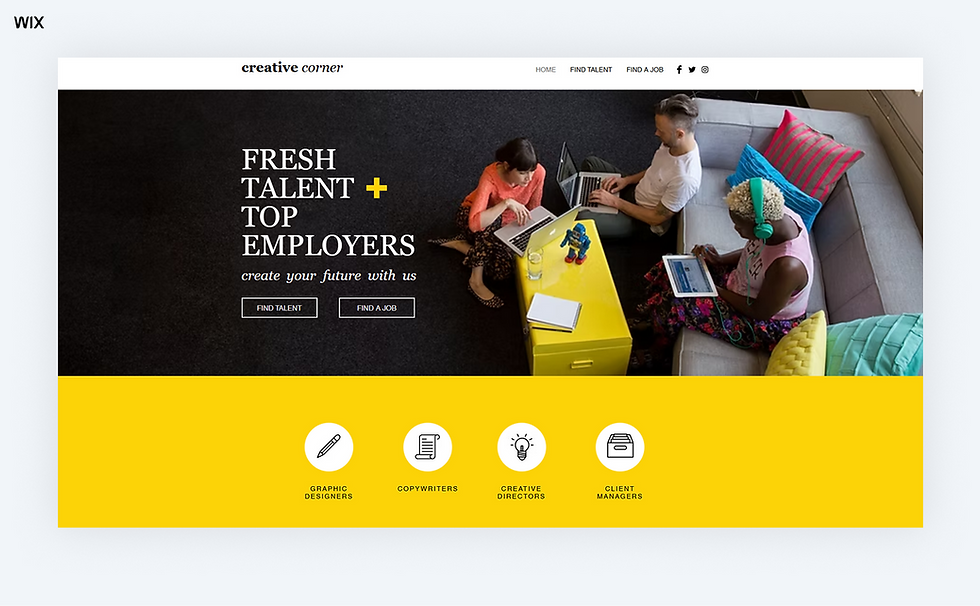
Template name: Recruitment agency (contemporary) template
02. GoTo Staffing

GoTo Staffing offers a professional, straightforward approach to connecting candidates with employers. Job listings are categorized by industry and location, making it easy for users to find relevant opportunities, and visitors can interact directly with their website to browse or apply.
Like what you see? Build your own job board website using this same template.

Template name: Strip header layout template
03. Pronto Staffing

From the first page, Pronto Staffing emphasizes speed and accessibility, helping candidates find jobs quickly. Well-organized job categories and search filters make it easy to narrow results, and applicants can see exactly what’s available on their job board.
Like what you see? Build your own job board website using this same template.

Template name: Moving company template
04. Pace Staffers

Pace Staffers combines a sleek, modern design with practical functionality. Job listings are easy to scan, and advanced filters let users quickly narrow down by location, role type or industry.
Visitors can explore their website to see featured jobs and how resume uploads work, keeping the experience simple and seamless for both employers and candidates.
Like what you see? Build your own job board website using this same template.

Template name: Minimal layout template
05. ATC Finder

ATC Finder presents a clean, organized job board with a strong focus on accessibility and search. Candidates can browse their job board to see how notifications, resume uploads and featured listings make the experience smooth for everyone.
Like what you see? Build your own job board website using this same template.

Template name: Classic layout template
Free website builders like Wix offer customizable website templates across niche industries, making it easy to get online fast.
Did you know: a .careers domain is open to any employer, while .jobs is a sponsored extension that reviews applicants before issuing a name.
Check out some popular website templates to get started quickly:
Best practices for your job board website

Following a few best practices can help your job board website stand out and clearly showcase your skills and experience. As Anna Suntsov, blog and social design team lead at Wix, says:
"The most important thing before building a website is good research. Know what you want to do and collect good inspirations that will contribute to your design."
How to create a job board website FAQ
Are job boards profitable?
Yes, job boards can be a great way to earn income. You can charge companies to post listings, offer premium placements or even sell access to your resume database. With a clear niche and a steady flow of traffic, the earning potential is definitely there.
How much does it cost to start a job board?
The cost can vary depending on your goals. Using a website builder with built-in tools is a budget-friendly way to get started. You’ll mainly need to cover your domain name and a monthly subscription, which makes it easy to grow as your site gains traction.
What is a downside of using job boards?
One challenge is standing out in a crowded market. It takes consistent effort to attract both high-quality employers and active job seekers. However, by focusing on a specific industry or community you can build a loyal user base that finds your site more helpful than the bigger platforms.


