

Building a website used to mean choosing between speed and quality. You could spin up something fast with AI and hope it held together, or you could put in the time to build something polished and production-ready. Wix Harmony changes that.
Launched in early 2026, Wix Harmony is Wix's new website builder that merges human and artificial intelligence. At its core is Aria, an AI agent that understands natural language and the full context of a site. Describe what you want. Aria builds it.
But unlike some vibe-coding tools that produce demos that aren’t quite ready for prime-time, Wix Harmony is built on Wix's enterprise-grade infrastructure. That means enterprise-level security and 99.99% uptime. With Wix Harmony, you also have access to built-in eCommerce and bookings, and—crucially for this article—industry-leading SEO and GEO baked in from the start.
Search is no longer just about ranking on Google. AI platforms like ChatGPT, Gemini, Claude, and Perplexity are fast becoming the first place people go for answers, recommendations, and discovery. If your site isn't set up for generative engine optimization (GEO) and the agentic web, you're invisible in an increasingly large slice of the search landscape.
The good news: Wix Harmony makes it straightforward to optimize for AI search with Wix’s GEO features.
How to optimize for AI search on Wix Harmony
01. Complete the SEO panel
GEO doesn't float free from traditional SEO; it sits on top of it. AI models look for the same signals that Google does: well-structured pages, strong metadata, quality backlinks, and content that demonstrates expertise, experience, authority, and trust (E-E-A-T).
Wix Harmony's AI-powered SEO panel, which you can access directly in the editor, gives you a personalized, step-by-step plan to cover all the on-page fundamentals. It analyzes your site and surfaces exactly what needs attention, starting with the basics and working up to the fine details.
From the editor, click the Page dropdown at the top left of the page, then "More Actions" next to the relevant page and navigate to SEO.
The site-wide Setup step shows you what Wix already knows about your business. You can add more information about your site and key focus areas to sharpen the recommendations you'll receive.

Next comes the Pages step, where you'll find optimization tips for each of your pages. The standout feature here is the "Optimize with AI" button. Click it and Harmony analyzes your entire site, taking into account your business details, page content, and focus areas, then conducts keyword research to match the best terms to each page.
Once you approve the research plan, the SEO panel generates recommendations for every task on your pages. All you need to do is review and approve. It prompts you to write effective meta descriptions (which frequently get surfaced verbatim in AI responses), and it keeps you from missing easy wins like alt text on images—another element LLMs read when building their understanding of a page.
Finally, the connect step is where you link your site to search engines, so all those optimizations actually start working for you. More on this next.
02. Connect your site to Google and Bing
From the SEO panel in your Wix Harmony editor, you can connect your site to both Google and Bing directly. Look for the "Connect to search engines" section, and make sure you’ve connected a custom domain.
Google: Connecting to Google verifies your site with Google Search Console, which is the foundation for how Google crawls and understands your content. That matters for AI search, because many AI tools draw from Google’s index. A site that isn't properly indexed, or that Google can't fully parse, is less likely to get cited. Think of it as making sure you're in the room before trying to get picked.
Bing: ChatGPT and Microsoft Copilot use Bing as the foundation for their real-time web searches. Once connected to Bing, your site plugs into the Bing ecosystem and gets access to Bing Webmaster Tools, a free dashboard with crawl reports, keyword insights, and backlink analysis.
Wix Harmony sites also support IndexNow by default. Every time you publish or update content, Bing gets an instant signal to re-crawl that page. No manual submissions, no waiting.
One thing to note: It's worth completing your SEO setup and page optimizations (above) before connecting, so your site gets indexed in its best shape.

03. Monitor your AI Visibility Overview
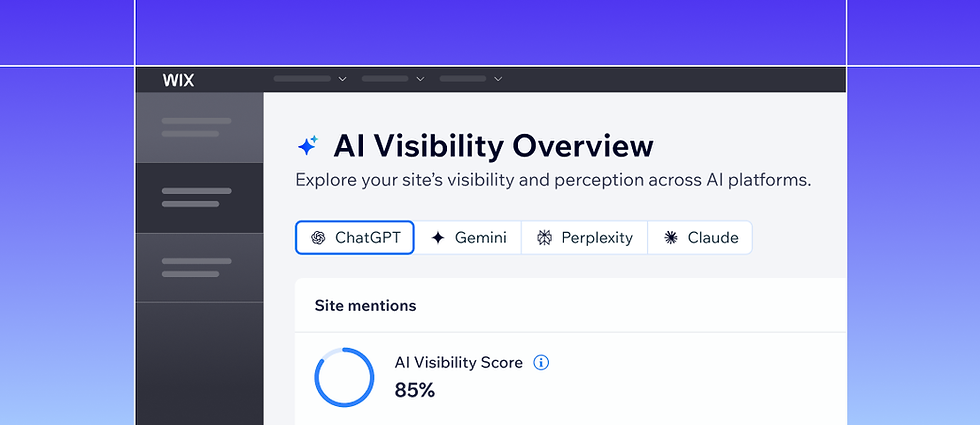
How do you know your AI search efforts are working? That's where Wix's AI Visibility Overview comes in.
The tool generates questions that potential customers might ask an LLM about your business, then checks whether your site surfaces in the answers. The result is an AI visibility score, a benchmark you can track over time across platforms like ChatGPT, Gemini, Perplexity, and Claude.
Dig deeper and you'll find a competitor comparison showing how rivals are performing for the same queries, which third-party sources LLMs are pulling from most often (a roadmap for your outreach efforts), and a brand perception section that surfaces exactly how AI models characterize your business. It's the clearest picture available of where you stand in AI search, and it's built right into your Wix dashboard for no extra cost.
04. Use Aria to inform your content strategy
Most AI search content advice boils down to this: be clear, be authoritative, be useful. Aria, Wix Harmony’s AI agent, can help you get there at scale.
Aria understands your site's structure and context, which makes it a useful thinking partner when adapting your content strategy for LLMs. A few practical ways to use it:
Create audience personas. Prompt Aria: "Based on my website, create three personas of people most likely to engage with my content." The output helps you write for real search intent, not keyword guesses.
Generate blog topics. Aria can surface conversational query angles that align with bottom of the funnel queries that users are actually asking on AI platforms, and those tend to differ from traditional keyword-driven topics.
Sharpen semantic clarity. Ask Aria to help you rewrite vague statements into clear subject-predicate-object sentences (e.g., "We offer same-day plumbing services in Austin"), the kind of unambiguous language LLMs parse easily and cite confidently. This approach can be important for improving your vector embedding optimization strategy.

05. Don't overlook accessibility
Accessibility and GEO are more connected than most people realize because agentic browsers, like Perplexity’s Comet and ChatGPT’s Atlas, use accessibility features like ARIA tags to navigate your website. Wix Harmony makes it easy to improve your accessibility for both humans and agentic users.
When you build an accessible site, you're doing the same things that help AI models and AI agents understand your content: using proper heading structure, adding descriptive alt text to images, writing clear and semantically organized HTML, and labeling interactive elements correctly. These aren't just good practices for users with disabilities—they're signals that tell AI crawlers your content is well-structured and trustworthy.
Wix's platform complies with WCAG 2.0 standards and includes a built-in Accessibility Wizard that provides monitoring and guidance out of the box. Use it to scan for issues and address them step-by-step. It's the kind of audit that typically costs money to commission and it's right there in your editor. A couple highlights:
Alt text on images. Wix has a built-in alt text generator to help you describe images quickly. Every image that gets a proper description is one more piece of content that both screen readers and LLMs can actually read and use.
Heading tags. Wix Harmony's editor helps you maintain a logical heading hierarchy (H1, H2, H3). This is how AI models understand the structure and priority of your content.
These are just two examples. The Wizard covers many more guidelines to help make your site accessible to all.
06. Leverage out-of-the-box structured data
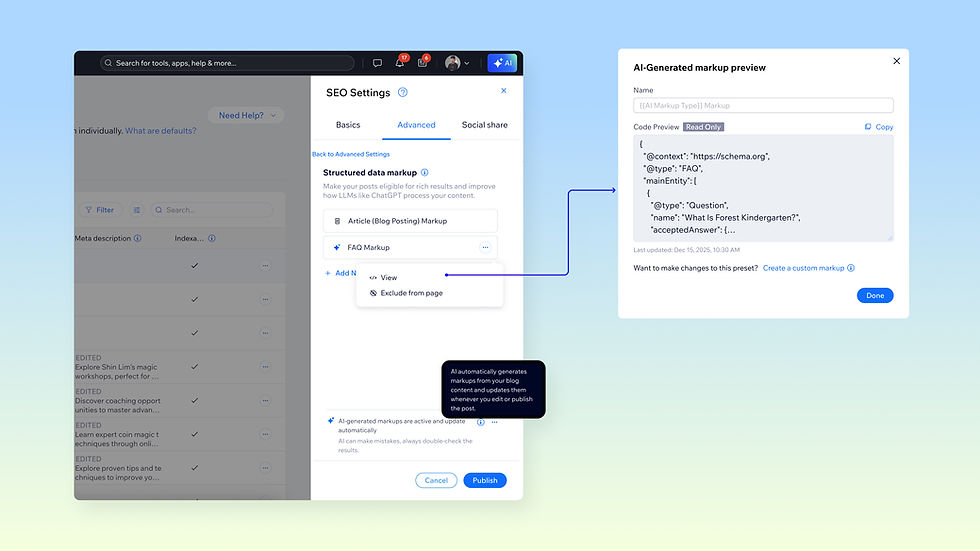
Structured data markup can provide context for AI chatbots, particularly for AI mode and RAG searches. Structured data markup can help AI systems to understand what a site is about quickly and efficiently. In Wix Harmony, all of your structured data is predefined for you, no manual schema markup required.
For example, your homepage automatically gets site search structured data, plus local business markup if you've set up a physical location in your website’s business information. Wix page types, like products, services, or blog listings, already come with the right schema applied, so you're set from the moment you publish.
Wix Harmony goes a step further for blog posts. Beyond the standard Article markup, AI will generate bespoke structured data types like FAQ, Recipe, and HowTo for relevant blog posts. This can contribute to more rich results in search and more context for AI models, without you having to think about it.
07. Use the AI Marketing Agent, Kleo
AI platforms favor sites with fresh, in-depth content that answers the complex natural-language queries users are asking. Keeping up with that demand is a challenge unless you have help.
With your Wix Harmony SEO strategy set, you can turn on the AI Marketing Agent and let it go to work. The agent drafts blog posts aligned with your content strategy, targeting the topics most likely to boost your visibility in both traditional and AI search.
Once a post is ready, you review it, approve it, and it goes live. It's a hands-on-the-wheel, hands-off-the-keyboard approach to content that keeps your site consistently publishing without burning hours writing from scratch.

08. Try LLM.txt
LLMs.txt is a file (similar to robots.txt) that sits at the root of your domain and tells large language models what your site is about, how it's organized, and what content matters most. Think of it as a structured briefing for AI crawlers.
In Wix Harmony, all you do is flip the switch. Wix creates the file for you, populates it with your business information and site content, and keeps it up to date automatically. Every time you add or update a page, your LLMs.txt file reflects those changes. No manual editing, no maintenance. This feature is currently available to all English-language Wix Premium eCommerce websites and will expand to others soon.

09. Install NLWeb
NLWeb is an open-source protocol introduced by Microsoft that lets websites respond to natural-language queries directly. Built on existing standards like Schema.org and JSON-LD, things Wix already generates for you, NLWeb turns your site into something AI agents can have a conversation with, not just crawl.
Major companies like TripAdvisor and Hearst are already adopting it. Wix Harmony enables NLWeb, and the integration is set up for you. Wix sets up the connection, configures the protocol, and keeps it in sync with your content as your site evolves. Read more about optimizing your Wix website for NLWeb.

Both LLMs.txt and NLWeb prepare sites for the agentic web. The more structured and machine-readable your site is today, the better positioned you'll be as these protocols become mainstream. Combined with the other features on this list, Wix Harmony helps you build a site that's ready for how people search today—and how they'll search tomorrow.


