

Updated: Mar 30
The web is getting more conversational. Instead of typing keywords into a search box and sorting through a list of blue links, more people are asking questions and expecting answers right away. We’re heading toward a web where AI agents communicate with each other on our behalf, retrieve information across sites, and autonomously complete tasks. To stay visible in that future, websites need to be agent ready.
Microsoft developed NLWeb, short for natural language web, to prepare websites for this shift. NLWeb is an open-source framework that makes structured content queryable through natural language. Once a site is connected to NLWeb, both AI agents and human visitors can ask questions and get relevant responses directly from that site's content.
Wix users can now tap into NLWeb straight from their SEO dashboards, with no coding required. Here's why it matters, and how to set it up.

What are the benefits of enabling NLWeb on Wix?
NLWeb uses the structured content on your Wix website to communicate information about your brand to AI agents and make your website accessible to the agentic web.
This creates a structured, queryable channel that allows LLMs to surface accurate information from your site directly. For example, when a shopper asks an AI agent to find waterproof hiking boots under $150, NLWeb will pull an accurate answer from your store's inventory.
"The future isn't about how your static content is found on the web,” as Chelsea Carter, product manager at Microsoft working on NLWeb said in her interview with Wix Studio. “It's about how users can interact with your content, and how they discover that ability to interact.”
As a site owner, NLWeb gives you more control over how your content is represented in AI answers than traditional search indexing allows. Rather than leaving it up to an agent to interpret your pages however it sees fit, NLWeb gives it a clean, reliable source to pull from.
How does NLWeb work on Wix
NLWeb taps into the structured data, feeds, and HTML elements that are built into your Wix website. This includes accessing the custom and automated structured data from certain Wix page types and features.
Data type | Page type | Wix location / implementation |
Schema.org markup | Multiple | Generated in Blogs, Products, Events, Portfolios, Business Info, Site Search, FAQ pages & features |
On-page elements | All | Directly within the On-page HTML (Headings, Lists, Tables) |
Sitemaps | All | Automatically generated at [yourdomain].com/sitemap.xml |
Custom database | Dynamic pages | Managed via the Wix CMS (content management system) |
RSS feed | Blogs | Accessible at [yourdomain].com/blog-feed.xml |
Product feeds | eCommerce | Located under Sales Channels & Integrations |
NLWeb complements the SEO and GEO work you’ve already put in place: the structured data you've added to your site for search purposes is exactly what NLWeb uses to build its index. So, for most Wix websites, the groundwork for NLWeb is already there.
How to implement NLWeb on Wix
Eligible Wix websites are automatically configured for NLWeb; you simply need to enable it. Setting up NLWeb on a Wix website takes just a few minutes from the SEO & GEO dashboard. Before you start, make sure two prerequisites are in place.
You need structured data on your site’s pages, but Wix adds structured data to most pages automatically so this part is taken care of. If you’d like, you have the option to customize your structured data. Read more about how to add structured data on Wix here.
The site must be on a premium plan and connected to a custom domain.
As of March 2026, the initial rollout of NLWeb will be for English speaking websites with plans to expand to other languages throughout the year.
01. Install NLWeb
To install NLWeb:
Go to SEO & GEO in your site's dashboard
Scroll down to Tools and settings
Click Connect to NLWeb under NLWeb
Click Install NLWeb. Indexing may take a few minutes depending on your site's size.
Once installation is complete, NLWeb indexes your site's structured content across all public pages in a machine-readable format, including structured data markup, RSS feeds, product feeds, HTML tags, and listings. The ASK protocol is automatically enabled, which means supported AI agents can immediately begin querying your content through natural language questions.

02. Manage AI agent access
After installation, you can control whether AI agents can query your indexed content using the ASK protocol toggle in your SEO dashboard. This setting can be changed at any time without affecting your NLWeb connection.
To manage AI agent access:
Go to SEO & GEO in your site's dashboard
Scroll down to Tools and settings
Click Go to NLWeb under NLWeb
Click the toggle next to Allow ASK protocol so AI tools can search your site
The two states of the toggle work as follows:
Enabled: AI agents that support NLWeb can query your site's public structured content through natural language questions.
Disabled: Your indexed structured content stays in NLWeb but is inactive for AI queries, so agents cannot use it to answer questions.
It’s worth noting that once you connect a site to NLWeb, you can’t reverse it. But disabling the ASK protocol prevents AI agents from querying a site’s content, so turning off access is an option if you (or your client) change your mind later.

Tip: Check your robots.txt settings
If you’ve customized your Wix robots.txt file to block AI crawlers, then you may limit NLWeb functionality. AI agents need crawler access to read your structured content through NLWeb, so make sure you haven't blocked the relevant AI crawlers if you want the tool to work as intended.
Wix automatically generates agent-friendly robots.txt for every site. To make your robots.txt NLWeb compatible, you can restore it to default or remove any custom AI exclusions. Wix's support documentation covers how to manage AI crawler settings in robots.txt.
How to optimize your site for NLWeb
Since NLWeb queries your structured content to generate answers, the quality of that content directly affects the quality of the responses it serves. Here's how to make the most of it.
Make sure your structured data is complete and accurate
NLWeb relies heavily on structured data. The good news is that Wix automatically adds preset markup to several page types when you create them, including the homepage, Wix Stores product pages, events pages, and booking services pages.
Our new AI Structured Data Generator will also create and implement structured data for blog posts. Current Wix users will need to opt in to the feature via SEO Settings, and new Wix users will have the feature by default.
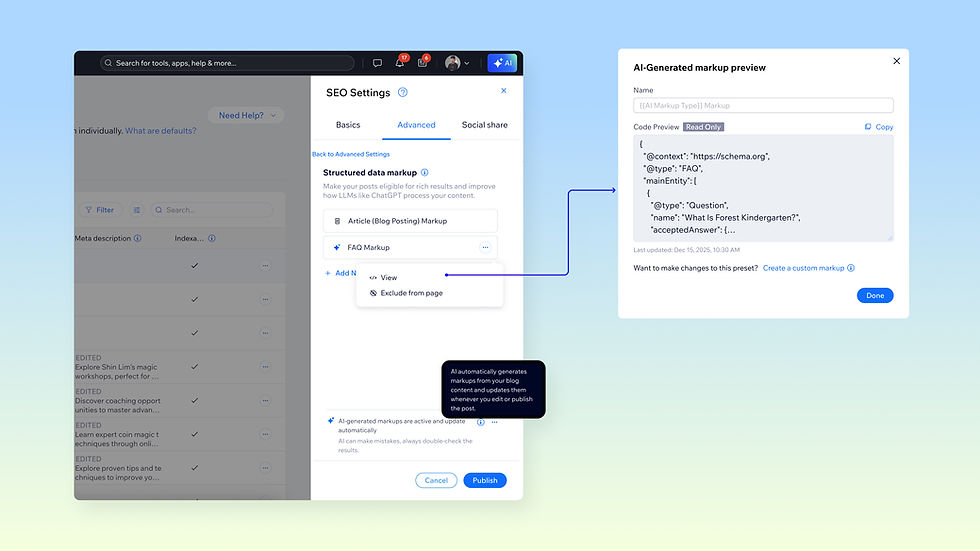
For other pages, you can add markup manually through the Advanced SEO tab in the editor or via SEO Settings.
The more complete and accurate your structured data, the more NLWeb has to work with. Pay particular attention to high-value pages like product pages, service pages, FAQs and make sure the information in your markup matches what's on the page.
Write content that answers real questions
NLWeb is built to respond to natural language queries, which means your content should be written with real questions in mind. Think about what potential customers ask about your products. Consider recent support emails and check conversations on forums, then make sure your site answers those questions clearly and directly.
FAQ sections are especially valuable here. They map naturally to the conversational queries NLWeb handles, and structured FAQ content gives the framework clear, retrievable answers to surface. If you haven't added an FAQ section to key pages, now is a good time. From there, Wix will generate the structured data based on your content.
Keep your content accurate and up to date
Since NLWeb serves your content as direct answers rather than directing users to browse your site themselves, outdated or inaccurate information has more immediate consequences than it would in traditional search. A product that's no longer available, a price that's changed, or a service description that no longer reflects what you offer can all result in misleading responses.
Wix automatically updates your structured data when you make updates, but it’s still up to you to make sure your content is fresh. Make sure to remove or de-index outdated content from your site to keep your NLWeb index clean.
Don't neglect your foundational SEO
NLWeb and traditional SEO reinforce each other more than they compete. The same qualities that help a page rank well in search (like clear structure, descriptive headings, complete metadata, high-quality content) also make it easier for NLWeb to understand and query.
If you're using Wix or Wix Studio, go to the SEO & GEO dashboard to access tools like the SEO Assistant, the SEO Setup Checklist, and AI Visibility Overview.
If you're using Wix Harmony, head to the SEO panel to set up your site according to best SEO practices.
Start building for the agentic web now
Search is evolving faster than most site owners can keep up with. NLWeb is part of what comes next: a web where agents and users can interact with your content directly, and where visibility depends on being queryable, not just indexable.
Implementing NLWeb on Wix requires almost no additional work if your structured data is already in place. It's a one-time easy install and a new channel that allows your content to be discovered. We’re in the early stages of agentic web development, but an investment of a few minutes is well worth it to be ready for the future of search.


