How to add and customize structured data on Wix
Updated: Mar 30
Author: Crystal Carter

Structured data has become a crucial tool for website owners looking to improve their performance in search.
Structured data, also known as schema markup, is a standardized format that helps search engines better understand your website's content. When implemented correctly on your Wix, Wix Studio, and Wix Harmony websites, structured data can lead to rich results in Google search, including eye-catching features like recipe cards, event listings, and product snippets.
In this guide, I’ll walk you through everything you need to know about implementing structured data on Wix, from the basics to advanced implementation techniques.
Whether you're new to SEO or looking to optimize your existing Wix site, this guide will help you leverage structured data to improve your search visibility and click-through rates.

The SEO benefits of structured data
Structured data markup is a standardized format that helps search engines understand your page content by turning visible webpage text into machine-readable data. Google recommends JSON-LD as the preferred format, and schema.org serves as the central resource for over 800 structured data types.
Structured data serves as a translator between your website and search engines. While search engines can crawl and understand basic HTML content, structured data provides explicit clues about the meaning and context of that content. Think of it like adding labels to your content that tell search engines exactly what they're looking at. Here are some specific benefits.
Enhanced search visibility through rich results: When properly implemented, structured data enables your content to appear as rich results in Google search.
Rich results are visually enhanced search listings that display additional information beyond the standard title, URL, and meta description. For example, a recipe page with structured data might show cooking time, calorie count, and star ratings directly in the search results. Rich results also correlate with higher click-through rates.
Better understanding of your content: Google uses structured data to better understand the content of your pages and gather information about the web in general. This includes information about people, companies, and other entities mentioned in your markup. While structured data isn’t a direct ranking factor, this improved understanding can indirectly benefit your SEO efforts.
How to add structured data to your Wix sites
Wix offers distinct ways to add structured data:
This multi-layered approach ensures that your site stays SEO-compliant by default while allowing for customization when needed.
Automated default structured data by page type
Wix, Wix Studio, and Wix Harmony websites automatically add structured data for many common content types as you add the pages.
Wix Stores product pages
Wix Blog posts
Wix Forum posts
Wix Events pages
Wix Portfolio
Online programs list pages
Wix Video

The AI Structured Data Generator, our newest structured data feature, analyzes your blog posts with AI, then creates and implements relevant structured data from Schema.org. If you’re a current Wix user, you’ll need to opt in to the feature via SEO Settings. New Wix users will have the feature by default. With this release, every new and updated blog post will automatically have structured data.

Automated default structured data by feature
On Wix, local business schema and site search schema are added when you update features and information on your website.
Local Business structured data is automatically added to your home page when you update your Settings > Business Information to include your name and address.

When you add the Wix Site Search app your website automatically generates Sitelinks search box. Google can use this markup to display a search box when your pages appear as search results.
Optimize automated schema markup
You can optimize the automated schema markup that is on your website by…
choosing the right page or WixApp types for your content
improving on-page and back-end content
Choosing the right theme, page type, or WixApp for your content will ensure that your page type includes content fields that support your schema, and, where applicable, that your schema is best optimized for the most relevant rich result for your content.
Creating pages with robust content helps you optimize your structured data markup because Wix generates this data based on your page's content. This means improving the quality of information you add to your site can also improve the quality of your structured data.
For instance, if your product information is only partially complete, your structured data will not include as much detail as it could. The schema on the page will be valid, but it will give less information to search engines than a complete product page.
SEO Settings & Custom Page Markup
On Wix, Wix Studio, and Wix Harmony websites, you can access the Wix SEO Settings panel to modify your structured data.
To begin, navigate to SEO Settings in your Wix dashboard, then select the page type you want to work with, and click "Customize Defaults." From there, you can preview the existing markup, see how dynamic variables populate, view rich result examples, set custom markup by page type, and add additional markup by page type.

How to customize the default Wix structured data markup
If you want to modify what Wix provides rather than start from scratch, click "Preview preset" then "Convert to custom markup." Give your markup a name, then edit the JSON-LD code directly. Use the "Add Variable" button to pull in dynamic content from your elements on your Wix website— things like product names, URLs, prices, and images. When you're done, click "Apply," then "Save."
How to add a new custom structured data markup to a Wix webpage
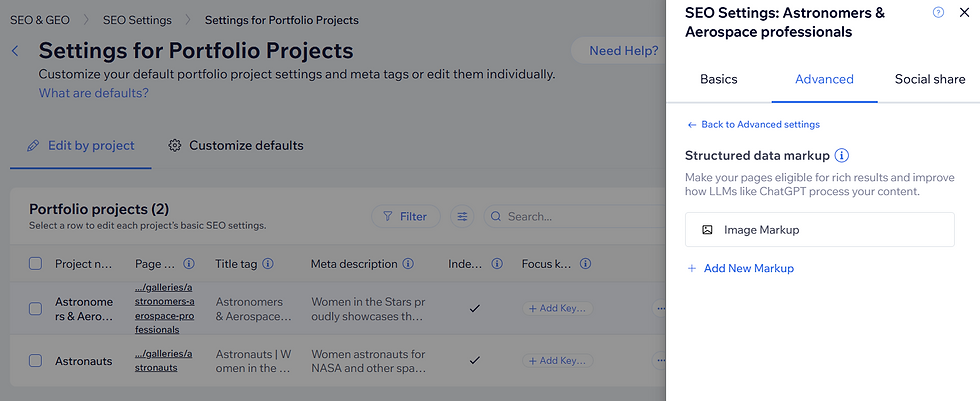
Use Wix SEO Settings to add custom schema markup to your Wix webpage. Navigate to the specific page's SEO settings > Advanced > Structured Data markup. Click "Add New Markup," name your code.

Below the name of the code, you’ll find a box to add your code. When the code is ready to add to your post, click "Apply" and "Save." Unlike the templated structure data, this is an open field, so you’ll need to add schema that you’ve already generated here.
This approach is best suited for pages with information that doesn’t regularly change, like a home page that doesn’t include prices that change with seasonal offers.
How to generate schema
To generate schema, you can use third-party schema markup generators, an AI assistant, or Aria, the AI business assistant in your Wix dashboard. Aria is trained in the schema.org vocabulary so it can create code when you give it source material.
For instance, to generate recipe schema for a profile page with Aria, you’d open the chat, add recipe information, and ask it to generate the code. Aria may use placeholders for fields like URLs, but you can paste the code into the Add new markup box, then fine-tune it in the future.

If you’re using Aria or an AI assistant like ChatGPT, you can use the following prompt to create structured data.
Try this prompt in Aria |
Generate schema.org [schema type] structured data markup in JSON-LD, based on this information [paste page copy]. |
Can you add more than one schema to the same page?
Yes, you can add multiple schema types to the same page. A blog post that includes an embedded video, for example, can have both BlogPosting and VideoObject markup, giving search engines a fuller picture of your content.
Validate before and after
You can only submit valid structured data markup on your Wix website. Wix also has built-in validation in both the SEO settings panel and the IDE. Code with incorrect or incomplete syntax will see an error message that says “Markup can only be in JSON-LD format.”

Common reasons for error messages include:
Not balancing your code. If you use a single {} or [] at the beginning or end of your code without closing it at the other end, you'll have an unbalanced statement and invalid code. In the code above, for instance, the code opens with [{ but ends with only }, invalidating the whole block.
Using the wrong quotation marks. In JSON-LD “” and "" are different. If your code won’t submit, this might be why.
Missing , after each line. Strings of code in {} or [] lists should be separated by , or the code. For instance, in the code below, the invalid markup does not have a , after the string "height": "653". This breaks the code.

It can be tricky to see where the issue is. In these scenarios, you can use Aria, Wix’s built-in AI agent, to help you correct your code.

Simply explain that you have received an error message, paste the code, ask Aria to help you correct it, then resubmit.
Try this prompt in Aria: |
I received an error message for this schema markup [insert code]. Can you correct the code? |
While you're creating a custom schema, you can also use Google's Rich Results Test to check whether your schema is eligible for rich results, or the Schema.org Validator for a broader check, before you add it to your website.
Schema best practices and common pitfalls
Only mark up what's visible. Structured data must reflect content users can actually see on the page. Adding markup for hidden content violates Google's guidelines and can result in manual penalties.
JSON-LD can be case sensitive. "BlogPosting" is valid; "blogposting"may not be valid. Mind your capitalization, and be careful with quotation marks. A misplaced character can break the entire schema.
Choose the right schema type. With over 800 types available, it's tempting to approximate. Take the time to find the most accurate type for your content, rather than forcing it into something that doesn't quite fit.
Start with high-traffic pages. You don't need to implement structured data everywhere at once. Prioritize your most visited pages first, then expand from there.
Plan schema into your content workflow. When building new page types, consider structured data requirements from the start, rather than retrofitting it later.
Audit twice a year. Schema.org adds new types regularly, and Google periodically introduces new rich result features. A biannual review ensures you're not missing opportunities and that your existing markup stays accurate.
Measure your results. Before adding structured data to a set of pages, note their baseline performance in Google Search Console: impressions, click-through rate, and average position. Check back after a few months to see whether rich results are appearing and whether performance has improved.
As you implement structured data on your Wix site, remember to be patient. It can take time for search engines to crawl your updated pages and for rich results to appear. Continue monitoring your performance, stay informed about new schema types and rich result features, and iterate on your implementation based on the data you collect.
The landscape of search continues to evolve, with structured data playing an increasingly important role in how search engines understand and display web content. By mastering structured data implementation now, you're positioning your site for success both today and in the future of search.

Crystal is an SEO & digital marketing professional with over 15 years of experience. Her global business clients have included Disney, McDonalds, and Tomy. An avid SEO communicator, her work has been featured at Google Search Central, Brighton SEO, Moz, DeepCrawl, Semrush, and more. Twitter | Linkedin


