Updated: 6 days ago

You make a fitness website by picking a template built for fitness, securing a domain, adding your classes and booking tools, then optimizing the site for search. Building one is a lot like building muscle, where steady effort beats one big push. A professional site sets you apart from the competition and gives you the edge you need when you are learning how to start a business. Whether you are a bootcamp trainer, an indoor cycling instructor, a Pilates studio owner or a fitness influencer, your site is where prospective clients see what you’ve got and book their first session.
Wix lets you build a fitness website with tools for scheduling, payments and client reminders. In this guide, you’ll learn how to create a professional fitness website that helps you attract clients, showcase your services and grow your business.
Create a website that gets clients moving and signing up.
TL;DR: how to make a fitness website
Making a fitness website means setting up a site that shows what you offer, lets clients book and gets found in search. From choosing the perfect template and securing a custom domain to personalizing your site’s branding, adding videos, live chat and interactive features and optimizing for search engines, we cover every step.
You’ll also learn how to promote your site, track performance and make improvements so your website works hard for you, helping you build a strong website and turn visitors into loyal clients.

Building a website for your business, passion project or side hustle should feel simple and exciting. Wix generates a personalized starting point with AI. You can customize every detail with intuitive drag-and-drop tools, while Wix handles the tricky parts to make building your site simple. That way, you can focus on what matters most: bringing your ideas to life. Ready to get started? Create your website today.
How to create a fitness website in 9 steps
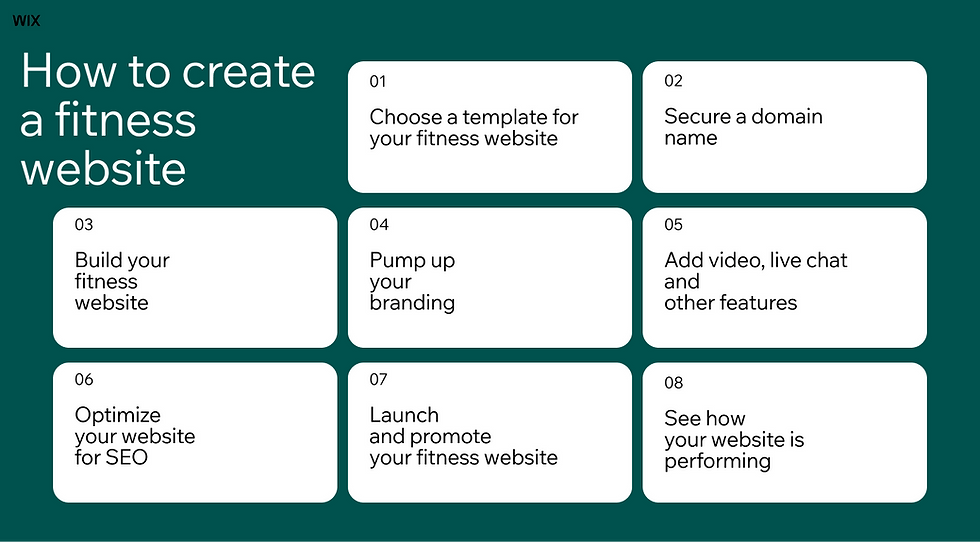
01. Choose a fitness website template
You don’t need to learn code or become a designer, you just need to find the right website builder. With Wix, you can learn how to develop a website for your fitness brand or business with easy-to-use features and professional tools. When thinking about the plan for your website, templates should be first on your list.
For starters, you can use a ready-made template to do all the heavy lifting. Browse these sport and fitness website templates, which are especially designed for fitness professionals. Pick the one you love, then customize it to suit your brand’s colors and voice.
As you explore, you’ll find everything you need to highlight your services, sell merchandise, schedule classes, upload images, add videos and so on. Look through professionally designed templates to find one that suits you and your brand.
Wix provides an AI website builder that generates beautiful, fully customizable sites. With Wix Harmony you describe your gym or studio in a prompt and get a designed starting point, then refine it with drag-and-drop tools or ask Aria, Harmony’s built-in AI agent, to restructure a page for you.

02. Secure a domain name
Next, choose a domain name. If you own a yoga studio called, “The Sutra’s Fitness Studio,” your domain name might be thesutrasfitnessstudio.com. If you’re just starting out and need help finding a name, use this handy Business Name Generator to choose both a company name and a corresponding domain name. Wix offers quick domain registration.
Remember to choose a domain name that’s easily identifiable, includes your business name (if available) and isn’t hard to spell. Your domain name should feel cohesive with your brand. Try not to include numbers in place of letters (like “2” for “to,” or “4” for “four”) and avoid dashes in your domain name. Both can make it harder to say your website name.
You’ll also need to choose an extension: the ‘.com’, the ‘.org’ or the ‘.biz’ that will follow your domain name in the website address. There are many more extension options to choose from, and you can read more about available domain extensions to understand which is right for you.
Just an FYI: You get free web hosting when you create your site on Wix, plus advanced security the second you hit Publish. Wix offers secure, scalable web hosting built in when you create your website.
03. Build your fitness website
Now, the best part: designing your fitness website and bringing your business to life online. Your fitness website needs to make an immediate impression to keep visitors engaged with your content. Make sure to include...
A welcoming homepage: Think of your homepage like the foyer of a house (or gym). It's an inviting entrance that showcases the style and vibe of the home. This is the first page that visitors will see, so make it count.
An informative “about us” page: Highlight your purpose, values, vision and mission statement. What's your business all about?
A products or services page: Whether you’re selling pre-recorded workout videos, branded merchandise, gym memberships or one-on-one sessions, you need to make sure your products and services page is clear, accessible and engaging. Include eye-catching visuals and informative product descriptions to highlight what you’re selling.
An online booking system: Integrate scheduling software directly with your website so customers can book classes, schedule appointments or services and easily pay online. As the gym owner, you’ll be able to manage calendars for both your staff and your clients. Wix Bookings now also syncs your services and near-real-time availability directly into Google Search, Google Maps and Google AI Mode, so potential clients can book a class or session without ever leaving their search results.
A “plans and pricing” page: Like a products or services page, a “plans and pricing” page showcases your membership packages. Consider a brief description to outline who might benefit from a specific package.
A clear “contact us” page: This is one of the most important pages on your fitness website, so make sure it’s clear and visible. Include relevant info, such as phone numbers, email addresses, a physical address, a social bar and any other methods of getting in touch. Also include necessary contact information in the footer of your fitness website. To encourage communication, consider a contact form, which makes it easy for visitors to email you directly from the site.
A testimonial page: If you promise results, prove it with user testimonials. Keep in mind that “success stories” are more than just weight loss before-and-after photos. Encourage happy clients to share a range of experiences: a boost in confidence, more energy to keep up with their kids and the like.
A friendly staff bio page: Create a page to highlight the other trainers on your team. Include their expertise and show off their personalities with a brief bio and favorite workout songs.
"As people's habits change and AI reshapes how they search for and compare service providers, businesses that rely on bookings need technology that is seamless... Our focus is to reduce operational friction so businesses can deliver great service, scale in a healthy way and maintain strong client relationships." - Koby Maman, VP, Head of Wix Bookings
04. Pump up your branding
You’ll need to consider your website’s visuals to build your fitness brand online. Here are some branding elements to think about.
Color: Your favorite color might not be the best one for your brand. Consider the psychology of colors. Example: Yellow is correlated with happiness, warmth and optimism; green represents health, earth and prosperity; blue evokes trust and peace; orange is confident and approachable. What color will convey the feel and value of your fitness business? Color also impacts the user experience on your site. Select a white or black background and integrate no more than two additional colors.
Fonts: The font you choose should align with your overall image and help convey your message. Is your brand bold and energizing? Sleek and fuss-free?
Logo: Your logo instantly represents your fitness business. If you don’t already have a logo, use this free logo maker. Include your logo on all your branding assets, like merchandise, business cards and, you guessed it, your website. Check out these fitness logo ideas to help you get started.

05. Add video, live chat and other features
Now that you've told your customers what your business is all about, consider a few other features to add value for your clients.
Wix Smart Chat combines an AI chat that answers questions from your own site content with manual chat you handle yourself, so clients get a reply whether or not you are at your desk.
Learn how to shoot a workout video like a pro. Integrate Zoom to host live workouts or beef up your video library with on-demand content. The Wixel video maker can help you create demo videos and the social cuts to promote them.
Create a free blog to engage readers and show off your expertise. You can also invite external writers, staff members of other industry leaders to publish on your fitness blog.
Add a members-only area to your site to offer exclusive discounts, educational videos or private workshops. With Wix, users will create unique accounts to access this content.
Online programs and fitness challenges will keep clients engaged and bring in passive income for your fitness business.
Alfred, Wix’s AI phone agent, answers your business calls around the clock while you are coaching a session. It takes messages, sends an SMS link after a call and flags the callers who need you to follow up, with a summary and transcript of every conversation waiting in your dashboard.
Symphony by Wix is built with agents specialized across marketing, client communications, scheduling, finance and operations so each one brings deep domain knowledge to its tasks.
06. Download your app
A mobile app makes life easier for everyone. The Wix app helps you manage all facets of your fitness website conveniently from your phone. Here are a few of the features.
Easily manage your site from anywhere: Update your site and send marketing emails directly from your phone.
Chat with your clients: Use the live chat feature to talk directly to your visitors.
Manage your online store: Update inventory, accept payments, upload product images, take customer orders and track sales.
Track your progress: See live stats to measure the success of your fitness website.
Your clients use the free Fit by Wix app, where they can view your schedule, book services, join online programs and buy your merchandise. If you want a native app under your own brand, Branded App by Wix lets you build and publish one.
07. Optimize your website for SEO
Between HIIT (high-intensity interval training) and BMI (body mass index), you’ve got plenty of acronyms to remember. But don’t sleep on SEO. Also known as search engine optimization, SEO is all about improving your site’s content and layout to rank higher in search engines like Google. The higher your fitness site ranks, the more prospective clients will visit your site. Include keywords (the specific words or phrases people search for) within your text, headings and images. Read more in our guide to SEO.
To make things easier, Wix SEO can support your optimization efforts with a customized plan for your fitness website. This free and handy tool will personalize your SEO strategy to help the right people find your site.
Kleo, Wix’s AI marketing agent, builds a marketing plan across SEO, email, social and paid ads for your fitness business, then prepares the content for you to approve before anything goes live.
08. Launch and promote your fitness website
Once you've launched your fitness website, there are many ways to promote it, too. You can try different methods to see what works best for you. Consider fitness marketing strategies, like working with influencers, hosting an event or sending a fitness newsletter. Keep in mind, people want value from your content, no matter the marketing method. Always ask yourself, what am I giving my audience? If it's just a sale's pitch, dig deeper.

09. See how your site is performing
Finally, maintain those gains and keep your site up to date. Use Wix Analytics to measure your site’s performance and review valuable insights, like booking statistics. This will help you see what's resonating with your clients: Which classes do they prefer? At what time? Who's their favorite coach? If knowledge is power, data is the advisory board. Consult it often.
Looking to grow your nutrition practice online? Check out how to create a nutritionist website for a complete guide to building the perfect site.
Why you need a fitness website
It doesn’t matter how awesome your kettlebell class is if no one knows it exists. As much as you hate sitting at a desk, you’ve got to admit that potential clients are looking online for their next workout, and you need to meet them there.
That's where your fitness website comes in. A strong fitness website serves as a marketing tool and educates potential clients about your offerings. A super strong website also streamlines your payments and scheduling, so you can focus on the fun stuff: your clients.
How to make a fitness website FAQ
What is the best website builder for fitness?
The best fitness website builder needs templates designed for gyms, trainers and health clubs. Make sure it includes tools like booking systems, membership management and class scheduling to stay organized. Mobile optimization, high-quality images, payment gateways and SEO tools are essential. Social media integration and call-to-action buttons keep visitors engaged and help turn them into members.
How to create a website for a gym?
Pick a gym-focused website builder with bold, energetic templates that inspire people to move. Personalize the template with photos and copy that show your approach to training. Gym websites need to be functional, too, so include features like class bookings and membership sign-ups.
Key pages to include in a gym website:
Home (highlight your gym's atmosphere and equipment)
About (your gym’s story, mission and trainers)
Services (group classes, membership levels, personal training and specialty programs)
Schedule (class times with easy booking options)
Pricing (clear membership and drop-in rates)
Testimonials (client success stories and reviews)
Contact (location, hours and a contact form)


