

Multilingual websites built in Wix Studio are one of the most high-value deliverables an agency or freelancer can offer and with the right setup, they're far more manageable than they used to be. International clients increasingly expect their websites to speak their customers' languages, and the demand for agencies who can deliver that is only growing. This guide walks through the full workflow: adding languages, handling translation, configuring SEO per language, setting up multilingual eCommercemanaging translator permissions, and handing off to clients all inside Wix Studio.
Building a multilingual client site in Wix Studio involves the Wix Multilingual app, per-language SEO metadata, automatic hreflang tags and translator permission controls. Done right, you can deliver a production-ready multilingual site that ranks in multiple languages and gives clients a clear, maintainable handoff workflow.
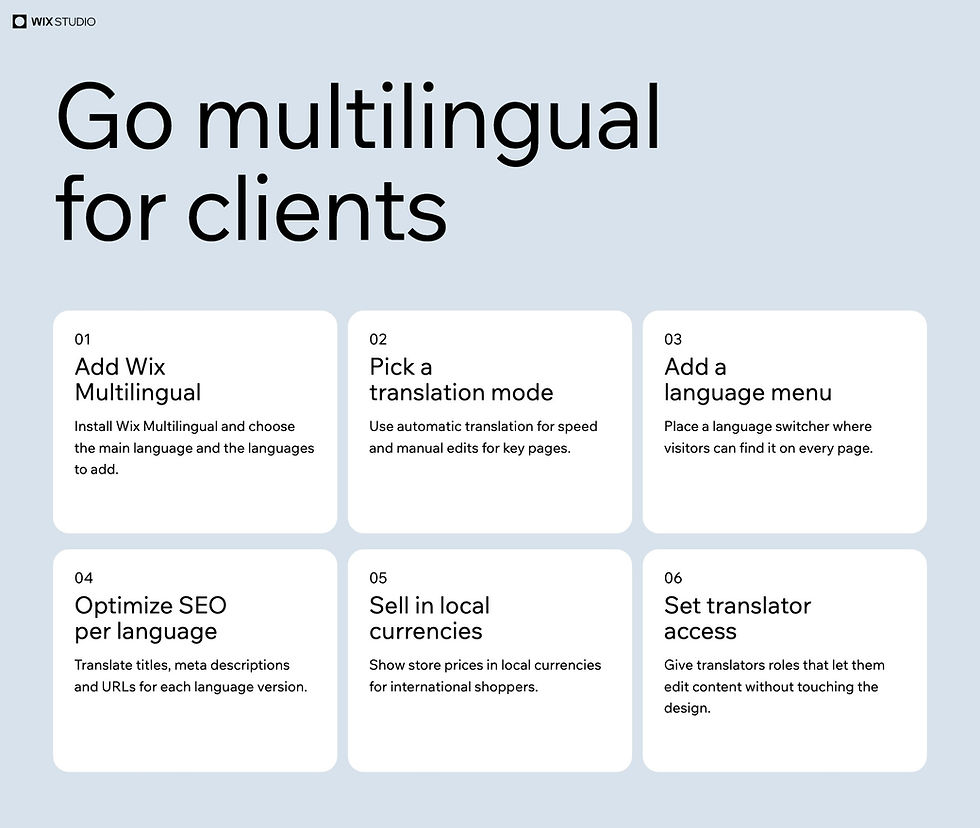
Install the Wix Multilingual app and add languages from the dashboard
Choose manual translation, machine translation or a hybrid approach
Get automatic hreflang tags with no manual configuration needed
Enable multi-currency for international stores
Assign translator permissions without exposing the full editor
Localize SEO metadata, URL slugs and blog posts per language
Why multilingual matters to your agency pipeline
Clients who want to expand internationally don't just need a website translated they need every layer of their web presence localized. That includes page content, product listings, checkout flows, blog posts and search engine metadata. Agencies who can handle all of that in a single platform, with a clear handoff model, have a meaningful advantage over competitors who patch together third-party localization tools with unpredictable results.
The market for multilingual web builds is broad and growing. Clients in fashion, food, professional services, SaaS and manufacturing all face international audiences and the expectation that their website reflects that is becoming standard rather than a premium request.
Getting started: the Wix Multilingual App
The foundation of multilingual support in Wix Studio is the Wix Multilingual app. You install it from the dashboard, select the site's primary language and then add as many additional languages as the client needs. The app works across the entire site pages, dynamic content, product listings, blogs and SEO fields making it the single control center for the localization workflow.
Once installed, each language gets its own editing context. When you switch languages in the editor, you're working on that language's version of the page. Text fields, image alt text, metadata and button labels all become editable per language, while the structural layout stays consistent across all language versions. That consistency is what makes multilingual builds scalable: you're not rebuilding the site for each language, you're translating a single well-designed structure.
Wix Multilingual supports a wide range of languages, including right-to-left languages like Arabic and Hebrew, with automatic text direction switching. For clients targeting markets in the Middle East, this is a significant capability that saves considerable custom development work.
Manual vs. automatic translation
One of the most practical decisions you'll make in a multilingual build is how translation gets handled. Wix Multilingual gives you two primary paths: manual translation and automatic (machine) translation.
Most real-world projects use a combination of both.
Automatic translation uses machine translation to fill in all text fields in a target language instantly. It's fast and useful for generating a working draft to put in front of a client or a professional translator quickly. You trigger it from the Translations panel, select the language and apply. For clients with limited budgets or less critical language markets, machine translation with light editing can be a workable approach.
Manual translation gives you full control. You work through each field in the Translations panel or export the content to a spreadsheet, hand it off to a translator and import the finished translation back. This workflow integrates cleanly with professional translation services and keeps quality high for priority markets.
A hybrid approach works well in practice: use automatic translation to generate a draft, then route the output to a human translator for review and correction. The Wix Translations panel makes it easy to see which fields have been translated and which still need attention, so translators can work efficiently without wading through the full site structure.
The language switcher widget
Once you've added languages, visitors need a way to switch between them. Wix Studio provides a language switcher widget that you can add to any page and typically in the header or footer. The widget is fully styleable inside the Studio editor, so you can match it to the client's brand without workarounds or custom code.
You can configure the switcher to show language names, flags or both. For international sites with many language options, a dropdown layout keeps the interface clean. The switcher automatically knows which languages are active on the site and updates dynamically as you add or remove languages with no manual list management required.
Placement matters for usability. For global sites, the header is the most common location and the top-right corner is the established convention most users expect. For sites targeting a specific secondary market, say, a primarily English-language site with a French version for Canadian visitors, a more subtle footer placement can be appropriate.
SEO per language: getting it right
This is where multilingual builds earn their complexity premium. Each language version of a site needs its own SEO metadata: title tags, meta descriptions, Open Graph tags and URL slugs. Wix Multilingual handles this through the per-language SEO panel: when you switch to a target language in the editor, the SEO settings for that page switch to the localized version as well.
For every page, you can set a unique title tag, meta description and URL slug in each language. That means a page that lives at /en/services can live at /es/servicios for Spanish visitors, a meaningful SEO improvement over sites that serve translated content at the same URL with a query parameter.
Hreflang tags, the HTML attributes that tell search engines which version of a page is intended for which language and region ar, e generated automatically by Wix for every language version of every page. This is one of the most technically complex parts of multilingual SEO, and Wix handles it without any manual configuration. Every language version gets the correct hreflang markup, including the x-default tag, ensuring Google and other search engines correctly identify the relationship between language versions.
Worth knowing: Machine translation is a time saver but for client sites targeting high-stakes language markets, review translated SEO metadata and URL slugs carefully before launch. Search engines index each language version separately so a poorly translated meta title will appear in search results for that language, directly affecting click-through rates. Auto-generated slugs often need human correction too, especially for languages with different grammar structures or character sets. This is not a platform limitation; it is simply a quality control step that any serious multilingual workflow requires.
Multilingual eCommerce and multi-currency
For clients running international stores, multilingual support needs to extend into the full eCommerce experience. Product names, descriptions and specifications all translate through the Wix Multilingual panel, the same workflow that applies to regular page content.
Multi-currency is a separate but complementary feature. You can enable multiple currencies in the Wix Payments settings, and prices will display in the visitor's local currency based on their location. Combined with translated product content, this creates a genuinely localized shopping experience and not just a translated one.
Checkout flows, order confirmation emails and policy pages can all be localized through the same Multilingual workflow.
Translator permissions
One of the more practical multilingual features for agencies is the translator permissions system. Rather than giving a client's external translator access to the full Wix Studio editor which creates risk and confusion you can assign them a Translator role. Translators get access only to the Translations panel, where they can edit text fields in their target language without touching layout, design or settings.
This keeps your build clean and your client's site safe. Translators work through content fields methodically, the agency retains control of the editor and the client doesn't have to manage access escalations every time their translation vendor needs a revision. For agencies with multiple active multilingual projects, this permission model is not optional it's how you keep concurrent builds from colliding.
For ongoing relationships where translation is updated regularly, seasonal content, new product launches, blog posts, the translator permission model makes the workflow sustainable at scale. You can add and remove translator access per language, so a French translator only sees French content fields and a Japanese translator only works in Japanese. There's no cross-contamination risk between language workstreams.
Managing complex multilingual builds: the client handoff
Delivering a multilingual site to a client requires more than a functional build it requires a handoff workflow the client can actually maintain. That means documentation on how to add content in each language, how to run the machine translation step for new pages and how to engage their translator for review cycles.
As Tal Ashtar, Graphic Designer at Wix, puts it: "As a designer, staying efficient and adaptable is a must. That's why finding the best website builders for designers can be a total game-changer. Go for platforms that make collaboration easy, provide design tools that feel like an extension of your creativity and make client handoffs smooth and hassle-free."
That philosophy applies directly to multilingual builds. The cleaner your setup inside Wix Studio, well-organized translation panels, appropriately scoped permissions, clear naming conventions for language-specific assets, the smoother the handoff and the less support burden falls back on your agency after launch. Build the translation workflow into your project scope from the start, not as an afterthought priced in at the end.
Multilingual blog posts
Content marketing in multiple languages is a real commitment but Wix makes the infrastructure straightforward. Blog posts can be translated through the Multilingual panel, you create the post in the primary language, switch to each target language and fill in the translated content. SEO metadata for each post, title, description, slug, is editable per language and each translated version is indexed independently by search engines.
For clients running active blogs in two or three languages, the workflow becomes routine quickly: write in the primary language, export for translation, import the translated version, review the SEO fields, publish. The blog's category structure, tags and related posts display in the visitor's language automatically once translations are in place.
For agencies building content-heavy multilingual sites, it's worth establishing a publishing schedule that accounts for translation turnaround time. Posting in the primary language and adding translations in batches, rather than holding publication until all translations are ready, keeps content flowing while giving translators time to work without rushing and cutting corners.
Performance with multiple language versions
A concern agencies sometimes raise is whether adding multiple language versions will affect site performance. In Wix Studio, language versions share the same underlying site infrastructure and there's no separate site to maintain per language, and no performance penalty for having ten language versions versus two. Pages load from the same CDN, and Wix handles routing between language versions transparently based on visitor browser preferences and language switcher selection.
The main practical performance consideration is image optimization. If you're using different images for different language versions, sometimes appropriate for localized visuals or market-specific photography, make sure each image is properly compressed before upload. Alt text for those images should also be translated in the Multilingual panel, both for accessibility and for image search SEO in each target language.
What a properly configured international site unlocks
The real impact of a well-built multilingual site becomes clear when you look at what it enables for clients operating at scale. Noah Rosen, founder of Forge to Table and a Forbes 30 Under 30 honoree, started by ordering 200 hand-forged knives to his culinary school dorm room and building a Wix website to sell them. Forge to Table now ships to 30+ countries and offers 40+ kitchen products. "I ordered 200 hand-forged knives to my dorm room and built a Wix website to sell them," Rosen says. On the accessibility of the platform: "I think Wix offers the perfect medium for everyone, even someone like myself, a really good cook, but a monkey with a keyboard."
That kind of growth, from a dorm room to a global shipping operation, depends on infrastructure that can handle international audiences. A properly configured Wix Studio multilingual site, with localized product content, multi-currency pricing and SEO-optimized language versions, is the foundation that makes it possible. You can explore starting points at [Wix website templates|https://www.wix.com/website/templates] to see how internationally-ready designs are structured out of the box.
Building multilingual client sites as a core service
Multilingual website builds are not a niche service, they're an increasingly standard expectation for agencies working with clients who have international growth ambitions. Wix Studio gives you the tooling to deliver them efficiently: a single platform for design, translation management, SEO configuration, eCommerce and client permissions. The learning curve is the workflow, not the technology.
If you're building your multilingual service offering, start with the Wix Multilingual app, get comfortable with the translation panel and the per-language SEO workflow, and build out your translator handoff process before your first multilingual project. Set clear expectations with clients about translation quality, machine translation is a starting point, not a finished product for high-stakes markets and price your services to include the QA step that professional multilingual builds require.
The agencies who have that workflow dialed in will win the international client mandates. Wix Studio gives you everything you need to be one of them. [Start building on Wix Studio|https://www.wixstudio.com] and deliver your first multilingual client site today.
Ready to build your next multilingual client website? Start creating on Wix Studio today →


