
Yes, Wix is a good website builder for photographers, because you can create a website that shows your work at its best while it also books clients and sells prints. This post explains why Wix stands out as one of the best website builders for photographers and how it can help you start and grow your photography business.
Building a website for your business, passion project or side hustle should feel simple and exciting. Wix generates a personalized starting point with AI. You can customize every detail with intuitive drag-and-drop tools, while Wix handles the tricky parts to make building your site simple. That way, you can focus on what matters most: bringing your ideas to life. Ready to get started? Create your website today.
TL;DR: is Wix good for photographers?
Wix is a strong fit for photographers because it combines image-first design tools with the business features a photography practice actually runs on. Wix provides a drag and drop editor, the Wix Pro Gallery for high-resolution image display, Wix Bookings for client sessions and Wix Stores for selling prints and digital downloads. Wix also handles hosting, SSL and backups, so your portfolio stays online without a separate provider.
Wix's photography feature | What it does | Why it's a win for photographers |
Drag and drop editor | Allows you to place any element (text, image, video) anywhere on the page without code. | You have total creative control over the layout to ensure your photos are the hero of the site. |
Wix Pro Gallery | Advanced image display with built-in protection and "sharpness" controls. | Images load fast, look crisp on Retina displays, and are protected from "right-click save" theft. |
Business tools | Integrated Wix Bookings for scheduling shoots and Wix Stores for selling prints. | You can move a client from "viewing your work" to "paying a deposit" without leaving your site. |
SEO and marketing | AI-generated meta tags and image "Alt Text" tools to help Google find your work. | Photographers often struggle with SEO, and Wix automates the technical work so your photos can rank in local searches. |
Scalable paid plans | Options ranging from a simple Portfolio (Light) to full eCommerce (Core and Business). | You can start with a free portfolio and upgrade only when you’re ready to start selling digital downloads or prints. |
Zero-code customization | Visual menus for changing fonts, colors and animations. | You can change your entire brand look (like switching to a dark mode) in minutes without hiring a developer. |
Hosting and security | All-in-one managed web hosting with SSL certificates and automatic backups. | You don't have to worry about site crashes or manual updates, Wix handles the technical maintenance for you. |

Why is Wix good for photographers?

01. Drag and drop editor for easy website design
Wix offers a drag-and-drop website builder that makes learning how to start a website straightforward. The editor covers the layout work a photography site needs.
Intuitive editing tools that let you place images, text and galleries exactly where you want.
Pre-designed website templates made specifically for photographers, featuring clean layouts focused on visuals. Explore Wix's range of photography website templates to get started.
Mobile-friendly designs so your portfolio website design looks great on phones and tablets without extra work.
Learn more: How to make a photography website
02. Powerful image galleries and portfolio options

As a photographer displaying your photos online in the best way is crucial. Wix includes several gallery types that you can use to highlight your work on your photography website.
Grid galleries for a classic, organized look.
Masonry layouts that adapt to different image sizes for a dynamic feel.
Slideshow galleries to tell a story with a sequence of images.
Full-screen lightboxes that let visitors focus on each photo without distractions.
You can also add captions, titles and links to each image, making it easy to share details about your shoots or direct visitors to book sessions. The galleries also load quickly, which keeps visitors engaged and improves your site’s performance.
03. Integrated tools for client bookings and sales
Many photographers want more than just an online portfolio. They want to book clients and sell prints or digital downloads directly from their website. Wix is a great option for this because both sets of tools are built in.
Online booking system where clients can schedule sessions and pay deposits.
eCommerce platform to sell prints, photo books or digital files.
Secure payment options including credit cards and PayPal.
Automated email confirmations and reminders to keep clients informed.
If you're a portrait photographer, you can create a website with Wix and set up a booking calendar with your available time slots. Clients can book, pay upfront and then will receive reminders automatically. Not only do you get a great website to display your work with Wix but you also get a business assistant too.
04. SEO and marketing tools to attract more clients
A great looking website is only part of what you get with Wix as a photographer. Wix also helps you get found online with tools to improve your chances of appearing in search engines and other ways to market your work.
Integrated SEO toolguides you through optimizing your site’s titles, descriptions and keywords.
Blog maker so you can share photography tips, behind-the-scenes stories, or client testimonials.
Email marketing integration to build a mailing list and send newsletters.
Social media buttons that link your site to Instagram, Facebook and more.
All of these integrated marketing tools help you as a photographer build an audience and then turn visitors into clients. If you're a travel photographer you can create a blog on your site to share stories from shoots around the world, attracting readers who might book a session or buy prints from you.
05. Affordable pricing plans with scalable options
Wix offers a range of paid plans, including a free option with Wix branding and ads. For photographers serious about their business, premium plans remove ads, allow you to connect a custom domain and unlock more storage and bandwidth. The best domains for photographers range from .com to industry extensions like .photography.
Light plans are affordable and include enough features for a simple portfolio.
Core plans support online payments, bookings and eCommerce.
Business and Business Elite plans add priority support and more advanced marketing and eCommerce tools.
This flexibility with pricing means as a photographer you can start small and upgrade as your business grows. For example, as a beginner photographer you might start with a basic plan to showcase your work, then move to a business plan when you're ready to sell prints.
06. Website design customization without coding
As a photographer you need your website to reflect your unique style and talent. Wix allows for website design customization without needing to write code.
Change fonts, colors and layouts with simple controls.
Add custom sections like client testimonials, pricing tables or contact forms.
Use Wix’s App Market to add features like Instagram feeds, live chat or booking widgets.
If you're looking for even more customization, Wix Studio might be the best option for you. Wix Studio gives you custom breakpoints for responsive design, custom CSS and API access plus AI tools that adapt layouts across screen sizes.
07. Reliable web hosting and security
Wix hosts your website on its servers, so you don’t need to worry about finding a separate hosting provider. The hosting is managed for you.
Fast loading speeds thanks to Wix’s global content delivery network.
SSL certificates to secure your site and protect client data. Learn more about how to get an SSL certificate.
Automatic backups and updates handled by Wix.
What does all of this mean for you as a photographer? It means your site is always live and functioning.
Examples of photographers using Wix
Looking at real photography portfolio examples is a great way to see what works and what doesn't. From minimalist galleries to bold, image-heavy layouts, photographers use Wix to present their style, organize their work and attract clients.
Paul Carter Photography
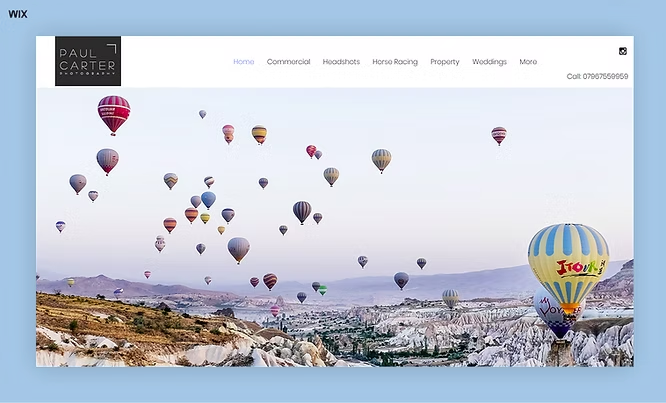
Paul Carter’s photography website is an excellent example of a professional and versatile portfolio. The site effectively showcases a wide range of photography services, from weddings to commercial and property photography, with detailed descriptions and visually appealing galleries. Its clean and organized layout ensures an easy browsing experience, while the inclusion of service-specific pages adds a personalized touch.
Be inspired by these photography website examples, all built on Wix.
Marion Bergin

Marion Bergin's photography website is a prime example of how simplicity and focus can create a powerful online presence. The site emphasizes the photographer's work through clean design and high-quality visuals, ensuring that the images take center stage. Its minimalist approach enhances the user experience, making it easy to navigate and explore.
Wix gives photographers the gallery quality, the booking tools and the selling tools in one place, which is why it holds up for a working practice and not just a portfolio. Pick the plan that matches what you sell, then build the site around your strongest images.
Is Wix good for photographers FAQ
Is Wix free for photographers?
Wix has a free plan that photographers can use to build and publish a portfolio, but it shows Wix branding and ads and cannot connect a custom domain. Paid plans remove the branding, connect your own domain and unlock the storage, payment and selling tools a working photography business needs. A free site works best as a way to test layouts and galleries before you commit.
Does Wix reduce the quality of your photos?
Wix does not force you to publish soft images, because the Wix Pro Gallery gives you direct control over image quality and sharpening. You can raise the quality setting for a single image or for a whole gallery, and adjust the sharpening amount, radius and threshold. Pushing quality to the maximum adds page weight, so the practical approach is to prioritize hero and portfolio images and keep the rest balanced for load speed.
Can you stop visitors from downloading your photos on Wix?
The Wix Pro Gallery blocks right-click saving on desktop by default, so visitors cannot pull your images straight out of the gallery. You can deliberately allow downloads with a toggle in the gallery settings when you want clients to save files. No web protection is absolute, since a visitor can always take a screenshot, so watermarking is still worth considering for high-value work.
Can you create private client galleries on Wix?
Wix lets you build a private client gallery by password protecting the page the gallery sits on, so only the client holding the password can view those images. This suits proofing sets and event deliveries that should not be public. Password protected pages are not indexed by search engines, which keeps client work out of search results.
Which Wix plan do photographers need?
Photographers who only need a portfolio can stay on the Light plan, and photographers who take payments need Core or higher. Core unlocks online payments and bookings, so it fits anyone selling prints, digital downloads or session deposits. Business and Business Elite add more storage and advanced selling tools for higher volume work.


