

Your page can rank number 1 on Google, get cited by ChatGPT, and still completely fail when an AI agent tries to use it. The crawler indexed you. The LLM quoted you. But the agent gave up halfway through checkout because a cookie pop-up was covering the button, and it couldn't work out how to close it.
This puts a new question on the SEO team's desk: can an AI agent actually use your site? That’s where an agentic audit comes in. Consider it the first step in optimizing your website for the agentic web.

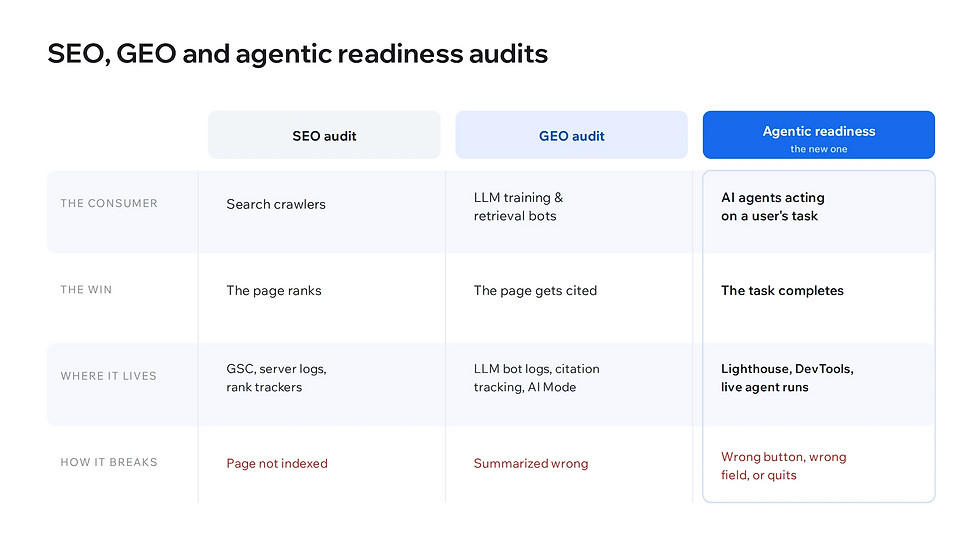
How an agentic readiness audit compares to SEO and GEO audits
The agents I'm talking about range from the consumer ones that have taken off in the past year (ChatGPT's agent, Claude in Chrome, Gemini's side panel, Perplexity's Comet) to the custom agents companies, developers, and even ordinary consumers are building on top of the same models for their own workflows.
What they share is the behavior: an agent takes a plain-language goal from a user, something like "check ten sites selling this jacket and buy from the cheapest once it drops below $120," and then carries it out on real pages by clicking, typing, and submitting the same way a person would.
Auditing for this is a different exercise from SEO or GEO, even though all three live in adjacent territory. Search crawlers want to understand your page so they can index and rank it. AI Overviews want to summarize it so they can cite it in an answer. Agents want to use it so they can complete a task. A site can fail one while passing the other two. What you're testing for shifts depending on which machine is on the other end.
Why organic growth teams should own agentic audits
If you're wondering why agent readiness lands on organic growth rather than engineering or product, it sits across all three, but SEO is best placed to own it for two reasons.
Everything an agent relies on to use your site is the same set of signals SEO has cared about for years. SEO is already the team that thinks about how non-human visitors perceive a site, because that's exactly what crawlers are. Agents are just a new kind of non-human visitor with a different goal.
The second reason is commercial. Agent traffic is becoming a discovery and conversion channel, and channels that drive discovery and conversion are squarely an SEO concern. If an agent can't complete a purchase on your site but can on a competitor's, that's lost revenue through a channel you weren't watching, which is the same problem SEO has always existed to prevent. So, while the fixes often land with engineering, the auditing, prioritization, and advocacy fit naturally on the SEO desk.

How agents read your page
Before getting into the framework, it helps to know what an agent is working with, because it isn't the page you see. Agents read a page in three main ways, usually in combination:
Screenshots: A vision model interprets the rendered page, reading size, color, and position as cues to what each element is.
HTML: Reading the HTML directly and viewing the DOM tells the agent how things are constructed and laid out.
The accessibility tree: A browser-native summary of the DOM that keeps the roles, names, and states of interactive elements and drops the visual noise.
The accessibility tree is the foundation almost every agent relies on, so it's worth seeing yours directly. Right-click your primary call-to-action button, choose Inspect, then open the Accessibility tab in Chrome DevTools. If your "Sign Up" button shows up generically with no accessible name, that's exactly what the agent sees: a generic, nameless box it has no confident way to act on. Doing this on a few key pages tends to be eye-opening.

Your agentic readiness website audit framework
This agentic audit is organized into four phases, grouped by the scope of what's being checked. They run roughly in order, and there's a practical reason for this. There's no point auditing templates if your firewall is blocking agents at the edge, so the site-wide blockers come first. Once the platform is open, the per-template structural work makes sense. Once your templates pass cleanly, live agent walkthroughs validate that all the static fixes actually add up to a site an agent can use end to end.
Phase 1: Site-wide. Robots.txt, sitemap, LLMs.txt, bot detection, commerce feeds. Run once for the whole site. Quarterly.
Phase 2: Per-template structural. Lighthouse Agentic Browsing, accessibility, schema, rendering, performance, WebMCP. One representative URL per template, mostly automatable. Per-release on changed templates, plus a quarterly baseline.
Phase 3: Per-flow validation. Live agent walkthroughs on your most important transactional flows. After meaningful fixes, plus quarterly on the top-converting flow.
Phase 4: Ongoing. Tracking the emerging protocols and tooling, because the space is moving fast.
One note on scoping: audit by template, not by URL. A given template (your product page, your blog post layout, your category listing) tends to pass or fail consistently across every page that uses it, so checking all of them individually is wasted effort.
Pick one representative URL per template, audit it, and spot-check a couple of others after the fix to confirm it held. You can audit critical one-off pages like the homepage or pricing page. Multi-step flows like checkout go to Phase 3, because the flow, not the page, is the thing that needs to work.

Why Lighthouse alone isn't enough
Chrome's Lighthouse, the same tool you've used for performance and accessibility audits, now has a dedicated category called Agentic Browsing. It's the obvious starting point, and it's genuinely useful, but you need to understand what it does and doesn't do. A clean Lighthouse score can give a false sense of security.
When it runs, Lighthouse Agentic Browsing checks four things: accessibility for agents (a focused subset of the accessibility audits), layout stability via CLS, discoverability (whether an LLMs.txt file exists at the root), and WebMCP integration (a standard for explicitly exposing your site's actions to agents). It returns a pass ratio rather than a 0-100 score, because the standards are still settling, and the category is still marked experimental.
Lighthouse checks the accessibility tree for spec compliance, meaning it verifies that your markup conforms to the rules: roles are valid, labels are correctly associated, ARIA attributes are well-formed. That's valuable, and it catches a real category of problems automatically. But spec compliance and real-world usability are not the same thing. A page can pass every Lighthouse check and still defeat an agent, because a lot of what makes a page usable isn't expressible as a spec violation.
Phase 1: Site-wide agentic audit
These checks run once for the whole site. They don't vary by template or page, and they're worth getting right before anything else, because they tend to be the things that block agents from doing anything on your domain.
Robots.txt: Open your robots.txt and check the policy on AI agent user agents (ChatGPT-User, Claude-User, PerplexityBot, and so on). The point isn't to allow or block them, since both are defensible depending on your strategy. The point is to make the policy deliberate rather than an accident of some broad disallow rule written years ago for a different purpose.
Sitemap.xml: Confirm it exists and that it's reachable and current. Agents use it the same way crawlers do, as a map of what's on the site and what matters.
LLMs.txt: This is a newer convention worth understanding properly. LLMs.txt is a Markdown file at the root of your domain that summarizes your site for AI crawlers.
A standard LLMs.txt is descriptive. It lists your site's important pages and what they're about. Useful for content sites and for giving LLMs accurate context about what you do.
An agentic LLMs.txt is imperative. Instead of just describing the site, it tells agents how to take action on it, pointing them to API endpoints, structured data feeds, and action documentation. Think brochure versus control panel.

Bot detection and firewall behavior: Most sites sit behind a security or CDN layer that challenges or throttles anything looking non-human. Benign agents can be flagged as harmful bots because they might fire requests faster than a person would, and these systems may restrict that behavior. If your security tooling is blocking legitimate agent traffic at the edge, the agent never reaches your page, and nothing else in this audit will help. To fix this, have a conversation with the relevant dev / security team to check your level of access.
Commerce feeds and shopping protocols: If you sell anything, agents can reach your products in two distinct ways, and they call for different preparation.
The first is your structured product feed, which is what AI shopping surfaces consume directly, often without ever rendering your page. Every field an agent might filter on (price, availability, identifiers, shipping, return policy) needs to be present and accurate in real time.
The second is the emerging agentic commerce protocols, which standardize how an agent completes a purchase with you. Two matter right now.
The Agentic Commerce Protocol (ACP), an open standard from OpenAI, and Stripe, powers Instant Checkout in ChatGPT and lets a shopper buy from you without leaving the chat; it's in beta but already processing live transactions for early partners like Wix who is an official signatory.
The Universal Commerce Protocol (UCP), an open standard from Google co-developed with Shopify and other retailers, connects your catalog and checkout across Google surfaces like Search, AI Mode, and Gemini.
Both let you stay the merchant of record while making your checkout agent-ready, and both are rolling out through 2026.
The practical move today is to know which surfaces your customers actually use and check whether your platform or payment provider already supports the matching protocol, since for many merchants it's becoming a configuration step rather than a custom build.

Phase 2: Template level site structure audits
Most of this phase can be automated by using Screaming Frog and configuring the relevant APIs, or by building a custom agent in the LLM of your choice that runs each check programmatically.
The one genuinely manual part today is the Lighthouse Agentic Browsing category itself, because while it's still maturing, it's worth eyeballing the results rather than trusting a green check blindly. Beyond that, your manual attention goes to the handful of things automation can't see, which I'll flag below. The work breaks into five areas:
Accessibility tree quality. Lighthouse and standard accessibility tooling catch most of this automatically: missing names, broken label associations, invalid ARIA attributes. What automation can't see is the contextual stuff, like hidden interactive elements that shouldn't be in the tree at all (off-screen menus, modals that aren't currently open), transparent overlays that block real targets, and elements that look interactable but don't register as such in code.
Layout stability. Lighthouse checks CLS for you, and CrUX gives you the field data across pages. The agent-specific reason it matters isn't visual annoyance, it's miscalculation: an agent identifies a button at a coordinate, the page shifts after first paint as a font loads or a banner injects, and the click lands on whatever moved into that spot.
Schema correctness and consistency. Validators confirm your structured data is well-formed, but they won't tell you it matches the visible page, which is the manual check. JSON-LD prices should match visible prices, availability flags should match the state of the "Add to Cart" button, bylines should match the displayed author. Mismatches are easy to introduce by accident when pricing logic and rendering logic live in different parts of the codebase, and they send agents off to act on the wrong information.
Rendering. When your H1, price, primary CTA, and product description only appear after JavaScript runs, you're betting that every agent executes JavaScript fully and consistently. Many don't, and some skip it to save time and tokens. Server-side or hybrid rendering is the safer bet. To check what a non-rendering agent sees, view the raw page source (not the inspected DOM, which shows the post-JavaScript state). Anything important should already be in that raw HTML.
WebMCP. WebMCP lets you explicitly declare your site's actions to an agent as structured tools, so instead of inferring from the UI that a box is a search field, the agent is told "this is a search tool, it takes a query and returns products." You declare tools either in HTML markup (declarative) or via JavaScript at runtime (imperative), and Lighthouse verifies the registration and schema. Adoption is still early and support is currently Chrome-led, so for most sites this is future-important rather than urgent: the pragmatic time to add it is the next time you rebuild a key transactional flow like checkout, search, or booking.

Phase 3: User journey validation
This is the phase where the audit stops being theoretical and starts catching the things that actually cost conversions. It's also the only phase that tests the real outcome rather than a proxy for it. Everything in Phases 1 and 2 checks whether the ingredients are right; this checks whether the meal actually comes together.
The flow is the unit here, not the page. A checkout that spans four screens is one flow. A signup that crosses two templates is one flow. They get tested as a whole, because an agent's task succeeds or fails across the whole sequence, not on any single page.
The check itself is one thing: a live agent walkthrough. You pick an important user flow, give an agent a plain-language goal the way a real user would phrase it, and watch what happens without intervening.
Open a browser-based agent like Claude in Chrome, the ChatGPT agent, or Comet, start from a clean session with no autofill or logged-in state, and give it a goal in plain English ("buy me this jacket in size medium" rather than "add SKU 4471 to cart"). Don't help. If it's going to fail, let it fail, because the failure is the finding. Take notes on every place it hesitates, misclicks, fills the wrong field, or gives up.
What turns up tends to be things no static checklist could catch. A cookie banner overlaying the CTA that the agent can't dismiss. A form where the agent fills the email address into the "company name" field because both have only placeholders. A modal opening that the agent doesn't realize has changed the page. A captcha at exactly the wrong step.
A few failure modes are worth provoking on purpose: flows where the URL doesn't change between steps (agents lose their place), validation errors the agent can't read or recover from, and post-login flows where the agent stalls because the run can't include the login step itself.
What "good" looks like
The agent reads the goal, finds the right starting point, fills the right fields, handles the cookie banner and any modals, and either completes the task or hands control back at the right moment, like payment, login, or accepting terms. If it can do that twice in a row on a fresh session without any help, the flow is in a strong place.

Phase 4: Ongoing
The protocols and tooling this audit relies on aren't stable yet. It's worth a standing quarterly slot to re-check where things stand and how your site's coverage stacks up. The cost of being early on a standard that catches on is small. The cost of being late on one that becomes table stakes is a channel you lose without noticing.
The whole framework, with every audit item, its source, scope, priority, and cadence, is laid out in a downloadable spreadsheet. Each item is tagged with where it comes from (Lighthouse Agentic Browsing, Google's agent UX guidelines, generic SEO best practice, or agentic-specific), whether it can be automated or needs a human, what scope it operates at, its priority, and how often to repeat it. You can filter by phase, by priority, or by source depending on how you want to work through it, and use the status and notes columns to track progress across templates and flows.
Agentic readiness isn't the easiest thing to get right on the first pass, and the standards are still evolving under it. But it isn't foreign territory either. Almost every check in this framework draws on a discipline you already know how to do. The consumer is new; the craft is the same. Start with Phase 1, run a live agent walkthrough on your top flow, and let what breaks set your priorities from there.


