Updated: Nov 5

Wedding guests have questions long before the big day: what time the ceremony starts, where to stay, what to wear and whether they can bring a plus one. A wedding website answers them in one place and lets guests RSVP without a phone call or a paper card.
This guide explains what a wedding website is, what to put on it and whether you need one. It also compares the ways to create a wedding website, from ready-made templates to hiring a designer.
Turn your plans into a wedding website your guests will love. Choose a template or start with AI, make the design your own and add the tools you need to collect RSVPs and share every detail, all with Wix.
TL;DR: what is a wedding website
A wedding website is a site where a couple shares their date, schedule, venue, travel tips and registry, and where guests RSVP online. Couples can build one free with a template or AI, launch it with the save the dates and take it down once photos are shared.
You'll learn:
The pages and features guests use most
Whether you need one at all
Every way to build one, compared
How to handle privacy, languages and photos
Real wedding sites for inspiration
How to make one with Wix

What is a wedding website?
A wedding website is a personal website a couple creates to share the details of their wedding with guests and collect RSVPs online. It's the one link guests return to for the date, schedule, venue, dress code, hotel options and registry, from the save the date to the day itself.
Among the types of websites, a wedding site sits between personal websites and event websites. It's personal because it tells your story and shows your photos, and it works like an event site because it has a guest list, a schedule and a deadline.
Some couples call it a wedding invitation website, since the link usually goes on the printed or digital invitation. The invitation gives the essentials, and the website holds everything that doesn't fit on a card or changes after it's sent, like a shuttle time or a new hotel block.
What to include on a wedding website
Every wedding website needs a few basics guests look for first, plus optional sections that add personality. These are the pages and features to plan for:
01. Event details and schedule
Start with the date, the start time and the address of the ceremony and reception, with a map link for each. Then add a schedule of every event guests are invited to, such as a welcome drink, the ceremony, the reception and a farewell brunch, with the dress code for each one.
If some events have a smaller guest list, like the rehearsal dinner, share those details by email or on a password-protected page instead of the public schedule.

02. RSVP functionality
An online RSVP form replaces reply cards and the spreadsheet that goes with them. Guests confirm whether they're coming, and you can ask the questions your caterer and planner need, such as meal choice, allergies and whether they're bringing a plus one.
Set an RSVP deadline a few weeks before your final headcount is due, and say on the site who is invited, for example whether children or plus ones are included. Then you can export the replies for your venue and seating plan.
03. Photo galleries
A photo gallery lets guests get to know you before the wedding, with engagement photos, travel snaps and favorite moments from your relationship. Keep it to a small selection on the homepage or your story page so the practical details stay easy to find.
After the wedding, the same gallery can hold your professional photos, or link to a shared album where guests upload the pictures they took.

04. Registry information
Wedding websites usually link to the couple's gift registries, so guests can choose a gift without asking what you need. Add one clear button per registry, and say on the page if you prefer contributions to a honeymoon or house fund instead of gifts.
05. Love story or About Us section
Many wedding websites include a short section about the couple: how you met, the proposal and a few photos. It gives guests who only know one of you a way to meet the other, and it sets the tone for the day. A few honest lines work better than a long essay.
Some couples go further and build a site for the proposal itself. Fabio, a growth manager at Wix, spent four months secretly building a Netflix-themed proposal website for his partner, Marina, in his own time:
“I had to wake up early or pretend that I was going to a friend's house to work on this.”

06. Countdown timer
A countdown timer shows the days left until the wedding and gives returning guests a reason to look at the homepage, where you can post news. It's optional, so add it only if your template has a spot for it that doesn't push the date and RSVP button down the page.
07. Wedding party information
Introduce your wedding party with a photo, a name and a line about how each person knows you. It also tells guests who to ask on the day, for example which friend is handling the shuttle or the guest book.
08. Blog or updates section
An updates section keeps guests informed about changes in the run-up to the wedding, like a new shuttle time or a weather plan for an outdoor ceremony. Put the date on each update and keep the main pages current too, since some guests will only look at the schedule.
Learn more: How to build a blog or website vs blog
09. Travel and accommodations
For guests traveling from out of town, list the hotels where you've reserved a room block, the booking link or code and the date the block closes. Add parking, airport and shuttle details and a few local recommendations.
For a destination wedding, put travel near the top of the homepage, since guests need to book flights and rooms long before they need the schedule.
10. Guest FAQ
A guest FAQ page answers the questions you'd otherwise get by text: Are kids invited? Can I bring a plus one? Is the venue wheelchair accessible? Is there parking? What happens if it rains? Write each answer in a sentence or two and update the page when a new question comes in more than once.
Why do you need a wedding website?
A wedding website saves you from answering the same questions again and again, and it keeps guests from relying on an outdated invitation. Here's what it does for you and your guests.
Efficient communication
A wedding website gives every guest the same, current information at the same time. When the ceremony moves indoors or the shuttle time changes, you update one page instead of sending dozens of messages, and nobody relies on a group chat they muted months ago.
Guest engagement
A website lets guests take part before the wedding: they can RSVP, look at your photos, read your story and leave a message. For guests who haven't met your partner or family yet, it's a friendly introduction to the people they'll celebrate with.
Convenience for guests
Guests can check the details whenever they need them, from any phone, without asking you. That matters most for guests in other time zones or countries, and for the questions that come up on the wedding weekend itself, like the venue address or the after-party location.
Cost-effective and eco-friendly
A wedding website costs less than printing every detail on paper, and you can build one for free with many website builders and wedding planning platforms. You may still want printed invitations, but they can stay simple, with the website link carrying the rest. Fewer inserts also means less paper waste.
Personalization and creativity
Your website can look and sound like your wedding, from the colors and fonts to the photos and the way you write. A relaxed beach wedding and a black-tie evening call for different designs, and guests read those cues before they choose what to wear.
Learn more: Benefits of a website
Do you have to have a wedding website?
No, you don't have to have a wedding website. It isn't an etiquette rule, and a small wedding where everyone lives nearby can work with invitations and a group message. A website becomes more useful as your wedding gets more complex.
It's worth having one if you have out-of-town guests, more than one event, a registry, a dress code that needs explaining or a date far enough away that plans may change. A free site takes an afternoon to set up and saves time on every question you don't have to answer.
There are a few trade-offs to consider. You'll need to keep it up to date, you should think about what personal details are public, and some older guests may still prefer a phone call. Keep a printed details card or a contact number for anyone who doesn't go online.
Ways to build a wedding website
There are several ways to build a wedding website. The biggest difference is who keeps it up to date as plans change, and how much time and skill that takes.
Already know how you'll build? Skip ahead to setting up and running your site.
Wedding website builder with templates
A website builder gives you ready-made pages to fill in with your names, photos and details. Wedding templates usually include the schedule, travel, registry and RSVP pages guests expect.
This suits couples who want to update the site themselves, because either partner can change the schedule from a phone. Compare wedding website builders on design freedom, RSVP options and privacy, including free sites from planning platforms such as The Knot or Zola.
Marina Tamir, Senior Technical SEO at Wix
“Templates aren't just a starting point. They are a shortcut to a polished site. I always tell people: pick one that fits your vibe and then make it your own.”
Learn more: How to create a wedding website

Create a wedding website with an AI website builder
An AI website builder asks about your date, location and style, then creates a first draft with pages and text that you edit like any template.
It suits couples who don't know where to start or are short on time. Check every detail the AI writes, from the venue name to the RSVP deadline, and compare the best AI website builders before you choose.
Learn more: How to create a website with AI
Build a wedding website with an AI chat assistant
An AI chat assistant, such as ChatGPT, Claude or Gemini, can plan your pages, write the welcome text and draft your guest FAQ. Some website platforms connect to these assistants so you can edit the site from the chat.
This suits couples who find it easier to describe what they want than to click through an editor. Review the site in a browser before sharing it and test the RSVP form and registry links.

Build a wedding website with AI coding tools
AI coding tools, such as Claude Code, Cursor or Lovable, write a website's code from your instructions (sometimes called vibe coding). You get a custom design, but you also need hosting, a domain and a way to collect RSVPs.
It suits tech-savvy couples who want something no template offers, like a custom seating chart. Make sure both of you can update it in the busy final weeks.
Learn more: How to vibe code a website
Use a content management system (CMS) for a wedding website
A content management system (CMS) such as WordPress lets you update pages without editing code, but you add plugins for RSVPs and handle hosting and updates yourself. It's more setup than one event needs, so it mainly suits couples who already blog on one.
Hand-code a wedding website
Hand-coding means writing the site in HTML, CSS and JavaScript and hosting it yourself. It only suits couples where one partner is a developer, and you'll need a secure way to collect RSVPs since guests share names, emails and dietary needs.
Learn more: How to make a website
Headless website development for a wedding
A headless website keeps the design guests see separate from the system that stores content and handles RSVP forms or payments, such as Wix Headless. It only makes sense for a developer who wants a fully custom site and will test the guest journey themselves.

Hire a wedding website designer or planner
You can hire a web designer or ask your wedding planner, since some planners set up the website as part of their service. It suits large or multi-day weddings. Agree up front on who makes changes after launch and at what cost.
Learn more: How to make a wedding planner portfolio
Find the best way to create your wedding website
Method | Best for | Who updates the details | RSVPs and guest list | Skills needed |
Website builder with templates | Couples who update it themselves | Either partner | Built-in or app | None |
AI website builder | Couples short on time | Either partner | Built-in or app | None |
AI chat assistant | Couples who prefer to describe changes | Either partner, through chat | Depends on the platform | Basic |
AI coding tools | Tech-savvy couples | The partner who built it | You set it up | Medium |
CMS | Couples who already blog | You, plus plugin updates | Plugin | Medium |
Hand-coding | Developer couples | The developer | You build it | Advanced |
Headless | Developers who want custom design | The developer | Connected service | Advanced |
Hiring a professional | Large or multi-day weddings | The designer or planner | Set up for you | None |
How to set up and run your wedding website
These decisions keep the site useful from the save the date to the thank-you notes.
When to launch your wedding website
Launch the site with the save the dates, so the link on the card works from day one. The date, location and hotels are enough at first. Add the schedule, RSVP form and guest FAQ when invitations go out, after a test RSVP on a phone.
Set up RSVPs and your guest list
Decide what you need from each guest before you build the form, such as attendance per event, meal choices, allergies and plus ones. With several events, set up a separate RSVP for each so the rehearsal dinner only reaches invited guests.
Choose a wedding domain
A custom domain gives guests a short address to type from the invitation, usually your first names, such as annaandsam.com. Read it out loud and pick the version that's hardest to misspell.
Did you know: .wedding is a domain extension couples use for the event site itself, which gives guests something short to read off an invitation instead of a long link.
Keep your wedding website private
A wedding website often holds details like the venue address and the date your home may be empty. Password-protect the whole site or single pages, put the password on the invitation and keep a simple public homepage with your names and date.
Worth knowing: a password only keeps out people who don't have it, and guests can pass it on, so leave your home address and the dates your home is empty off the site.
When to take your wedding website down
Keep the site live until thank-you notes are sent and photos are shared, then keep it as a keepsake or unpublish it. If you leave it up, remove travel details and addresses, and check the renewal date of any custom domain.
Wedding website examples for inspiration
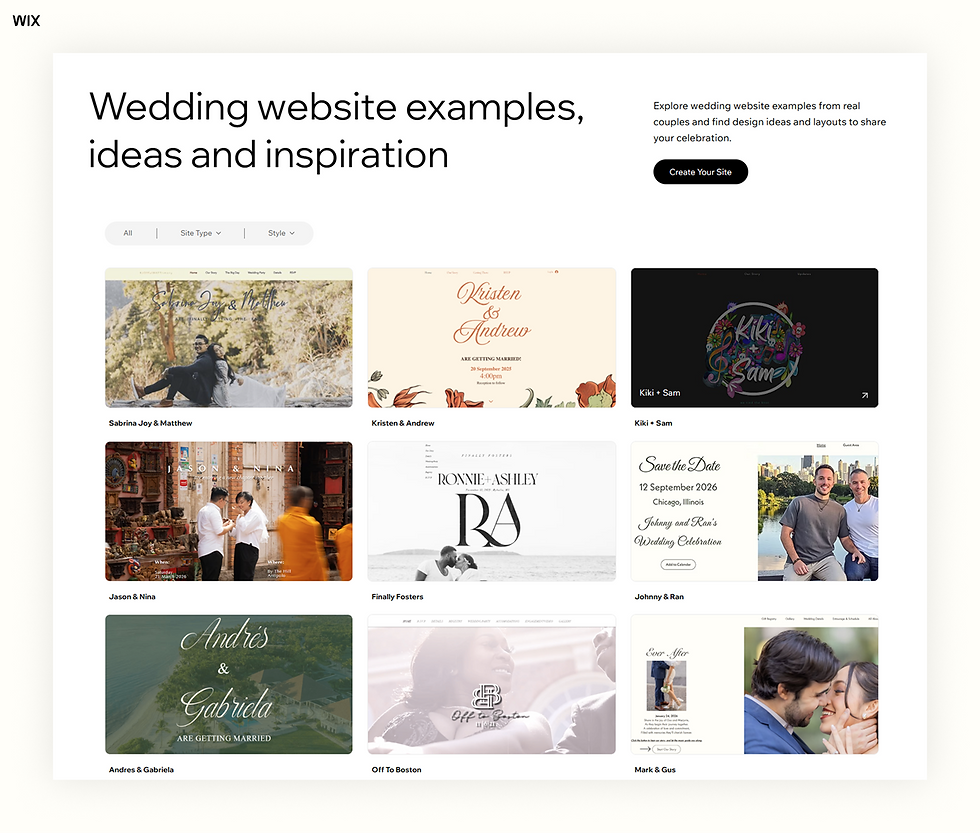
These wedding website examples were built by real couples on Wix, and each solves a different problem.
Destination wedding website: Andres & Gabriela
Andres & Gabriela launched their site as a save the date for their celebration in Punta Cana, Dominican Republic, with a Where to stay block that links to the resort's booking page.
Private guest area: Johnny & Ran
Johnny & Ran keep their public homepage minimal. Guests use a code from their invite to open a password-protected Guest Area with the RSVP, travel tips and Chicago recommendations.
Logistics-first wedding website: Brooke & Aaron
Brooke & Aaron lead with practical details like the venue, transportation, accommodations and an FAQ. Each section ends with one button, so guests always know where to go next.
How to make a wedding website with Wix
With Wix, you can build a wedding website for free and keep the RSVPs, registry links, photos and guest updates in one place. Here's how each tool fits a wedding and what you still set up yourself.
Start from a template or with AI
Pick one of the wedding website templates and replace the names, photos and details with your own. The Wix website builder lets you place, resize and customize every element with drag and drop, without editing code.
You can also describe your wedding to the AI website builder for a first draft, or build in Wix Harmony, which combines prompts with drag and drop editing and includes Aria, an AI agent that makes changes for you.
For a smaller wedding, a one-page site with anchored navigation can hold everything on a single scrolling page.
Collect RSVPs with Wix Events
Wix Events supports RSVP events without tickets, such as weddings. You customize the registration form with your own questions, for example a meal choice or a song request, and can let each guest add up to 10 additional people, such as a plus one or their children.
Replies appear in your guest list with each guest's RSVP status and answers, and you can export the list for your caterer or seating plan. If you only need a simple reply form, Wix Forms is another option.
Add your registry, photos and guest FAQ
Add a button for each gift registry that links to the store's registry page, or link a store logo to it. Show your engagement photos in a Wix Pro Gallery, and use a page or a collapsible section for your guest FAQ.
Keep it private and reach every guest
You can password protect your whole site or specific pages, such as the schedule and RSVP, and password-protected pages don't appear in search results. Wix Multilingual lets you add more languages, so international guests can read the details in their own language.
To use your own domain, such as your first names, you'll need a Premium plan. Compare the Wix plans to see which one fits.
Build with ChatGPT or Claude
If you prefer chat, you can make a website with Wix in ChatGPT by typing @Wix to get a site plan and a Harmony site. You can also use Claude with Wix through the official Wix connector, which creates and manages sites after you connect your account.
Get help from a professional
If you'd rather hand the work off, you can hire a Wix designer through the Wix Marketplace. Wedding planners and designers who build sites for several couples can use Wix Studio, which adds advanced design tools and client management.
What is a wedding website? FAQ
How does a wedding website work?
A couple builds the site, shares the link on their save the dates and invitations and keeps it updated as plans change. Guests visit it to check the schedule, venue and travel details, RSVP and find the registry, so they don't need to call or text the couple with every question.
Is a wedding website and a wedding planner website the same?
No. A wedding website is made by a couple to share details about their own wedding with guests. A wedding planner website is a business site where a planner shows their services and past events to win new clients.
What information can I find on a wedding website?
A wedding website can include the date, schedule and venue, an RSVP form, registry links, travel and hotel details, a guest FAQ and the couple's story and photos. Some also introduce the wedding party and post updates as the day gets closer.
Can I create a wedding website for free?
Yes. Wedding planning platforms and website builders, including Wix, let couples build and publish a wedding website for free. A paid plan usually adds options such as a custom domain with your names in it.
When should we launch our wedding website?
Launch it when you send your save the dates, so the link on the card works from day one. You can start with the date, the place and hotel information and add the schedule, RSVP form and FAQ once invitations go out.
What should you not put on a wedding website?
Leave out anything you wouldn't want a stranger to find, such as your home address, guests' names or details of when your home will be empty. Keep events with a smaller guest list, like a rehearsal dinner, off the public pages or behind a password.
Should a wedding website be password protected?
It's a personal choice. A password keeps the details among invited guests, while an open site is easier for older relatives to reach. Some couples keep a simple public homepage and protect the pages with the schedule, addresses and RSVP form.
How long should you keep a wedding website up after the wedding?
Keep it up until thank-you notes are sent and photos are shared, then decide whether to keep it as a keepsake. If you paid for a custom domain, check its renewal date so you can renew it or let it go on purpose.


