

Native integration means the platform builds, hosts and maintains a client site's business tools itself, so the site keeps working long after you hand it off. On Wix Studio, eCommerce, bookings, events, payments and CRM are part of the same system, which means fewer moving parts to update, secure and support for every client you take on.
This guide breaks down the real cost of plugin-built client sites, where built-in tools save agencies time and money and when a third-party app still earns its place.
TL;DR: native integration vs plugins
Plugins let you bolt features onto a site, but every extra add-on brings its own updates, support team and security risk. Built-in business tools share one data layer, one login and one support channel, so client sites are faster to build and easier to run after launch.
You'll learn:
What native integration means for client websites
The hidden costs of plugin-heavy builds
Why built-in business tools win for agencies
When a third-party app still makes sense
How to build client sites with built-in tools in Wix Studio
What is native integration on a website?
A native integration is a feature the platform owns end to end. The same company builds it, hosts it, updates it and supports it. It also shares data with the rest of the site by default. A plugin is a separate piece of software from another developer that you install on top of the site to add a feature the platform doesn't provide.
The difference is less about technology and more about ownership. With a native tool, one vendor is accountable when something breaks. With a plugin, responsibility is split between the platform, the plugin developer and whoever installed it, which is usually your agency.
Native tools vs plugins vs third-party apps
Native tools are built into the platform and work together out of the box. Plugins are add-ons that extend a site's code, often from many different developers. Third-party apps sit somewhere in between, since they connect to the platform through an app market or an API but are still built and supported by an outside developer.
Worth knowing: Wix Studio is clear about this line. Apps in the Wix App Market are built by third-party developers and supported by those developers, while Wix Studio's own business solutions are built and supported by Wix.
The hidden cost of plugin-built client sites
A plugin stack often looks cheap on day one. The real cost shows up months later, when updates collide, a license renews or a client calls because checkout stopped working.
01. Update and compatibility conflicts
Every plugin ships updates on its own schedule. When the platform, a theme and five plugins all update independently, one of them eventually breaks another. Someone has to test every update on every client site, and that someone is usually you.
02. Security exposure
Each add-on is another codebase that needs patching. An abandoned or slow-to-update plugin can leave a client site open to attack long after the original build, and the client will still expect you to fix it.
03. Split support ownership
When a booking form fails, is it the form plugin, the payment plugin or the theme? Plugin stacks turn simple bugs into investigations across several vendors, none of whom owns the whole picture.
04. Stacked license fees
Premium plugins tend to charge yearly per site. Multiply a few licenses by every client you manage and the stack quietly becomes a line item your clients notice at renewal time.
Worth knowing: plugins aren't automatically a bad choice. The cost comes from stacking many of them on sites you're responsible for maintaining. A lean site with one or two well-supported add-ons can be perfectly manageable.
Why built-in business tools win for client sites
Built-in tools remove most of the maintenance layer that plugins create. For agencies, that means more time building new sites and less time keeping old ones alive.
01. One shared contact and data layer
On Wix Studio, a booking, an order and a form submission all land in the same contact list. Your client sees a single view of each customer instead of exporting data between disconnected tools. Read how this works in practice in our guide to Wix Studio's built-in CRM tools.
02. Payments in one place
With Wix Payments connected, orders, bookings, event tickets and subscriptions are managed from one dashboard. There's no separate payment plugin to configure for each feature. Our guide on accepting payments on client websites built with Wix Studio covers the setup.
03. Security handled by the platform
Every Wix site gets HTTPS and an SSL certificate automatically. Wix is PCI DSS Level 1 compliant, SOC 2 Type 2 compliant and ISO 27001 certified, with 24/7 security monitoring. Security patching happens at the platform level, not plugin by plugin.
04. Faster builds and launches
When the store, booking calendar and members area already exist, a build becomes a design and configuration job instead of an integration project. Wix Studio's business solutions cover eCommerce, Bookings, Events, Restaurants and Hotels. Wix APIs let developers extend them when a project needs more.
05. Easier client handoff
A site built on native tools is easier to explain and easier to own. Clients manage everything from one dashboard, and you can invite them with the right roles and a client kit instead of a list of plugin logins.
"Instead of managing separate systems for memberships, content, events, blogs, landing pages, forms and ecommerce we can manage it all in one place. That means less time troubleshooting technology and more time focused on our mission of getting families outside and connected to nature." Adrianna Skori, Founder and CEO of Kids Who Explore
When a third-party app still makes sense
Native tools should be the default, not the only option. Some clients need a specialist feature, an industry tool or a connection to software they already use.
The Wix App Market is the right place to fill those gaps. Add an app when it solves a specific need that no built-in solution covers, choose apps with active support and recent updates and document every app you add so the client knows who supports it.
Worth knowing: a hybrid stack works best. Build the core of the site on native tools, then add one or two apps for edge cases. That keeps the maintenance load low while still giving clients the features they ask for.
Native vs plugin stack: side-by-side comparison
Factor | Built-in business tools | Plugin-based stack |
Setup | Add from the dashboard and configure | Install, configure and connect each plugin |
Maintenance | Updated by the platform | Each plugin updated separately |
Security | Patched at the platform level | Depends on every plugin developer |
Support | One support channel | Several vendors to contact |
Cost | Covered by the site plan | Separate yearly licenses per site |
Client handoff | One dashboard to learn | Many tools and logins to explain |
Performance is part of the picture too. Fewer add-ons usually means less code to load, and according to Wix's State of Websites 2026 report, the share of Wix sites scoring well across all three Core Web Vitals grew by 25% in a single year.
How to build client sites with built-in tools in Wix Studio
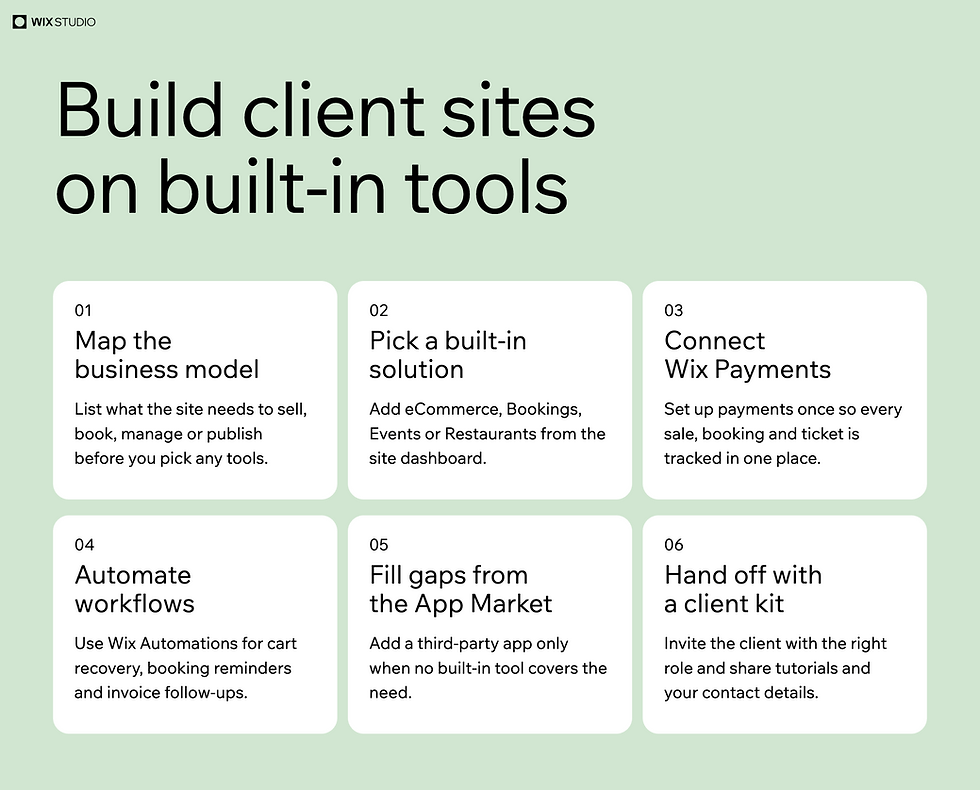
Here's a simple workflow for scoping and building a client site on native tools first.
01. Map the client's business model
List what the site needs to sell, book, manage or publish. A yoga studio needs classes and memberships, while a retailer needs products, shipping and inventory.
02. Pick the matching built-in solution
Add the business solution that fits from the site dashboard, such as eCommerce, Bookings, Events or Restaurants. Our guides on building a client online store and setting up an online booking system walk through the two most common setups. Many Wix Studio templates already include the solution you need.
03. Connect Wix Payments
Set up Wix Payments once so every sale, booking and ticket is paid and tracked in the same place.
04. Automate client workflows
Use Wix Automations for tasks like abandoned cart emails, booking reminders and invoice follow-ups. Automations work across Wix apps and the CMS, at the site level and the workspace level.
05. Fill gaps from the App Market
Only when no built-in tool covers a requirement, add a third-party app and note who supports it.
06. Hand off with roles and a client kit
Invite the client as a collaborator with the right permissions and share a client kit with tutorials and your contact details. For the full process, see our guide to building a full-stack client website with Wix Studio.
Worth knowing: the biggest time savings show up after launch, not during the build. Track how many support requests your plugin-free sites generate compared with older builds and you'll have a strong case to make to future clients.
Native integration FAQ
What does native integration mean?
Native integration means a feature is built, hosted and supported by the platform itself instead of an outside developer. Native tools share data with the rest of the site by default and update along with the platform, so there's no separate software to maintain.
What is a website plugin?
A website plugin is an add-on from a third-party developer that adds a feature a platform doesn't include, such as a contact form or a booking calendar. Plugins are installed on top of the site and updated separately, which is why heavy plugin use adds maintenance work.
Are third-party plugins safe for client sites?
Many plugins are safe when they come from reputable developers and are kept up to date. The risk grows with every plugin you add, since each one is another codebase that needs patching. Limiting add-ons and favoring built-in tools reduces that exposure.
What's the difference between native integration and an API integration?
A native integration is built into the platform and ready to use. An API integration connects two separate systems through code, which gives you flexibility but also means someone has to build and maintain the connection.
Can I still add third-party apps in Wix Studio?
Yes. You can add apps from the Wix App Market when a client needs something the built-in business solutions don't cover. Apps are supported by their developers, so choose ones with active support and document them for your client.
Ready to build your next client site on built-in tools? Start creating on Wix Studio today →

